Speed Reading Supercomputer Nexus: How to Run It? How to Participate?
TechFlow Selected TechFlow Selected
Speed Reading Supercomputer Nexus: How to Run It? How to Participate?
Nexus raised $25 million in a Series A funding round in June.
 Navigating Web3 tides with focused insights
By KarenZ, Foresight News
This week, the supercomputing project Nexus launched its new testnet. Daniel Marin, founder and CEO of Nexus, said that within just two hours of the release, the testnet had attracted active participation from 10,000 users.
So what exactly is Nexus? How does it work, and how can one participate?
What is Nexus?
Nexus draws inspiration from large-scale projects such as SETI@home—a scientific experiment developed by the University of California, Berkeley that harnesses globally connected computers to search for extraterrestrial intelligence (SETI)—and Stanford University's Folding@home, a distributed computing project aimed at helping scientists develop new treatments for various diseases by simulating protein dynamics. Nexus envisions building an internet based on verifiable computation, connecting computing devices scattered around the world—such as large GPU farms, personal computers, and mobile phones—into a single, unified supercomputer.
In addition, by leveraging the Nexus zkVM, Nexus bridges computational supply with proof demand. Anyone can connect their devices to the network, not only contributing computing power but also earning corresponding rewards in return.
Daniel Marin, founder and CEO of Nexus, graduated from Stanford University with a degree in computer science and is a two-time medalist in the International Physics Olympiad. Chief Scientist Jens Groth is the inventor of pairing-based zkSNARKs and previously served as Research Director at DFINITY and Professor of Cryptography at University College London.
The engineering and research team at Nexus brings together numerous experts with extensive experience in cryptography and computer science. Furthermore, Nexus lists eight advisors on its official website, including Yevgeniy Dodis, Chair of the Cryptography Department at New York University; Chelsea Komlo, Chief Scientist at Zcash; Ethereum cryptographer Zhenfei Zhang; Google cryptographer Giuseppe Persiano; Daniel Vogel, Co-founder and CEO of Bitso; and Gengmo Qi, Partner at Dragonfly.
In terms of funding, Nexus Labs raised $25 million in a Series A round in June 2024, led by Lightspeed Venture Partners and Pantera Capital, with participation from Dragonfly Capital, Faction Ventures, and Blockchain Builders Fund.
How Does Nexus Work?
As previously mentioned, Nexus Network functions as a large-scale parallel proof network, tightly connecting computing devices worldwide to collectively form a supercomputer. At the core of this network lies the Nexus zkVM, capable of proving any computation. A zkVM is a virtual machine that uses zero-knowledge cryptographic techniques to verify whether a computation was executed correctly, without accessing any private or personal information.
According to official documentation, Nexus zkVM is a modular, scalable, open-source, highly parallel, prover-optimized, contributor-friendly zkVM written in Rust, with a strong focus on performance and security. The core components of Nexus zkVM include: the Nexus Prover, the Nexus Virtual Machine (NVM), and the Nexus Proof Compression Mechanism—a recursive SNARK-based sequence for compressing proofs. Due to its design supporting massive parallel computation, Nexus zkVM significantly enhances proof generation speed.
Specifically, Nexus Network operates by orchestrating a set of prover clients, each with access to the Nexus zkVM. Each connected prover is assigned a unit of work—that is, a program to be proven. Throughout the proving process, the prover client continuously reports progress back to Nexus and waits for new task assignments upon completion.
Is Nexus Secure?
Regarding security, according to Nexus FAQ document, programs running on the Nexus network cannot access files on a user’s computer or network. The proving environment, the program to be proven, and its inputs are always communicated through encrypted, secure network connections. Additionally, virtual machines are used during proving to prevent programs from directly accessing your files, devices, peripherals, etc. When communicating with the Nexus network, the web version of the prover executes the virtual machine within a sandboxed browser environment, which has no access to other applications, files, or data on the system.
What information does Nexus collect? According to the Terms of Use and Data Privacy page, aside from the email address used to connect the account, Nexus may collect and track usage metrics of your machine, including geographic location, bandwidth, clock speed, hash rate, throughput, and/or other measurement data (collectively referred to as telemetry data).
How to Participate?
The new Nexus testnet has introduced a points and account system, allowing contributors to compete for rankings on a leaderboard. The current testnet will run until December 14, 01:00 UTC.
Currently, users can participate in Nexus Network in two ways: one is through a web interface to directly contribute computing resources (supporting both desktop and mobile devices); the other is by using the command-line interface (CLI) tool, Nexus Network CLI, to provide computing resources. Using the CLI offers better performance and allows users to submit their own programs for others to prove.
Option 1: Contribute computing resources directly via the web interface—no technical knowledge required. Steps:
1. Visit beta.nexus.xyz;
2. Click "Connect";
3. Enter your email to link a ProverID and create a Nexus account (email confirmation required, though the author has not yet received the confirmation email).
Alternatively, you can add your email under Profile in the bottom-left corner to start tracking your NEXUS points. You may also link multiple devices to a single email address.
Please note: Closing the webpage will stop point accumulation. Additionally, clearing your browser cache will generate a new ProverID, and you will lose access to your previous points. Also, the displayed ProverID is abbreviated—only showing the first few digits or letters. To view the full ProverID, check the localId field in developer mode.
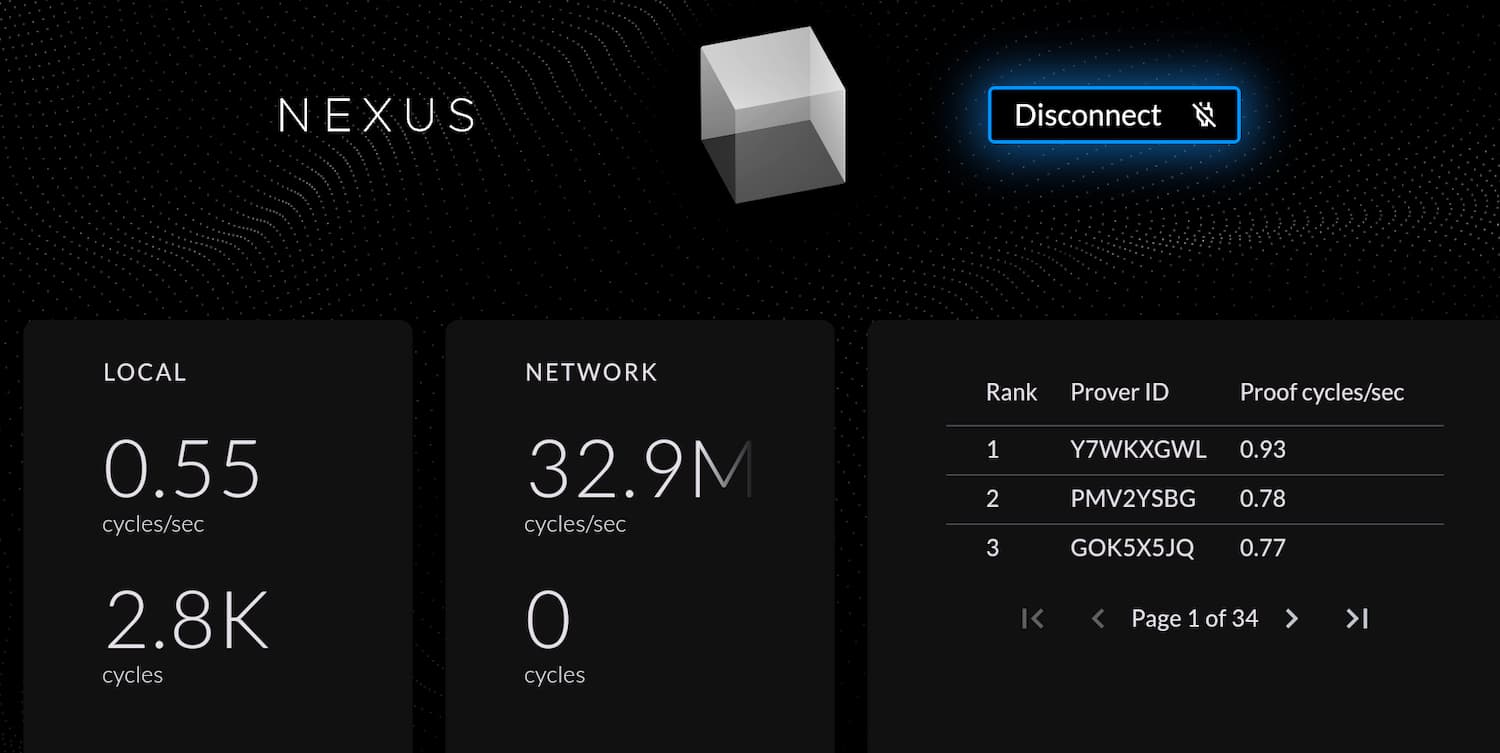
Option 2: Contribute computing resources via the Nexus Network CLI. Nexus states that using the CLI provides better performance and enables you to submit your own programs for others to prove.
Supported operating systems include Linux, macOS, and Windows. Users can also run the CLI on a VPS server for continuous operation. For detailed instructions, refer to the official documentation.
Join TechFlow official community to stay tuned
Telegram:https://t.me/TechFlowDaily
X (Twitter):https://x.com/TechFlowPost
X (Twitter) EN:https://x.com/BlockFlow_News
 Foresight News




![In-depth Analysis of Trade[XYZ]: How Were 92 Markets and 98% HIP-3 Trading Volume Established?](https://upload.techflowpost.com/upload/images/20260716/20260716061117965147.jpeg?x-oss-process=image/resize,p_50/quality,q_80)