Reviewing bitchat: the new app from Twitter's founder—Is this the "twttr" moment for encrypted messaging?
TechFlow Selected TechFlow Selected
Reviewing bitchat: the new app from Twitter's founder—Is this the "twttr" moment for encrypted messaging?
Without using Wi-Fi or the internet, Twitter co-founder Jack Dorsey has developed a Bluetooth-based encrypted communication device.
 Navigating Web3 tides with focused insights
By Jaleel, BlockBeats
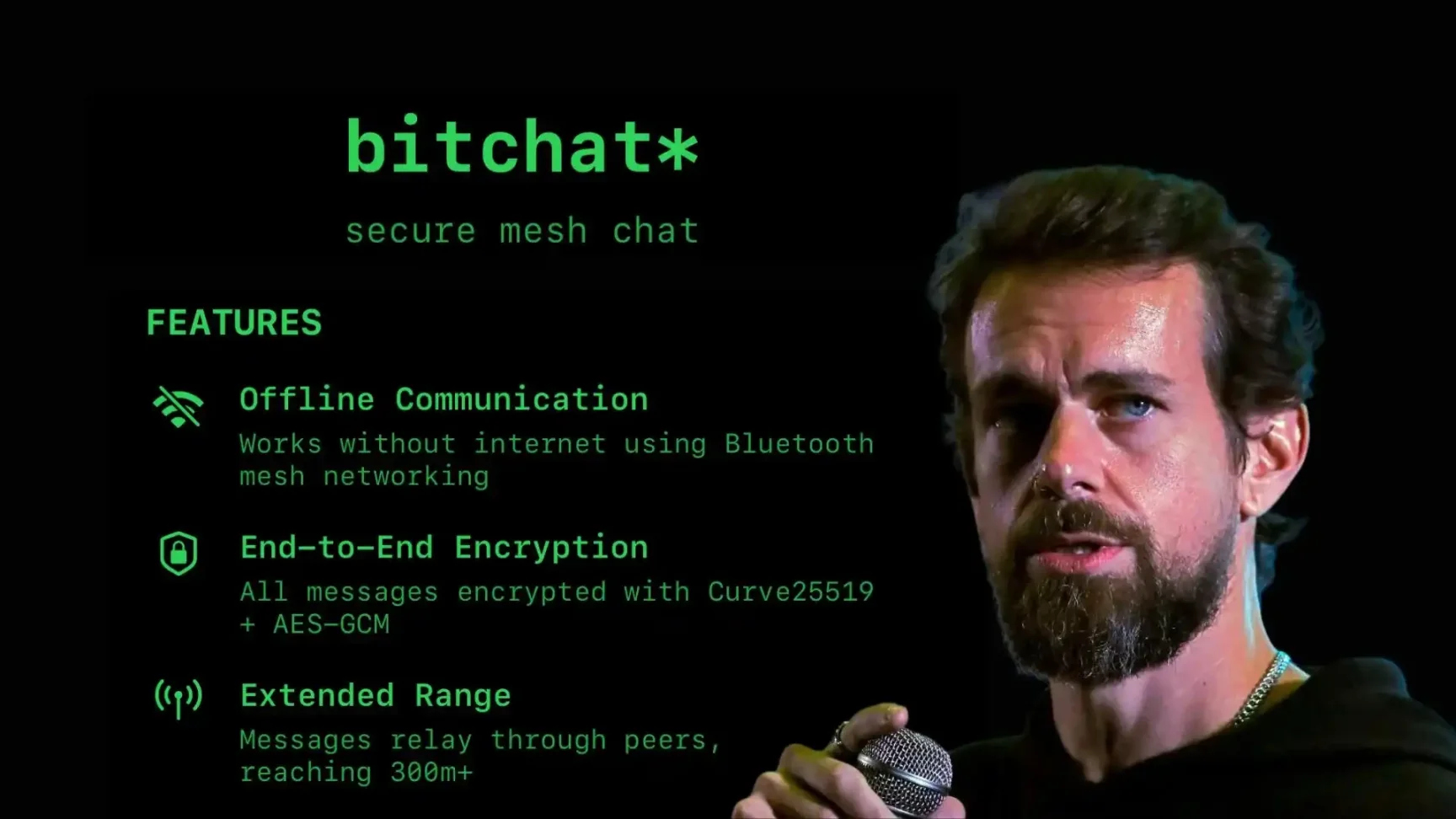
Twenty years later, Twitter co-founder Jack Dorsey returns with a new product—bitchat—an exercise in radical minimalism.
Back in the summer of 2006, mobile internet was still a novelty, feature phones dominated users' hands, and SMS remained the most convenient form of "mobile socializing." It was then that a project codenamed "twttr" was born. Starting with SMS group messaging, using strict character limits and a simple broadcast protocol, it made "talking to the world anytime, anywhere" a reality for the first time.
In a modest office, the founding team passionately debated product details, with a young college student named Jack Dorsey sitting among them. He turned his vision of communication into reality through straightforward technical execution. Soon, "twttr" evolved into Twitter—a product that would fundamentally reshape global social dynamics.
Now, in 2025, time has passed, technology and the world have transformed dramatically. Wi-Fi blankets urban spaces, and 5G connects everything into one vast network. Yet the essence of social interaction remains unchanged: we still yearn for free, authentic, intermediary-free communication. Reality, however, often falls short—network blind spots, platform outages, data breaches can happen at any moment. The once-iconic Twitter, now rebranded and reshaped under Elon Musk's leadership, is no longer what it used to be.
Jack Dorsey, the legendary figure who once led two publicly traded companies each valued over $5 billion, long ago left Twitter behind, dedicating himself to the crypto industry and building Block. But he never fully abandoned his passion for social protocols. Much like the young man designing "twttr" back in 2006, during an ordinary weekend fueled by inspiration, he stayed up all night writing code line by line to create a new minimalist social app—bitchat.
The only difference? bitchat embodies even more deeply Jack Dorsey’s beliefs in minimal protocols, decentralized communication, and information freedom than "twttr" ever did.
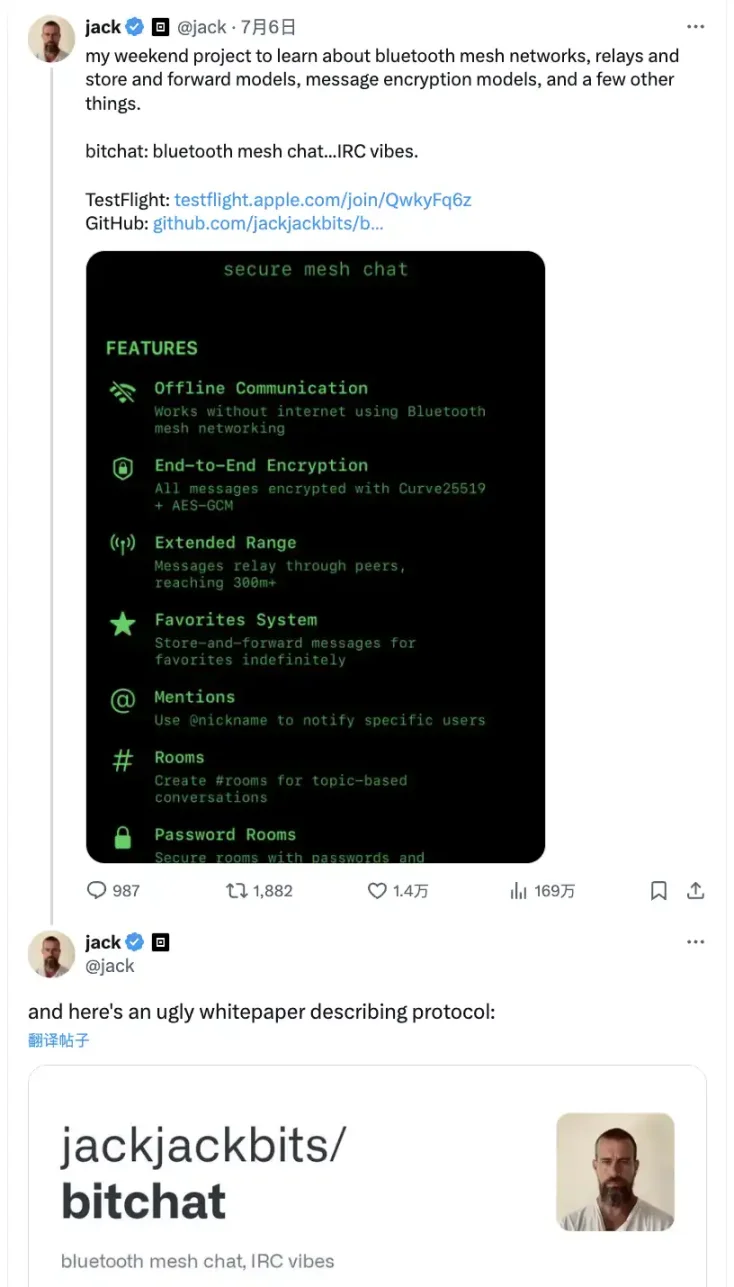
Key Features
bitchat shines in scenarios such as outdoor camping, hiking, or mountain expeditions where there's no cellular signal but location sharing or emergency alerts are needed; music festivals, concerts, stadiums, comic conventions—crowded places where networks often collapse—allowing friends to easily set up temporary chat networks; natural disasters, power outages, extreme weather events when rescue teams, volunteers, or residents need to establish emergency communications; protest sites, social movements, or sensitive discussions requiring privacy protection so participants cannot be easily tracked; or closed environments like universities, summer camps, research groups, or hacker meetups aiming for maximum unrestricted brainstorming. In all these situations, bitchat proves invaluable.
The standout feature of bitchat is its complete independence from infrastructure—no servers, no Wi-Fi, no cellular signals required. Each smartphone acts both as a "transceiver" and a "relay station," discovering others via Bluetooth Low Energy (BLE).
What makes it appealing to the crypto community is that all messages are end-to-end encrypted. Private chats use advanced encryption including X25519 and AES-256-GCM, while group chats can also be password-protected—only those who know the password can access the content. Messages exist solely on your device, disappearing automatically upon exiting or turning off the phone, leaving no trace on any backend.
Unlike other encrypted messaging apps, bitchat completely eliminates the concept of "login"—no phone number, email address, or long cryptographic keys needed. Every time you go online, a random "user ID" is generated, which you can change at will—ensuring your identity remains untraceable.
User Experience
Downloading and Using bitchat
Copy and open the following URL in Safari on your iPhone: https://github.com/jackjackbits/bitchat.
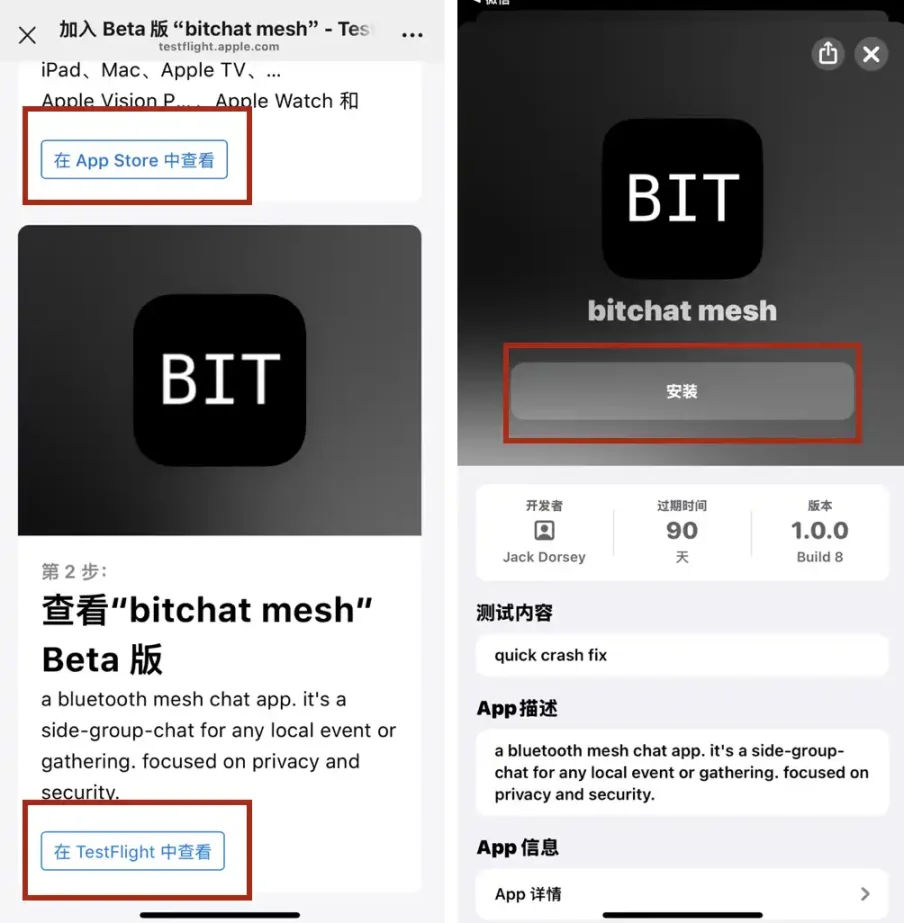
On the page, locate the TestFlight invitation link and click “View in App Store” to be redirected to TestFlight. If you haven’t installed TestFlight yet, you’ll be prompted to download it automatically. After installation, return to the invitation page and you’ll see the beta version of “bitchat mesh.”
Install bitchat via TestFlight by clicking the “Install” button. You'll see a brief app info screen. Installation takes about 5–10 seconds until the button changes from “Install” to “Open.”
Upon opening bitchat, a permission prompt appears: “Allow ‘bitchat’ to discover Bluetooth devices?” with the message: *bitchat uses Bluetooth to create a secure mesh network for chatting with nearby users.* Tap “Allow” so bitchat can scan and connect to nearby devices in the background, ensuring relay functionality works properly.
Since this is still in testing phase, you may receive a feedback request—simply tap “Next” to skip. Finally, tap “Start Testing” to enter the main interface of bitchat.
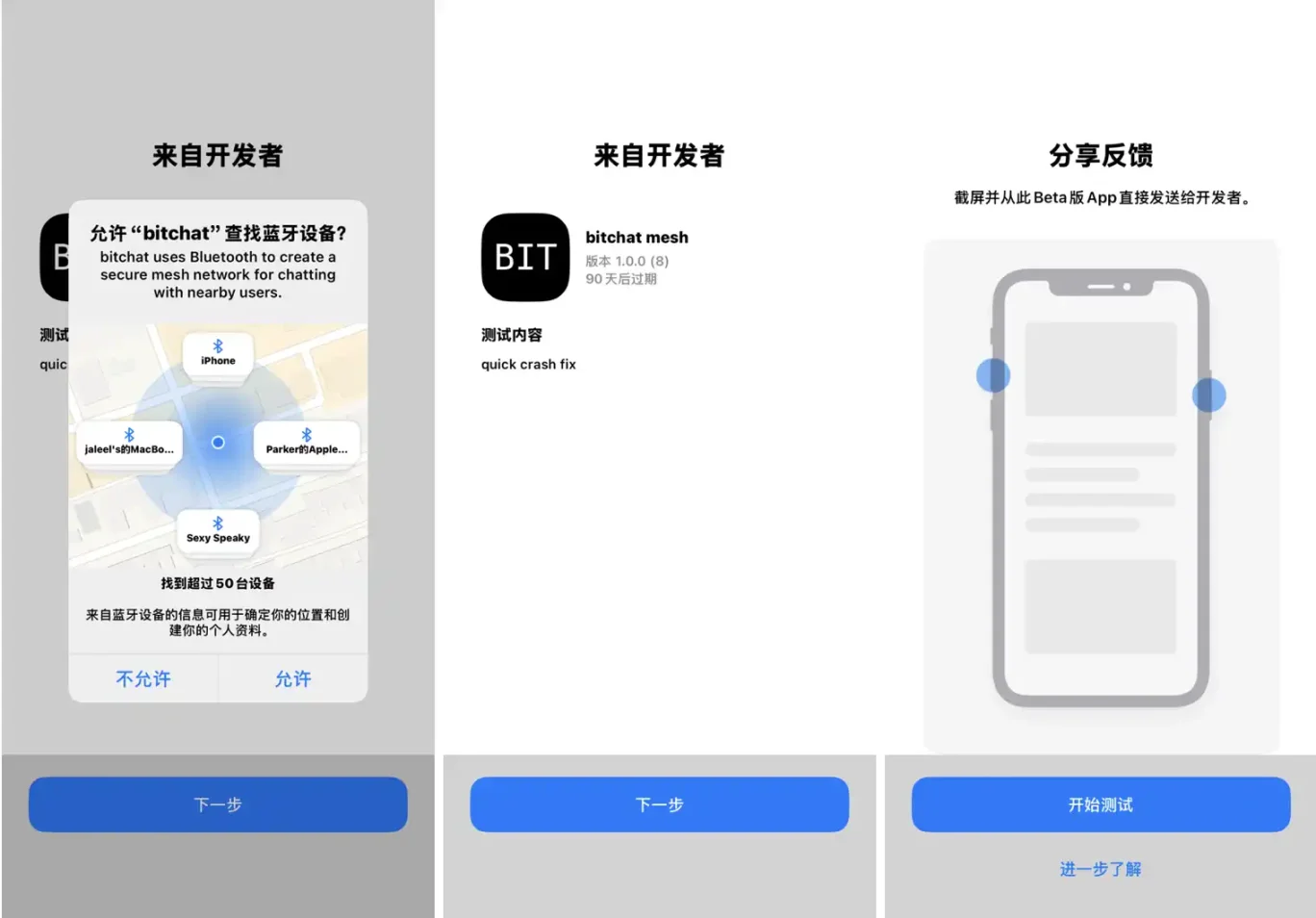
Tip: Make sure Bluetooth is enabled on your phone and allow TestFlight to run in the background; otherwise, nearby friend devices won't be detected.
Notice that bitchat has no login process whatsoever—you can use it immediately after downloading. Every conversation in bitchat is anonymous and untraceable—no phone numbers, no emails, no registration required. You can change your nickname anytime. This design maximizes user privacy, allowing safe usage in sensitive contexts without fear of identity tracking.
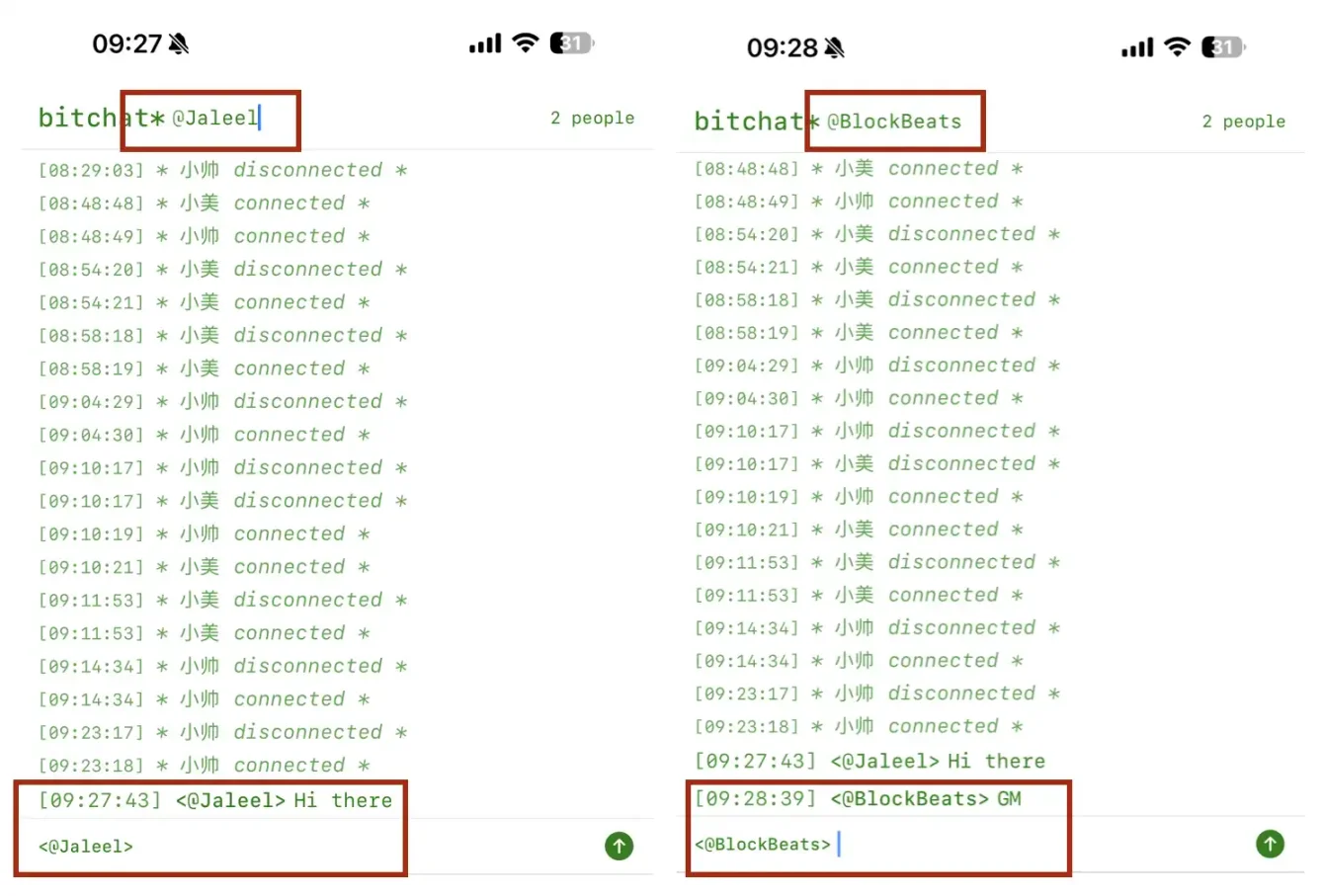
At the top of the screen, under the "bitchat* @ current ID" section, you can edit your ID anytime. Click the name after the @ symbol to directly modify and save a new ID. The updated ID takes effect instantly, appearing immediately in friends' contact lists and message headers within the same room.
End-to-End Encrypted, Ephemeral Private Messaging
After using bitchat for a while, you'll notice the main interface continuously logs device connections ("connected") and disconnections ("disconnected"), along with message timestamps.
To prevent "timing analysis" attacks, bitchat adds a random delay of 50–500 milliseconds after every action. While timestamps are recorded, they don't precisely match real-time operations, preventing packet sniffing and ensuring network traffic doesn't directly correlate with actual user behavior—further protecting anonymity in sensitive settings.
bitchat supports true end-to-end encryption: only you and the recipient (or group members) can read each message—intermediate relay devices cannot decrypt it. Whether private or group chat, content stays secure and private, inaccessible to platforms or third parties.
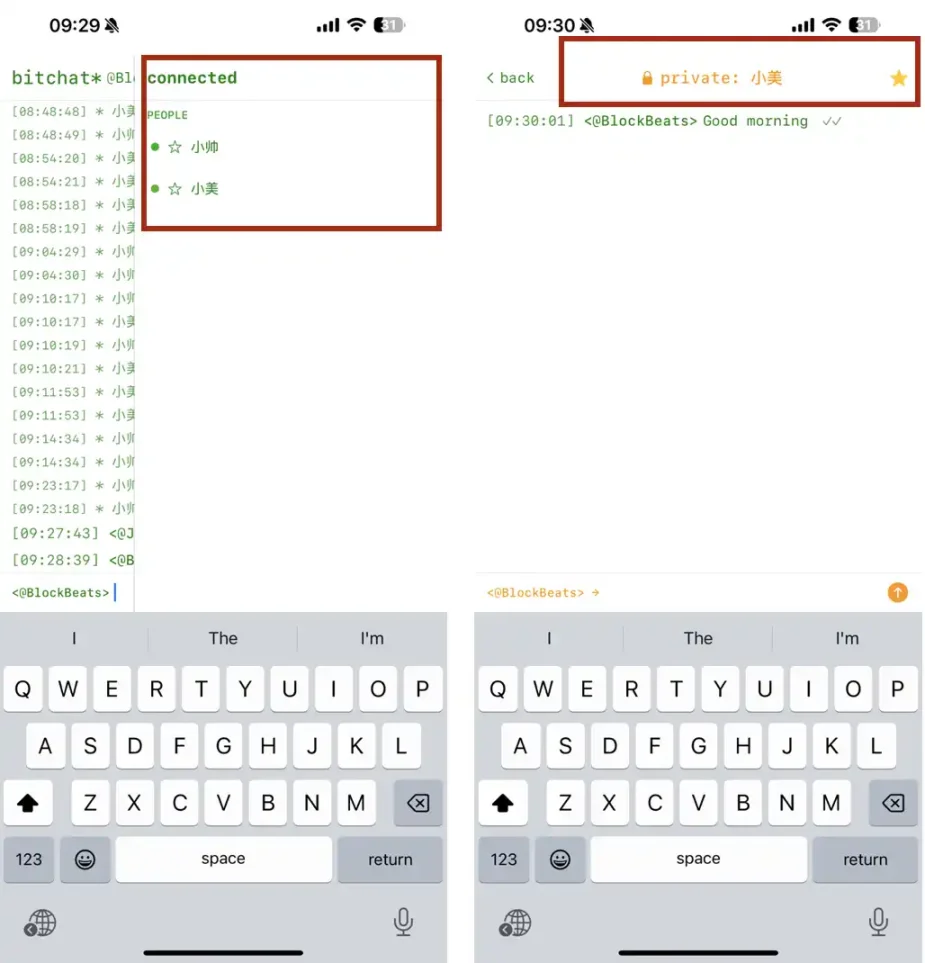
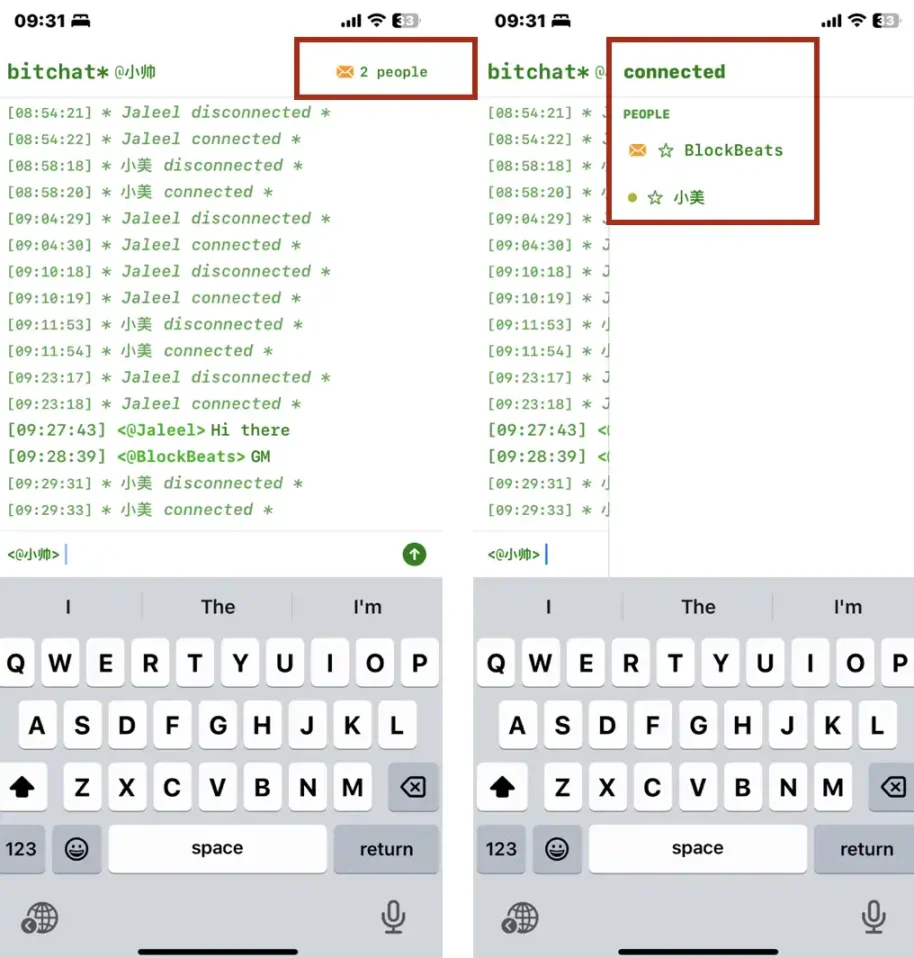
In the upper right corner, tap the person icon to view all currently connected peers: green dots indicate online status, gray crosses mean recently disconnected. For frequent or important contacts, tap the ☆ star next to their name to "favorite" them. Once favorited, a star will appear before their name for quick identification next time.
Select "Xiaoshuai" from the list to open a private chat window—his device will now display an unread message count.
When Xiaoshuai opens the notification, he’ll see the sender is “<@BlockBeats>,” and tapping in reveals the full chat history. Private chats remain end-to-end encrypted—the message content cannot be decrypted by observing nodes. Timestamps also include randomized jitter to enhance privacy and resistance against traffic analysis.
Advanced Commands: Creating Rooms
Here arises a question: public chats aren't very private. How do we conduct a confidential multi-user conversation?
At any time, typing "/" in the input box brings up a full command menu below the screen:
- /j: Join or create a room. If the specified room exists, join it; if not, create it and become the owner.
- /rooms: List all discovered (joinable) rooms, helping you quickly identify available ones.
- /w: View current online users—shows everyone in your room or local network.
- /m: Send a private message to a specific user. Format: /m @username message text—visible only to you and the recipient.
- /clear: Clear all message records in the current chat window, restoring a blank interface.
- /pass: (Owner-only) Set or change the room password. After setting, anyone joining must enter the correct password.
- /transfer: Transfer room ownership to another online user. The new owner gains control over password management and message retention.
- /save: (Owner-only) Toggle local message retention. When enabled, chat history persists locally even after going offline or restarting the app. When disabled, messages stay only in memory and vanish upon exit.
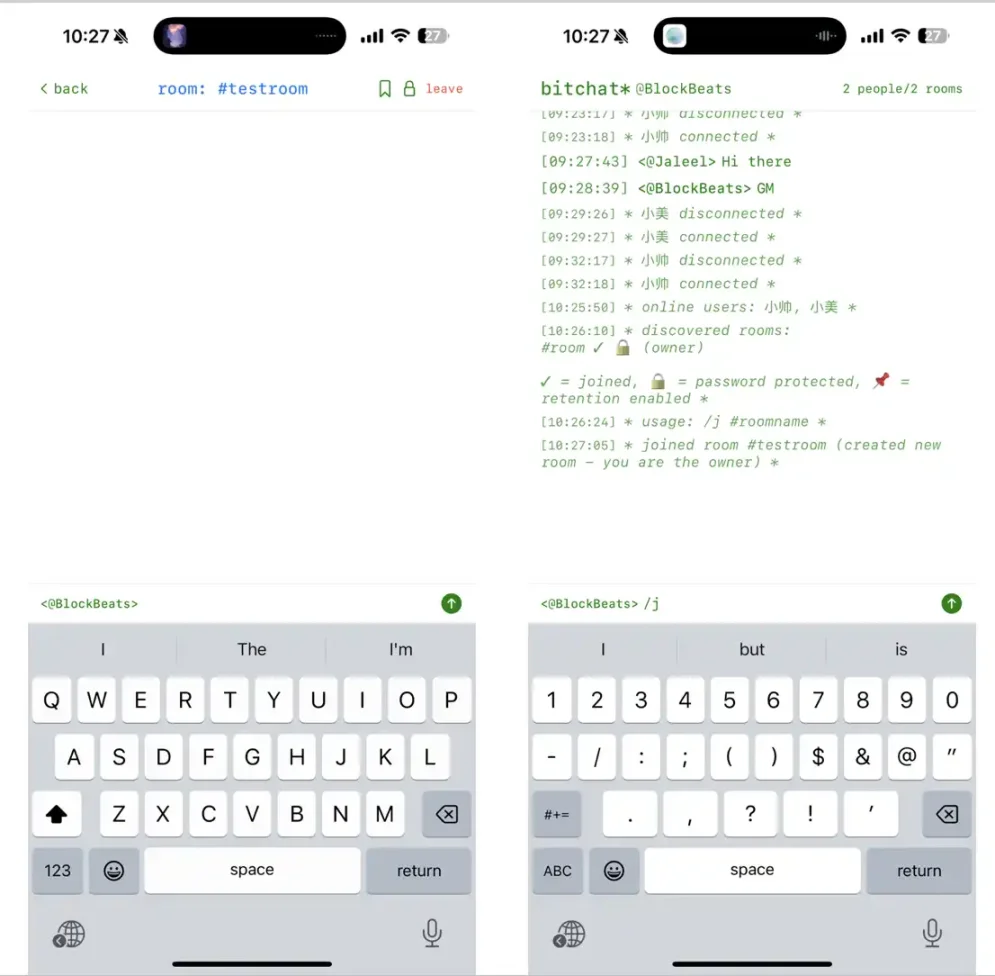
To create a room, type /j followed by your desired room name—for example, “testroom.” Upon sending, if the room doesn’t exist, the system creates it and sets you as owner. A confirmation appears: “joined room #testroom (created new room – you are the owner) *”
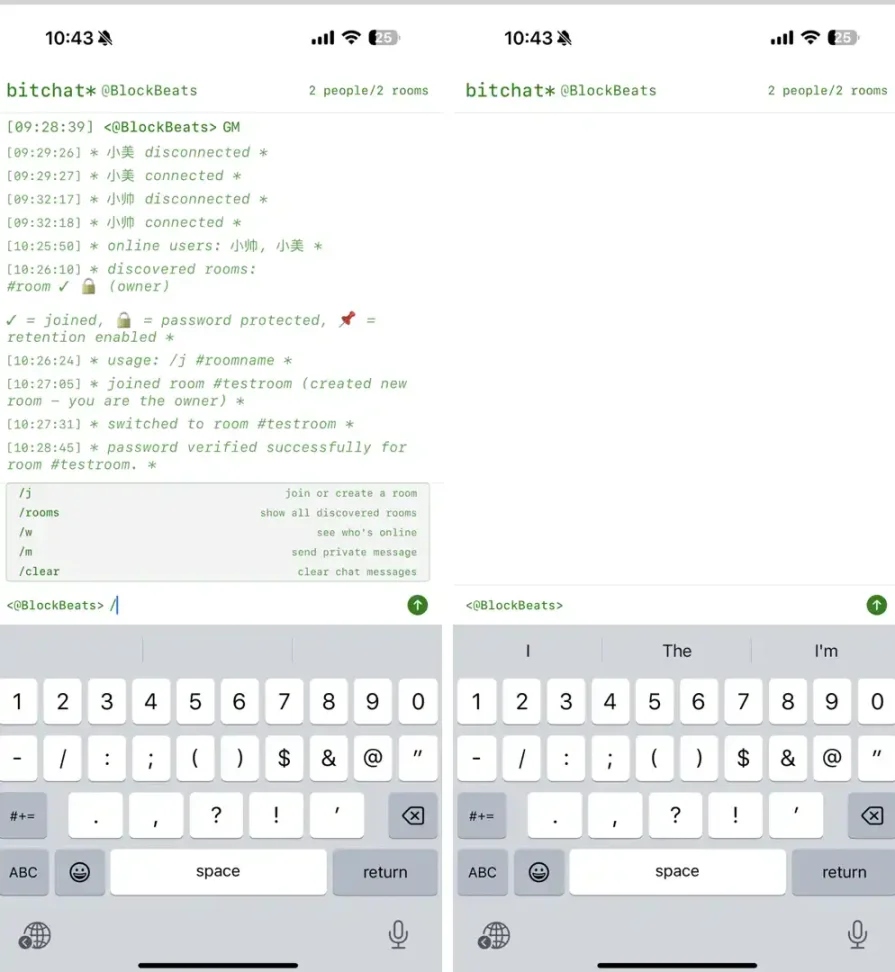
If Xiaoshuai wants to join this private room, he types /j testroom and enters the password when prompted to gain access.
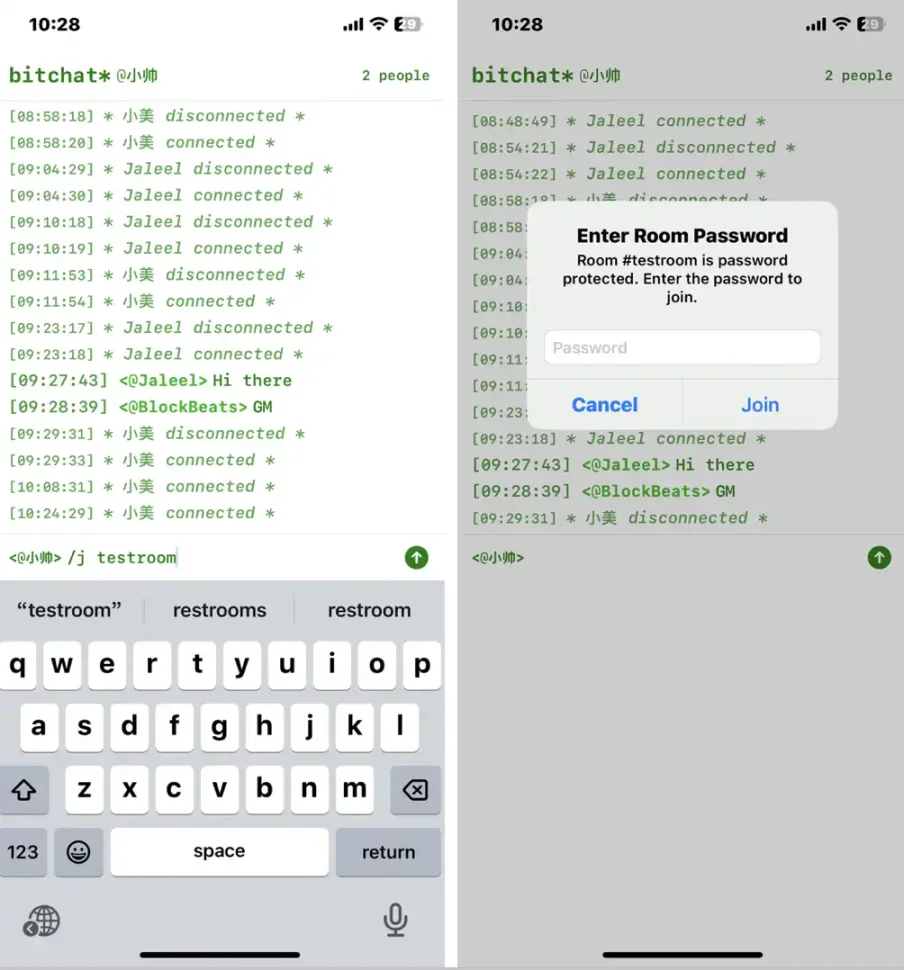
Inside a room, additional commands apply. Typing /pass yourSecret prompts a password field—once verified, only users knowing the passphrase can join. Only the room owner can lock or change the password. Ownership transfer is possible too: type /transfer @otherID, and upon acceptance, the other user becomes the new owner with full privileges including member management, password settings, and message retention control.
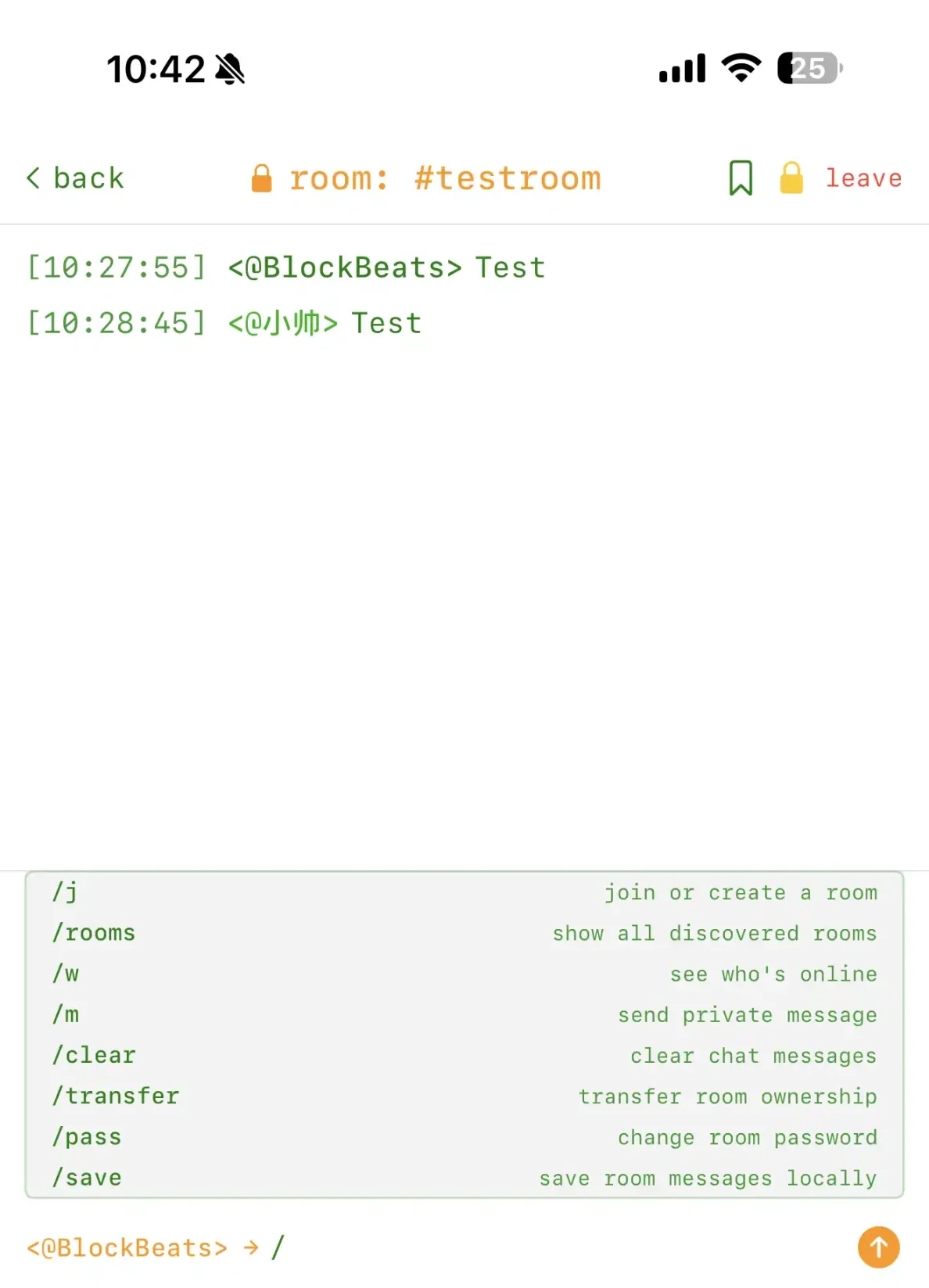
By default, room messages exist briefly in memory. The owner can use /save to enable or disable local message retention. With retention on, historical messages remain accessible locally even after restarting the app. Re-entering /save disables retention, reverting to the default "ephemeral session" mode.
After mastering basic functions—creating/joining rooms, sending private messages, viewing online users—users can explore advanced commands on the main page, including clearing chat history, checking active users and rooms, etc.
If you want to temporarily “clean up the battlefield,” enter /clear in the command line to instantly wipe all displayed messages in the current session. After clearing, the screen returns pristine, as shown:
In the future, bitchat mesh plans to support multiple transmission methods including Wi-Fi Direct (250 Mbps, 100 meters), ultrasonic waves, and LoRa, automatically switching based on network conditions and battery levels. It may optionally integrate with the Nostr protocol, bridging local mesh networks with internet nodes to extend communication range.
Clearly, bitchat perfectly inherits Jack Dorsey’s three core principles he once defined for Twitter: simplicity, constraint, and craftsmanship.
This isn’t the first time Jack Dorsey has built a social protocol since leaving Twitter. In 2024, Bluesky—initially incubated within Twitter and later spun off (though Dorsey is no longer affiliated)—was launched as a decentralized social protocol centered around "relays/channels," supporting tens of thousands of community-hosted server nodes. In mechanism, it shares conceptual similarities with bitchat mesh’s BLE multi-hop relaying.
The Bitcoin community’s ethos of “trustlessness” is deeply embedded in bitchat’s design: no central servers, no cloud archives, not even persistent user identities—each restart generates a fresh ID. Nostr’s stateless discovery, randomized operation delays—all these meticulous choices serve one fundamental goal: preserving genuine “privacy and freedom.”
The emergence of bitchat represents yet another personal experiment by Jack Dorsey in decentralization and information liberty. In today’s era of frequent network restrictions and recurring data leaks, he returns social interaction to the hands of users—where every conversation is limited only by the reach of Bluetooth signals, free from interference by platforms, servers, or intermediaries.
This might be the most promising aspect of bitchat: though small and imperfect, it could very well mark the crypto world’s own “twttr moment.”
Join TechFlow official community to stay tuned
Telegram:https://t.me/TechFlowDaily
X (Twitter):https://x.com/TechFlowPost
X (Twitter) EN:https://x.com/BlockFlow_News
 BlockBeats