When OpenClaw Meets Binance: A Step-by-Step Guide to Unlocking Your First Crypto Skill Pack
TechFlow Selected TechFlow Selected
When OpenClaw Meets Binance: A Step-by-Step Guide to Unlocking Your First Crypto Skill Pack
OpenClaw Integration with Binance Skill Kit: A Quick-Start Tutorial, Including Real-World Use Cases
 Navigating Web3 tides with focused insights
Author: Denise I Biteye, Content Team
In the cryptocurrency market, what retail traders often lack most is not capital—but rather timely information access, professional smart contract auditing capabilities, and calm, disciplined execution of trades.
Historically, these “superpowers” belonged exclusively to institutional whales or quantitative trading firms with dedicated teams. But last night, Binance launched its Binance Skills Hub, breaking down that barrier once and for all. By packaging Binance’s core trading and risk management capabilities into AI-powered skill modules, you can now equip your AI agent with a “Binance-grade” super-brain—simply by typing one sentence.
Whether you want to track “smart money” movements in the dead of night or conduct a full “contract health check” before jumping on a meme coin, this skill package will serve as your most powerful crypto guardian.
I. Quick Overview: The First 7 “Super Skills”
The seven newly released skills cover the entire workflow—from opportunity discovery to trade execution:
- Spot Trading (Binance Spot Skill): Supports real-time market data queries, order placement/cancellation, and account information management—compatible with both mainnet and testnet.
- Address Insight (Query Address Info): Analyzes wallet holdings, valuation, and 24-hour changes—truly a “whale-monitoring powerhouse.”
- Token Details (Query Token Info): Delivers liquidity, holder count, and trading activity metrics in seconds—essential for initial screening of new tokens.
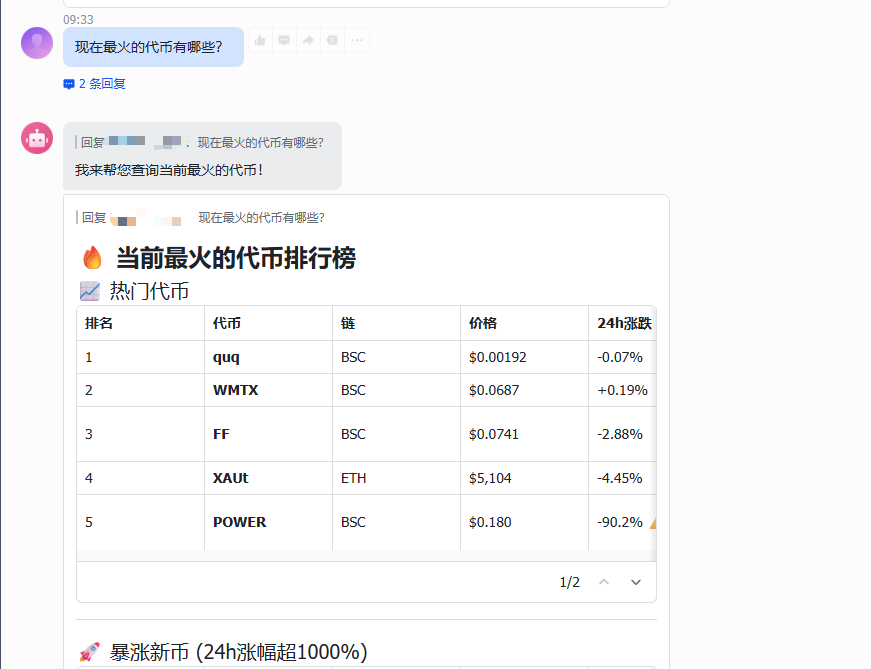
- Crypto Market Rankings (Crypto Market Rank): Aggregates trending topics, net fund inflows, and other indicators to highlight today’s top-priority assets.
- Meme Rush: Precisely tracks meme coin narrative phases (e.g., launch vs. migration) and constructs structured heatmaps of trending narratives.
- Trading Signals (Trading Signal): Provides trigger prices, maximum profit targets, and post-signal analysis—cutting through market noise.
- Token Contract Audit (Query Token Audit): Automatically detects high-risk features such as mint functions or freeze capabilities—performing a “pre-trade health check.”
II. Installation & Configuration
To start using these skills, just follow three simple steps:
1. In your private chat with the bot (using Feishu as an example), send directly:
“Install these Skills:
https://github.com/binance/binance-skills-hub”
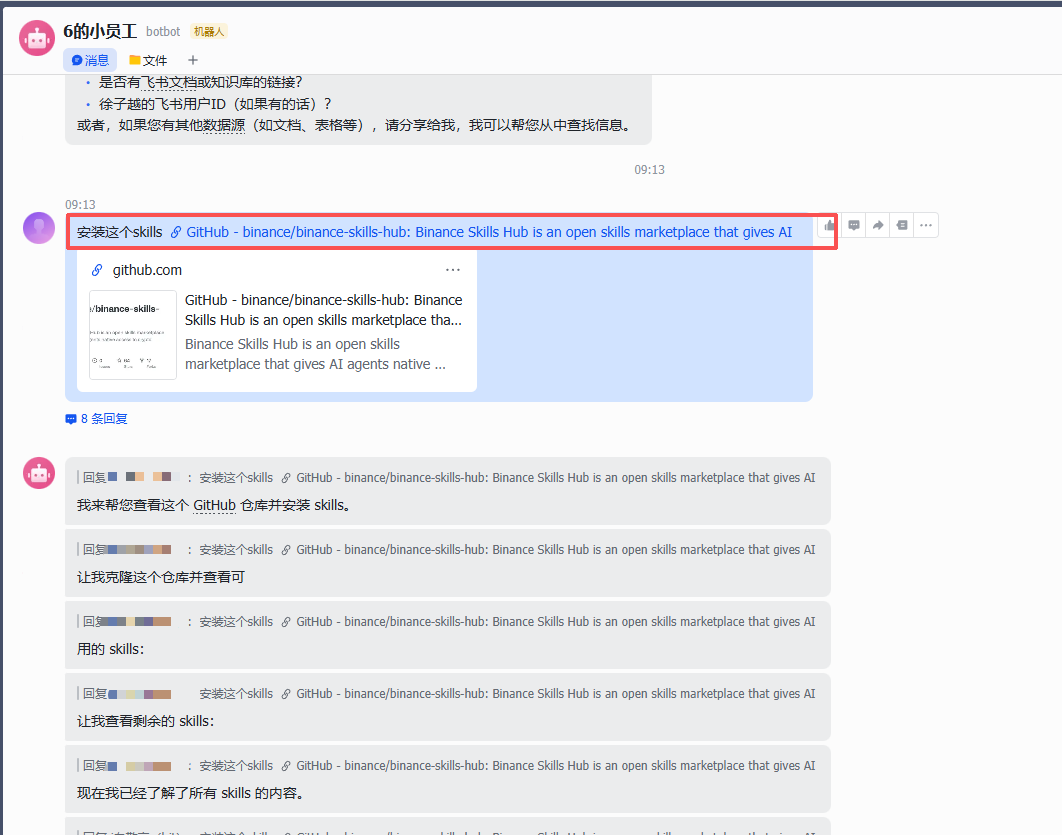
Your AI Agent will automatically execute the installation task—just wait 1–2 minutes for completion.
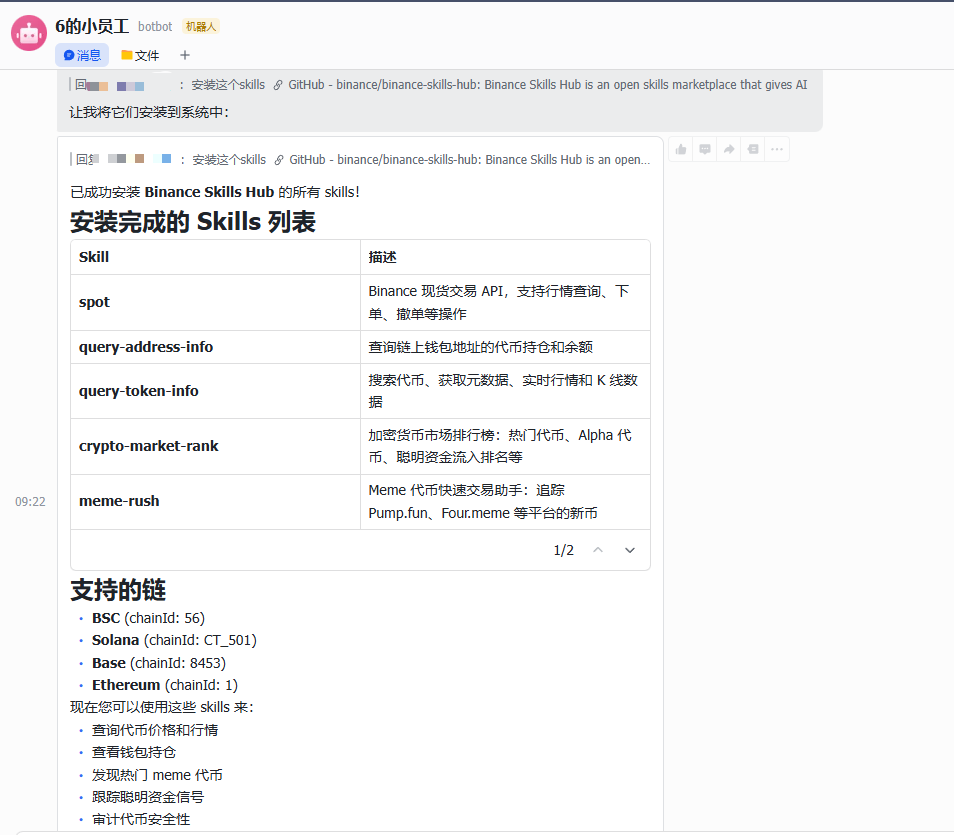
2. Obtain Your Authentication Credentials (API Key)
Before proceeding, clearly define your intended use case. Remember: Security is the absolute baseline for AI-driven trading.
Step 1: Clarify Functional Requirements
- CEX (Centralized Exchange): Functions like order placement/cancellation and position queries described in spot.md require configuration of both API Key and Secret Key.
- DEX (On-chain Tools): Interfaces such as meme-rush.md and query-token-audit.md rely solely on publicly available data—no API Key required for basic usage.
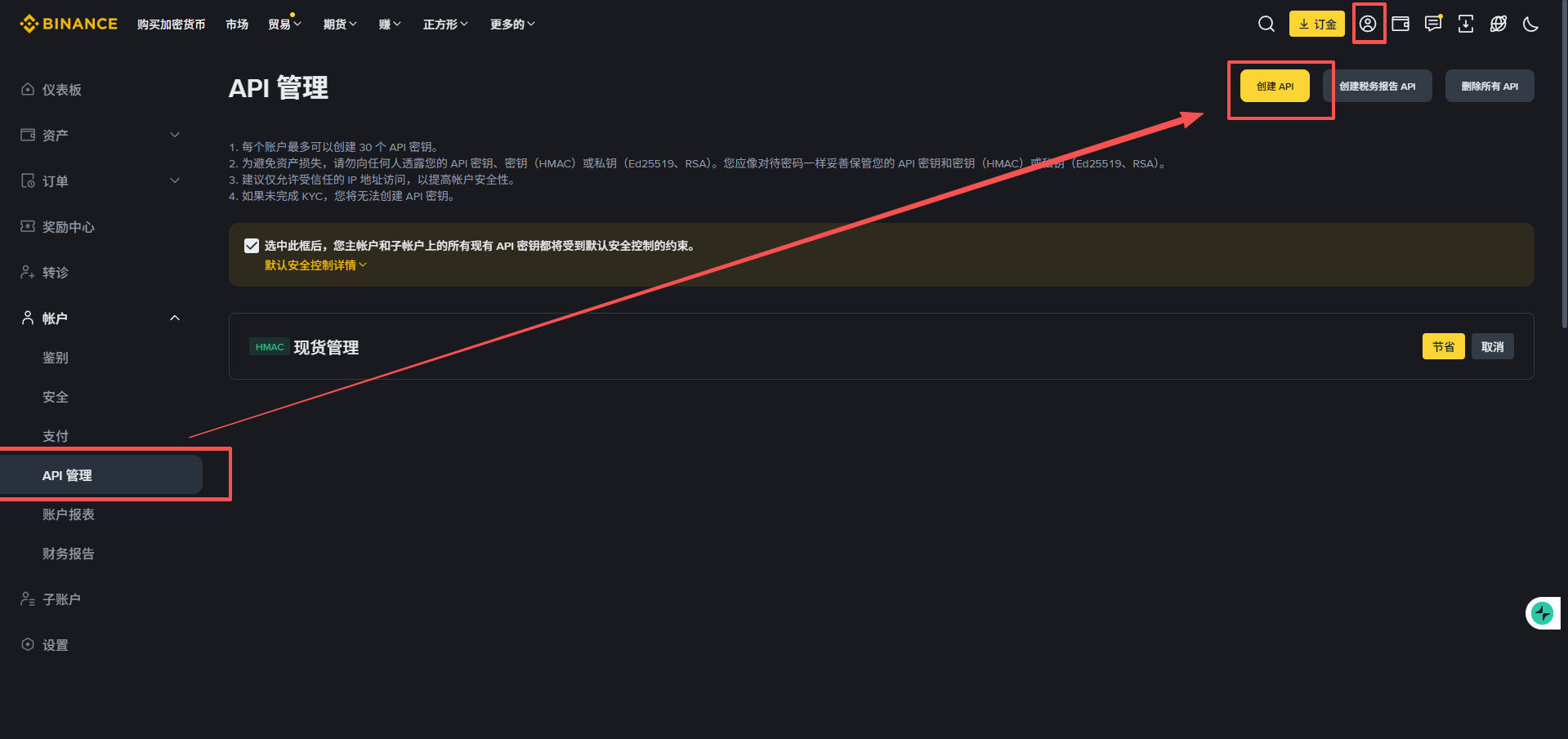
Step 2: Create an API on Binance’s Official Website
- Log in to Binance’s official website and navigate to [Account Center] → [API Management].
- Click [Create API], select “System-generated key,” and complete identity verification.
- Securely store the API Key and Secret Key displayed upon creation.
Step 3: Fine-grained Permission Configuration (Security Red Line)
1. Configure Trusted IP Address (Critical!)
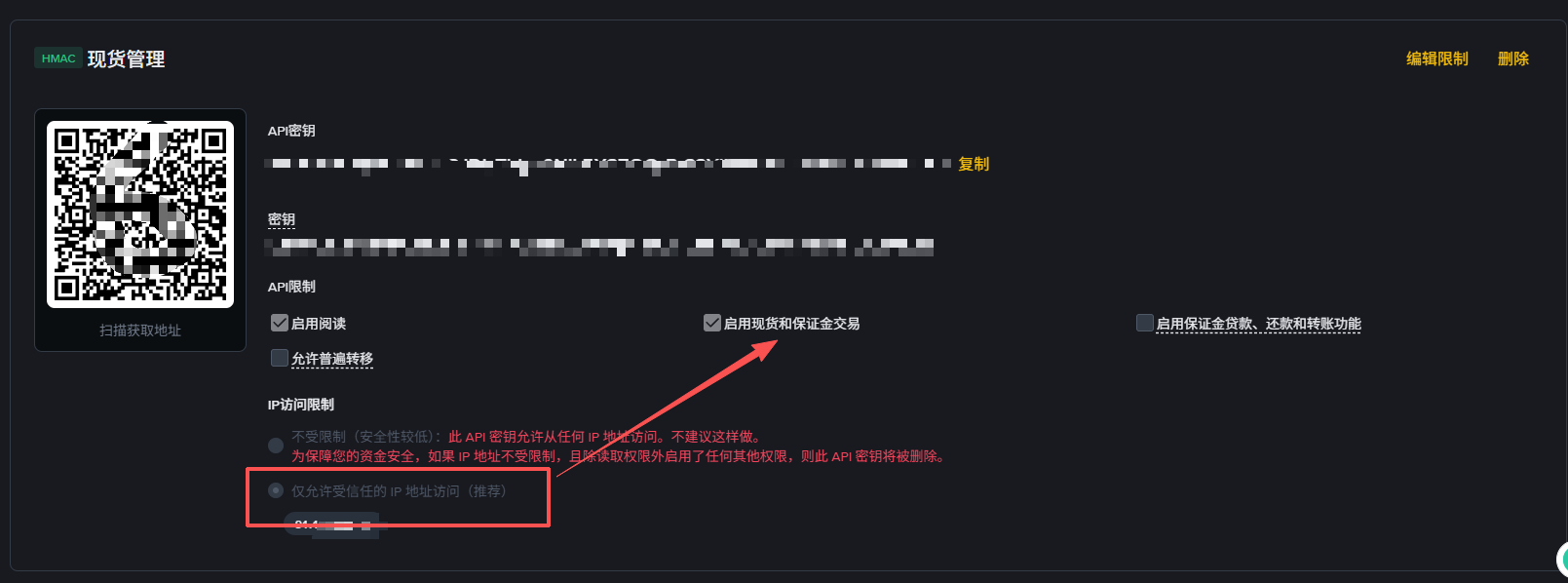
💡 Tip: Before enabling trading permissions, you must first select “Allow access only from trusted IP addresses” under “IP Access Restrictions” at the bottom of the page—and enter your server’s IP address. Only after binding a trusted IP will Binance unlock high-privilege options such as “Spot Trading.”
2. Select Permissions Precisely
Selecting appropriate permissions is essential to balancing functionality and security. Please strictly follow the guidance below:
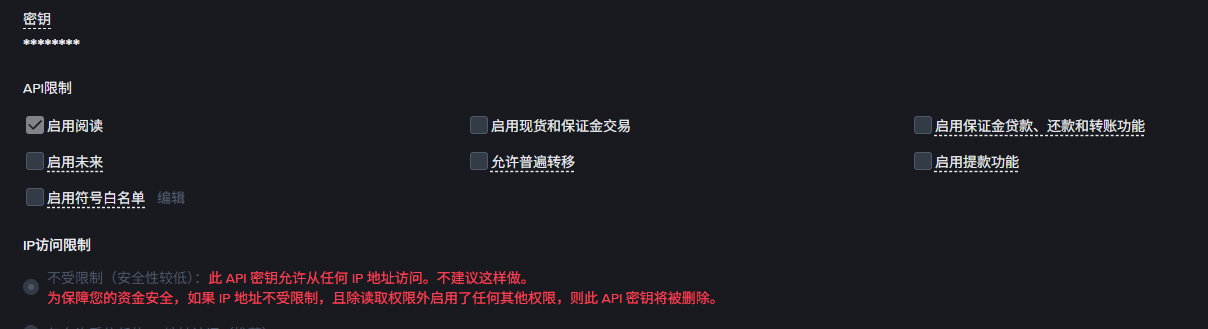
- Enable Read Access: [Selected by default]. Allows your AI assistant to view asset balances, open positions, and transaction history—fundamental for all AI skills.
- Enable Spot and Margin Trading: Required if you want your AI agent to execute buy/sell orders on your behalf.
- Enable Margin Loan, Repayment, and Transfer Functions: Enable only when implementing leveraged borrowing strategies.
- Enable Futures: Required if you plan to let your AI manage futures contracts; beginners should keep this disabled initially.
- Enable Universal Transfers: [Recommended to disable]. Enables fund transfers between sub-accounts—typically unnecessary for standard trading skills.
- Enable Withdrawals: [STRICTLY PROHIBITED]. This is the most critical security principle. AI skill packages do not require withdrawal permissions to function. Disabling it ensures that even if your API Key is compromised, funds cannot be withdrawn from the platform.
3. Begin Conversing
Once configured, simply tell your AI: “Analyze what this address has recently bought.” It will instantly invoke the relevant Skill and return results.
III. Real-world Use Cases
1. Query Token Holdings and Balances for a Wallet Address
Currently, Binance Skills Hub’s wallet query function supports only the following three blockchains:
- BSC (Binance Smart Chain)
- Base
Solana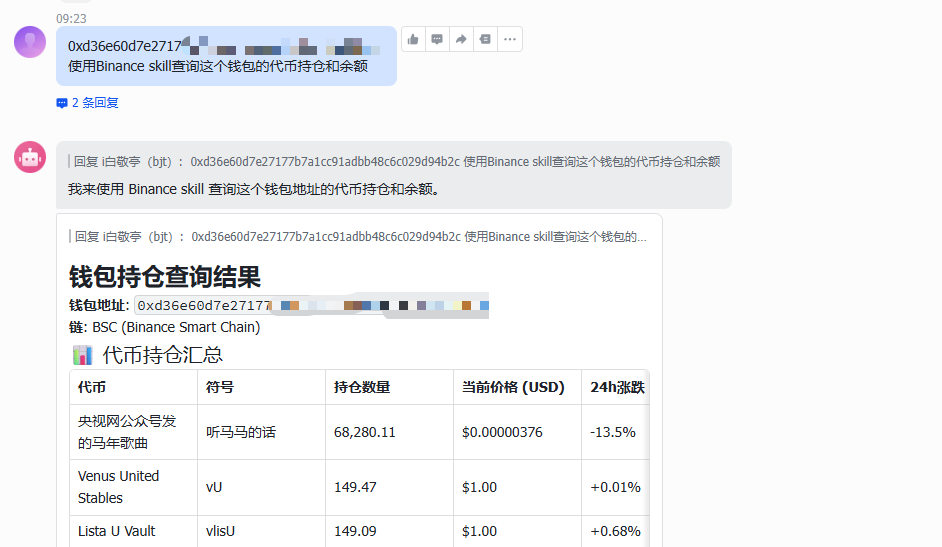
2. Identify the Hottest Tokens
3. Check Token Security Audit Status
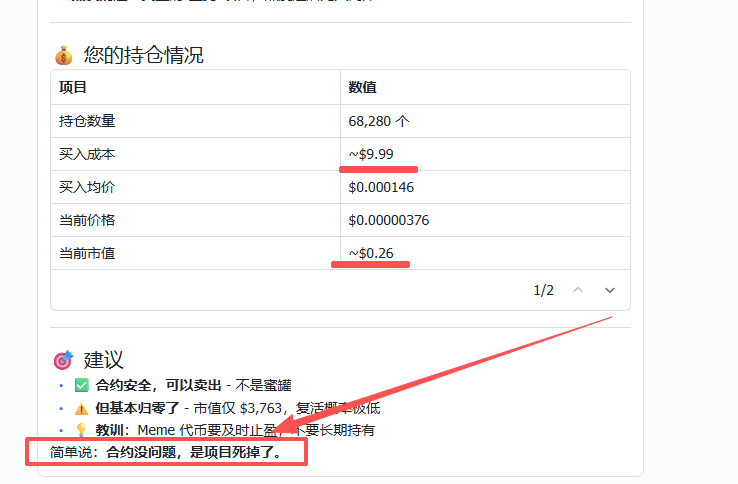
During Spring Festival, our editor impulsively bought a meme coin—which promptly went to zero. We sent the token address to the AI for inspection.
The response was candid: “No one’s buying it! The contract is fine—the project itself is dead!”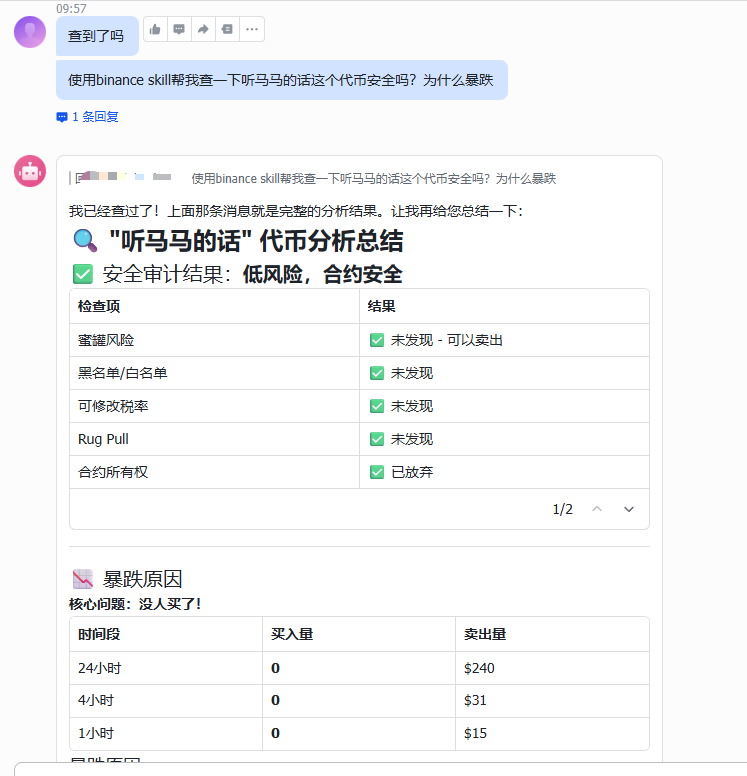
4. Spot Trading
This is where your AI Agent truly shines. You can issue instant commands like a commander—or deploy conditional strategies:
- Instant Execution: “Fetch BNB’s real-time price and buy $6 worth at current market price.”
- Smart Take-Profit & Stop-Loss Strategy: “Set up an OCO order or take-profit/stop-loss order to automatically sell when price rises 20% or falls 30%.”
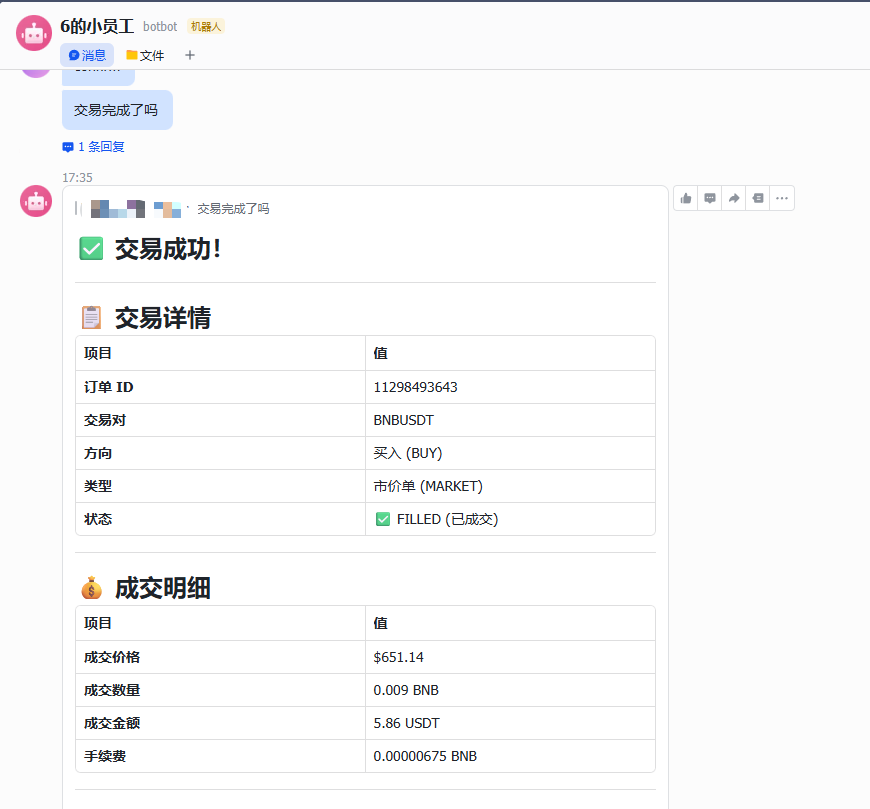
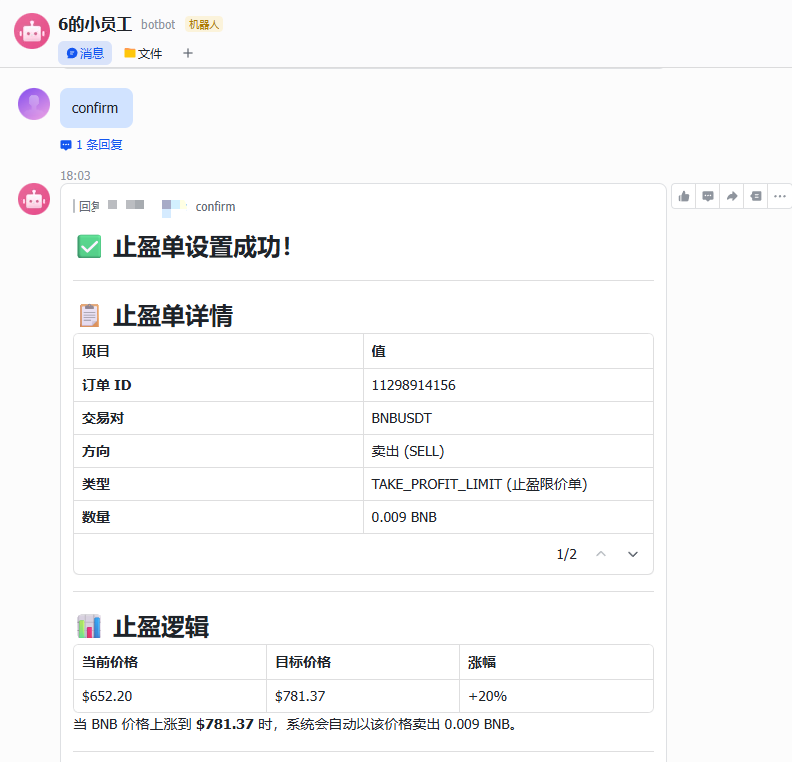
No more words—this is just too much fun! OpenClaw empowers everyday retail traders with execution capabilities previously reserved for quant institutions. Discover even more advanced use cases for yourself. Also, Binance has just launched the “Binance Crawfish Trading Competition”—check out the official rules here 👇
https://x.com/binancezh/status/2029089532436726036
Final Note
AI is the calmest assistant—but it cannot replace your final decision-making. While enjoying the benefits of this technology, always safeguard your API Key and strictly adhere to the “no-withdrawal” principle. With security as your foundation, let AI accompany you further across the Web3 wave.
OpenClaw Deployment Guide: See here 👇
https://x.com/BiteyeCN/status/2021057481703641439
Join TechFlow official community to stay tuned
Telegram:https://t.me/TechFlowDaily
X (Twitter):https://x.com/TechFlowPost
X (Twitter) EN:https://x.com/BlockFlow_News
 @BiteyeCN