Essential Meme Tools for BSC Chain Players: A Complete Guide from Chain Scanning to Trading
TechFlow Selected TechFlow Selected
Essential Meme Tools for BSC Chain Players: A Complete Guide from Chain Scanning to Trading
A craftsman must first sharpen his tools before he can do his work well.
 Navigating Web3 tides with focused insights
Author: Zibu
cz(@cz_binance) started hesitantly shouting $tst, and now he's bringing up his pet dog on Twitter—it seems he really wants to push meme coins on BSC.
So, how should we play with memes on BSC?
A craftsman must sharpen his tools before doing his job well. This article will introduce the tools available at each stage of participation.
1. Chain Scanning
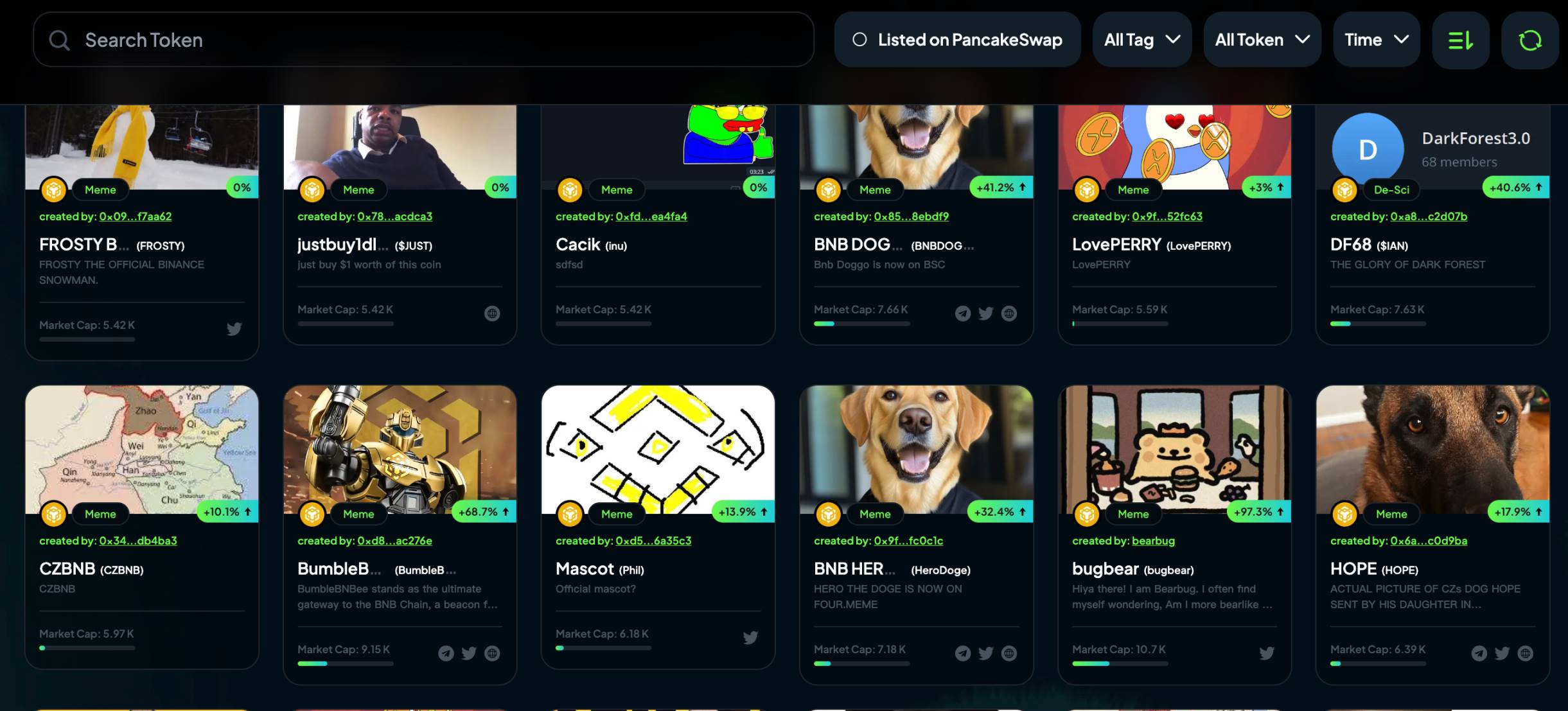
The pump platform on BSC is:
https://four.meme/
We can view in-house tokens on the 【Board】 page and apply various filters; we can also check market cap rankings and 24-hour trading volume rankings on the 【Ranking】 page.
2. On-chain Tools
Besides chain scanning, we can use many on-chain tools to help us filter tokens, mainly considering metrics such as market cap/pool size, trading volume, number of transactions, and creation time.
The commonly used on-chain tools are listed below.
1. UniversalX
Website:
https://universalx.app/user/x/0x_zibu?inviteCode=E8LJSP
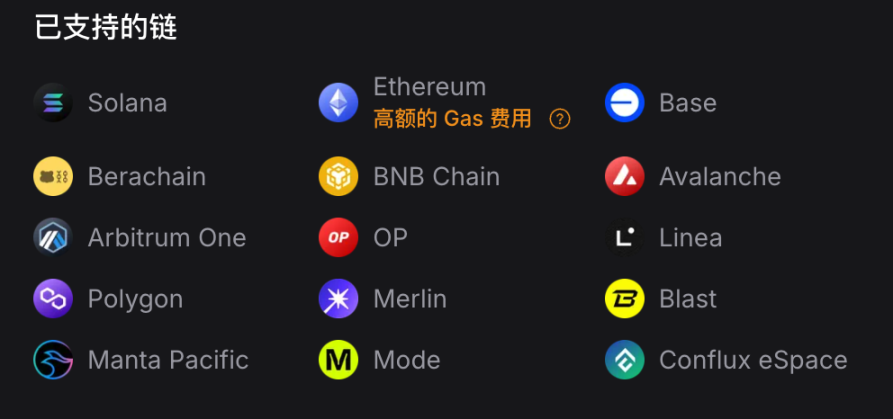
UniversalX (@UseUniversalX) is the first official application of Particle Network (@ParticleNtwrk), enabling seamless access to cross-chain assets without custody, manual bridging, or gas management. UniversalX currently supports Solana, BSC, and 13 other major EVM chains. UniversalX also has mobile support, available on App Store and Google Play.
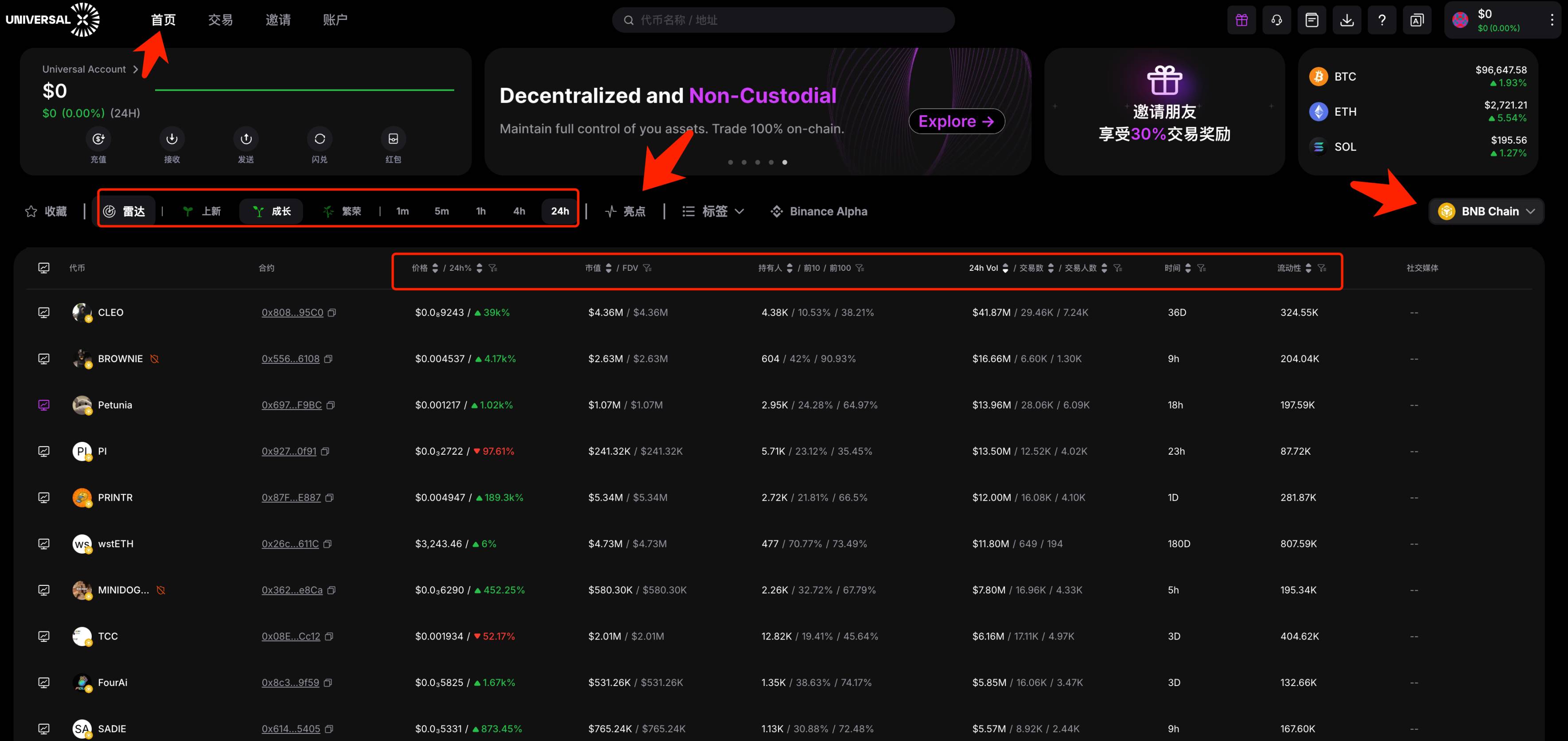
On the homepage of UniversalX, select 【BNB Chain】 and under the 【Radar】 section, choose tokens in different phases by selecting "New", "Growth", or "Prosperity". Key filtering indicators include market cap, holders, trading volume, and liquidity.
Focus on "New" for early entries, "Growth" for second-stage plays, while "Prosperity" mainly refers to older, established tokens that have been around longer.
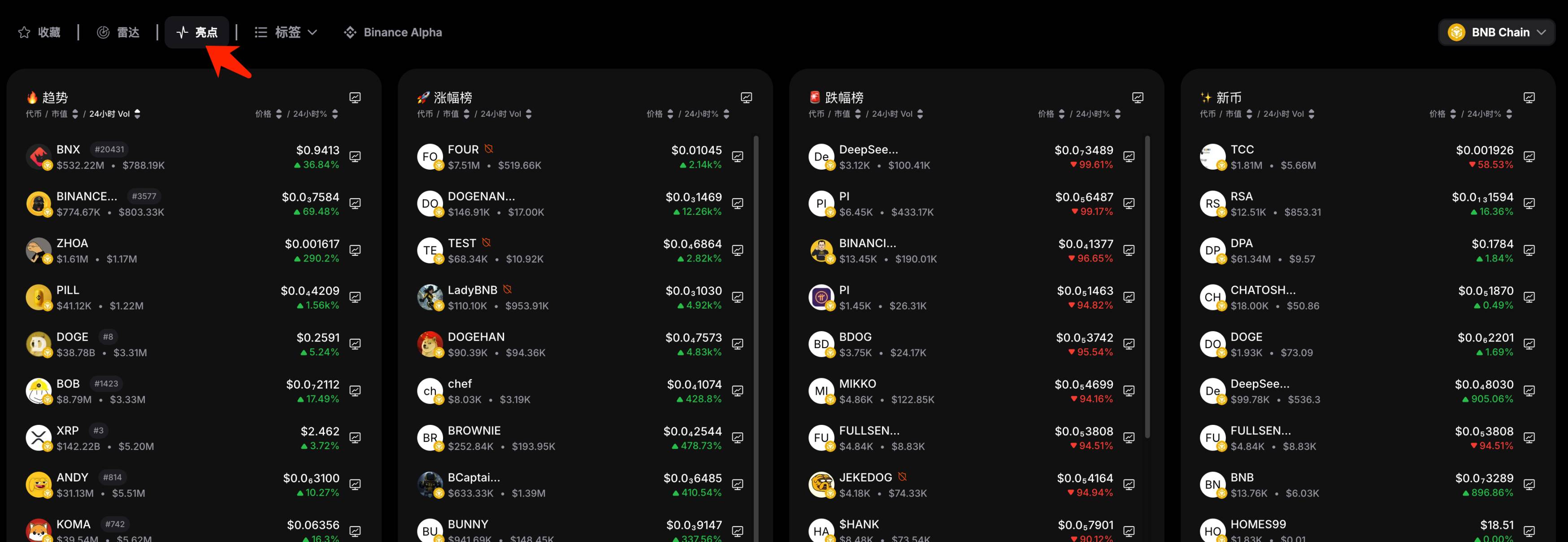
The 【Highlights】 feature includes four leaderboards: "Trending", "Gainers", "Losers", and "New Coins". Among these, "Trending", "Gainers", and "New Coins" deserve special attention.
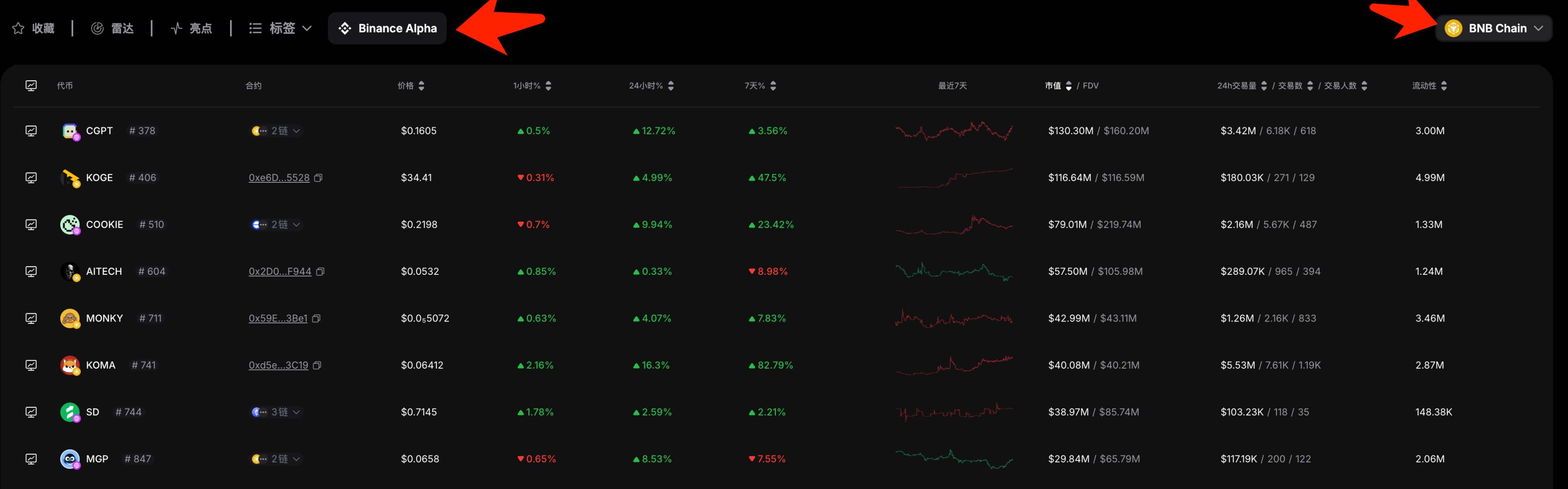
UniversalX also lists tokens from Binance Alpha, allowing viewing across all chains or filtering for a specific chain like BSC. This functionality outperforms Binance Wallet, which lacks chain-specific filtering.
2. debot
Website: https://debot.ai?inviteCode=175623
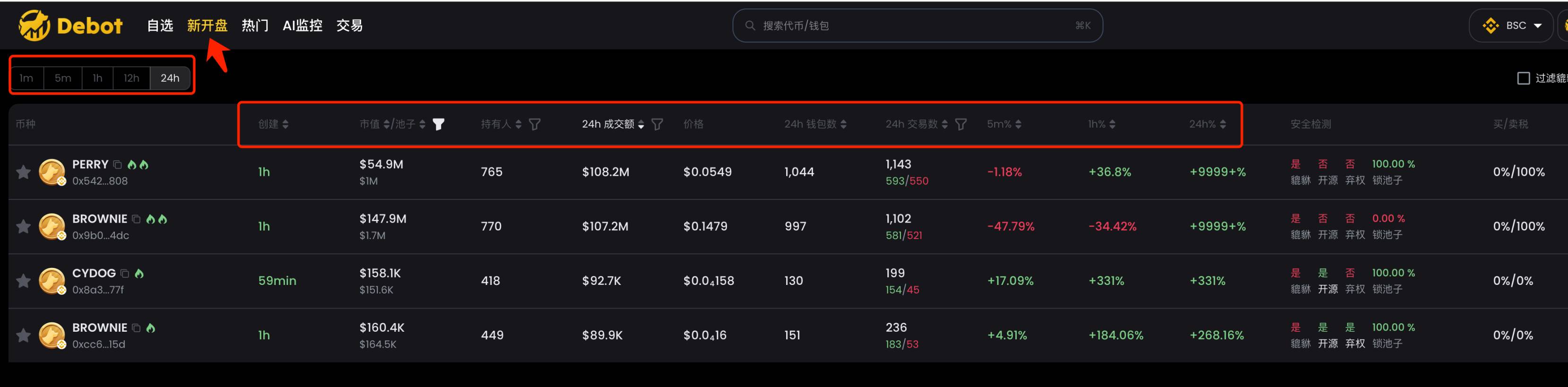
debot mainly features two sections: 【New Listings】 and 【Popular】.
The 【New Listings】 section includes new tokens launched within the last 24 hours, filterable by time period, market cap, trading volume, number of transactions, etc. Its advantage lies in including an additional metric: wallet count.
The 【Popular】 section ranks all listed tokens by popularity, using similar filtering criteria as the 【New Listings】 section.
3. gmgn
Website: https://gmgn.ai/?ref=sxsy7oyJ
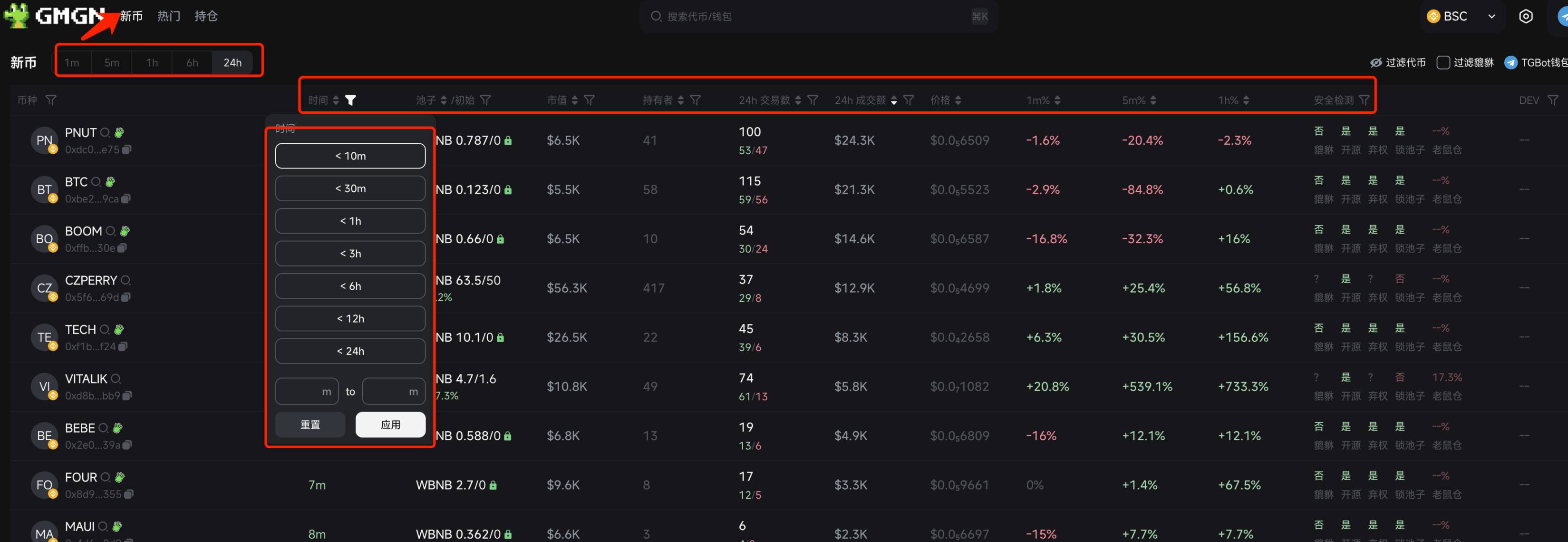
gmgn recently added support for BSC and was even retweeted by cz. gmgn's BSC interface mainly consists of two sections: 【New Coins】 and 【Popular】, similar to debot.
The 【New Coins】 section includes new tokens launched within the past 24 hours, filterable by time with finer granularity. It also supports safety checks—on EVM chains, it's common for newly launched tokens to be closed-source, non-renounced, or with unlocked pools, so this filtering capability is highly practical. Other standard metrics are shown in the image below.
The 【Popular】 section filters all listed tokens by popularity, with similar metrics to the 【New Coins】 section.
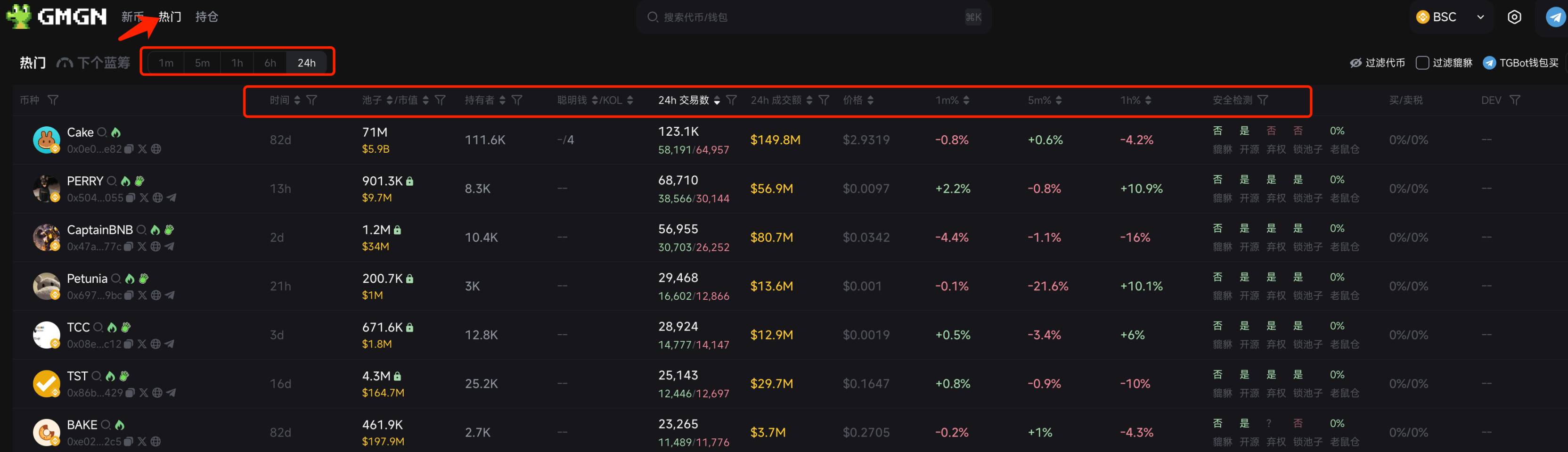
gmgn also features a 【Next Bluechip】 function for BSC, which currently has no data. Based on its implementation on Solana, this section likely highlights promising tokens—worth watching once live.
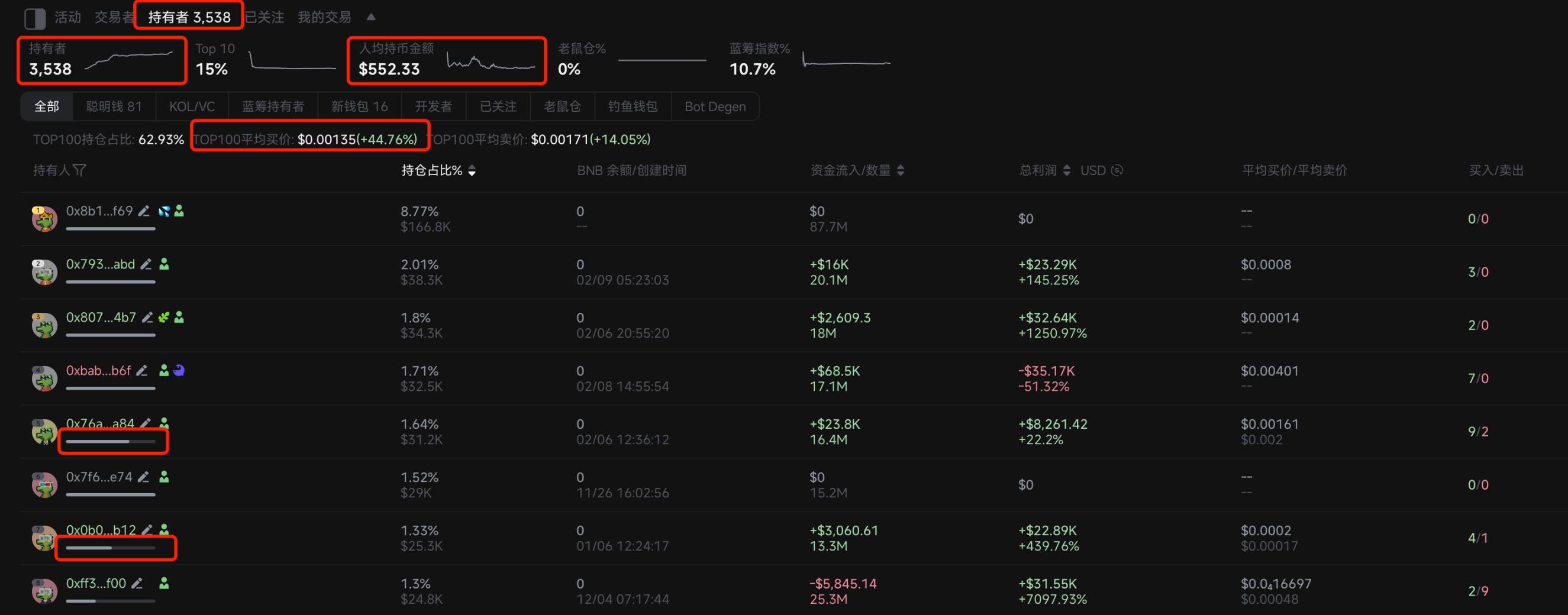
When analyzing charts, gmgn's 【Holders】 section includes a new feature showing changes in holder numbers, average holdings per person, and average buy price among Top 100 holders—very convenient for quickly assessing holder fundamentals. Each holder’s address displays a progress bar indicating remaining holdings—an intuitive and useful feature.
4. okx
Website: https://www.okx.com/zh-hans/web3
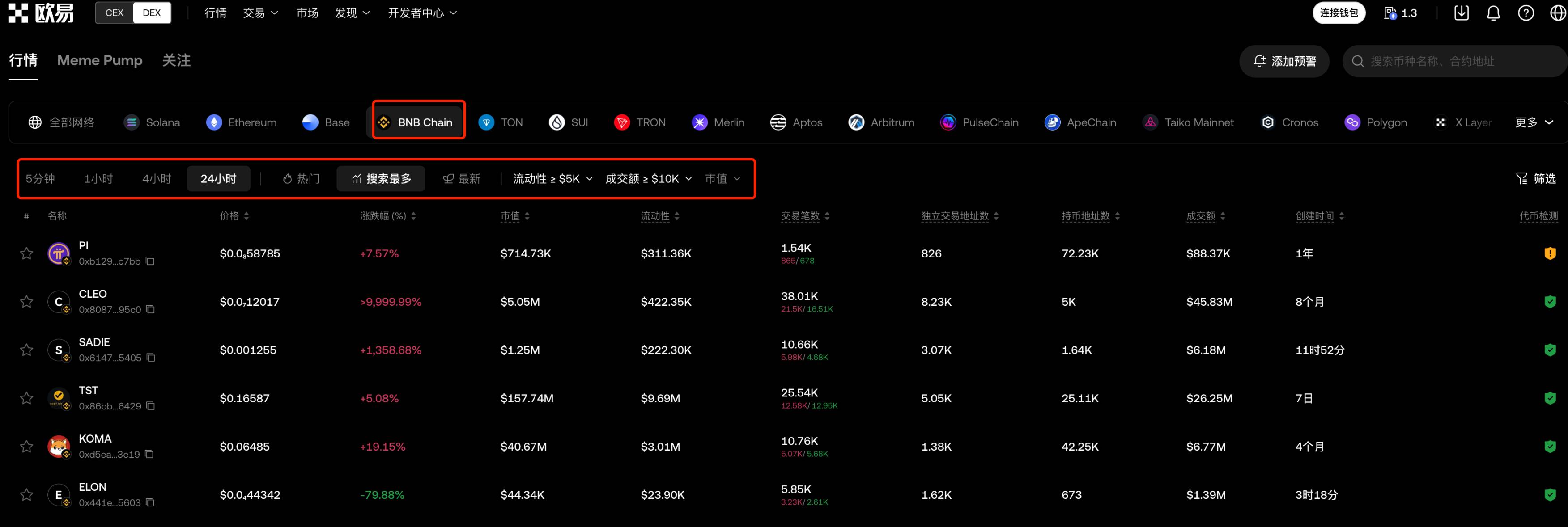
okx offers comprehensive coverage across multiple chains, including BSC. The web version provides richer features than the Web3 wallet, allowing filtering by time, popularity, most searched, and latest.
5. ave
Website: https://ave.ai/
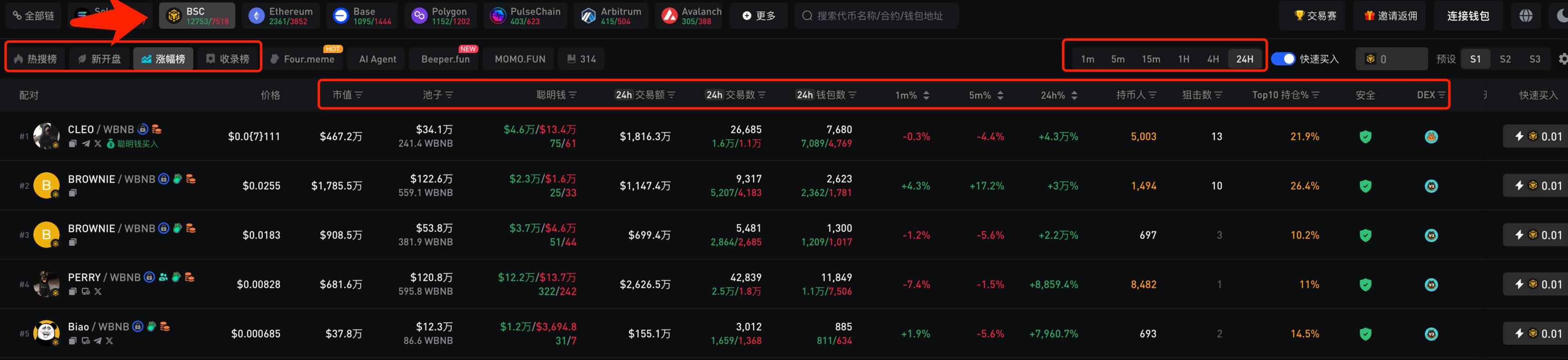
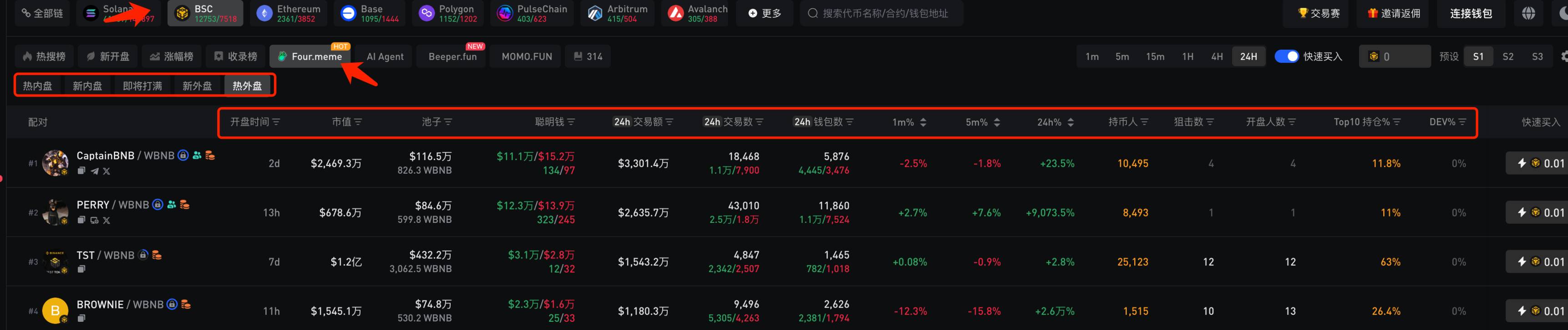
ave is a veteran tool widely used during the last bull market, supporting multiple chains and offering a mobile app for easy chart monitoring. For BSC, it features four sections: 【Trending Search】, 【New Listings】, 【Gainers】, and 【Listings】. Each section allows filtering by different metrics, though some can only be filtered, not sorted—choose based on personal preference.
ave separately categorizes Four.meme tokens into five sections: 【Hot Inner Market】, 【New Inner Market】, 【Filling Up Soon】, 【New Outer Market】, and 【Hot Outer Market】. This makes chain scanning easier—more user-friendly than the official site. Hopefully, other tools will follow suit soon.
6. Eagle
Website: https://dexscreener.com/
Like ave, Eagle is a veteran tool supporting many chains. It allows filtering by time period, trend, top trading volume/number of trades, returns, new pools, etc., and supports custom filters—overall very rich in metrics. Previously, I've used Eagle’s filter settings to analyze years of data and develop numerous strategies.
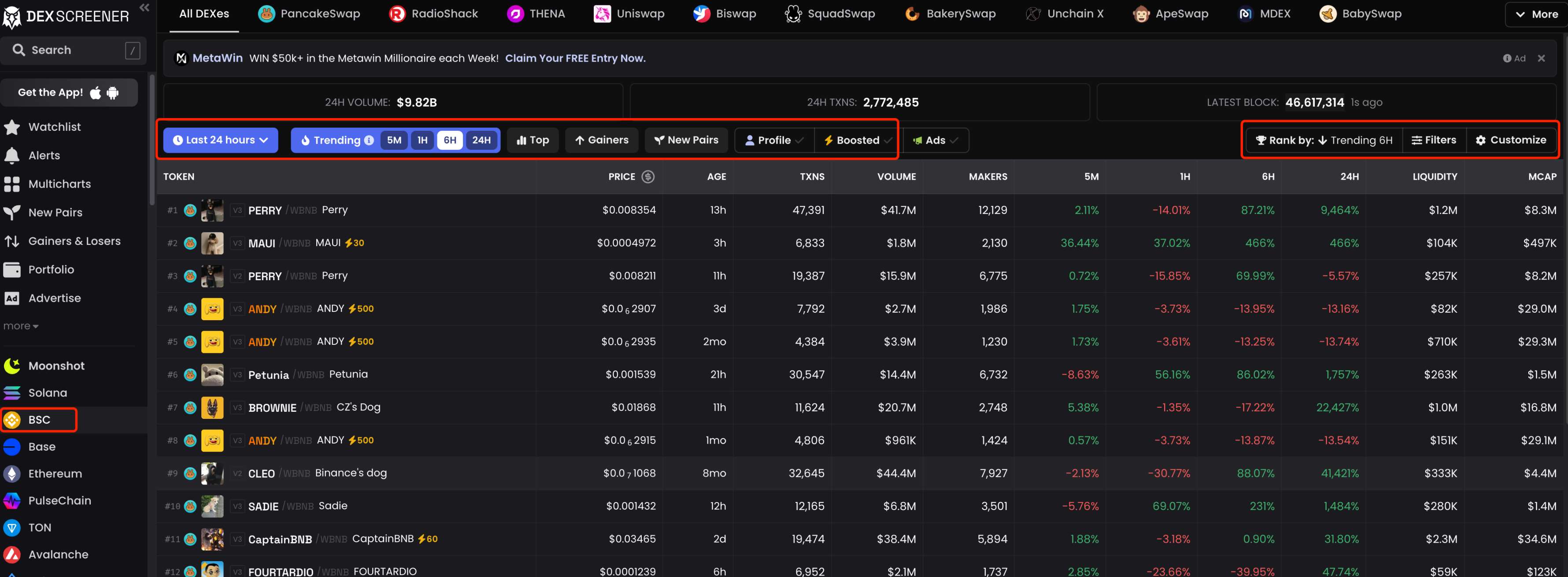
Eagle's strength lies in its comprehensiveness, but its weakness is slightly delayed k-lines—usually a few seconds behind other tools. However, its multicharts feature is exceptionally useful, ideal for monitoring multiple tokens simultaneously. While other tools offer similar functions, none match Eagle’s usability, despite room for improvement.
3. How to Find Smart Money
Monitoring smart money is an effective way to discover early potential gems and trending tokens on-chain. More commonly used on Solana, BSC has remained relatively dormant during this bull cycle, leaving many without accumulated smart money addresses on BSC. So how do we find smart money?
First, leverage smart money from other EVM chains such as ETH and BASE—check if these addresses are active on BSC. If they remain active, they can be directly utilized.
Second, use existing tools to analyze emerging gems and identify smart money.
1. debot
Website: https://debot.ai?inviteCode=175623
In debot, enter the contract address (CA) of the token you want to analyze and open the 【Transaction Analysis】 section at the bottom. Focus on 【Top Holders】 and 【Top Earners】—where 【Top Holders】 lists the top 100 holding addresses and 【Top Earners】 lists the top 100 most profitable addresses.
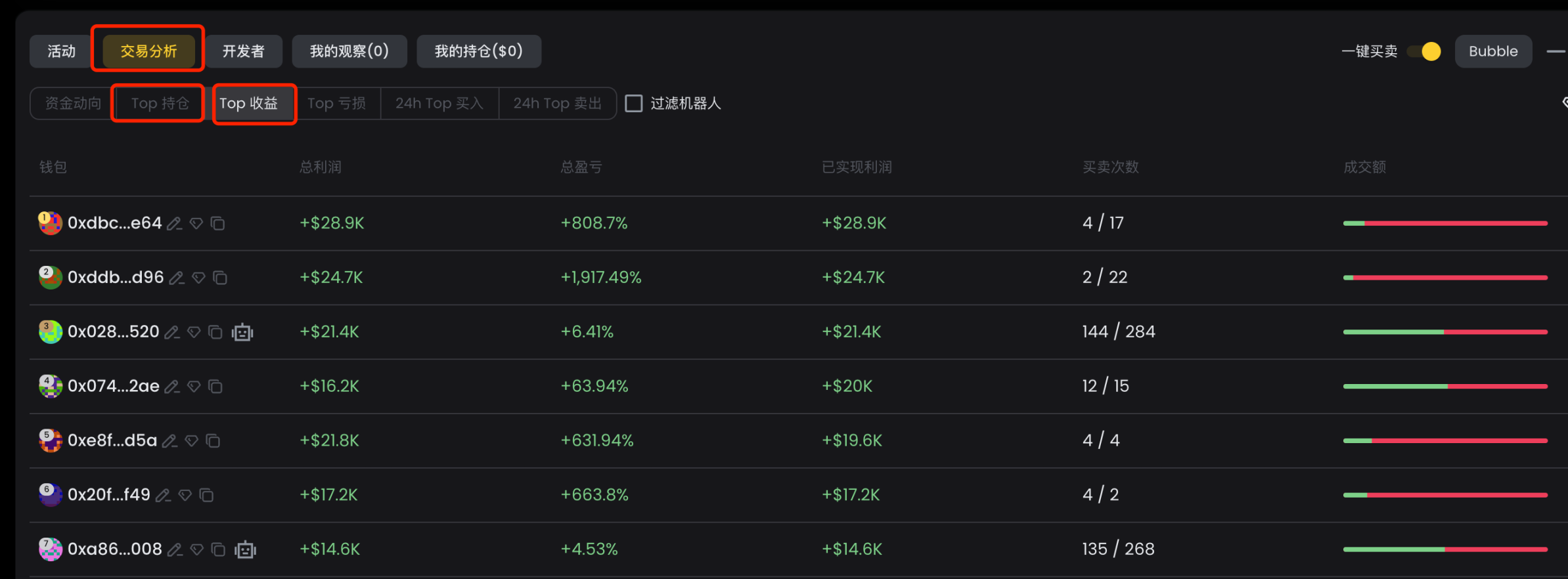
Click any address to see its detailed profit data and transaction history displayed on the right side of the interface.
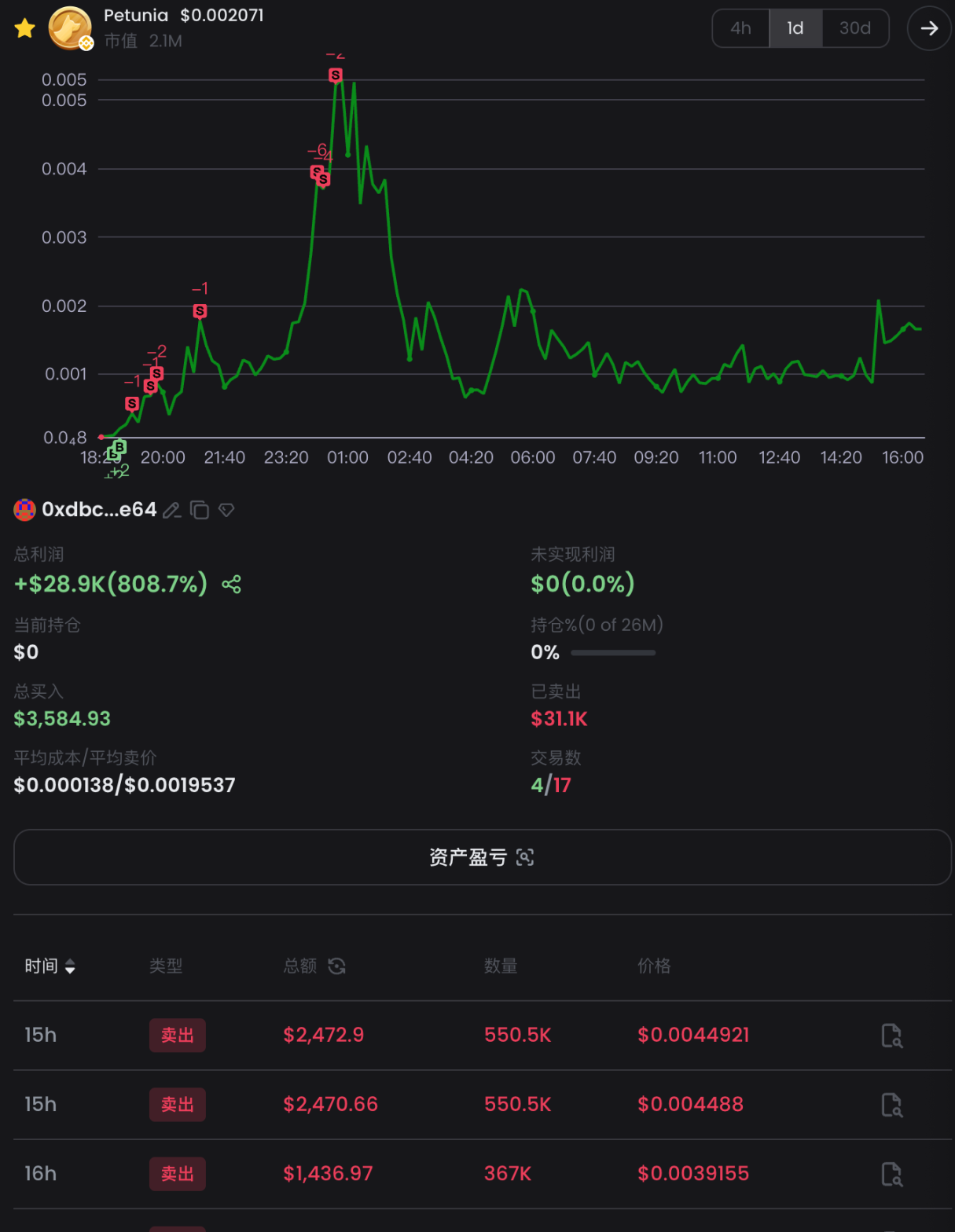
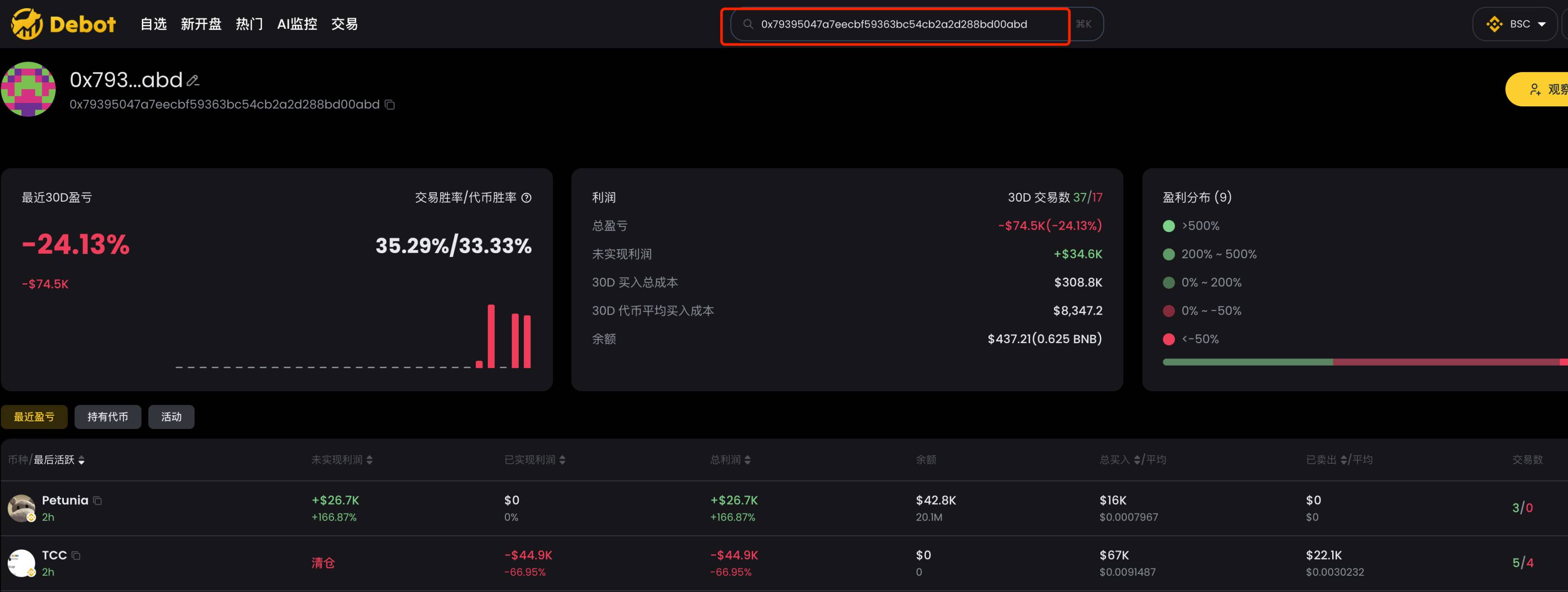
To view an address’s overall profit, recent PnL, held tokens, and recent transaction history, simply input the address into the search bar to access detailed data.
2. gmgn
Website: https://gmgn.ai/?ref=sxsy7oyJ
In gmgn, enter the CA of the token being analyzed and focus on the 【Traders】 and 【Holders】 sections at the bottom.
【Traders】 lists the top 100 most profitable addresses, further categorized into "Smart Money", "KOL/VC", "New Wallets", "Developers", "Insider Trading", "Phishing Wallets", and "Bot Degen". You can sort by metrics such as "Total Profit", "Realized Profit", and "Unrealized Profit" to filter suitable smart money.

【Holders】 lists the top 100 largest holders, similarly categorized into "Smart Money", "KOL/VC", "Bluechip Holders", "New Wallets", "Developers", "Insider Trading", "Phishing Wallets", and "Bot Degen". Sort by "Capital Injections / Quantity" or "Total Profit" to filter qualified smart money.
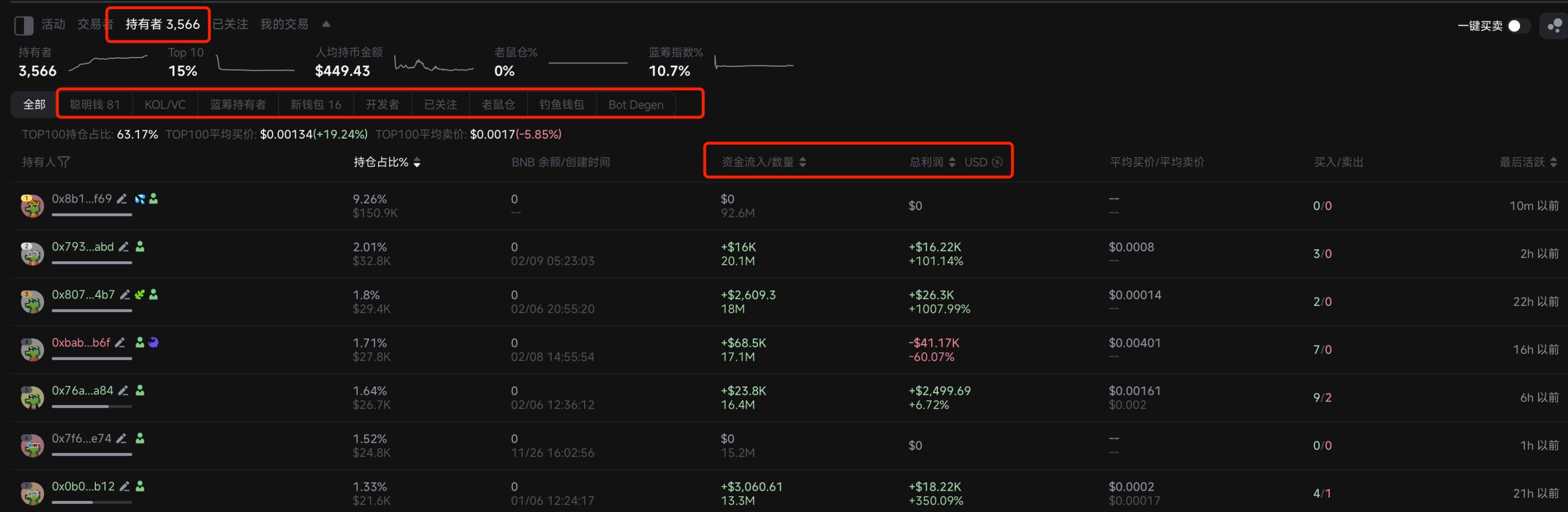
Click any address to see its detailed profit data and transaction history on the right panel.

Currently, gmgn does not support analyzing an address’s overall profitability or historical data—hopefully this feature will be added soon.
3. ave
Website: https://ave.ai/
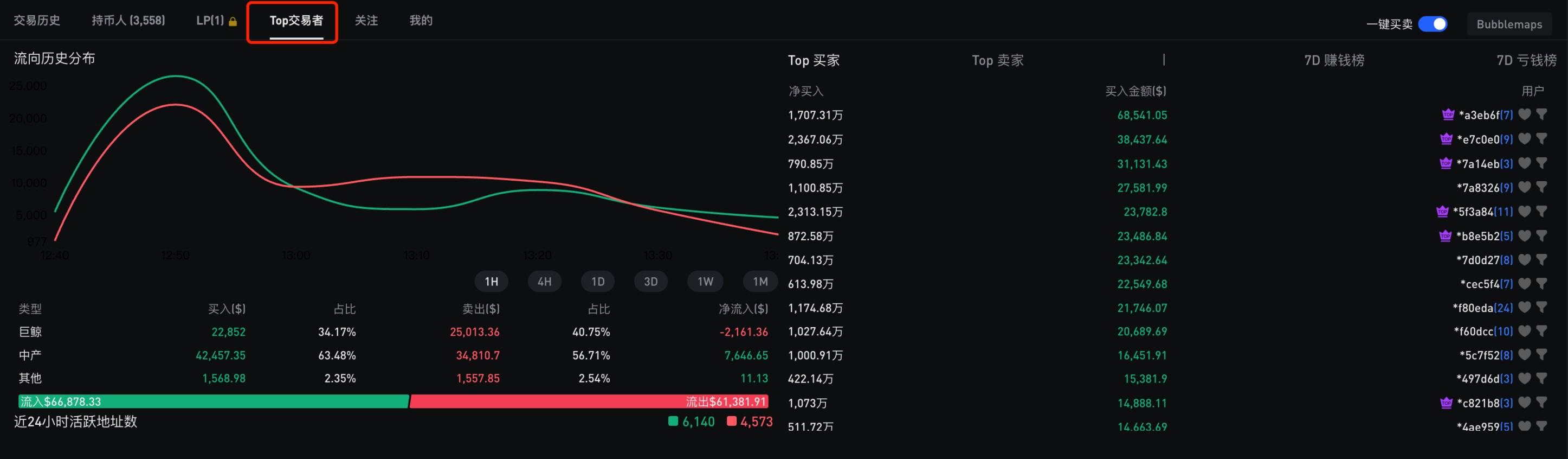
ave also analyzes 【Holders】 and 【Top Traders】.
【Holders】 lists the top 100 holding addresses, divided into categories: "Smart Money", "DEV", and "Snipers".
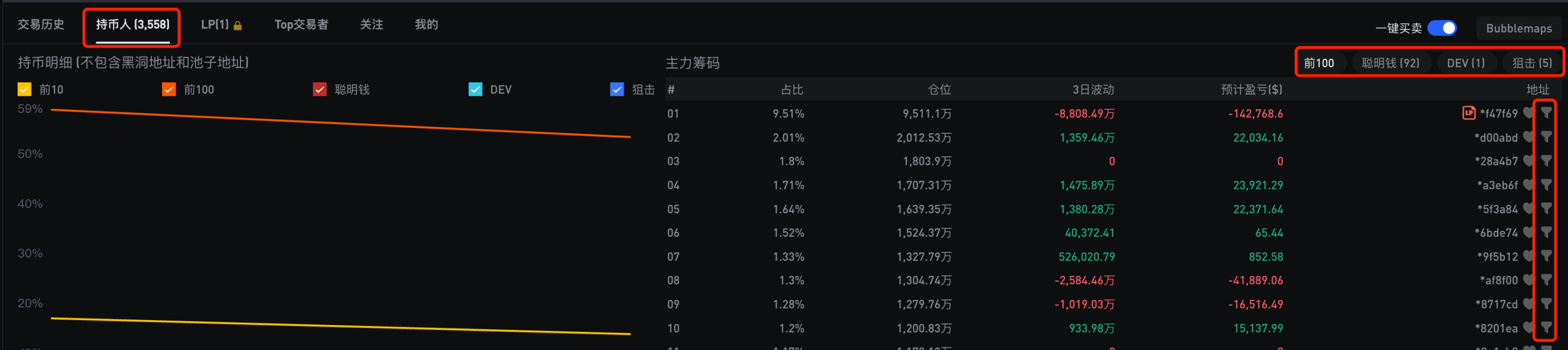
Clicking the filter button next to an address reveals its profit and transaction data for that token.
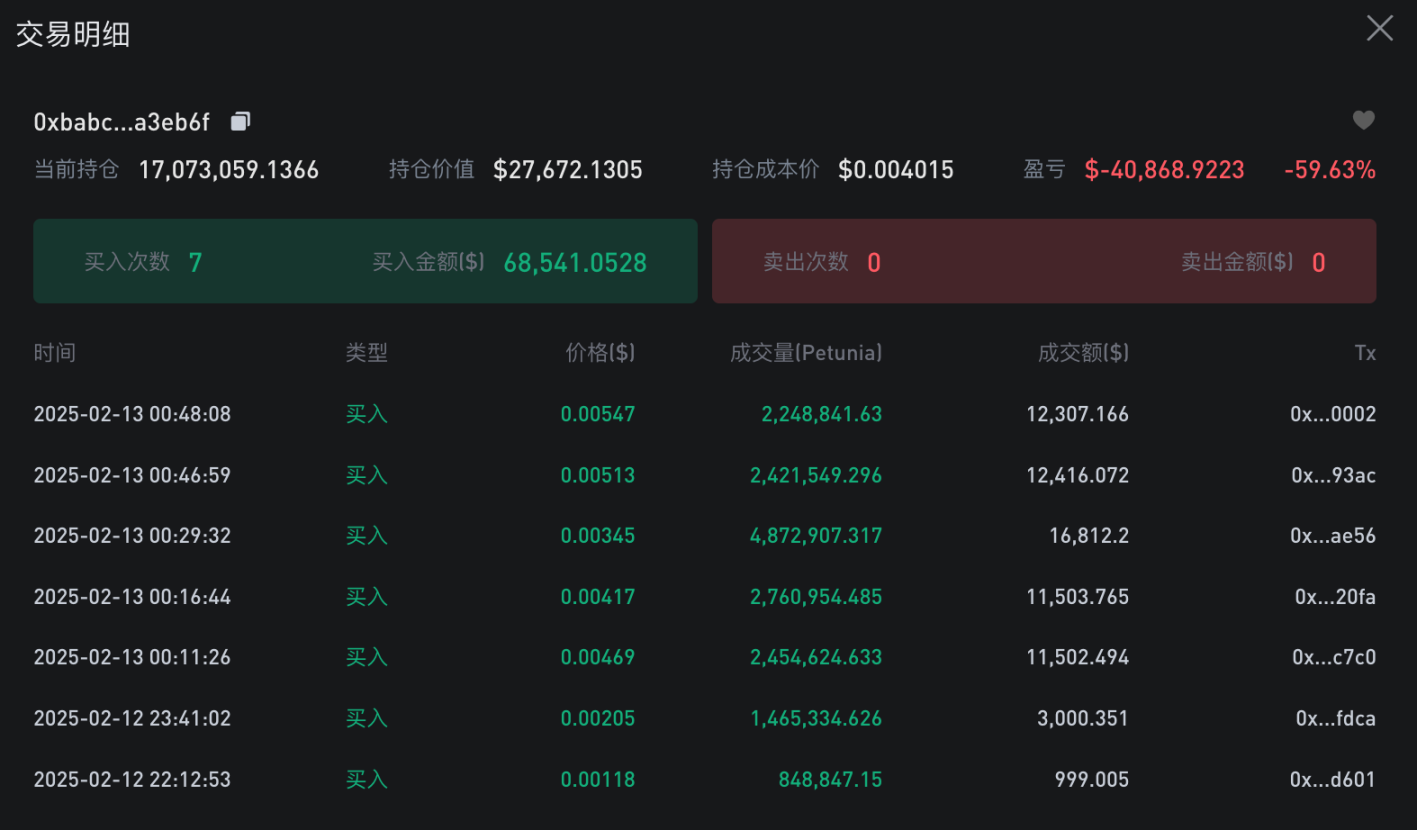
【Top Traders】 currently only shows data for the top 15 most profitable addresses—limited in scope.
4. Eagle
Website: https://dexscreener.com/
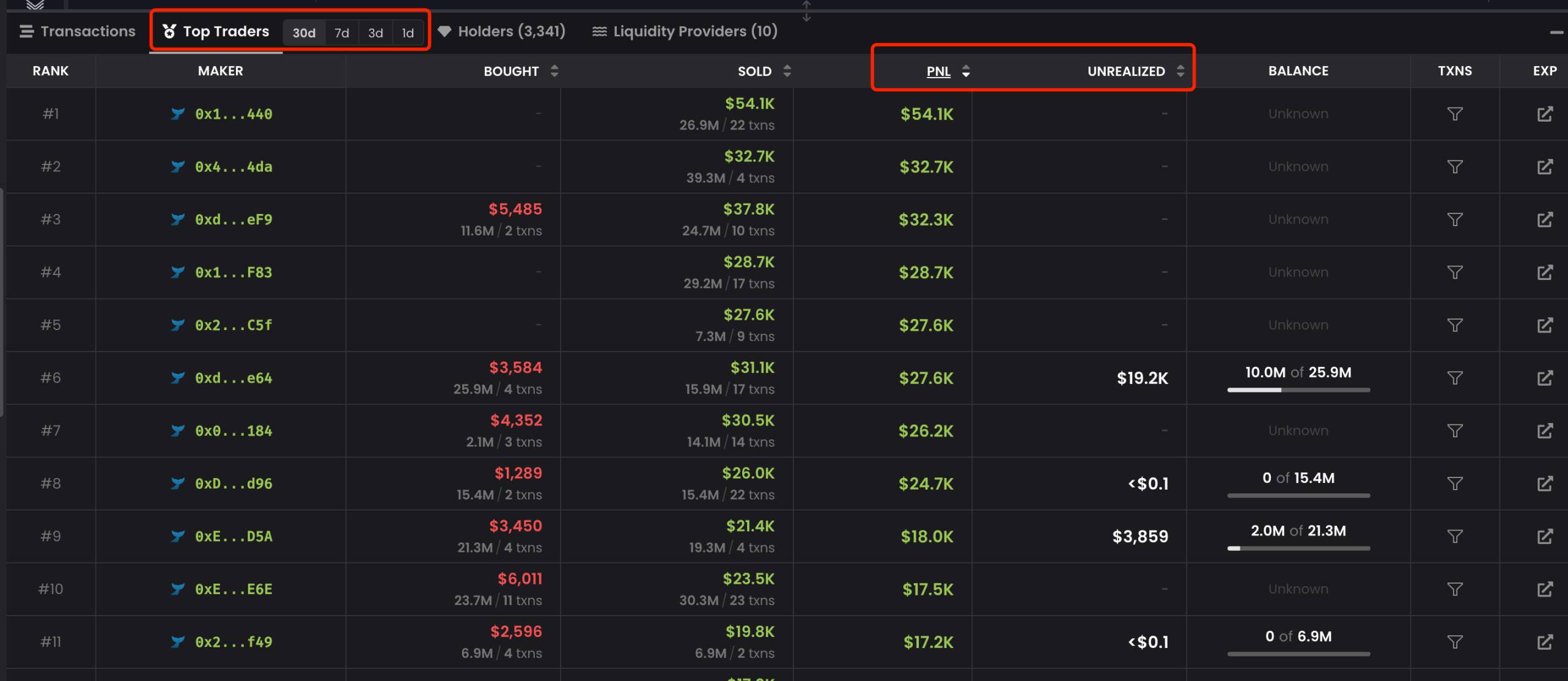
Eagle’s 【Top Traders】 section lists the top 100 most profitable addresses, sortable by total profit and unrealized profit. However, displayed information is limited and less functional compared to debot and gmgn.
4. Monitoring Smart Money
Once you’ve identified smart money, continuous monitoring is essential to know immediately what tokens these savvy players are trading. When it comes to monitoring, I recommend debot—currently the most feature-rich and finely-grained monitoring product I’ve used.
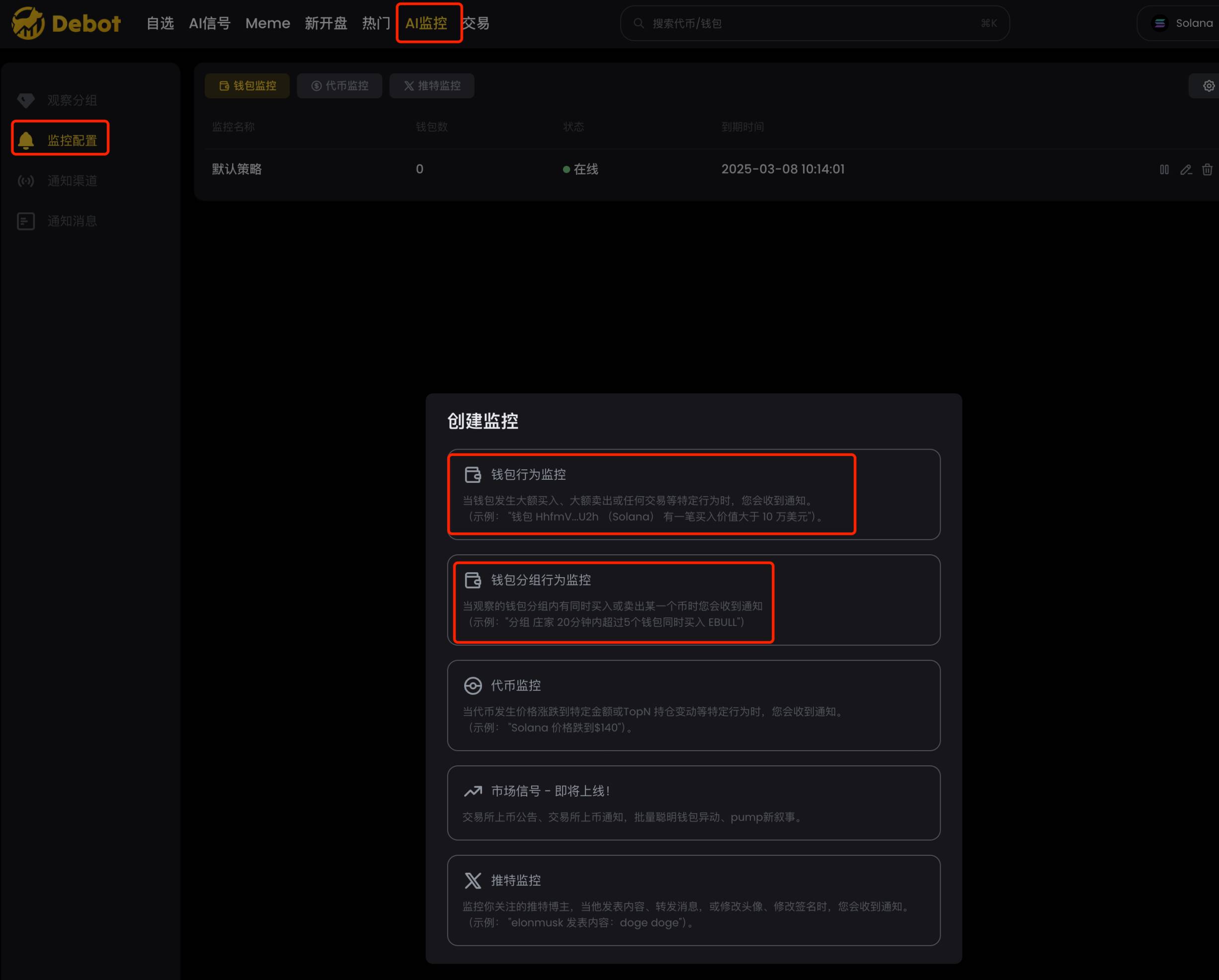
debot offers two types of wallet monitoring: individual wallet behavior monitoring and grouped wallet behavior monitoring, as shown below.
1. Wallet Behavior Monitoring
This type of monitoring is standard across tools. However, most tools push all address alerts into a single Telegram group, whereas debot’s advantage lies in allowing address grouping, pushing alerts to different Telegram groups accordingly, as shown.
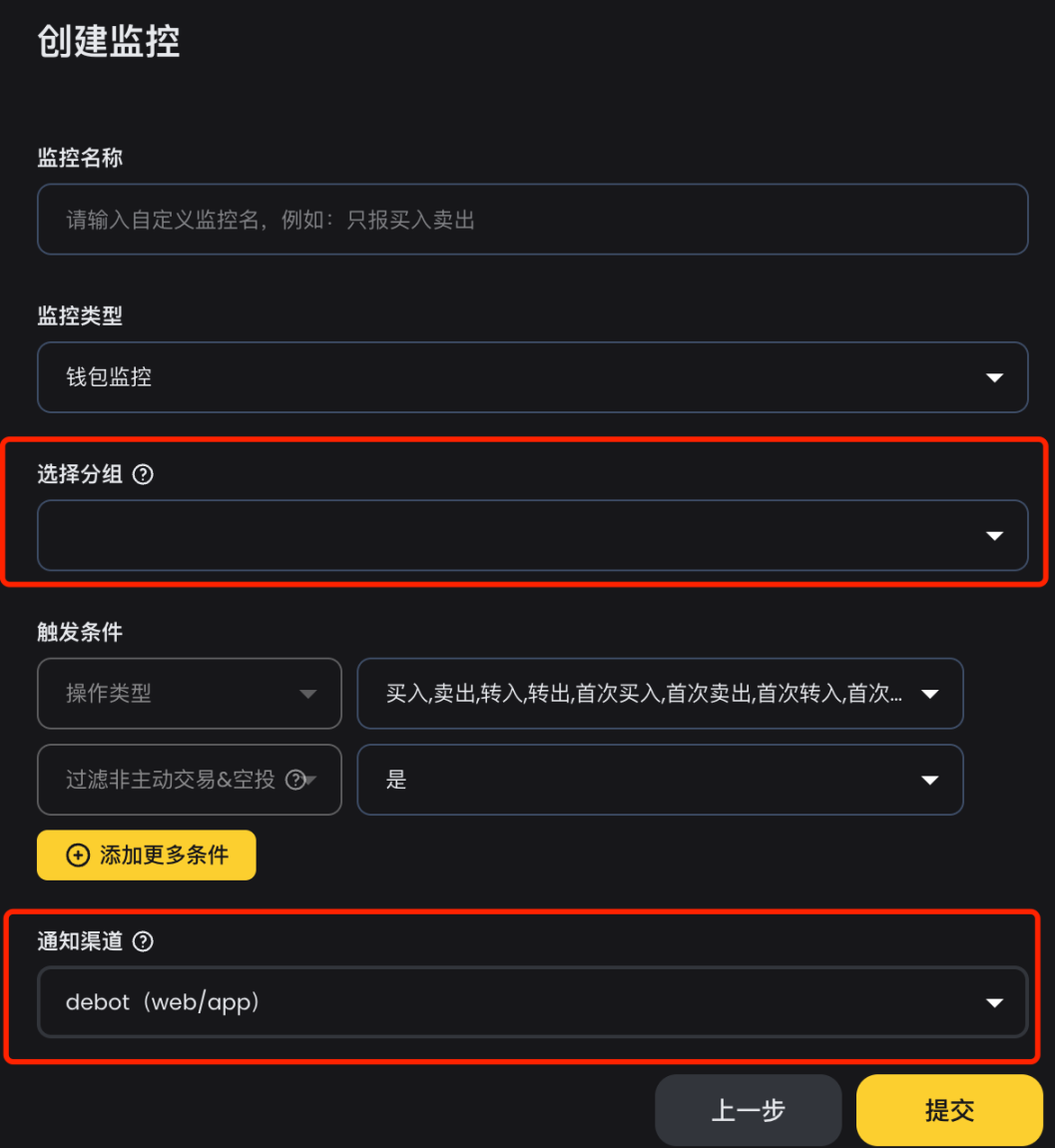
This enables creating separate Telegram groups based on tags—for example, inner-market traders, outer-market second-stage players, or high-priority watchlist addresses. A good monitoring tool should allow tiered alert distribution. Previously, when using abot, I had to tag addresses first and then perform secondary development in Telegram to redistribute alerts based on tags. With debot, this extra step is no longer needed.
2. Wallet Group Behavior Monitoring
If monitoring many addresses, an unavoidable issue arises: too many alerts. Excessive messages overwhelm human processing capacity, leading to disengagement—and defeating the purpose of monitoring. My previous strategy involved secondary development to set rules—such as triggering alerts only when a certain number of distinct addresses trade within a defined window (e.g., 5 different buys within 30 minutes). I used this method for about a year with excellent results—reducing noise while still catching trending tokens.
debot’s wallet group behavior monitoring implements exactly this strategy, with even finer granularity and more detailed metrics, as shown. We can monitor buy/sell actions, set monitoring windows, transaction amounts, notification frequency, and market cap thresholds—fully meeting diverse monitoring needs. Highly recommended.

3. Group-Traded Tokens and Recent Trades
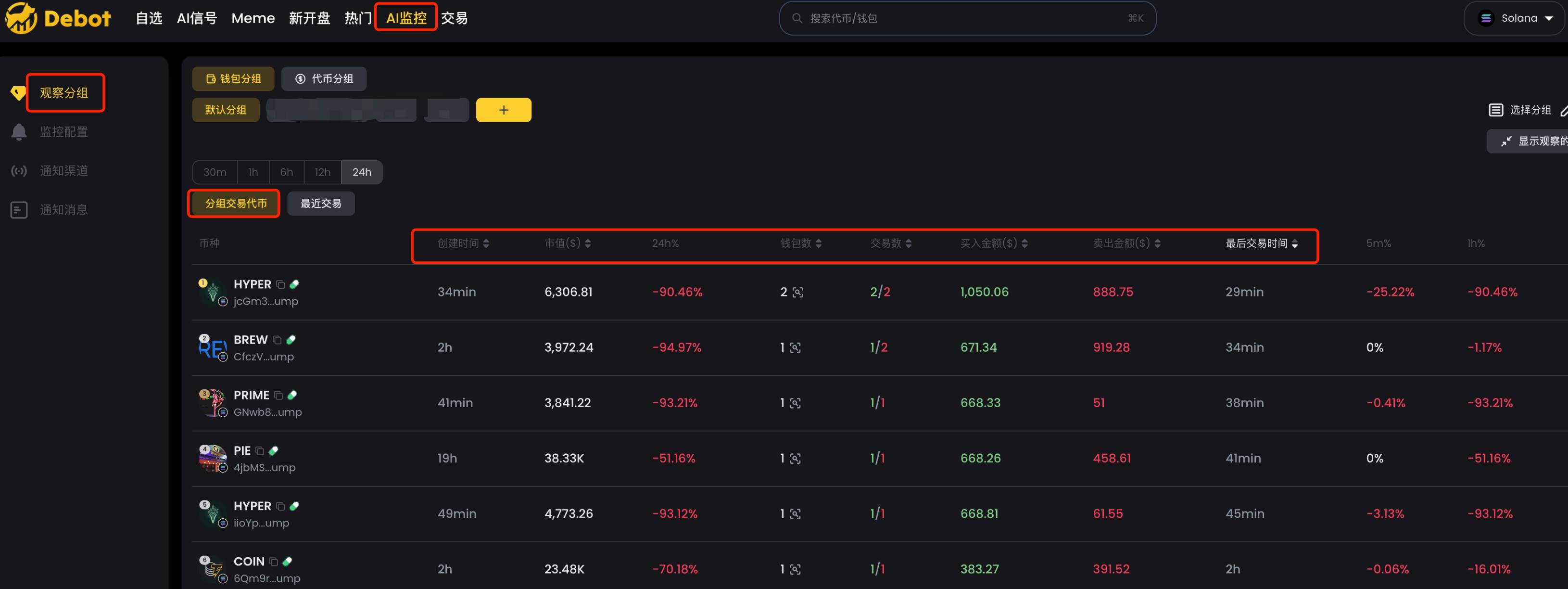
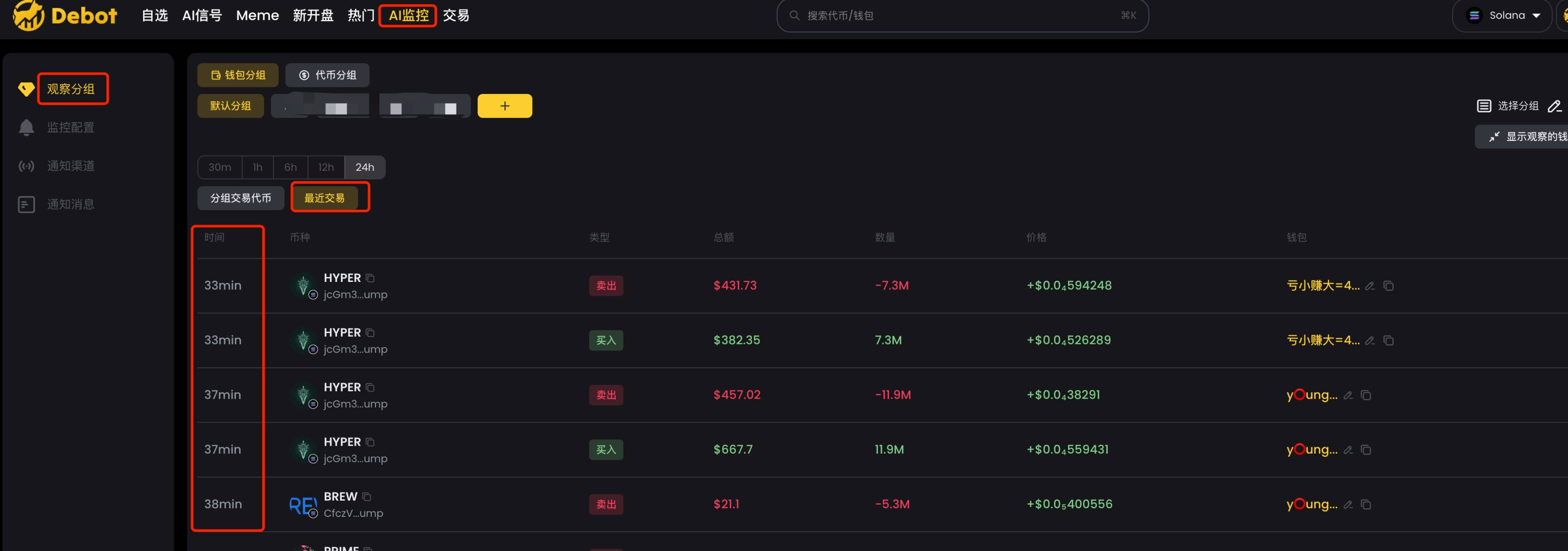
After importing smart money into debot, under 【Watch Groups】, we can view 【Group-Traded Tokens】 and 【Recent Trades】 by group.
【Group-Traded Tokens】 lists all tokens traded by smart money in a given timeframe (e.g., 24 hours), filterable and sortable by various metrics. This is extremely useful when you miss real-time alerts but want to know what tokens smart money has bought.
【Recent Trades】 lists trading records of smart money within the group, sorted chronologically.
4. Position Details and Transaction Details
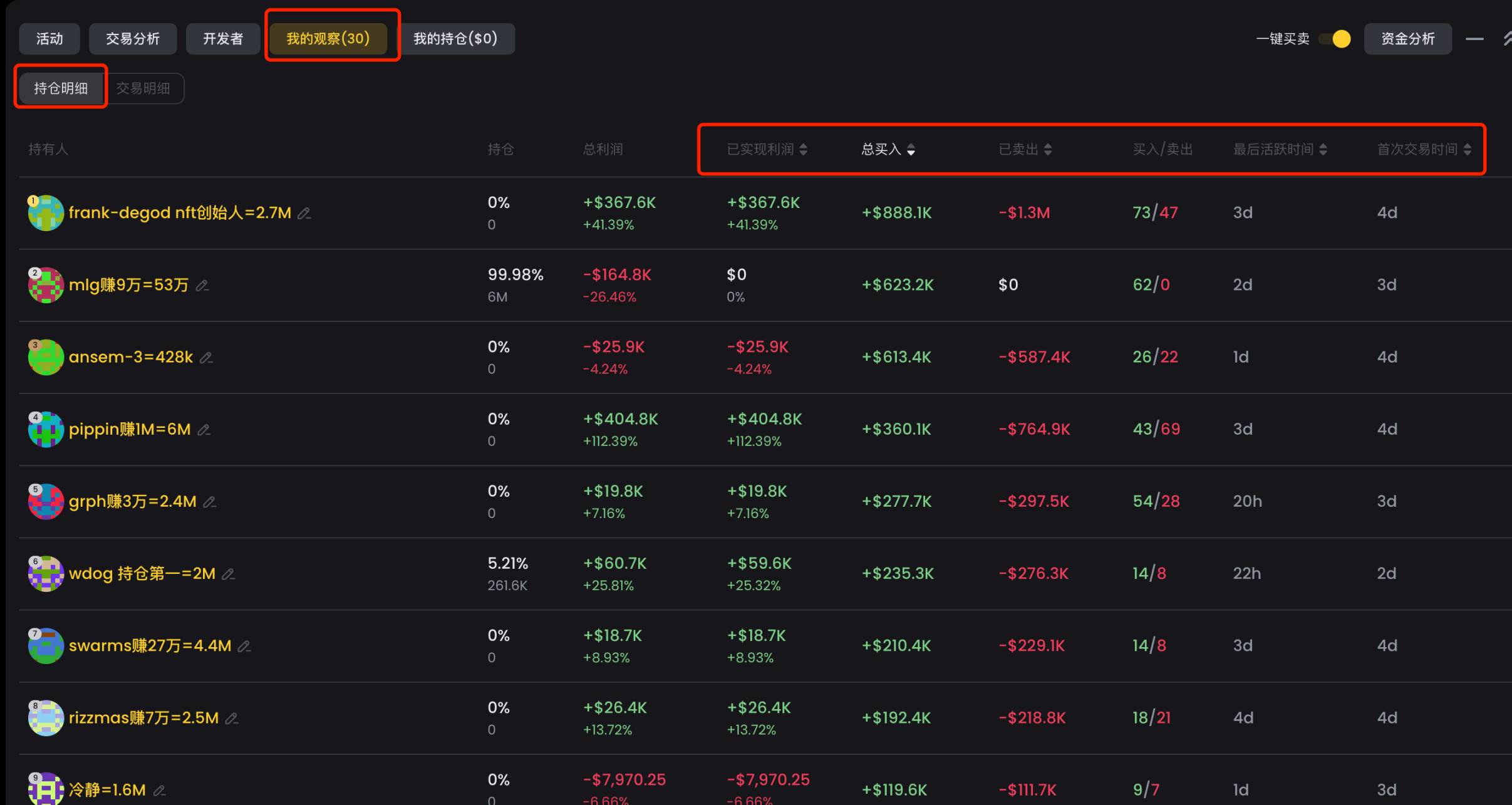
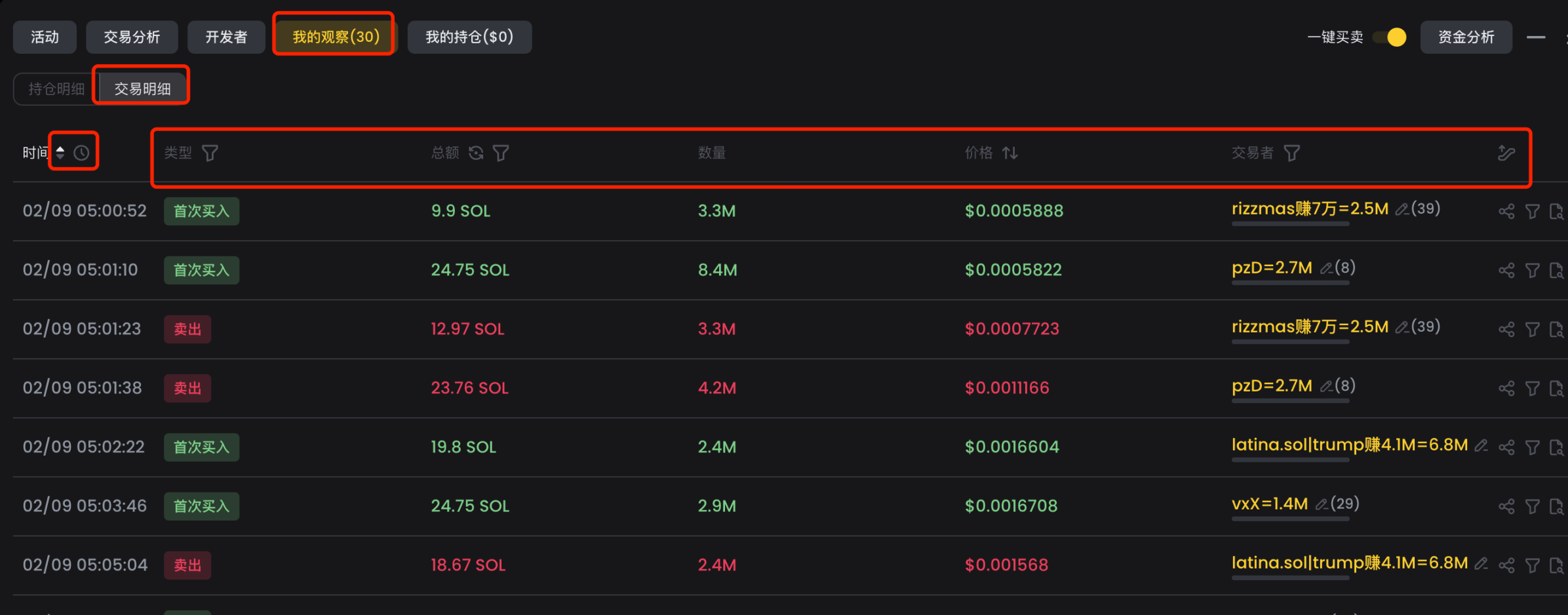
After importing smart money into debot, on a token’s K-line page under the 【My Watch】 section, we can view 【Position Details】 and 【Transaction Details】.
【Position Details】 lists data from all smart money wallets that traded this token, sortable and filterable by various metrics—helpful for identifying which smart money has already entered.
【Transaction Details】 lists every transaction made by smart money on this token in chronological order, viewable ascending or descending. To determine which smart money address bought earliest, sort in ascending order—the first entry is the answer. This practical feature helps identify the fastest-informed smart money.
5. Security Check Tools
A major issue on EVM chains is encountering honeypots ("Pilots"). Conducting security checks before buying is mandatory. Commonly used security check tools include the following.
1. goplus
Website: https://gopluslabs.io/token-security
goplus emerged during the last bull market and was backed by Binance Labs. Many tools integrate goplus functionality—available via website, browser extension, or public API. If running scripts or strategies, consider using their API.
2. honeypot.is
Website: https://honeypot.is/
honeypot.is gained popularity during the last bull market and remains accurate in detecting scams. They also offer an API.
3. tokensniffer
Website: https://tokensniffer.com/
tokensniffer is another veteran security check tool.
Given the numerous tricks and variations of honeypots on EVM chains, it's advisable to use multiple tools together to avoid losses due to limitations of any single solution.
6. Trading
BSC was very popular during the last bull market, but many trading tools from that era are now abandoned. Fortunately, newer tools have emerged—here are some currently popular ones.
1. UniversalX
Website: https://universalx.app/user/x/0x_zibu?inviteCode=E8LJSP
UniversalX is an on-chain CEX enabling trading with balances from any chain. As long as your account holds USDT, USDC, ETH, BTC, or SOL, you can trade. Currently supports basic buy/sell, with plans to add inner-market trading, limit orders, and more.
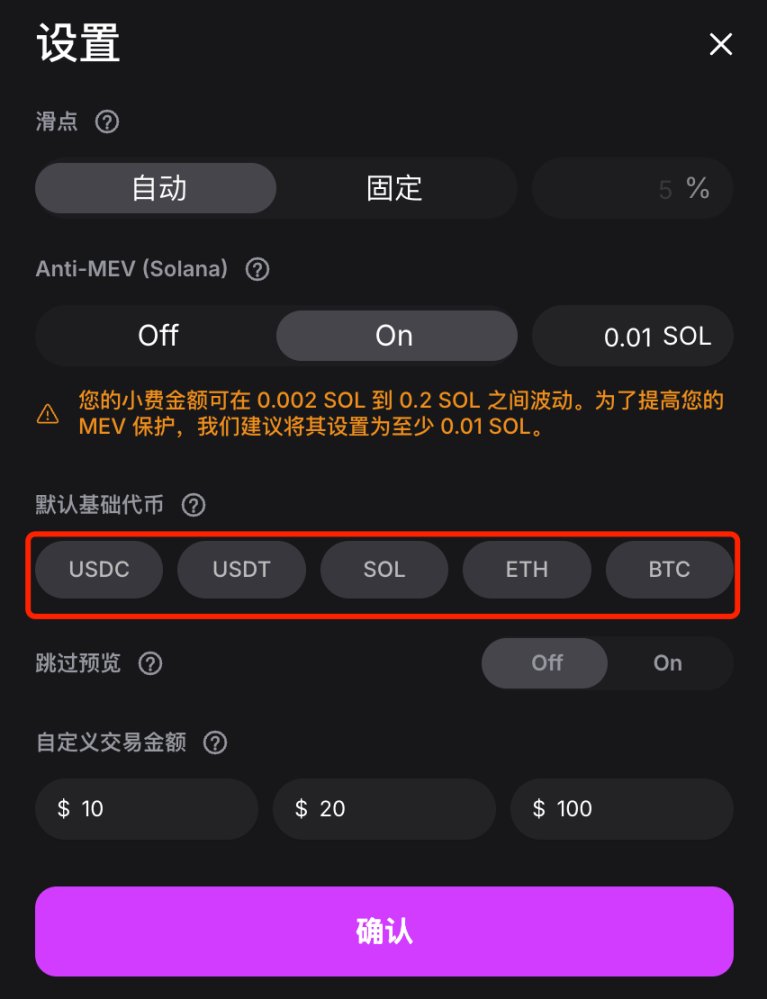
UniversalX’s advantages include chain-agnostic trading—enabling access to tokens across 15 chains with just base assets. This proves especially useful when other chains lack funds or exchanges experience withdrawal delays. Additionally, UniversalX offers fast chart loading and execution speeds, built-in MEV protection, and mobile support—making mobile trading convenient.
Additionally, UniversalX has reduced trading fees for major tokens to 0.1%, matching CEX levels, including $AI16Z, $Fartcoin, $ARC, $AIXBT, $TST, etc.
Backed by Binance Labs, they are expected to launch a token this year—trading on UniversalX counts as interaction, potentially qualifying for airdrops.
2. debot
Website: https://debot.ai?inviteCode=175623
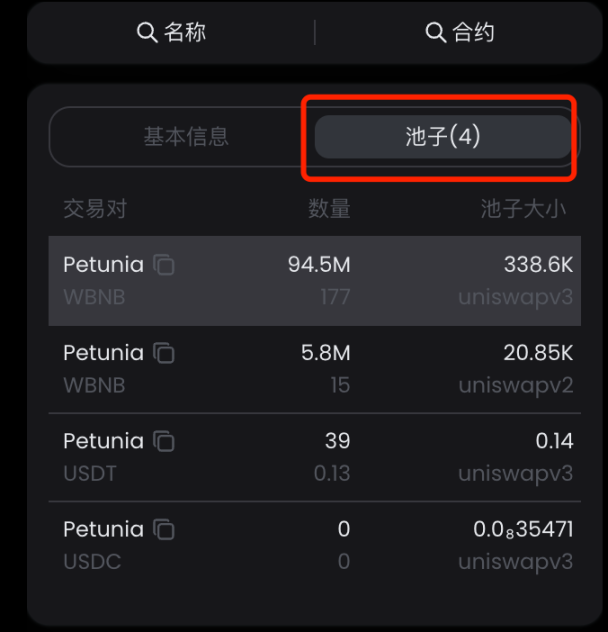
debot supports BSC trading, currently offering basic buy/sell with anti-MEV protection planned. A key benefit of debot is displaying all available pools for a token—currently the most complete pool visibility among tools, helping users choose optimal pools.
debot offers a mobile app for fast and convenient trading.
3. gmgn
Website: https://gmgn.ai/?ref=sxsy7oyJ
gmgn now supports BSC, offering basic buy/sell functions. Using gmgn allows easy use of its data analytics features, with clear display of holder fundamentals.
gmgn supports mobile devices.
4. okx
Website: https://www.okx.com/zh-hans/web3
okx is a major platform. Its standard mode supports basic buy/sell with MEV protection (anti-slippage). The meme mode supports BSC “Qingling Pickup”, enabling fast trades with preset parameters. Advantages include multi-platform coverage—web, plugin, and mobile app support.
5. PinkPunk
Link: https://t.me/PinkPunkTradingBot?start=ref_8CEB8FBBC7EE9B050033
PinkPunk is a veteran Telegram bot supporting multiple chains. Beyond basic trading, it supports limit orders and sniping, with fast execution speed.
Join TechFlow official community to stay tuned
Telegram:https://t.me/TechFlowDaily
X (Twitter):https://x.com/TechFlowPost
X (Twitter) EN:https://x.com/BlockFlow_News
 @0x_zibu