ZK hardware acceleration leader project Cysic officially launches incentivized testnet (with node tutorial)
TechFlow Selected TechFlow Selected
ZK hardware acceleration leader project Cysic officially launches incentivized testnet (with node tutorial)
This article provides a brief introduction to Cysic and explains how to obtain a free validator node whitelist, as well as the steps to install a Cysic testnet validator node.
 Navigating Web3 tides with focused insights
Author: Halsey
A month ago, we interviewed Leo Fan, Co-Founder of Cysic. During the interview, Leo mentioned that **Cysic's testnet would launch in July**, and users would be invited to become validators through a whitelist mechanism. Regular laptops can also join the Cysic network as validators and earn corresponding rewards.
Today, Cysic announced on Twitter the official launch of its incentivized testnet and points system. Limited validator node whitelists are now being distributed within the Cysic community.
The first phase of the Cysic testnet will open 1,000 validator nodes, inviting users to become validators via a whitelist mechanism. All validator nodes in Phase 1 will be granted to core contributors, active community participants, and partners. Cysic officially launched its Galxe whitelist campaign on July 19 and introduced a series of Discord community events, encouraging members to participate and earn validator whitelists.
Users who have obtained a whitelist can now connect devices such as laptops to provide validation services for the Cysic Network and will be among the first to earn Cysic Network points. These accumulated points will be converted into mainnet tokens at a certain ratio upon the launch of the Cysic mainnet.
To help you better understand Cysic, this article provides a brief introduction to the project and outlines how to obtain a free validator node whitelist and deploy a Cysic testnet validator node.
What is Cysic?
Cysic is a real-time ZK proof generation layer equipped with state-of-the-art hardware and a network of provers. Cysic is driving the ZK revolution at hyperscale, aiming to deliver ZK proofs in the fastest, simplest, cheapest, and most decentralized way possible. The project has previously raised $18 million across Seed and Pre-A funding rounds, with participation from Polychain Capital, Hashkey Capital, OKX Ventures, ABCDE, and others. Cysic has served over 50 leading projects in the ZK space, including Scroll, Risc Zero, Zkpass, and Ion Protocol.
Additionally, on July 15, leveraging ample computing power and high-performance mining machines, Cysic topped the leaderboard within 24 hours of deploying on the Aleo testnet, achieving over 500 million solutions per second.
About the Cysic Testnet
The Cysic Network testnet consists of multiple phases. Currently, it is in Testnet Phase 1—an incentivized, permissioned testnet where Cysic opens participation via whitelists to earn points.
Testnet Phase 1 offers core functionalities, including a Cosmos-based blockchain, a centralized scheduler for task assignment, registration processes for projects, provers, and validators, proof task tracking, dashboards, Cysic Scan, and an incentive points system. Cysic invites community members to join Testnet Phase 1 as validators to assist in proof settlement. Trusted parties selected by Cysic will operate the initial validator nodes.
Cysic plans to proceed with Testnet Phase 2 and Phase 3, which will primarily introduce a Proof of Compute consensus mechanism and gradually onboard more computational power—especially provers. In the final testnet phase, Cysic Network aims to implement a decentralized task scheduling mechanism, full network decentralization, and community governance through voting.
The first major milestone for the Cysic Network is Testnet Phase 1**.** As outlined in the timeline, this is a permissioned network designed to test proof generation tasks and other core functions, including registration, deployment, proving, verification, network connectivity, and consensus for projects, provers, and validators.
Testnet Phase 1 offers the following features, as shown in the image:
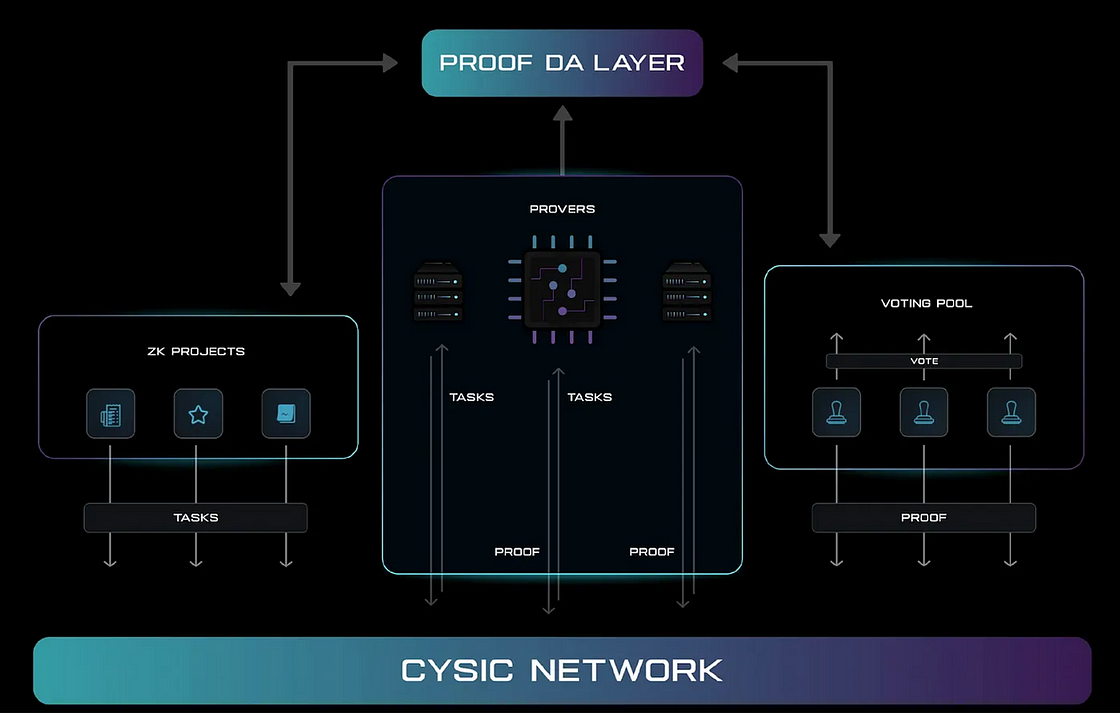
Testnet Phase 1 offers the following features
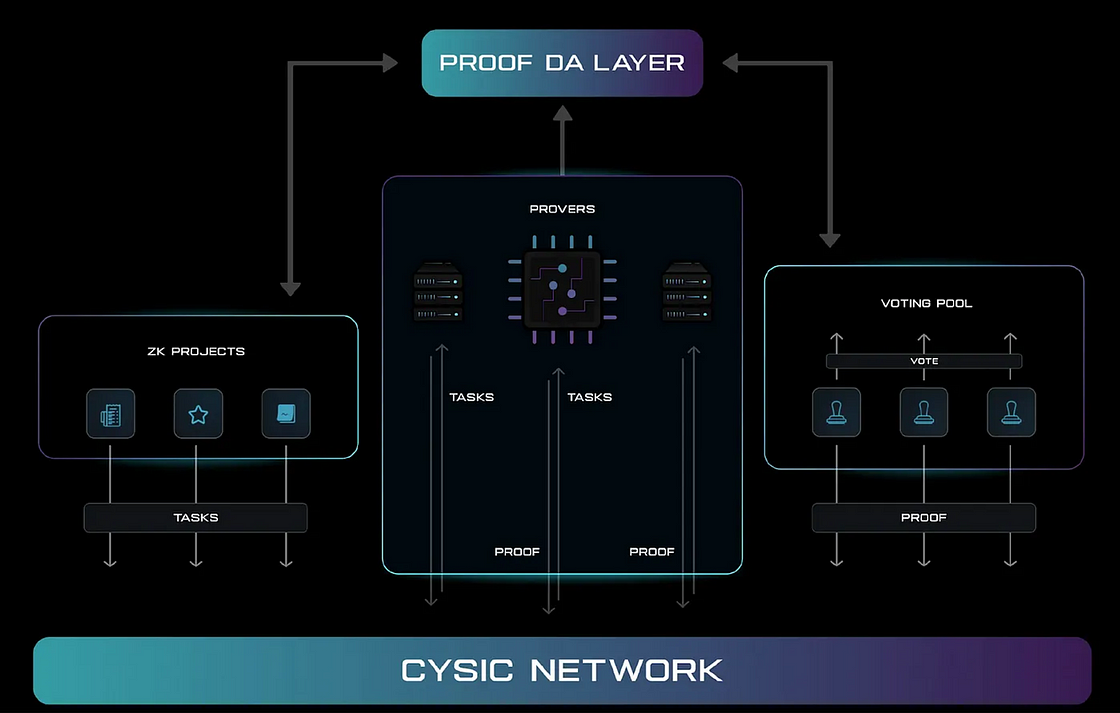
Testnet Phase 1 offers the following features
-
Deploy any ZK project
-
Allow whitelisted validators to join the network
-
Run proof and verification processes for tasks
-
Track task status
-
Store proofs on the data availability (DA) layer
-
Incentive points system
How to Obtain a Limited Validator Node Whitelist for Cysic
-
Join the official Cysic Discord channel and participate in community activities: https://discord.gg/9Wfr5USe
-
Participate in the Cysic Galxe campaign: https://app.galxe.com/quest/Cysic/GCaFjtk4eQ
How to Deploy a Cysic Validator Node?
The process for participating as a Testnet validator is shown below:
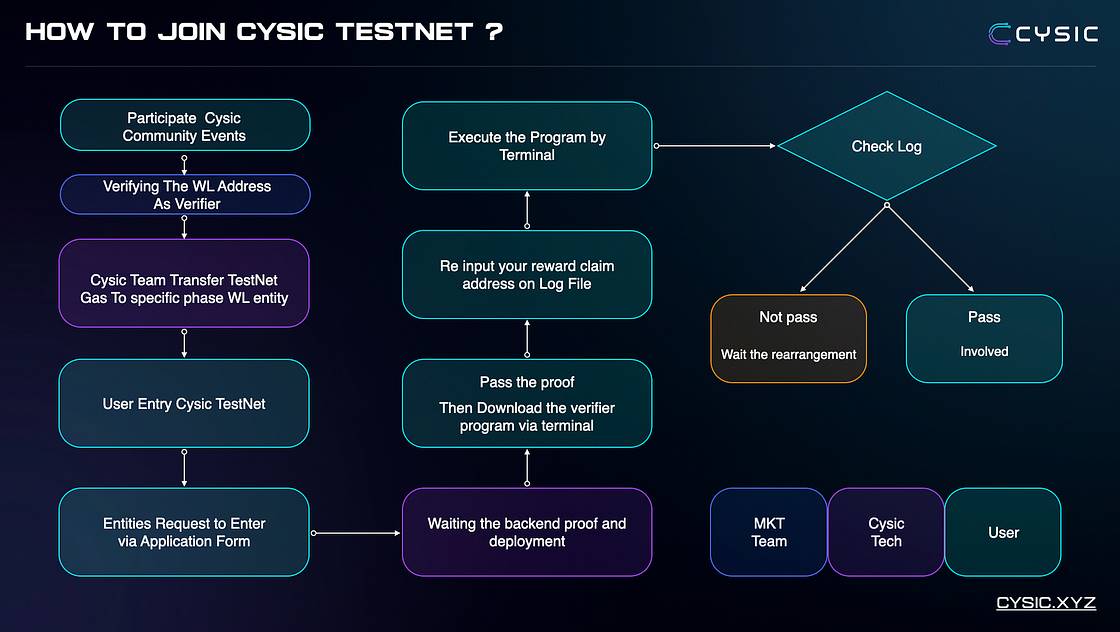
Testnet validator participation process
Submit Application
-
Open Cysic’s testnet website: https://testnet.prover.xyz/m/register
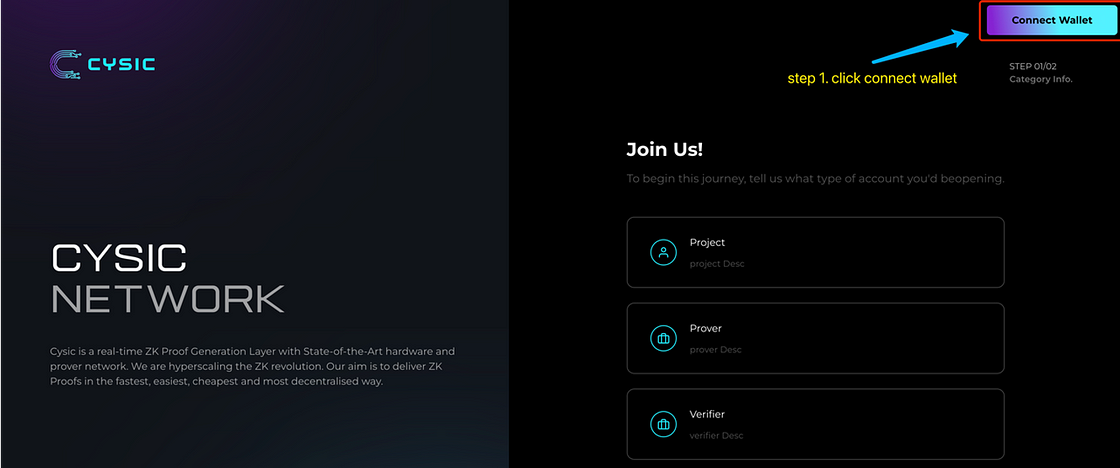
Open Cysic’s testnet website: https://testnet.prover.xyz/m/register
2. Click the “Connect Wallet” button and confirm the connection
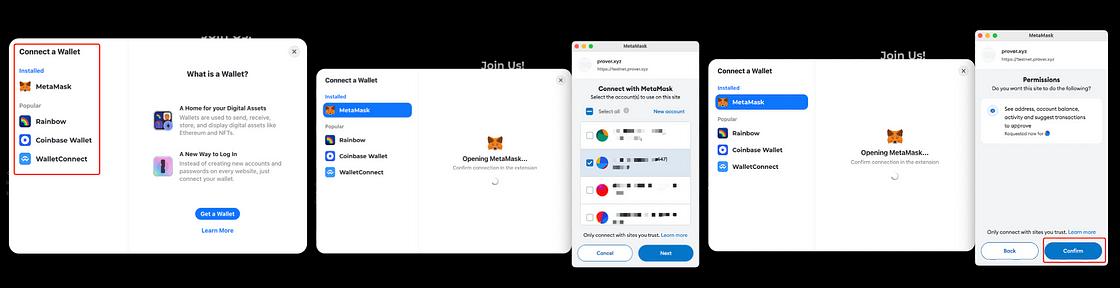
Click the “Connect Wallet” button and confirm the connection
3. After connecting your wallet, select the “Validator” option
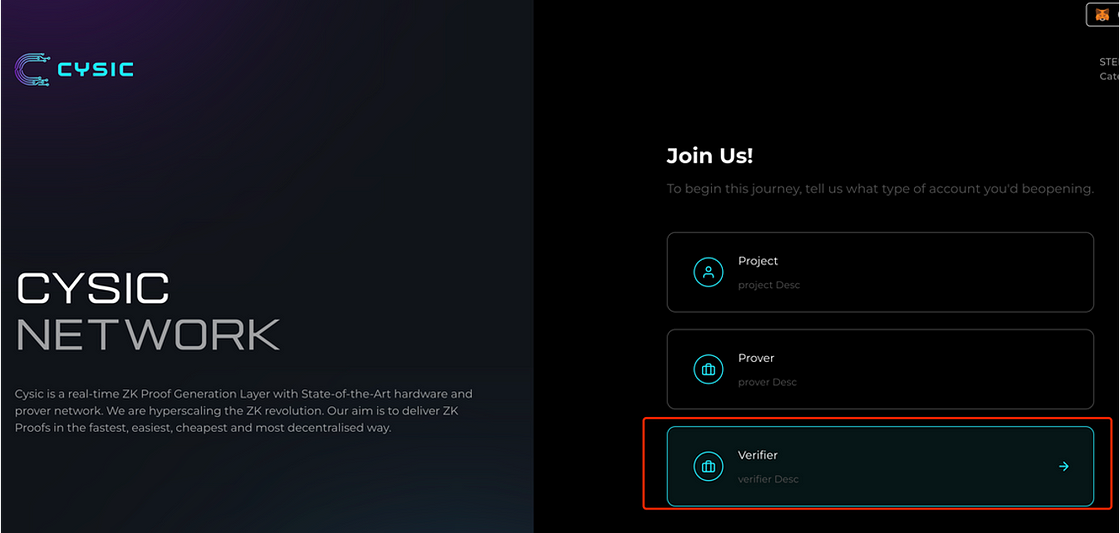
After connecting your wallet, select the “Validator” option
4. Submit your information
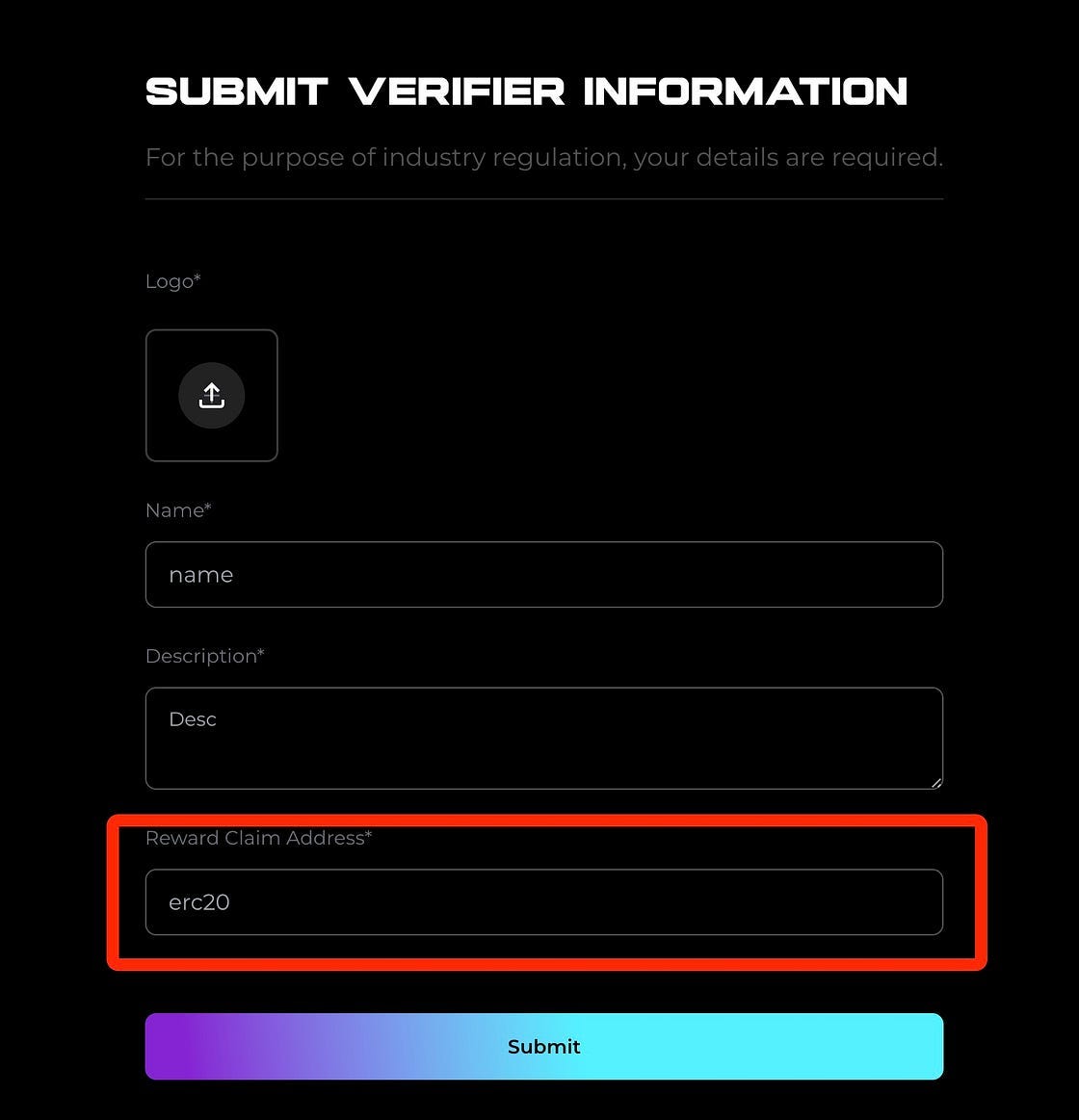
Submit your information
5. Verify your address, then click “Confirm,” sign the transaction, and wait for backend confirmation
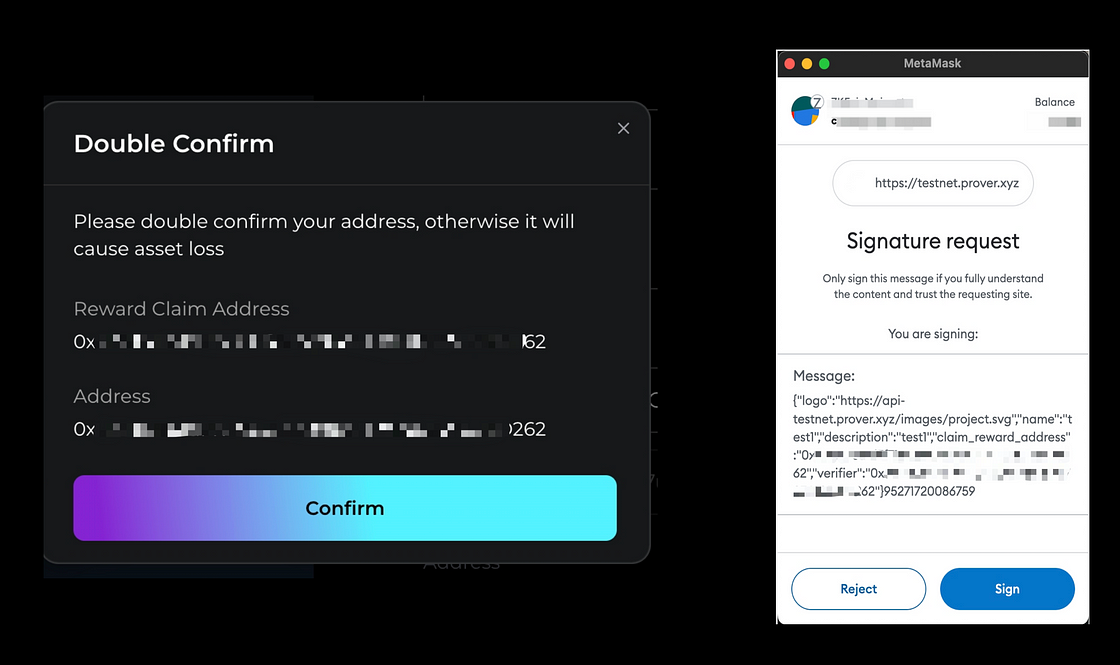
Verify your address, then click “Confirm,” sign the transaction, and wait for backend confirmation
6. Check on the Cysic Dashboard whether your address has been accepted: https://testnet.prover.xyz/m/dashboard/verifier

Check on the Cysic Dashboard whether your address has been accepted: https://testnet.prover.xyz/m/dashboard/verifier
Prepare Your Environment for Joining the Testnet
Note! Ensure your device meets the following minimum specifications to successfully install the Cysic validator program:
-
CPU: Single core
-
Memory: 512MB
-
Disk: 10GB
-
Bandwidth: 100 KB/s upload/download
-
Supported operating systems: Linux, Windows, Mac
-
OS categories will be further clarified in future updates
Locally Operate the Validator Node Program
If your address has been confirmed by the backend, download the validator program (approximately 4GB). Please be patient during the download.
Ⅰ. Open the terminal on your operating system and execute the following commands line by line:
Linux:
rm -rf ~/cysic-verifier
cd ~
mkdir cysic-verifier
curl -L https://cysic-verifiers.oss-accelerate.aliyuncs.com/verifier_linux > ~/cysic-verifier/verifier
curl -L https://cysic-verifiers.oss-accelerate.aliyuncs.com/libzkp.so > ~/cysic-verifier/libzkp.so
Mac:
rm -rf ~/cysic-verifier
cd ~
mkdir cysic-verifier
curl -L https://cysic-verifiers.oss-accelerate.aliyuncs.com/verifier_mac > ~/cysic-verifier/verifier
curl -L https://cysic-verifiers.oss-accelerate.aliyuncs.com/libzkp.dylib > ~/cysic-verifier/libzkp.dylib
Windows:
❗ We recommend using “Power Shell Terminal”
❗ The terminal must be run with administrator rights
cd $env:USERPROFILE
New-Item -ItemType Directory -Force -Path "cysic-verifier"
Invoke-WebRequest -Uri "https://cysic-verifiers.oss-accelerate.aliyuncs.com/verifier_win_x86_64.exe" -OutFile "cysic-verifier\verifier.exe"
Invoke-WebRequest -Uri "https://cysic-verifiers.oss-accelerate.aliyuncs.com/libzkp.dll" -OutFile "cysic-verifier\zkp.dll"
Invoke-WebRequest -Uri "https://cysic-verifiers.oss-accelerate.aliyuncs.com/start.ps1" -OutFile "cysic-verifier\start.ps1"
Ⅱ. Execute command to set configuration file information:
❗ Note that the content on line 13 should be the address you submitted under 'Submit Validator':
Linux and Mac:
cat <<EOF > cysic-verifier/config.yaml
# Not Change
chain:
  # Not Change
  endpoint: "testnet-node-1.prover.xyz:9090"
  # Not Change
  chain_id: "cysicmint_9000-1"
  # Not Change
  gas_coin: "cysic"
  # Not Change
  gas_price: 10
  # Modify Here: ! Your Address (EVM) submitted to claim rewards
  claim_reward_address: "0x696969696969"
server:
  # don't modify this
  cysic_endpoint: "https://api-testnet.prover.xyz"
EOF
Windows:
We recommend executing via Power Shell terminal:
$ConfigContent = @"
# Not Change
chain:
  # Not Change
  endpoint: "testnet-node-2.prover.xyz:9090"
  # Not Change
  chain_id: "cysicmint_9000-1"
  # Not Change
  gas_coin: "cysic"
  # Not Change
  gas_price: 10
  # Modify Here: ! Your Address (EVM) submitted to claim rewards
  claim_reward_address: "0x696969696969"
server:
  # don't modify this
  cysic_endpoint: "https://api-testnet.prover.xyz"
"@
$ConfigContent | Out-File -FilePath "cysic-verifier\config.yaml" -Encoding UTF8
Only Windows users need to implement and set up the environment, steps as follows: %USERPROFILE%\cysic-verifier
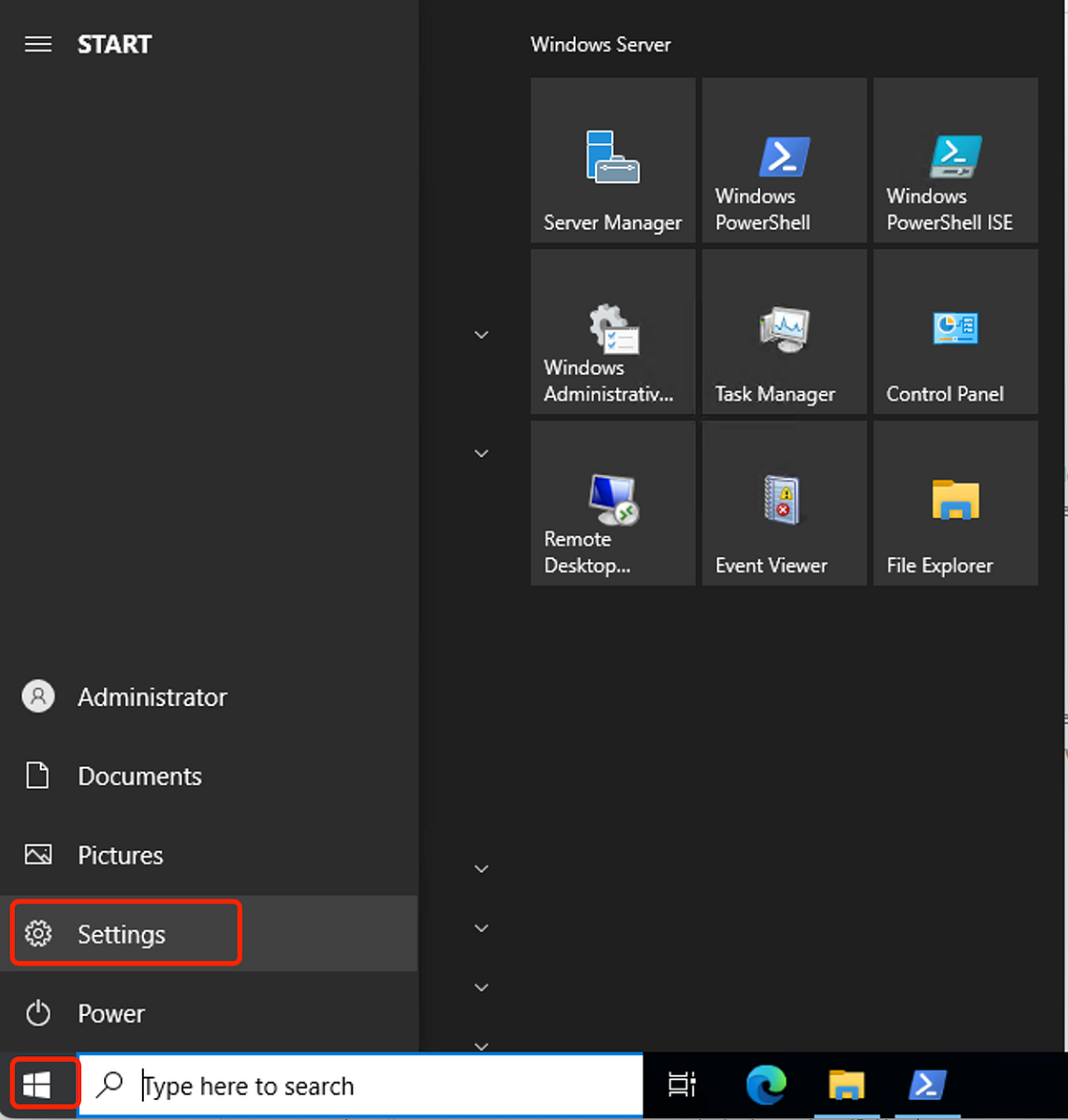

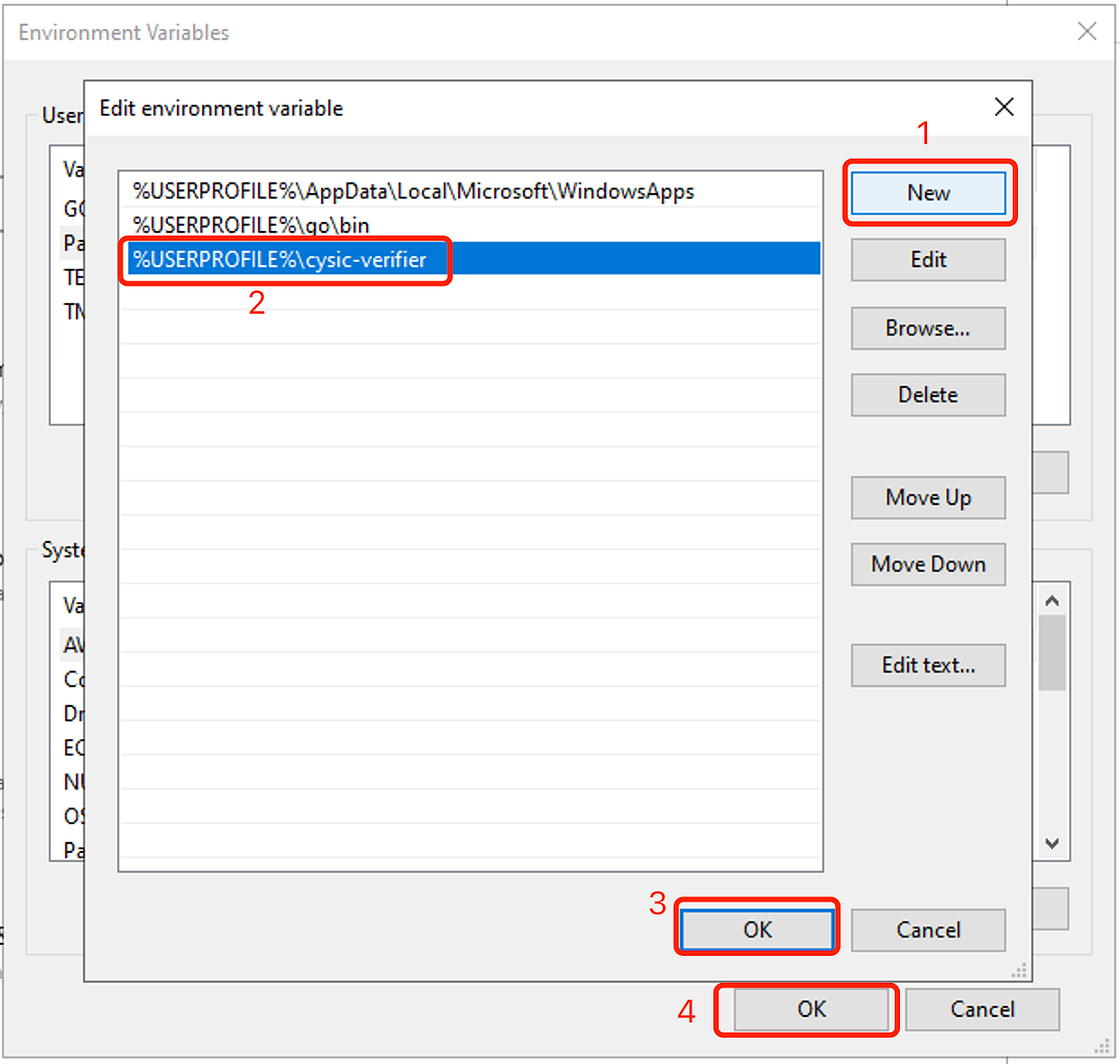
❗ Then execute the following in the Windows terminal:
Set-ExecutionPolicy -ExecutionPolicy Bypass
Ⅲ. Run the validator program:
Linux:
cd ~/cysic-verifier/
chmod +x ~/cysic-verifier/verifier
echo "LD_LIBRARY_PATH=.:~/miniconda3/lib:$LD_LIBRARY_PATH export CHAIN_ID=534352 ./verifier" > ~/cysic-verifier/start.sh
chmod +x ~/cysic-verifier/start.sh
~/cysic-verifier/start.sh
Mac:
cd ~/cysic-verifier/
chmod +x ~/cysic-verifier/verifier
echo 'DYLD_LIBRARY_PATH=".:~/miniconda3/lib:$DYLD_LIBRARY_PATH" CHAIN_ID=534352 ./verifier' > ~/cysic-verifier/start.sh
chmod +x ~/cysic-verifier/start.sh
~/cysic-verifier/start.sh
Notes for Mac users:
If you receive a prompt on your Mac (as shown below), follow these steps:

If this alert appears, follow the steps below
\Mac OS Privacy and Security Alert
· Click “Cancel”
· Go to System Settings -> Privacy and Security.
· Find the security warning and click “Still Allow”.
· Enter your password when prompted.
· Retry the operation.
· ./start.sh
Windows (non-terminal):
Enter the cysic-verifier folder in the user directory
Double-click verifier.exe to execute the program
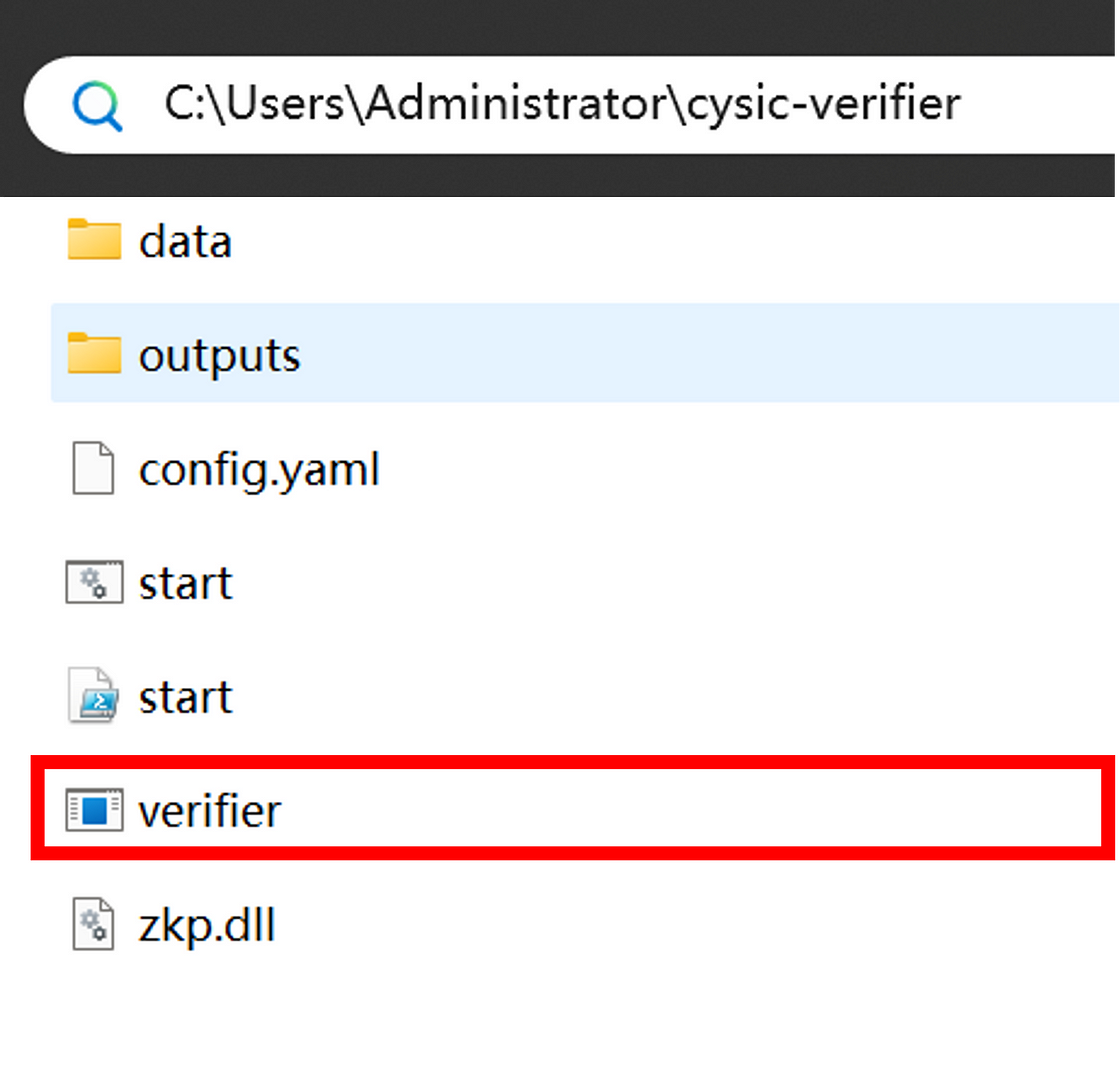
Ⅳ. Please verify that the address in the logs matches the one in the table.
Ⅴ. On first startup, the program will automatically download validator-related files

The program will automatically download validator-related files
Ⅵ. If the application is rejected, an error will appear and the program will recheck

If the application is rejected, an error will appear and the program will recheck
Ⅶ. If your address is connected, the validator will be successfully deployed:

If your address is connected, the validator can be successfully deployed
❗ Warning: Do not close your terminal, as this will affect your ZK task validation and points accumulation
Ⅷ. Check your points and validation status: https://testnet.prover.xyz/m/dashboard/
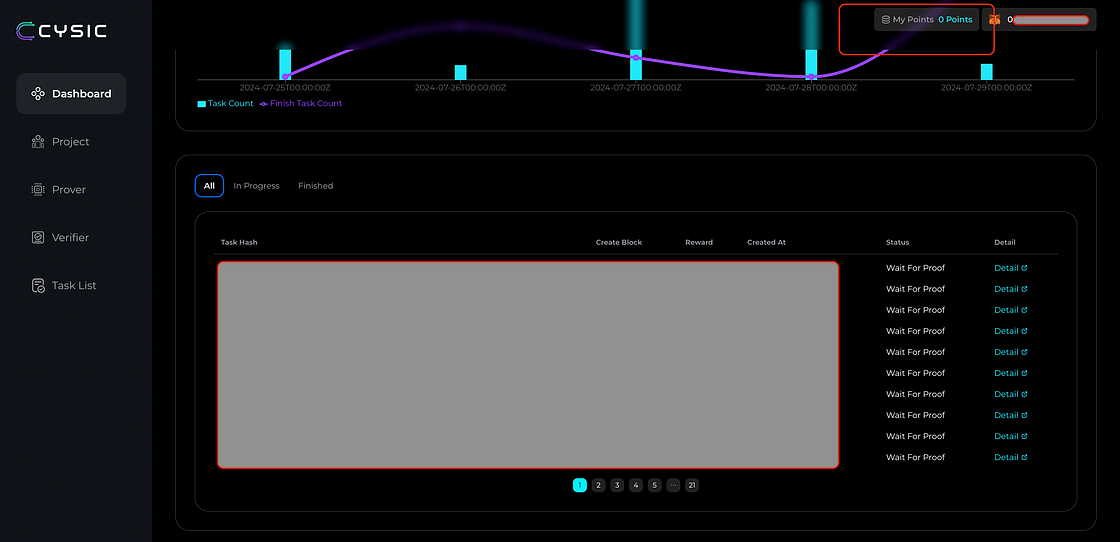
Use the webpage to check your points and validation status: https://testnet.prover.xyz/m/dashboard/
Ⅸ. Keep your computer connected to the internet. To reconnect the validator, execute the following:
Linux:
cd ~/cysic-verifier/
./start.sh
Mac:
cd ~/cysic-verifier/
./start.sh
Windows (non-terminal):
Enter the cysic-verifier folder in the user directory
Double-click verifier.exe to execute the program

About Cysic
Cysic is an industry-leading ZK hardware acceleration project dedicated to designing advanced ASIC chips to reduce ZK proof generation time and build the first ZK Prover Network. It is a real-time ZK proof generation and verification layer aiming to deliver ZK proofs in the fastest, cheapest, simplest, and most decentralized way possible.
Cysic provides ZK-CaaS (ZK Compute-as-a-Service) powered by cutting-edge in-house ASIC chips, capable of meeting computational demands across all ZK use cases such as ZK Rollups, ZKML, and ZK Bridges. Combined with community GPU computing power and integrated validator nodes, Cysic aims to build the Cysic Network—a trusted, comprehensive compute and verification infrastructure serving the entire industry.
Join TechFlow official community to stay tuned
Telegram:https://t.me/TechFlowDaily
X (Twitter):https://x.com/TechFlowPost
X (Twitter) EN:https://x.com/BlockFlow_News