



How to use an aggregated NFT platform to batch sweep the floor and obtain "potential airdrops"?
TechFlow Selected TechFlow Selected
How to use an aggregated NFT platform to batch sweep the floor and obtain "potential airdrops"?
NFT marketplace aggregators like Genie and Gem have greatly enhanced the NFT buying experience by enabling users to easily browse and purchase multiple NFTs in a single gas-efficient transaction.
 Navigating Web3 tides with focused insights
Original title: How to sweep NFT floors
Original author: William M. Peaster, Bankless
Compiled by: Alex, TechFlow
Dear Bankless Nation,
The NFT trading experience is still in its early stages.
Here's a flaw: OpenSea and LooksRare only allow you to buy one NFT at a time.
So if you're interested in buying multiple cheapest NFTs from a collection—commonly known as floor sweeping—you have to execute multiple transactions.
Want 10 NFTs? That’s 10 separate transactions.
On Ethereum, this can get expensive—and really expensive.
Is there a better way?
Yes, there is.
NFT aggregators are a new product category that has emerged during the recent NFT boom. They enable collectors to buy and sell NFTs in bulk within a single transaction.
Gem and Genie are currently the two leading platforms.
If you want to do some floor sweeping, this is the best method.
Oh... they haven’t launched tokens yet (just saying).
How to Sweep NFT Floors
Image courtesy of Logan Craig
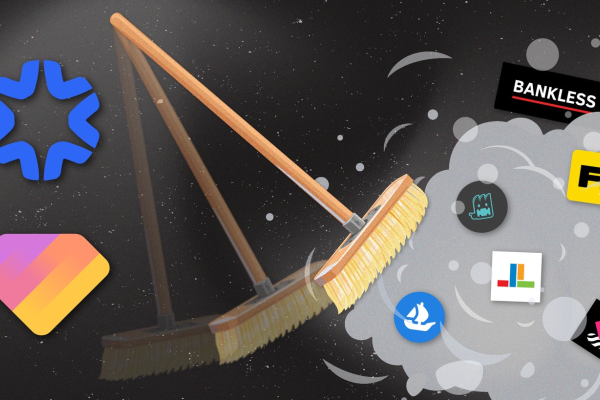
Being limited to purchasing only one NFT at a time through a single platform is inefficient and delivers a poor user experience. Therefore, a new class of applications—NFT marketplace aggregators—are making it easy to conduct bulk purchases across multiple NFT markets in one go.
Today’s Bankless strategy will show you how to use Genie and Gem, the leading aggregators currently available in the market.
1) Goal: Learn how to use Genie and Gem
2) Skill level: Easy
3) Time required: 30 minutes
4) Return: Efficient NFT purchasing method + potential future airdrops
Sweeping NFT Floors with Genie and Gem

Since launching its beta marketplace in December 2017, OpenSea has been the dominant hub for NFT trading activity.
While OpenSea has done much to promote and support the NFT ecosystem, its early monopoly and user interface have defined the NFT trading experience.
One major issue with OpenSea is that it restricts users to purchasing only one NFT at a time. Under this model, to "sweep" 10 floor-priced NFTs (i.e., the lowest-priced NFTs in a given project at any time) from a cool NFT project, you must complete 10 separate purchase transactions, one asset at a time.
What's wrong with this approach?
Because you must execute multiple transactions, it becomes gas-intensive. It's also slow, meaning others could snatch up your target NFTs while you're completing individual purchases.
Ideally, users should be able to purchase multiple NFTs in a single transaction to save on gas. Even better, they should be able to buy across multiple platforms at once, since liquidity is now spreading across other marketplaces such as Rarible, NFT20, NFTX, and LooksRare.
You don't need to wait for such a service anymore. Aggregators like Genie and Gem are already live, offering streamlined, checkout-style bulk NFT purchases across top-tier NFT liquidity channels today.
Let’s walk through the basics of each and show you how to use them.
Genie Basics
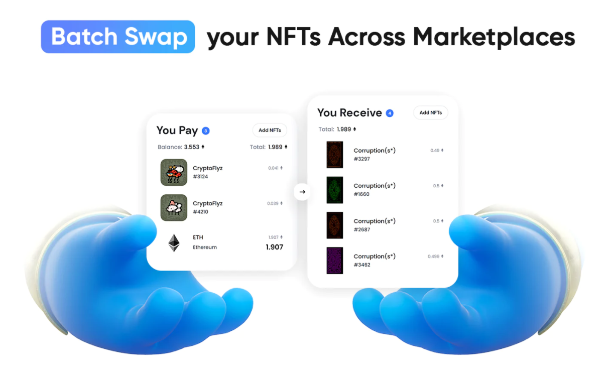
Image courtesy of Genie
Launched in November 2021, Genie was the first NFT marketplace aggregator to enter the crypto economy. Currently, the project offers two main products: Genie Swap and Genie List.
Genie Swap is the platform’s flagship marketplace aggregation service. Notably, it allows users to exchange combinations of ETH and NFTs (from liquidity pools on NFTX and NFT20) for other NFTs, using various optimizations to reduce gas costs.
Currently, Genie supports swaps across OpenSea, Rarible, Larva Labs’ CryptoPunks marketplace, and the aforementioned NFTX and NFT20 liquidity protocols.
As for Genie List, this service enables users to simultaneously list their NFTs across multiple marketplaces (currently OpenSea and Rarible) to reach the broadest possible pool of potential buyers.
How to Use Genie to Sweep NFT Floors
Genie's multi-select feature
1) Pick a project in which you'd like to buy multiple NFTs.
2) Go towww.genie.xyz and connect your wallet.
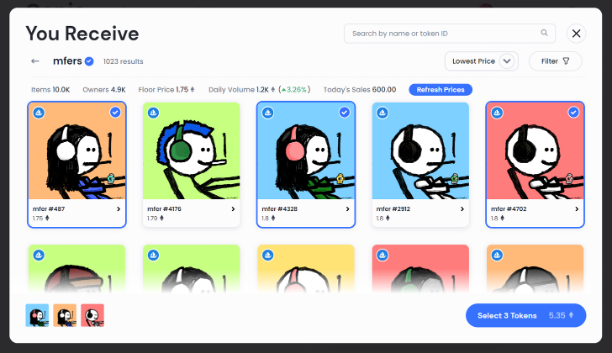
3) Enter the “You Receive” interface and search for your desired collection by name or contract address. Genie needs to index the collection, which may take a few minutes. Refresh the page later to continue.
4) Browse the collection, select the NFTs you’d like to purchase, and click “Select # Tokens” when ready.
5) Genie will automatically configure the required ETH amount in the “You Pay” interface. If you wish, you can use “Add NFTs” to partially pay with NFTs that have liquidity on NFTX or NFT20.
6) Once done, click “Review Order.” If everything looks good (you may need to click “Update” here if one of your target NFTs sells before you complete the purchase), then click “Place Order.” Finalize the transaction via your wallet, and the batch of NFTs will be yours.
Gem Basics
Image courtesy of Gem
Born from Vasa’s innovative cross-asset swap system in 2021, Gem is a new NFT marketplace aggregator that launched publicly in January 2022.
Functioning as a “Web3 shopping cart,” Gem aggregates liquidity from top NFT marketplaces and offers users up to 39% gas savings compared to underlying platforms.
Gem also allows traders to purchase NFTs using any combination of ETH and ERC-20 tokens, so you can easily use those DeFi tokens sitting in your wallet when buying NFTs.
Currently, the project is working toward supporting bulk listing of NFTs and integrating liquidity from LooksRare. In the meantime, don’t overlook Gem’s new rarity ranking features and collection analytics, which are highly useful for collectors.
How to Use Gem to Sweep NFT Floors
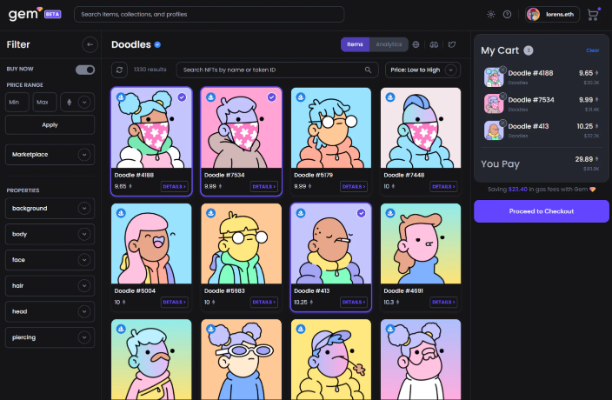
We all love Doodles
1) Go to www.gem.xyz and connect your wallet.
2) Use the website’s search bar to find the collection you’re interested in.
3) This will take you to the dedicated Gem dashboard for that NFT collection. Use the UI to add your desired items to your shopping cart.
4) When ready, click “Proceed to Checkout” on the right side of the page.
5) Now select your payment token. Options will appear based on the tokens currently available in your wallet.
6) Click “Proceed to Checkout” again and review your order. If everything looks correct, click “Place Order” and confirm the purchase through your wallet. Once the transaction completes, the NFTs are yours!
Conclusion
NFT marketplace aggregators like Genie and Gem greatly enhance the NFT buying experience, enabling users to easily select and purchase multiple NFTs in a single, gas-efficient transaction.
As a result, these aggregators have seen massive influxes of users and trading volume in recent weeks.
However, superior user experience isn’t the only reason these projects are becoming interesting NFT trading venues today.
In my personal view, both projects appear poised to launch native tokens in the future.
If so, early users will undoubtedly receive airdrops.
Join TechFlow official community to stay tuned
Telegram:https://t.me/TechFlowDaily
X (Twitter):https://x.com/TechFlowPost
X (Twitter) EN:https://x.com/BlockFlow_News