Bitget Agent Hub Major Upgrade: One-Click Access to End-to-End Trading Tools
TechFlow Selected TechFlow Selected
Bitget Agent Hub Major Upgrade: One-Click Access to End-to-End Trading Tools
Get up and running in 3 minutes—enable full trading capabilities for your Lobster instantly.
 Navigating Web3 tides with focused insights
Author: Bitget
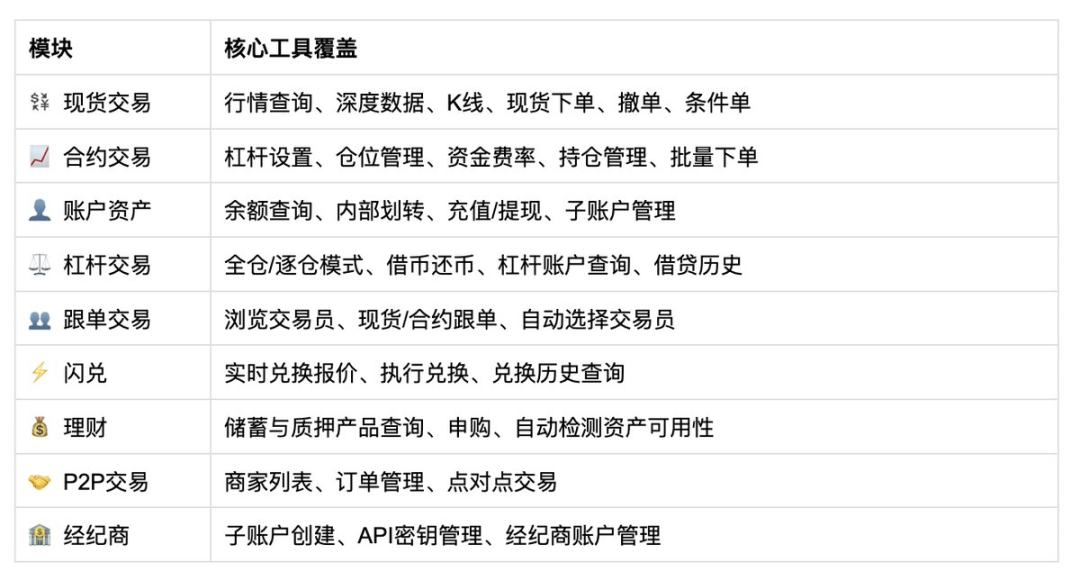
- Broadest feature coverage: Supports 9 modules, 58 tools, and over 100 functions—covering the full trading lifecycle including spot, derivatives, copy trading, wealth management, and P2P;
- Most comprehensive standards support: Fully compatible with all four standards—MCP, Skills, API, and CLI—regardless of which specification you use;
- Fastest integration: Complete setup in just 3 minutes, instantly equipping your lobster with full trading capability.
I. What Is Bitget Agent Hub?
It is the trading infrastructure for the AI era.
Not a plugin, not an auxiliary tool—it is the sole, complete entry point enabling AI to participate directly in exchange trading. From natural-language instructions to live order execution, from single interfaces to a full ecosystem, Agent Hub removes every barrier between AI models and crypto trading.
Developers, quant teams, Vibe Coders, and AI Agent product teams—if you want AI to trade, start here.
Nine Capability Modules · 58 Tools
II. How Does Agent Hub Empower Your Agent?
This product upgrade centers on deep integration between AI Agents and trading capabilities, establishing a complete AI-native trading development framework. Through unified interface standards, secure permission systems, and real-time market data access, Agent Hub elevates AI Agents from merely “reading data” to becoming intelligent systems that actively execute trades.
This upgrade introduces two core modules—Skills and CLI—and complements last month’s launch of MCP and API, forming a fully integrated invocation system that seamlessly connects AI models, development tools, and trading functionality.
MCP Tools: Enabling Direct AI Model Access to Trading Capabilities
Bitget natively supports MCP, allowing AI models such as Claude and GPT to directly invoke Bitget’s trading capabilities. With MCP, AI Agents can not only retrieve market data but also execute live trading operations—evolving AI from “understanding markets” to “participating in trading.”
API: Comprehensive Trading Interface Suite
Bitget provides a complete REST + WebSocket API suite covering all core trading scenarios—including spot, derivatives, and copy trading—with low-latency, high-availability trading infrastructure. Developers can build automated trading systems, quantitative strategies, and AI-driven trading applications using these APIs.
Skills: Enabling Automated Trading Execution by Agents
Through the Skills mechanism, AI Agents such as ClaudeCode and OpenClaw can automatically recognize Bitget trading intents and invoke Bitget’s exchange APIs in real time via the bgc tool. Developers no longer need to manually configure complex commands—Agents can autonomously perform market analysis, strategy execution, and order placement.
CLI: Command-Line-Level Trading Capabilities
Bitget launches the CLI command-line tool (bgc), enabling direct invocation of all Bitget APIs via Shell with standardized JSON output. Designed for script automation, data pipelines, and system-level calls by AI Agents, this tool lets trading capabilities be effortlessly embedded into diverse development environments.
With MCP, API, Skills, and CLI—the four modules—Bitget is building an AI-native trading infrastructure that enables developers and AI Agents to integrate trading capabilities more easily and rapidly build next-generation intelligent trading applications.
🚀 Try Bitget Agent Hub now
III. Six Key Use Cases
Use Case 1: 24/7 Automated Market Monitoring
- Real-time market data monitoring
- Price breakout/breakdown alerts
- Abnormal volume detection
- Candlestick pattern recognition
Use Case 2: Automated Spot Trading
- Auto-creation of conditional orders
- Market and limit order execution
- Order status queries
- Bulk order execution
Use Case 3: Derivatives Strategy Assistant
- Auto-position opening/closing
- Leverage configuration
- Take-profit and stop-loss strategy management
- Position inquiry and management
- Funding rate monitoring
Use Case 4: Account Asset Management
- Asset transfers
- Account balance queries
- Sub-account management
- Trade history review
- Fund flow analysis
Use Case 5: Copy Trading
- Browse trader leaderboards
- Auto-selection of top-performing traders
- Initiate spot/derivatives copy trading
- Copy position management
- Copy profit tracking
Use Case 6: Wealth Management
- Query available wealth management products
- Auto-matching of eligible assets
- Subscription to savings/staking products
- Profit inquiries
- Wealth management portfolio oversight
IV. Installation & Usage Guide
In just 3 simple steps and under 3 minutes, integrate Bitget Agent Hub with OpenClaw. Upon integration, AI Agents gain direct access to Bitget’s real-time market data, spot and derivatives trading, account and asset management capabilities—enabling intelligent trading Agent development atop a unified trading capability layer. This empowers AI to autonomously monitor markets, execute strategies, and complete trades—achieving truly AI-driven CEX trading.
1. Prerequisites
Install an AI Agent
Bitget Agent Hub supports all major Agents, including Claude Code, Cursor, and OpenClaw.
2. Configuration & Installation
Bitget Agent Hub offers four flexible integration methods:
- AI Skills: Embed trading capabilities directly into your Agent via Skills, enabling natural-language invocation of market data queries, strategy execution, and trading actions—no manual API coding required.
- MCP: Based on the Model Context Protocol, Bitget’s trading infrastructure seamlessly integrates with diverse AI Agents and large language model applications for standardized capability invocation.
- API: Full REST and WebSocket interfaces allow developers direct access to Bitget’s market data, trading, and account functionalities—enabling fine-grained control and system integration.
- CLI: The CLI command-line tool (bgc) supports invoking all Bitget APIs directly via Shell, with standardized JSON output. Ideal for script automation, data pipelines, and system-level AI Agent calls—effortlessly embedding trading capabilities across development environments.
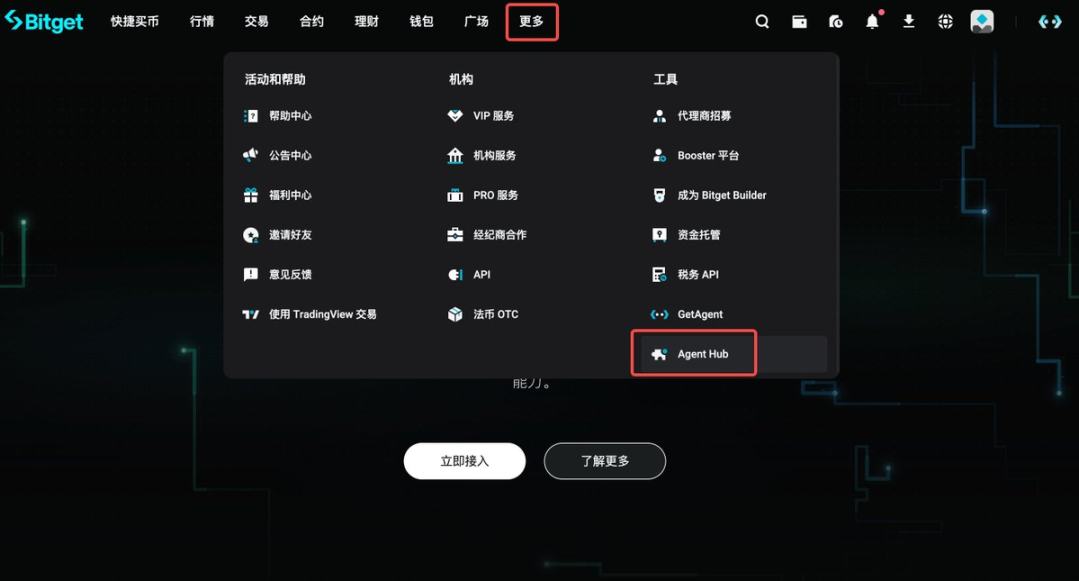
Locate the Installation Entry Point
Go to the official Bitget homepage, click More → Tools → Agent Hub
Install CLI
Instruct your Agent:
Install the Bitget CLI tool bgc:
npm install -g bitget-client
After installation, invoke Bitget APIs directly from the command line—for example:
bgc spot spot_get_ticker --symbol BTCUSDT
CLI is suitable for:
- Automated scripts
- Data pipelines
- Agent shell invocation
For more details, see: URL
Install Skills
Instruct your Agent:
Install Bitget Skills by running:
npx skills add bitget/bitget-skill
Once installed, your Agent will automatically recognize Bitget trading intents—for example:
- Query BTC/ETH market data
- Retrieve candlestick data
- Check funding rates
- Place orders
For more details, see: URL
Use MCP Server
Instruct your Agent:
Add an MCP server named “bitget-agenthub-mcp”, configured as follows: URL
Once configured, AI Agents—including Claude, GPT, and OpenClaw—can directly invoke Bitget’s trading capabilities, such as:
- Real-time market data
- Spot and derivatives trading
- Account asset queries
- Market data APIs
For more details, see: URL
Use API
Developers may also directly call Bitget APIs.
Bitget provides full support for:
- REST API
- WebSocket
- Spot and derivatives trading APIs
For more details, see: URL
3. Execute Trades
Start conversing with your Agent!
Join TechFlow official community to stay tuned
Telegram:https://t.me/TechFlowDaily
X (Twitter):https://x.com/TechFlowPost
X (Twitter) EN:https://x.com/BlockFlow_News