Has this generation's mental state been captured by a capybara?
TechFlow Selected TechFlow Selected
Has this generation's mental state been captured by a capybara?
This capybara wearing a money bag has already attracted millions of young users through AI.
 Navigating Web3 tides with focused insights
Author: Li Yuan

How long has it been since you last used a budgeting app?
I still remember the first time I had real disposable income—carefully logging every single expense, hoping that tracking my spending would help me understand my finances and ultimately save a little more. That was the idealistic version of my younger self.
But like most people, as studies or work grew busier, the habit of budgeting always ended up fizzling out.
Electronic payments have spent over a decade making transactions increasingly seamless—from scanning QR codes to password-free payments, facial recognition, and tap-to-pay. Yet budgeting apps haven’t evolved much at all.
Spending takes one second; recording it means opening the app, entering the amount, selecting a category—how unnatural is that?
Recently, I felt the urge to start budgeting again and asked a friend if there were any good budgeting apps. He immediately replied: “Don’t mention budgeting—I just want to die when I think about it.” He didn’t want to face how much he’d actually spent, nor did he want to endure months of tedious data entry just to gain a vague understanding of his finances.
Still, someone’s gotta keep track. So I started browsing the App Store—and one app's cover image made me burst out laughing: a capybara lying on the ground, flattened by a heavy money bag. That’s exactly what budgeting feels like!
This app clearly understands the psychology of budgeters.
Upon checking it out, I realized I’d struck gold: this app, called Kapibook, uses AI to simplify budgeting, developed by SenseTime. It launched just six months ago but already has over a million users, each averaging six entries per day.
Can budgeting really be as painless as spending? After using it for a week, I found—it actually can.
If budgeting isn't as easy as spending, who will do it?
Opening Kapibook, I discovered its first improvement directly addressed my core pain point: the difficulty of budgeting.
The last time I used a budgeting app was years ago, and I vaguely remembered several frustrations:
Every purchase required manually selecting a category before it showed up in reports—super annoying.
During shopping festivals, do I really need to log dozens of items one by one?
If I forget to log for a few days and spent across multiple platforms, reconstructing those transactions wastes so much time—even if it doesn’t help me save money.
But from the moment I started using Kapibook, powered by AI, all these issues were completely resolved!
I never expected that after just a few years away from budgeting apps, the world had advanced this far.
Kapibook offers two ways to record expenses: screenshot recognition and voice input.
I installed it right after the 618 Shopping Festival, so I tested the screenshot method with my Taobao order history—and it worked even smoother than expected.

As an iPhone user, the setup was incredibly simple. After adding a shortcut in settings, I enabled AssistiveTouch. Now, just double-tapping (customizable) the floating white dot instantly captures and logs the transaction shown on screen.
Android users reportedly have it even easier—triggering via notification shade or control center, double-tapping the back of the phone to take a screenshot, or using accessibility permissions so the app logs automatically without any taps at all once configured.
Even buying 200 items during a sale is now just a few taps away—budgeting suddenly became effortless.
Catching up on missed days is also stress-free. In the past, I often skipped catching up because it was too cumbersome, leading to incomplete data and inaccurate analysis—which eventually made me quit altogether. Now, I just tap the white dot a few times in WeChat Wallet, then a few more in Alipay, and I’m happily back on track.
In recent years, many apps have introduced screenshot-based logging, but in real-world testing, Kapibook’s AI shows clear optimization tailored specifically to checkout scenarios—especially those common among young users.
Since food delivery wars began, how many of us have become obsessed with stacking coupons?

I recommended Kapibook to a friend, and she sent me this screenshot immediately. “No matter how smart a budgeting app is,” she said, “can it handle this?”
At first glance, I was confused—wasn’t it just 7.58 yuan? But looking closer, I realized the trick: the actual cost wasn’t any single number shown—it was 7.58 + 0.42 + 0.5 = 8.5 yuan.
Now I have to do math to budget?
Trying it out skeptically, I uploaded the image to Kapibook—and hey, it understood me perfectly!

It not only recognized the correct total but also automatically categorized it as "milk tea."
What if spending doesn’t happen on your phone, or you’re too lazy to take screenshots?
Kapibook also supports voice input.
Just like screenshot input, voice commands let you log expenses while automatically assigning categories.
I intentionally made it harder for Xiao Pang Ka: asking it to back-log yesterday’s expenses and listing multiple purchases in one go—but it handled everything flawlessly.

Wow—could budgeting actually be easier than spending?
AI Analysis: What’s Your Spending Personality?
If “pain-free budgeting” surprised me enough, Kapibook’s AI analysis feature is what truly convinced me to stick with it permanently.
After all, budgeting is merely a means to an end—the real goal is understanding where your money goes and gaining control over your spending.
What’s the most satisfying moment for any budgeter? Definitely seeing your hard-logged data transform instantly into a clean report showing “50% on food, 20% on entertainment…” Then clenching your fist and vowing: “Next month, I’ll drink two fewer milk teas—I will save!”
But this joy is often fragile.
You feel frugal all month—until one expensive moisturizer purchase during a sale ruins your entire monthly report, turning everything red (over budget).
Large one-off purchases are manageable. The real headache comes when you overspend but can’t figure out why. Everything’s labeled “food”—but was it due to treating friends twice, or ordering three milk tea deliveries when feeling down? Trying to solve this mystery across hundreds of records feels impossible.
In the pre-AI era, this problem was largely unsolvable. The wealthy might afford financial advisors; tech-savvy experts could build complex Excel dashboards. Most of us ordinary folks could only scratch our heads and ask the eternal question: “Where did my money go? Did I… overspend again?”

Coming from someone who only ever used old-school budgeting apps, I never expected AI would begin solving this ultimate pain point!
I initially downloaded Kapibook just for “easy budgeting,” but within a week, I was fully hooked on its AI-powered analysis.
Earlier this year, everyone was amazed by DeepSeek’s deep reasoning capabilities. I discovered that Kapibook integrated its own AI assistant, “Pang Ka,” combining advanced reasoning and summarization abilities from large models like SenseTime’s SenseNova, DeepSeek, and Qwen—packed right into a budgeting app!
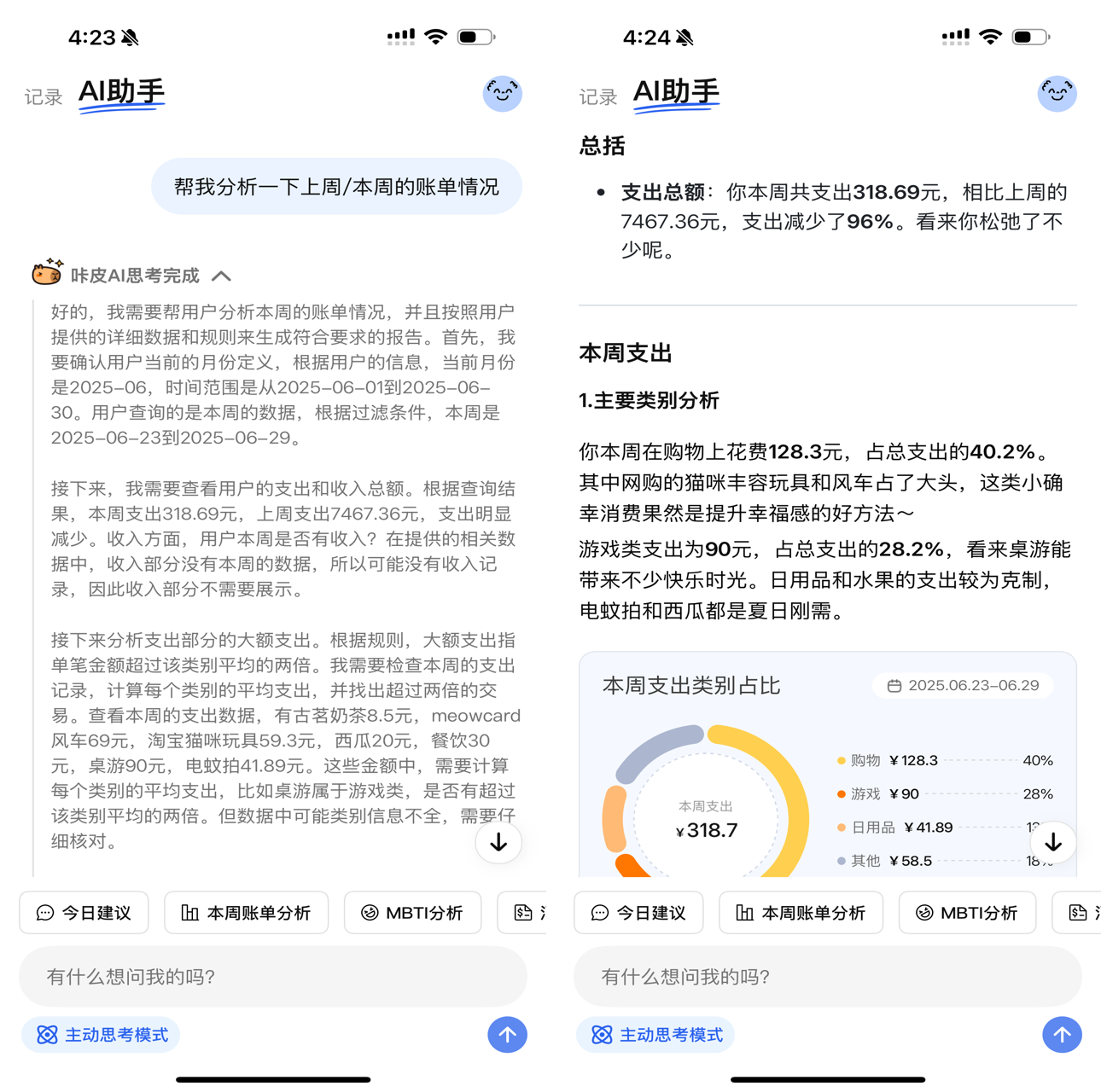
It’s not just basic data analysis—the output looks like a professionally formatted report. AI “Pang Ka” gives sharp insights into my spending habits, pinpointing what’s “essential” versus “impulse buying.”
This is leagues ahead of traditional budgeting apps! Old-school analysis relied heavily on user-assigned categories, which were often too broad and imprecise.
Now, you can simply chat with the AI: “How much did I spend on coffee this month?” “What’s my ratio of takeout vs home cooking?” “Summarize all my fitness-related expenses.”
As long as you’ve logged it, it can extract every detail. While current free-form queries occasionally return inaccurate analyses, I can easily imagine that as the AI model improves and learns more from personal data, it will evolve into an increasingly intelligent, 24/7 personal finance manager. The convenience is thrilling!
Beyond functionality, Kapibook includes a thoughtful budgeting feature tailored for young financial beginners.
It breaks budgets down to the daily level—no more reckless spending early in the month followed by eating instant noodles at the end!
If you exceed your spending early on, Kapibook instantly recalculates and tells you: “To stay within budget, you can spend no more than XX yuan per day going forward.”
Not sure how to set a realistic budget when starting out? No worries.
Kapibook AI analyzes your past few months of spending patterns and suggests a reasonable overall budget.
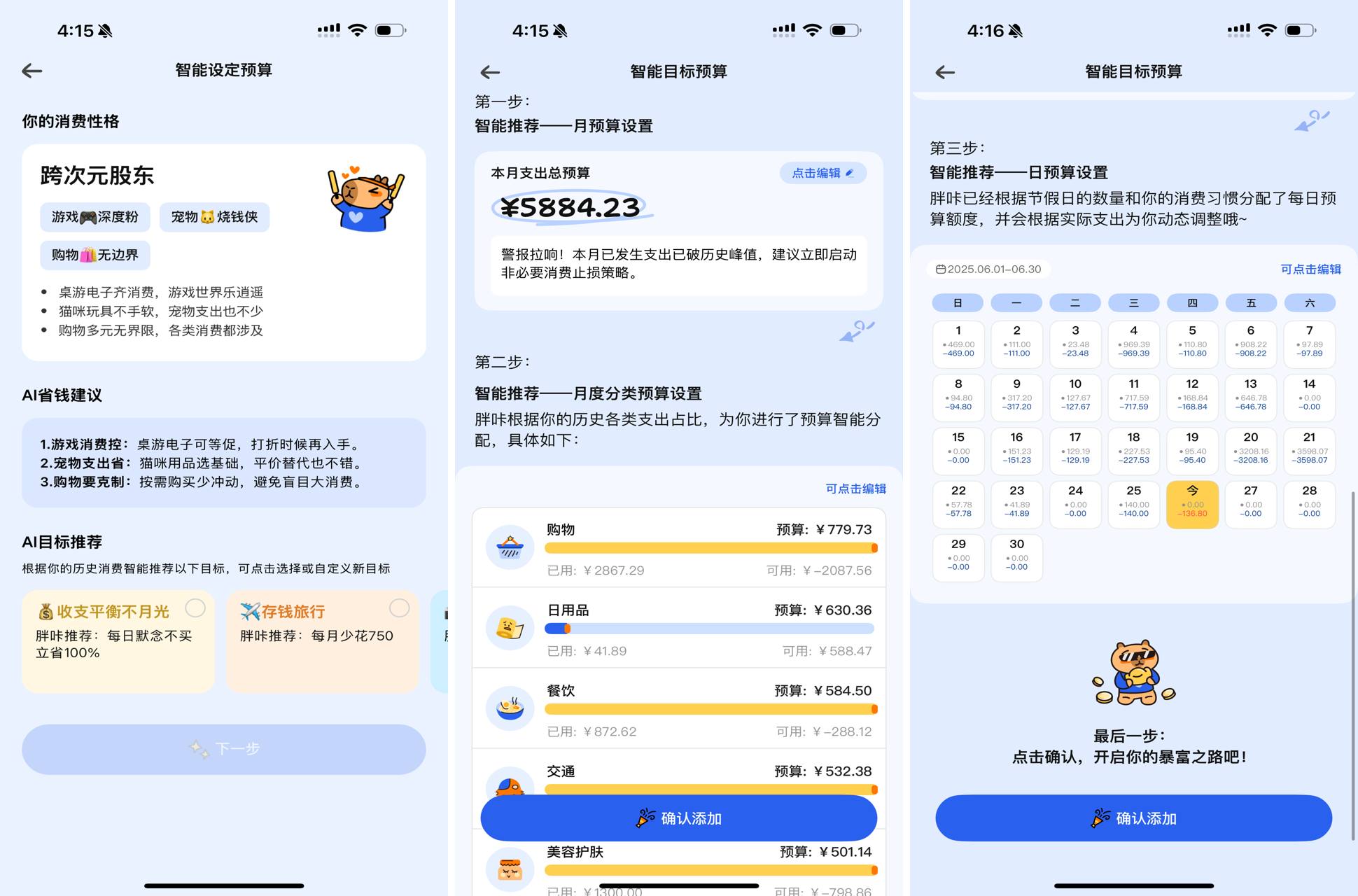
With just two taps, AI refines the budget into detailed categories and spreads it evenly across days.
Besides practical tools, the most fun feature is generating your “spending personality.”
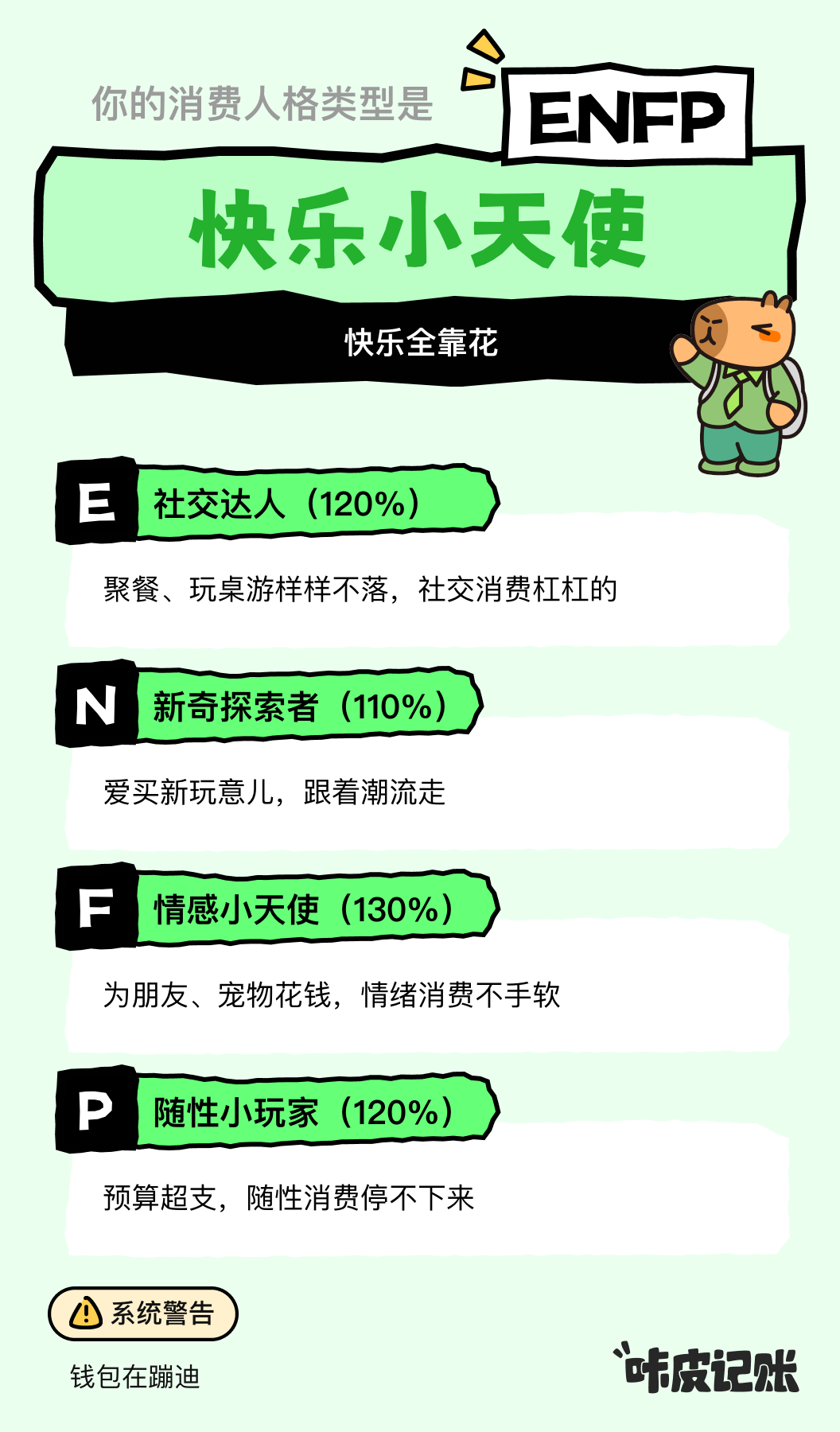
"Happy Puppy"—joy comes from spending! (guilty)
What Kind of Budgeting App Do Young People Need in the AI Era?
In today’s AI landscape, launching a pure-AI product to meet a new demand and achieve breakout success isn’t easy. Although AI development has become simpler, introducing a new use case requires re-educating the market—an uphill battle for many teams.
Gaining a million users in six months, Kapibook suggests a powerful idea: in the AI era, many essential applications deserve to be rebuilt from the ground up. New AI capabilities can deliver revolutionary experiences, potentially disrupting established industry norms overnight.
Leveraging cutting-edge AI, Kapibook delivers frictionless operations that make budgeting effortless, solving the long-standing data analysis challenges of traditional budgeting apps.
But it’s not just about technology.
The underlying tech behind AI-powered budgeting isn’t particularly complex. I later found several similar AI budgeting apps in the App Store—so why do users prefer staying with Kapibook?
One reason lies in its deep refinement within real-life scenarios.
Single-entry voice logging is relatively simple for AI—but parsing multiple line items from one spoken sentence? Much harder.
Screenshot recognition is common, but few apps intelligently adapt based on subtle interface changes across different payment platforms.
One feature deeply impressed me: historical data import during user onboarding.
The initial phase is typically when users are most likely to churn—there’s zero data in the app yet. Importing past transaction history is the best way to get new users engaged quickly.
However, major payment platforms currently offer far from user-friendly export processes. Exporting WeChat or Alipay statements involves complicated, almost discouraging steps—requesting encrypted files, receiving email links, downloading on PC, decrypting with passwords.
Kapibook devised an elegant solution: generate a one-time dedicated email address. Users simply forward their statement emails here—the rest—decryption, parsing, importing—is automatically completed in the cloud.
This seemingly small design choice precisely removes a major barrier at the most vulnerable stage of user experience, demonstrating profound empathy and strong technical execution.
A deeper reason may lie in Kapibook’s genuine understanding of its core audience—Gen Z.
Budgeting is inherently a necessity for young people. They have the most time but the least assets—making it crucial to take control of spending.
Kapibook clearly possesses deep insight into youth consumer psychology.
I vividly recall using voice input to log a board game night. Unlike standard apps that might broadly categorize it as “entertainment” or “other,” Kapibook created a dedicated subcategory: “Gaming - Board Games”—instantly earning my trust and affection.

Moreover, many of Kapibook’s subcategories closely reflect youth spending habits—a category for idol fandoms, another for lottery tickets, even one labeled “Party dues.”
This fine-grained classification reveals a deep understanding of young users’ lifestyles.
Beyond utility, Kapibook increasingly provides emotional value for young users.
Each time you log an expense, AI “Pang Ka” generates personalized responses to interact with you.
You can use Kapibook not just to track spending, but also to record thoughts and moods.
Beyond generating trendy MBTI-style results, Kapibook recently launched an even more engaging feature: “AI Journal.”

This kind of deep user insight is likely the product’s ultimate competitive edge.
Traditionally, budgeting is something young people try. As they age, time becomes scarcer, and conventional budgeting apps struggle to retain them.
But with the arrival of the AI era, budgeting becomes seamless, analysis becomes intelligent—perhaps the entire category will transform.
Users who started budgeting young might now stay for life, becoming long-term loyal users.
When you're 27, flipping through entries from age 21—recording how well you aced an exam and treated yourself to a milk tea—you'll probably smile warmly, won’t you?
And the complete evolution of a user’s spending habits, lifestyle, and inner journey from age 21 to 27 will become invaluable data assets for future personalized services and recommendation algorithms.
If you've only budgeted in the pre-AI era, it’s time to give Kapibook a try—and experience budgeting reinvented by AI.
Join TechFlow official community to stay tuned
Telegram:https://t.me/TechFlowDaily
X (Twitter):https://x.com/TechFlowPost
X (Twitter) EN:https://x.com/BlockFlow_News
 极客公园
极客公园