Alliance DAO Researcher: Demystifying the Hype Around MCP in AI
TechFlow Selected TechFlow Selected
Alliance DAO Researcher: Demystifying the Hype Around MCP in AI
For AI applications, MCP is like USB-C in hardware.
 Navigating Web3 tides with focused insights
Author: Mohamed ElSeidy
Translation: TechFlow
Introduction
Yesterday, the AI-related token $Dark launched on Binance Alpha, reaching a market cap of approximately $40 million so far.
In the latest wave of crypto-AI narratives, $Dark is closely tied to "MCP" (Model Context Protocol)—an area now being explored by major Web2 tech companies like Google.
Yet currently, few articles clearly explain what MCP is and its narrative impact.
Below is a clear and accessible deep dive into the MCP protocol by Alliance DAO researcher Mohamed ElSeidy, explaining the principles and positioning of MCP in plain language—offering valuable insight into this emerging narrative.
TechFlow has translated the full article.
During my years at Alliance, I’ve seen countless founders build their own custom tools and data integrations embedded within their AI agents and workflows. However, these algorithms, formalizations, and unique datasets remain locked behind bespoke integrations, rarely used by anyone else.
With the emergence of the Model Context Protocol (MCP), this is rapidly changing. MCP is defined as an open protocol that standardizes how applications communicate with large language models (LLMs) and provide context. One analogy I particularly like is: "MCP is like USB-C for AI applications"—it’s standardized, plug-and-play, versatile, and transformative.
Why MCP?
Large language models (such as Claude, OpenAI, LLaMA, etc.) are powerful but limited by the information they can access at any given time. This means they typically have knowledge cutoffs, cannot browse the web independently, and lack direct access to your personal files or proprietary tools without some form of integration.
Specifically, developers previously faced three key challenges when connecting LLMs to external data and tools:
-
Integration complexity: Building separate integrations for each platform (e.g., Claude, ChatGPT) required redundant effort and maintaining multiple codebases.
-
Tool fragmentation: Each tool functionality (e.g., file access, API connections) needed its own dedicated integration code and permission model.
-
Limited distribution: Proprietary tools were confined to specific platforms, limiting their reach and impact.
MCP solves these issues by providing a standardized method for any LLM to securely access external tools and data sources via a universal protocol. Now that we understand MCP’s role, let’s explore what people are building with it.
What Are People Building With MCP?
The MCP ecosystem is currently experiencing an innovation boom. Here are some recent examples I found on Twitter where developers showcased their projects:
-
AI-powered storyboarding: An MCP integration enabling Claude to control ChatGPT-4o and automatically generate full storyboards in the style of Studio Ghibli—all without human intervention.
-
ElevenLabs voice integration: An MCP server allowing Claude and Cursor to access an entire AI audio platform through simple text prompts. The integration is powerful enough to create voice agents capable of making outbound calls—demonstrating how MCP extends current AI tools into the audio domain.
-
Browser automation with Playwright: An MCP server enabling AI agents to control web browsers without relying on screenshots or vision models. This opens new possibilities for web automation by letting LLMs directly interact with browsers through a standardized interface.
-
Personal WhatsApp integration: A server linking a personal WhatsApp account, allowing Claude to search messages and contacts, and send new messages.
-
Airbnb search tool: A practical Airbnb apartment search utility showcasing MCP’s ease of use and ability to create functional applications that interact with web services.
-
Robot control system: An MCP controller for robots. This example bridges the gap between LLMs and physical hardware, illustrating MCP’s potential in IoT and robotics applications.
-
Google Maps and local search: Connecting Claude to Google Maps data to create a system that finds and recommends local businesses (like coffee shops). This expansion allows AI assistants to deliver location-based services.
-
Blockchain integration: The Lyra MCP project brings MCP capabilities to StoryProtocol and other web3 platforms. This enables interaction with blockchain data and smart contracts, opening new possibilities for AI-enhanced decentralized applications.
What makes these examples especially striking is their diversity. In just a short time since MCP’s release, developers have created integrations spanning creative media production, communication platforms, hardware control, location-based services, and blockchain technology. All these varied applications follow the same standardized protocol, highlighting MCP’s versatility and its potential to become the universal standard for AI tool integration.
If you’d like to see a comprehensive collection of MCP servers, visit the official MCP servers repository on GitHub. Always read disclaimers carefully and exercise caution regarding what you run and authorize.
Promises vs. Hype
With any new technology, it's worth asking: Is MCP truly transformative, or just another overhyped tool destined to fade?
Having observed numerous startups, I believe MCP represents a genuine turning point in AI development. Unlike many trends that promise revolution but deliver only incremental change, MCP is a productivity multiplier that addresses a core infrastructure problem holding back the entire ecosystem.
What sets it apart is that it doesn’t aim to replace or compete with existing AI models, but instead enhances their usefulness by connecting them to the external tools and data they need.
That said, legitimate concerns around security and standardization remain. As with any protocol in its early stages, growing pains are expected as the community works out best practices around auditing, permissions, authentication, and server validation. Developers must evaluate the functionality of MCP servers critically—not blindly trust them, especially as they grow more complex. This article discusses recent vulnerabilities exposed by blindly using unreviewed MCP servers, even when running locally.
The Future of AI Is Contextual
The most powerful AI applications will no longer be standalone models, but ecosystems of specialized capabilities connected through standardized protocols like MCP. For startups, MCP presents an opportunity to build niche components tailored to these expanding ecosystems—a chance to leverage your unique expertise while benefiting from massive investments in foundational models.
Looking ahead, we can expect MCP to become a fundamental part of AI infrastructure, much like HTTP is for the web. As the protocol matures and adoption grows, we’re likely to see the emergence of a dedicated marketplace for MCP servers, enabling AI systems to harness nearly any imaginable capability or data source.
Has your startup experimented with implementing MCP? I’d love to hear about your experience in the comments. If you're building something interesting in this space, reach out via @alliancedao to apply.
Appendix
For those interested in how MCP works under the hood, the following appendix provides a technical breakdown of its architecture, workflow, and implementation.
Behind the Scenes of MCP
Just as HTTP standardized how the web accesses external data and information, MCP does the same for AI frameworks—creating a common language that allows different AI systems to communicate seamlessly. Let’s explore how it works.
MCP Architecture and Workflow
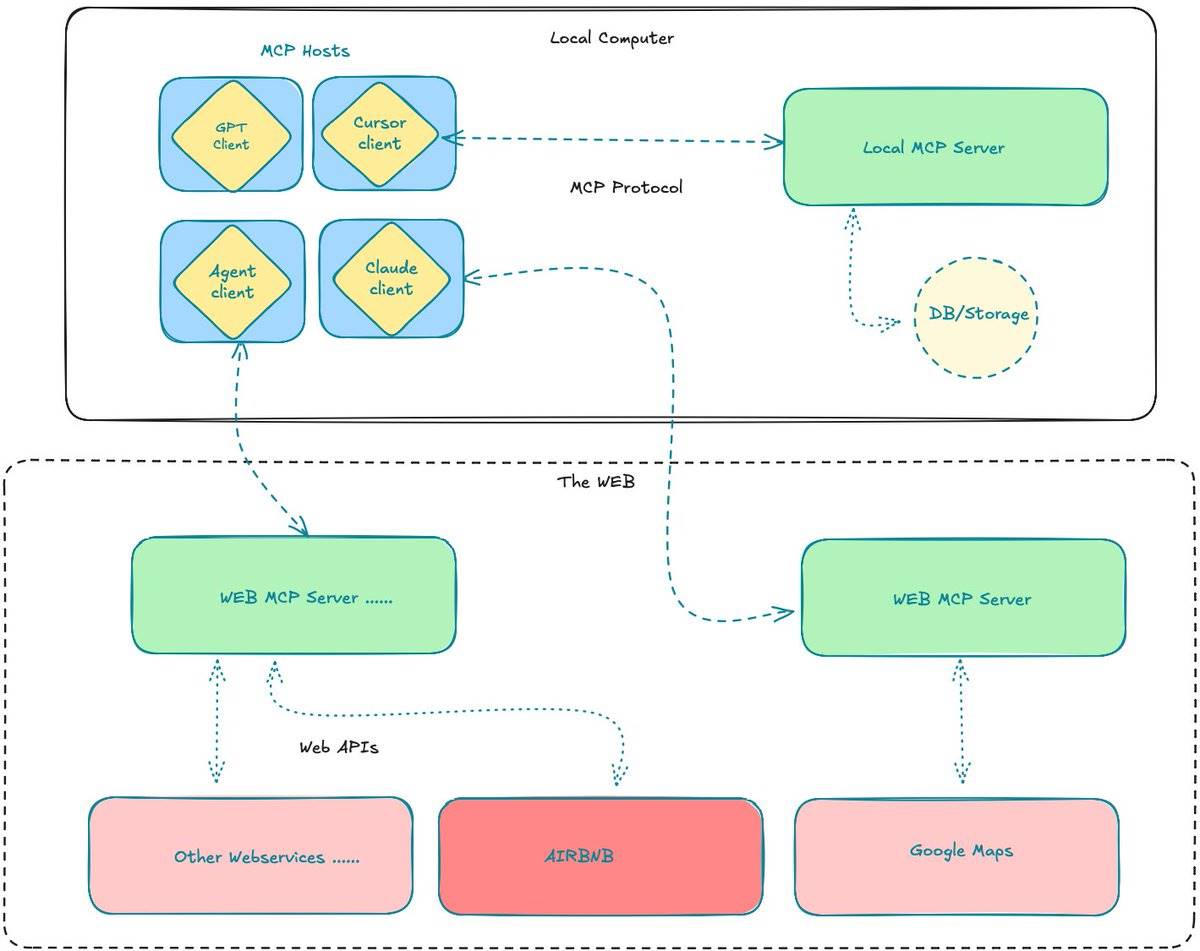
The core architecture follows a client-server model, with four key components working together:
-
MCP Host: Includes desktop AI apps like Claude or ChatGPT, IDEs such as cursorAI or VSCode, or other AI tools needing access to external data and functions.
-
MCP Client: A protocol processor embedded within the host, maintaining a one-to-one connection with an MCP server.
-
MCP Server: Lightweight programs exposing specific functionalities via a standardized protocol.
-
Data Sources: Files, databases, APIs, and services that the MCP server can securely access.
Now that we’ve covered the components, here’s how they interact in a typical workflow:
-
User Interaction: The user asks a question or issues a request within the MCP host (e.g., Claude Desktop).
-
LLM Analysis: The LLM analyzes the request and determines that external information or tools are needed for a complete response.
-
Tool Discovery: The MCP client queries connected MCP servers to discover available tools.
-
Tool Selection: The LLM selects which tools to use based on the request and available capabilities.
-
Permission Request: The host requests user permission to execute the selected tool, ensuring transparency and security.
-
Tool Execution: Upon approval, the MCP client sends the request to the appropriate MCP server, which uses its specialized access to data sources to perform the action.
-
Result Processing: The server returns results to the client, which formats them for use by the LLM.
-
Response Generation: The LLM integrates the external information into a comprehensive response.
-
User Presentation: Finally, the response is delivered to the end user.
The power of this architecture lies in each MCP server specializing in a particular domain while communicating via a standardized protocol. This allows developers to build a tool once and have it serve the entire AI ecosystem—eliminating the need to rebuild integrations for every platform.
How to Build Your First MCP Server
Now let’s walk through creating a simple MCP server using the MCP SDK—in just a few lines of code.
In this basic example, we want to extend the capabilities of Claude Desktop so it can answer questions like “What coffee shops are near Central Park?” using data from Google Maps. You could easily expand this to include reviews or ratings. For now, we’ll focus on the MCP tool find_nearby_places, which will allow Claude to fetch this information directly from Google Maps and present it conversationally.
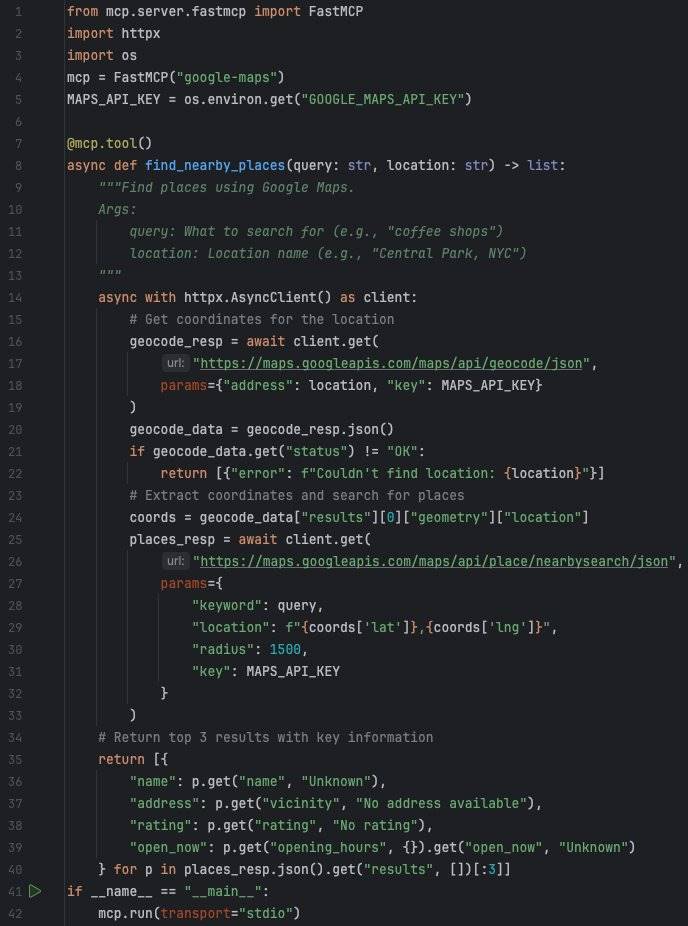
As you can see, the code is very straightforward. It first converts the query into a Google Maps API search, then returns the top results in a structured format—passing the data back to the LLM for further processing.
Next, we need to register this tool with Claude Desktop by adding it to its configuration file:
macOS path:
~/Library/Application Support/Claude/claude_desktop_config.json
Windows path:
%APPDATA%\Claude\claude_desktop_config.json
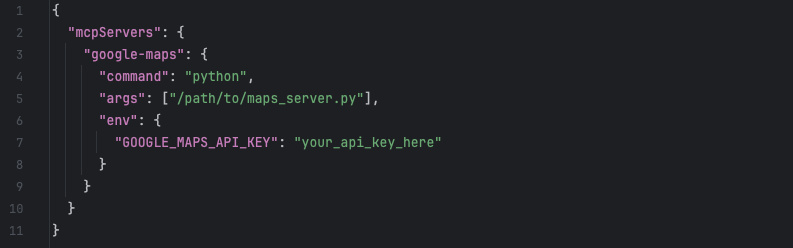
And that’s it—you’re done! You’ve successfully extended Claude’s functionality to retrieve real-time location data from Google Maps.
Join TechFlow official community to stay tuned
Telegram:https://t.me/TechFlowDaily
X (Twitter):https://x.com/TechFlowPost
X (Twitter) EN:https://x.com/BlockFlow_News
 Alliance