
Morpho Complete Guide: From Parameter Interpretation to Advanced Strategies, Understand DeFi's "Smart Fund" in One Article
TechFlow Selected TechFlow Selected
Morpho Complete Guide: From Parameter Interpretation to Advanced Strategies, Understand DeFi's "Smart Fund" in One Article
After several years of development, Morpho has gradually become one of the best options for managing spare cash and increasing financial leverage.
 Navigating Web3 tides with focused insights
Author: Axxiaohai

Background
Morpho is one of my favorite projects this cycle (I recognize the protocol's value, not recommending buying the token). Its clean code has received widespread praise. It combines elements of spare cash management and traditional fund management, making it convenient both for liquidity management and for users who need leverage.
Website: https://app.morpho.org/
We covered the project’s security in our last article. If you just want stable interest income, simply find a high-yield Vault based on your assets, deposit, enjoy instant-settled returns, and withdraw anytime.
This article focuses on helping you understand where your funds go after depositing, what key factors to monitor in your chosen Vault, how your APY is calculated, and how to potentially increase it (if interested).
INFO
Some terms may differ in translation. I will keep certain proper nouns in English to ensure accuracy.
Basic Mechanism
After its redesign, Morpho clearly separates its homepage into Earn / Borrow, clearly defining user needs for each.


Key Concepts
Before we begin, here are some concepts to understand:

-
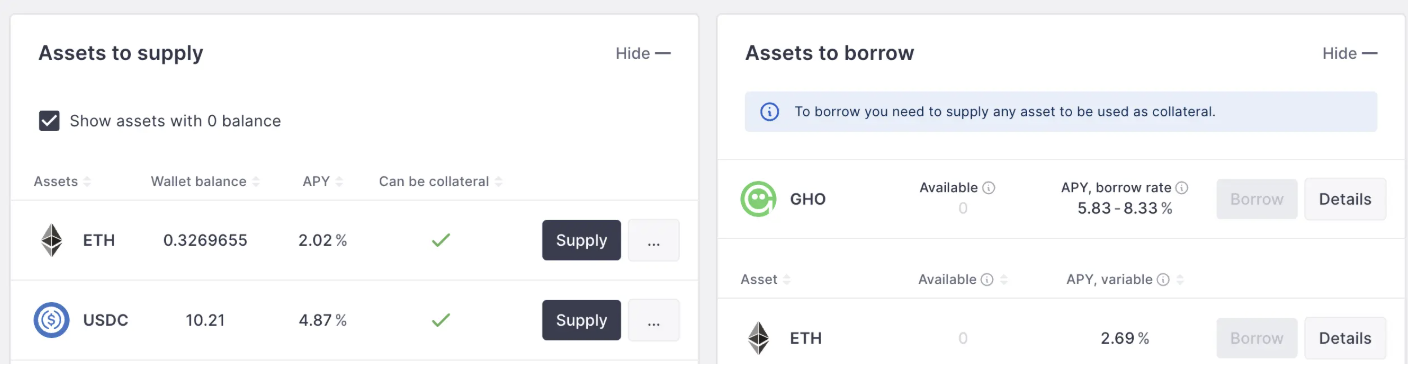
Vault: Traditional lending protocols categorize by token type—when you supply, you deposit a specific token and earn a fixed interest rate, similar to a bank. In Morpho, deposits go into concept-based Vaults, which can be thought of as distinct style funds with their own fund managers operating vaults that manage your funds.
AAVE
-
Curator: The Vault manager, analogous to a fund manager—the individual or organization managing the Vault, representing risk control and expertise, and primarily responsible for yield strategy.
-
Collateral: The assets received as collateral when the Vault lends out deposited funds. This will be explained in detail below.
Yield Distribution Mechanism
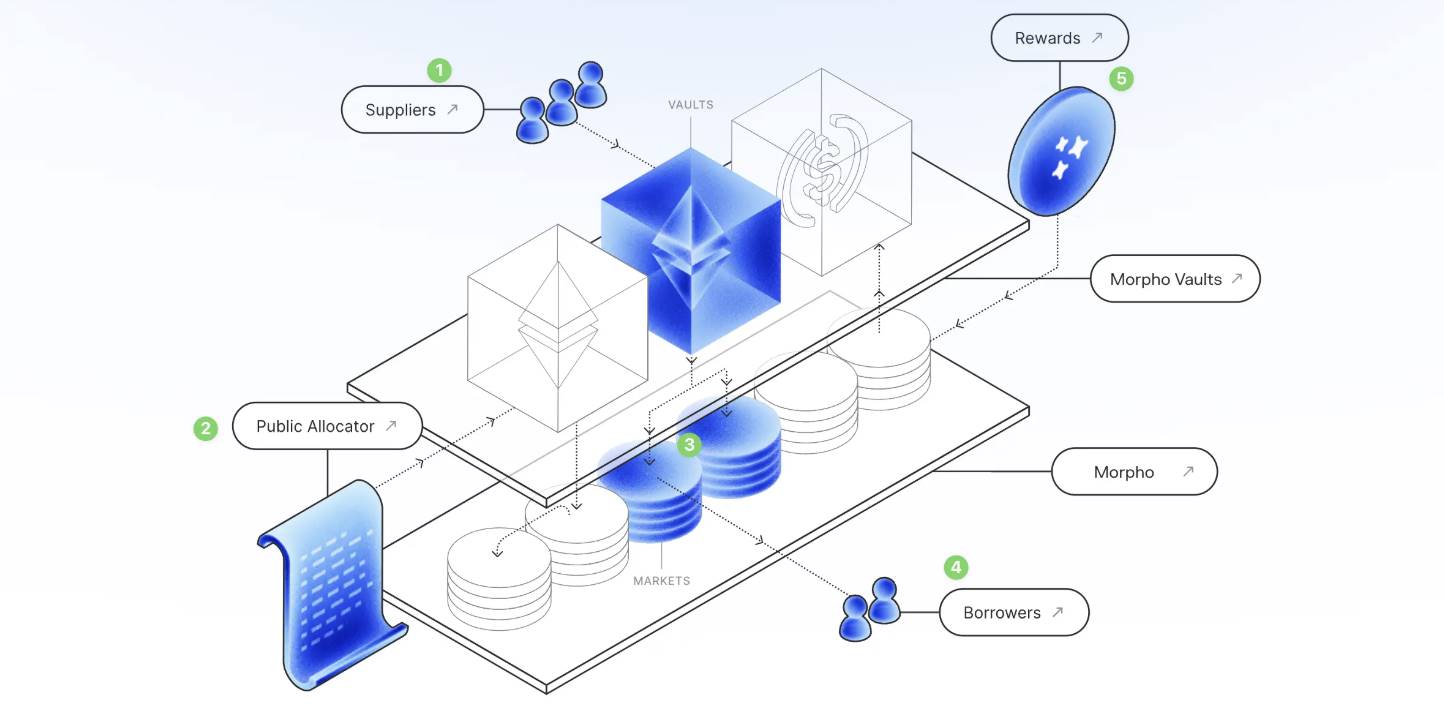
In lending protocols, lenders (Suppliers) earn interest paid by borrowers (Borrowers)—this holds true on Morpho as well, and recognizing this is crucial. Unlike traditional lending protocols where you deposit funds directly into a protocol acting as an intermediary, here you deposit into a protocol that ensures safety, then entrusts the funds to a fund (Vault) that manages and lends them on your behalf. The simplified relationship is shown in this official Morpho documentation diagram—study it carefully to grasp the core of the protocol:
-
Supplier (depositor) deposits assets like ETH / USDC via Earn into a Morpho Vault
-
Through the Public Allocator—a verified smart contract—the Curator safely accesses the funds
-
The Vault allocates funds to corresponding Markets (full name: Borrow Market)
-
Borrower pledges collateral in the Borrow Market to borrow funds and pays interest
-
Reward mechanisms distribute interest back from the Market to the Vault
If unclear, read it again.
What makes Morpho different from traditional lending:
-
Traditional lending protocols typically require borrowers to pledge major or more universally accepted assets such as USDC, USDT, or ETH. Morpho supports less common assets like PT / USD0++ / Berastone as collateral, allowing borrowers to better utilize idle assets (e.g., pledging PT-sUSDe to borrow DAI).
-
Additionally, in traditional lending, volatility in a single asset could affect the entire protocol—for example, failure of one asset might trigger cascading defaults. In Morpho, Vaults are isolated from each other (if Vault A fails, it does not impact the safety of funds in Vault B).
Understanding Earn and Borrow
Let’s break it down with examples.
Earn Parameters Explained
https://app.morpho.org/ethereum/earn
Earn targets users with idle funds seeking interest—this covers most users’ needs. The listed Vaults are all officially whitelisted. In reality, anyone can create a Vault (Permissionless)—you and your friends can launch one together. Fund safety, usage, and transparency are guaranteed at the Morpho base layer, so there’s no worry about unauthorized misuse. Unwhitelisted Vaults won’t appear or be searchable on the homepage.
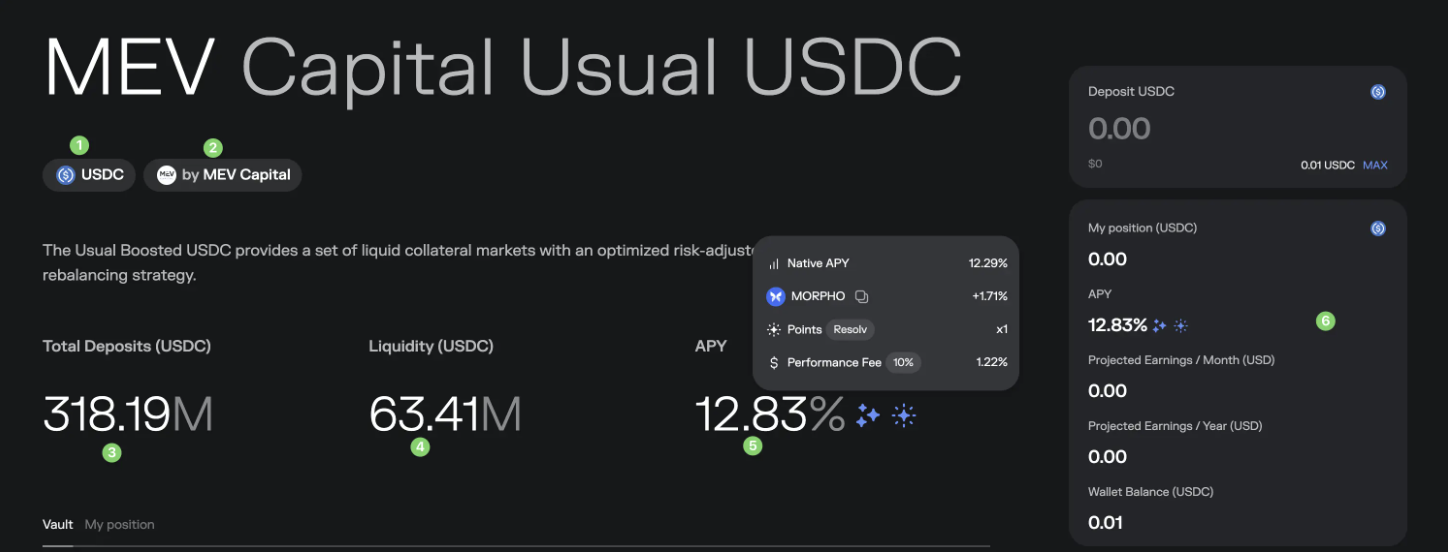
Let’s use the 🔗 MEV Capital Usual USDC Vault as an example, walking through each parameter. If unfamiliar, please proceed slowly.
-
USDC: Indicates which token the Vault accepts for deposits—in this case, USDC. Other Vaults accept tokens like USDT, DAI, BTC LST, etc.
-
MEV Capital: The Curator (manager) of this Vault, usually institutions. You can research the institution’s credentials, history, and fund size to better assess their risk management capabilities.
-
Total Deposits: Total funds currently deposited in this Vault—here, 318M USDC.
-
Liquidity: Remaining liquidity, similar to bank reserves—users withdraw from this balance. Here it’s 63M, meaning if you previously deposited 100M, you cannot fully exit in one step. We’ll explain how Morpho’s mechanism addresses this later.
-
APY: The parameter most people care about. Typically composed of Native APY + $Morpho token incentives - Performance fee. There may be additional parameters—for example, this display also shows 1x Resolv points, which might be redeemable for future Resolv rewards.
-
Personal asset info: How much you have in your wallet, how much you’ve deposited, and estimated earnings over one month/year.
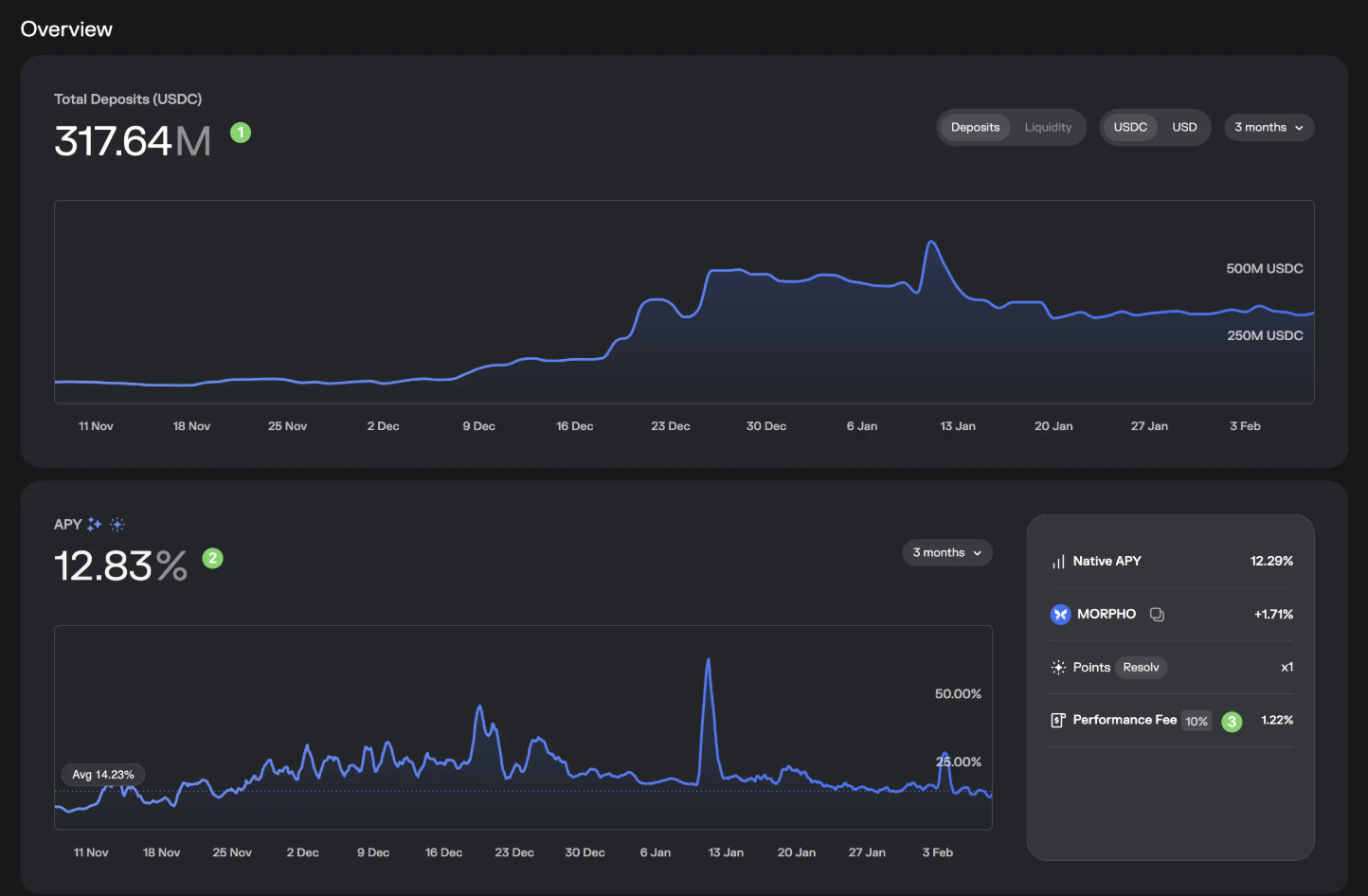
Next, let’s examine Overview
-
Fund inflow trend—can switch views. A sharp decline may signal emerging risks; monitor closely to protect yourself.
-
APY trend—can switch views.
-
Performance Fee: A critical metric within APY. This is the fee charged by the Vault manager, deducted from your returns. Here it’s 10%, meaning 10% of your earnings go to the Vault manager, resulting in a 1.22% reduction based on current APY.
Next, Market allocation
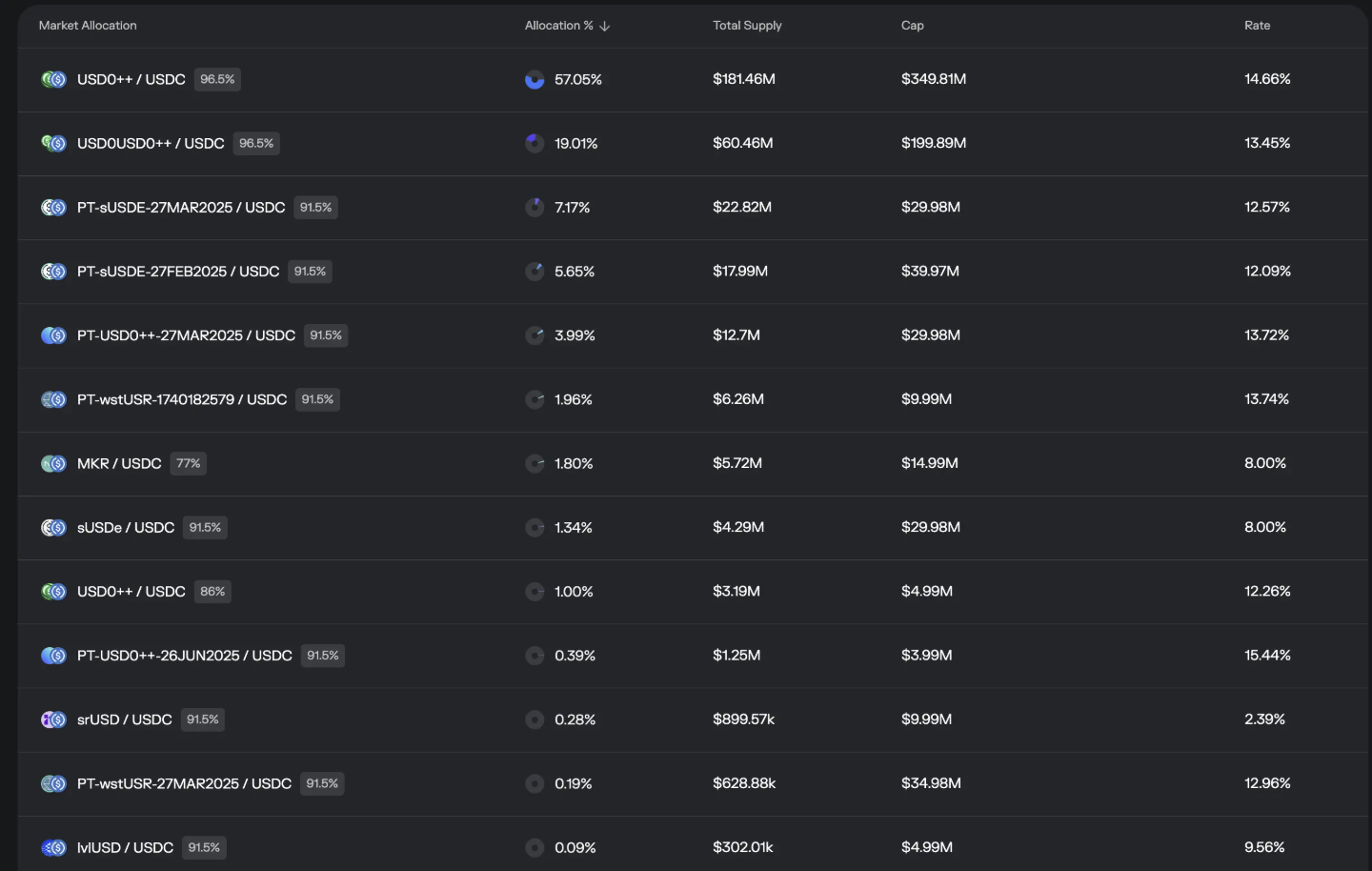
This section transparently shows where your deposited funds are lent out—i.e., your yield sources. This openness and real-time visibility are key attractions of decentralized funds.
As shown, 57.05% of this Vault’s funds are allocated to the USD0++ / USDC Market, which allows users to pledge USD0++ to borrow USDC at a maximum loan-to-value ratio of 96.5%. It has supplied 181.46M, with a strategy cap of 349.81M, and a daily APY of 14.66%.
Interpret other Markets similarly. You might now wonder: isn’t this also the core risk of the Vault? What if the collateral received loses value? Indeed, this is Morpho’s biggest risk—not from the protocol itself, but from the collateral.
Recently, USD0++ depegged. While no actual losses occurred, panic spread, temporarily locking many users' deposits. Recovery was achieved through actions like changing managers, injecting liquidity, and switching Markets.
Next, Performance
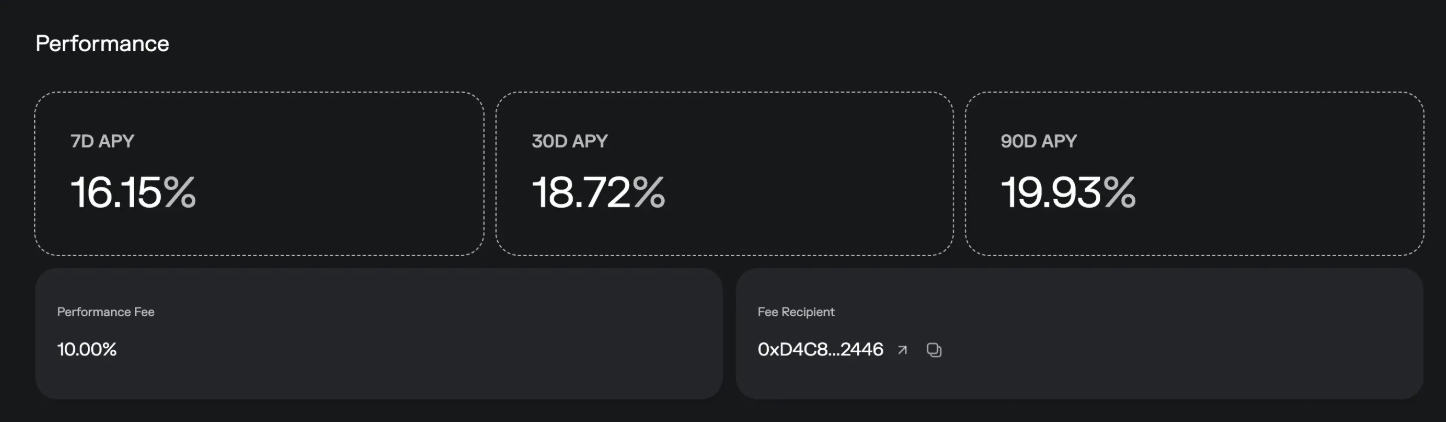
Nothing special here—just historical performance and the fee recipient address.
Vault Configuration
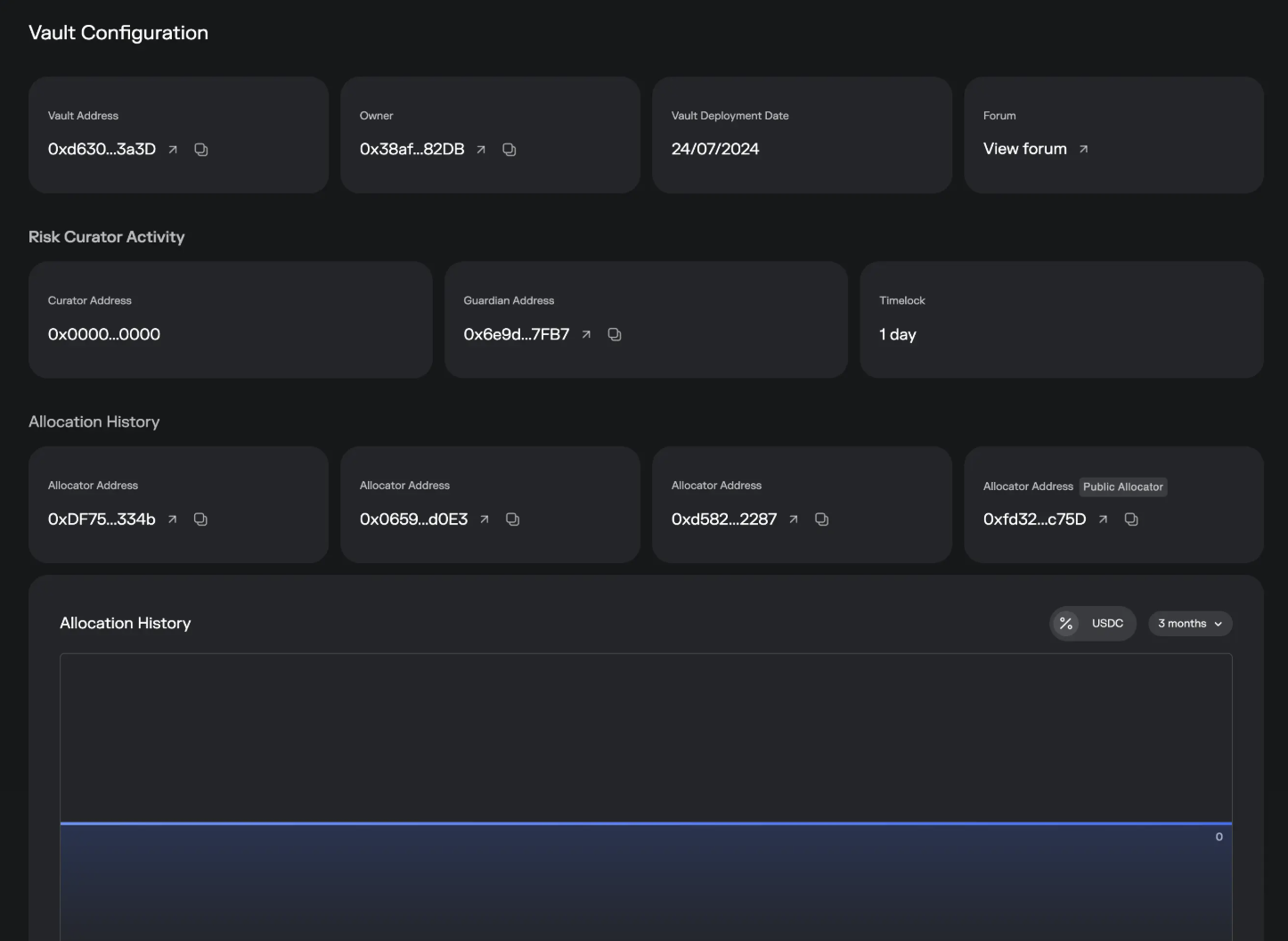
Most of this section contains transparency disclosures. For example, Guardian Address monitors and blocks risky Vault operations. Timelock specifies the minimum waiting period for core changes, giving time for the market, Curator, and Guardian to react.
Depositors
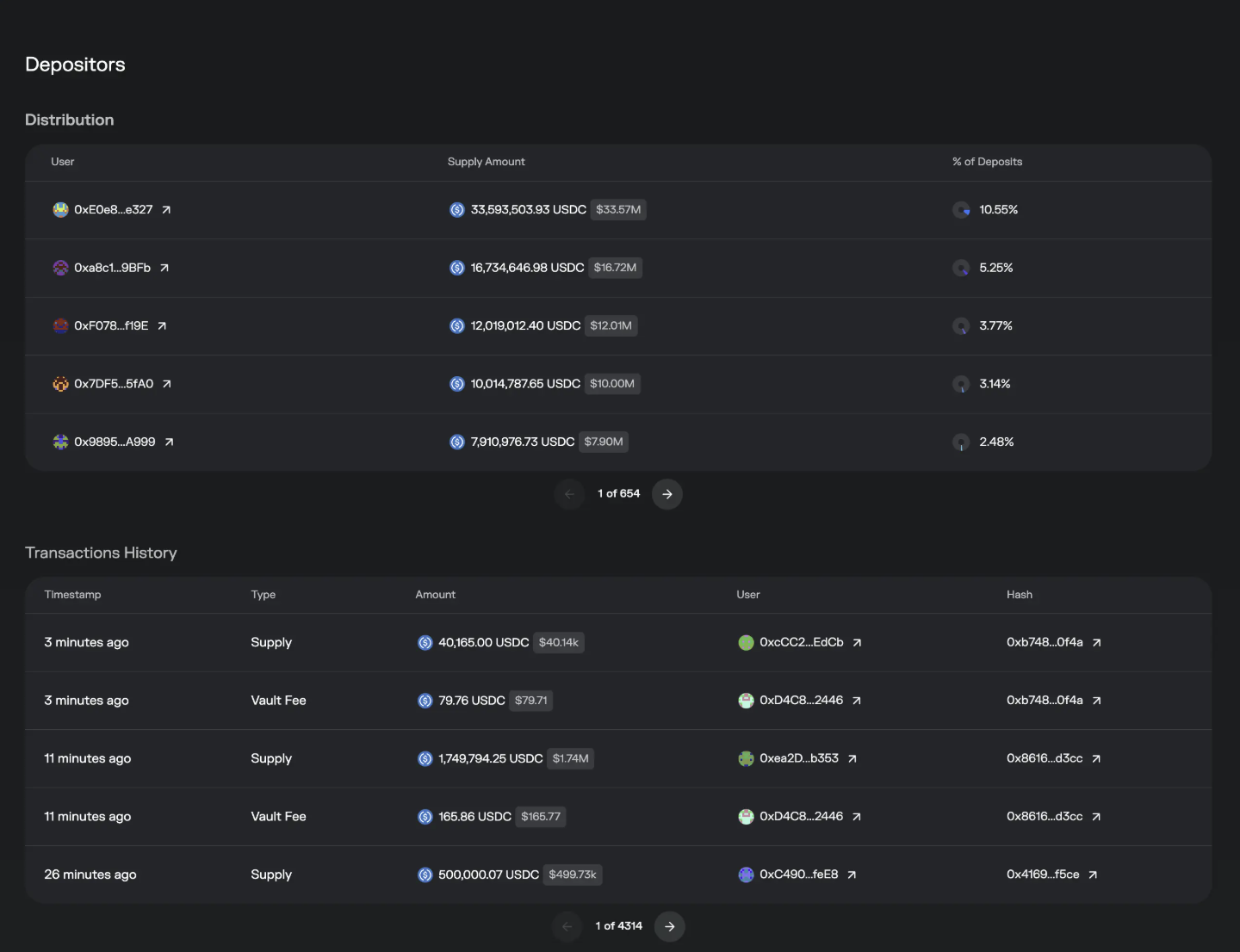
-
Distribution: Amount deposited by each user and their share—large holders appear first.
-
Transactions History: Deposit and withdrawal activity. Observant users will notice that every Supply/Withdraw transaction is accompanied by a simultaneous Vault Fee transaction. This mechanism means every user interaction with the Vault helps the Curator extract earned performance fees from Morpho—which is partly why interacting directly with Morpho incurs relatively high gas fees 😂.
That covers all Earn parameters.
Borrow Parameters Explained
https://app.morpho.org/ethereum/borrow
Each pool in Borrow is called a Market, typically used by those needing revolving loans or other borrowing needs.
Let’s take 🔗USD0++ / USDC as an example
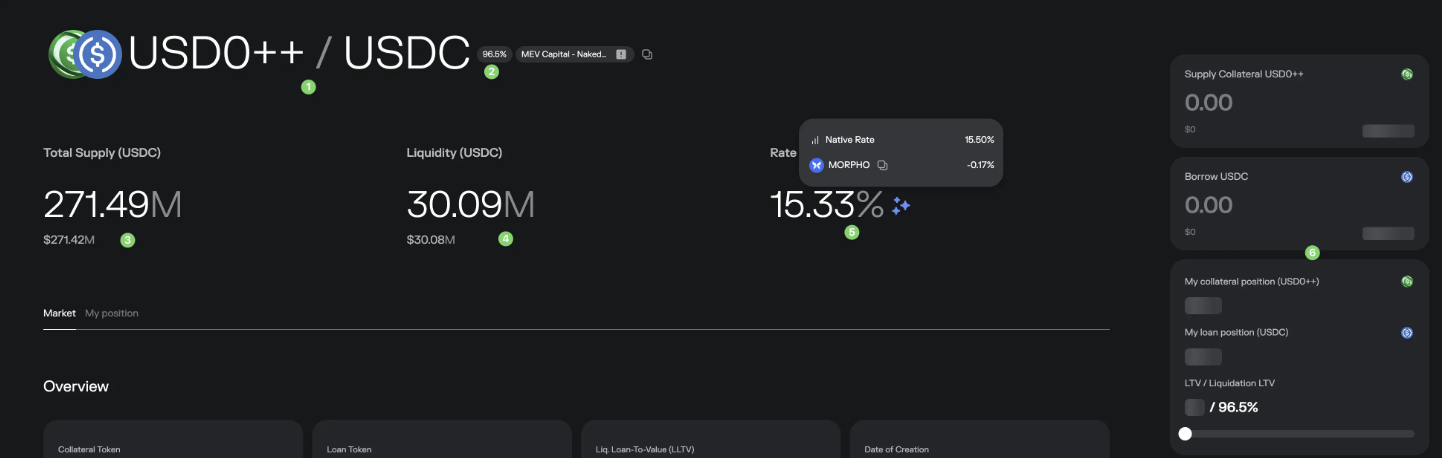
The title indicates support for pledging USD0++ to borrow USDC
-
96.5%: LLTV—we’ll explain this below
-
Total Supply: Total funds supplied to this Market
-
Liquidity: Remaining funds available to borrow in this Market
-
Rate: Interest rate borrowers pay. Native rate is 15.5%, with 0.17% subsidized by $Morpho, making the actual rate slightly lower.
-
Your position: How much you've pledged, borrowed, and your LLTV. If unfamiliar with LLTV, never get close to the threshold—it triggers automatic liquidation when reached.
Now, Overview
-
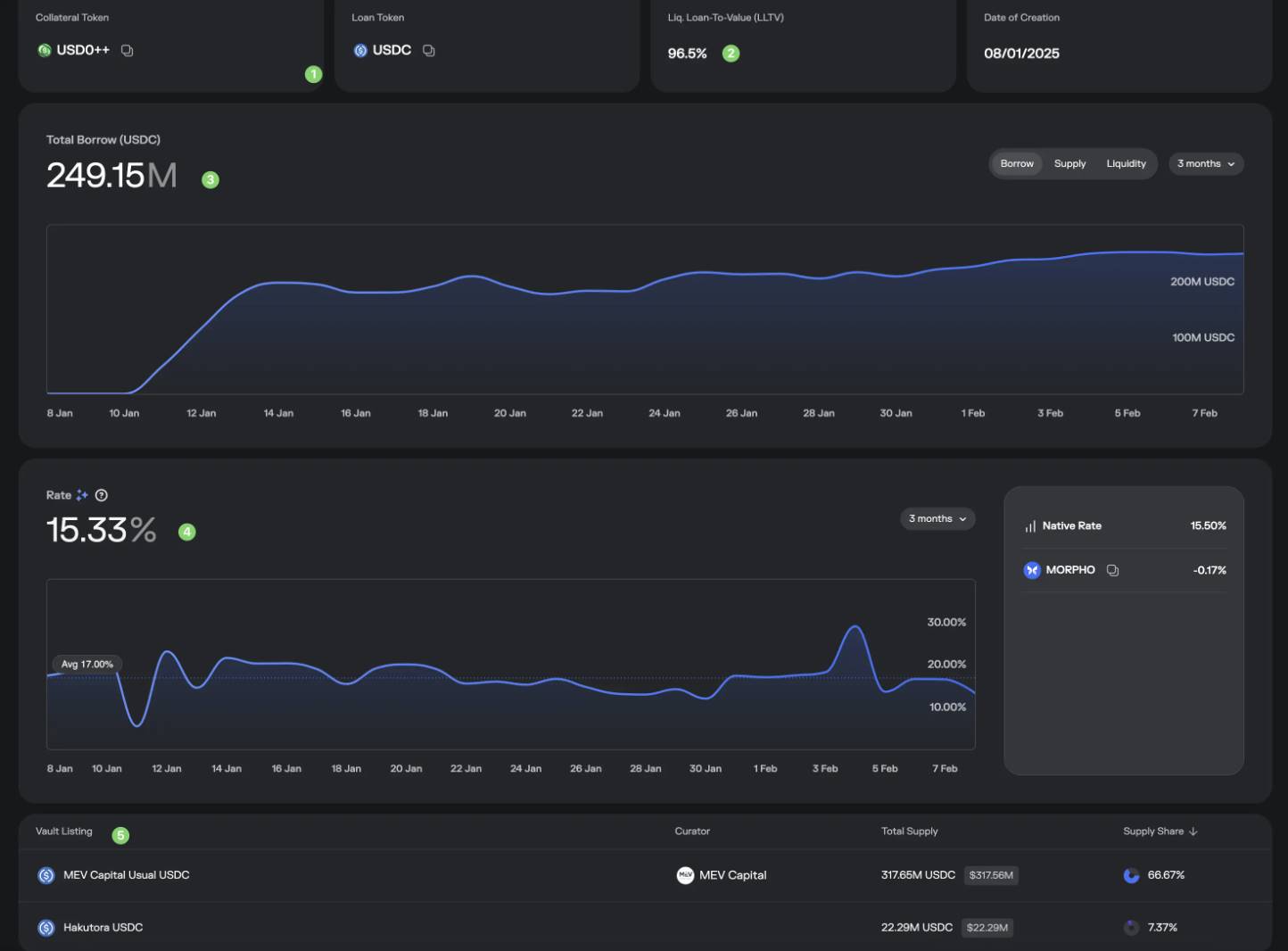
Pledged and borrowed assets—already mentioned above.
-
Liq. Loan-To-Value (LLTV): Simply put, the liquidation threshold. When loan value / collateral value = 96.5%, your collateral becomes eligible for liquidation. To protect your collateral: avoid approaching this level, monitor price movements of both collateral and loan tokens, and pay attention to the Market’s oracle structure (how prices are determined), discussed next.
-
Borrowing amount trend
-
Borrowing rate trend and calculation method on the right
-
Which Vaults supply funds to this Market. You'll also notice the two Vaults' Supply Share totals less than 100% because some "individual investors" also supply funds directly but aren't counted as Vaults and thus not displayed here—they appear below.
Now, Oracles—this part is complex. Seek help from engineers or AI if needed.

This explains how collateral prices are determined—mostly via contracts, hard for average users to understand. But you can use AI, for example:
1️⃣ Shows latest price: 1 USD0++ = 0.87 USDC
2️⃣ The contract tells us how USD0++ price is defined (ask AI). It says it takes FloorPrice directly from the USD0++ contract. Those familiar with USD0++ know its FloorPrice is hardcoded at 0.87, meaning this price is fixed and won't change with market fluctuations.
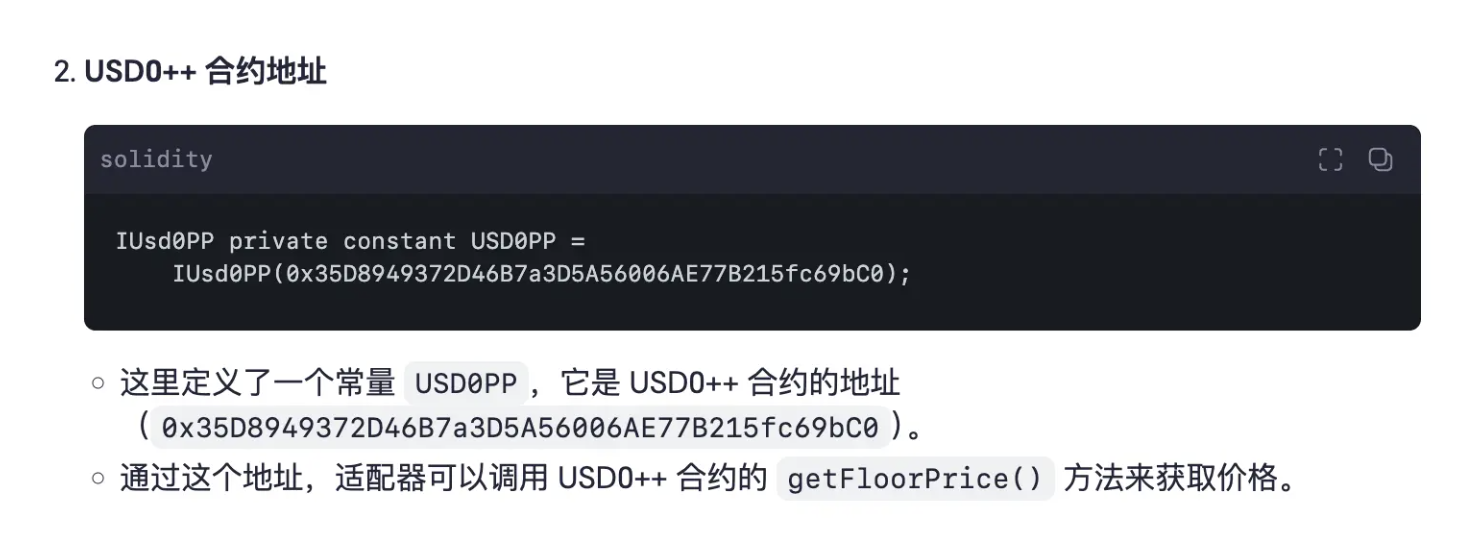
Oracle setups vary across Markets—some prices fluctuate, others are fixed or linearly increasing.
Now, Instantaneous Rates—this section is very important.
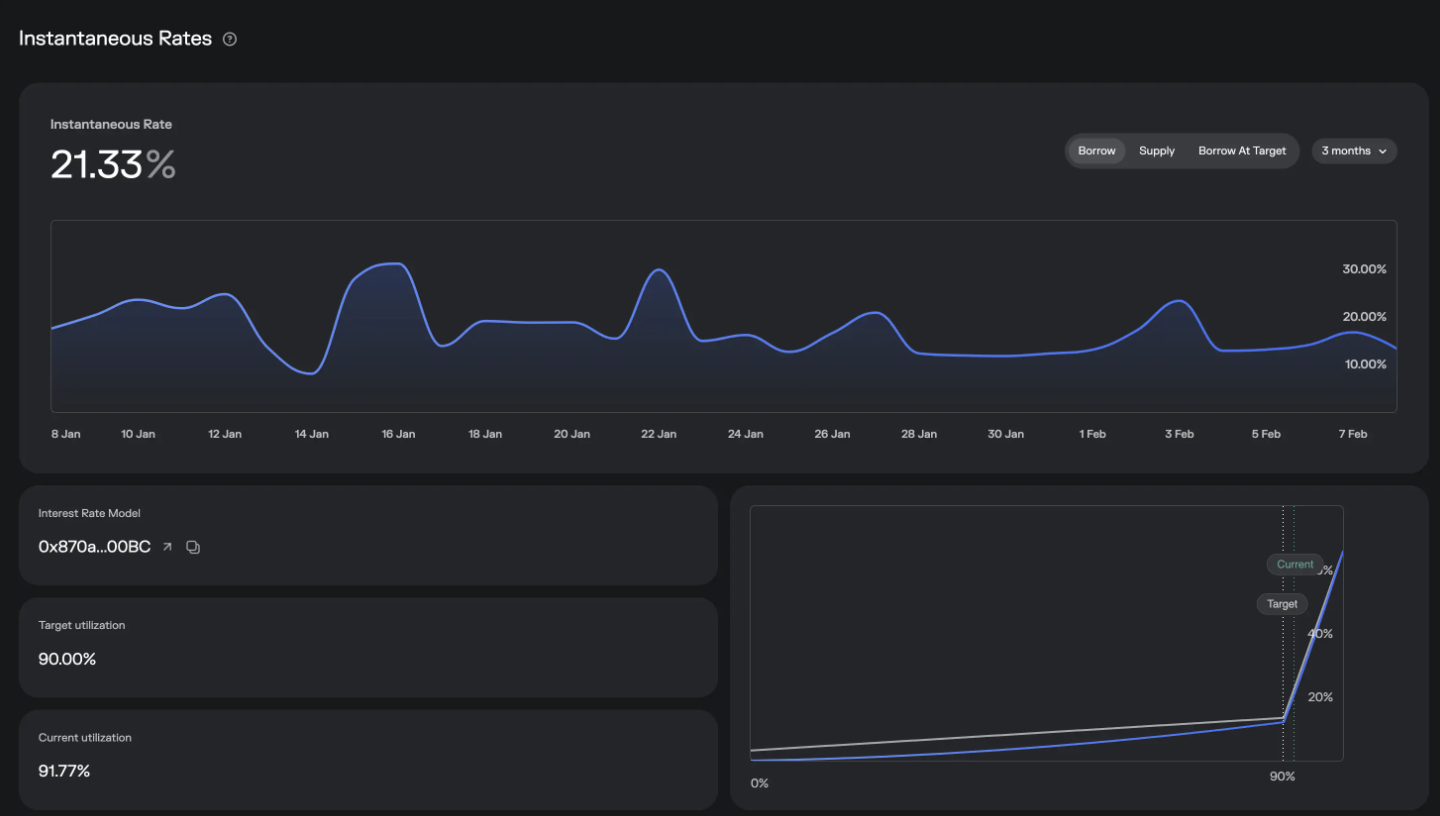
You can see real-time borrowing and supply rates and trends. Key parameter: Target utilization—currently 90%, while Current utilization is 91.77%. Utilization is calculated as: amount borrowed / total supplied. Simple math shows: the more borrowed or the less supplied, the higher the utilization.
In the bottom-right graph, gray line is borrowing rate, blue line is supply rate. 90% is a threshold. When utilization exceeds 90%, borrowing rates spike sharply. This mechanism protects against our earlier question: What if a Vault lacks sufficient liquidity when you want to exit? Example:
Imagine a Vault lends out funds to a Borrow Market, leaving only 50M in liquidity. A large holder wants to withdraw 100M—what happens?
Suppose the holder first withdraws 50M, draining the Vault’s liquidity. The Borrow Market’s supply decreases, causing utilization to rise, which increases borrowing rates, forcing borrowers to repay. Simultaneously, the Vault’s APY rises, attracting new suppliers. Repayments and new deposits provide funds for the large withdrawal, cycling until a new equilibrium is reached.
This interest rate adjustment mechanism maintains rate stability and accommodates large withdrawals.
Next, Liquidations—minimal content here
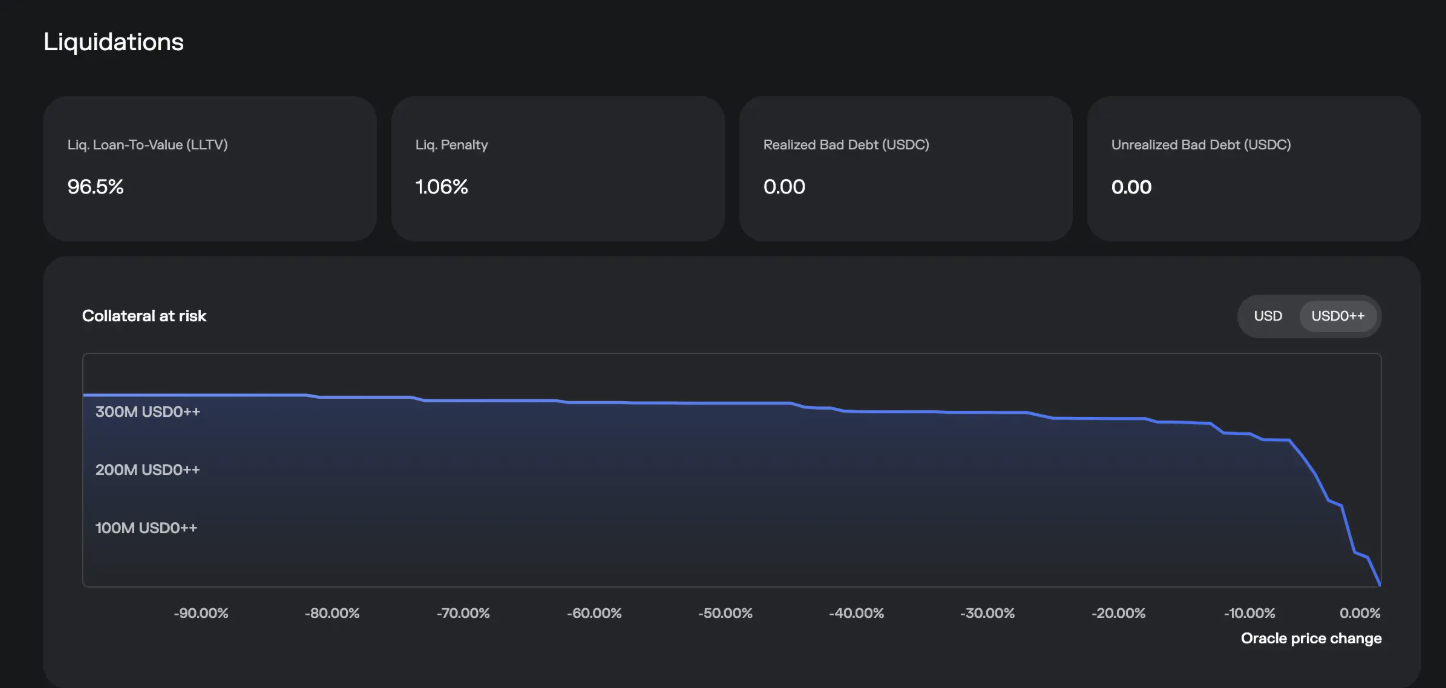
One is Liq. Penalty (liquidation penalty)
The graph shows, from right to left, how much asset is at risk of liquidation as collateral price drops—hover and slide to check.
Market Activity
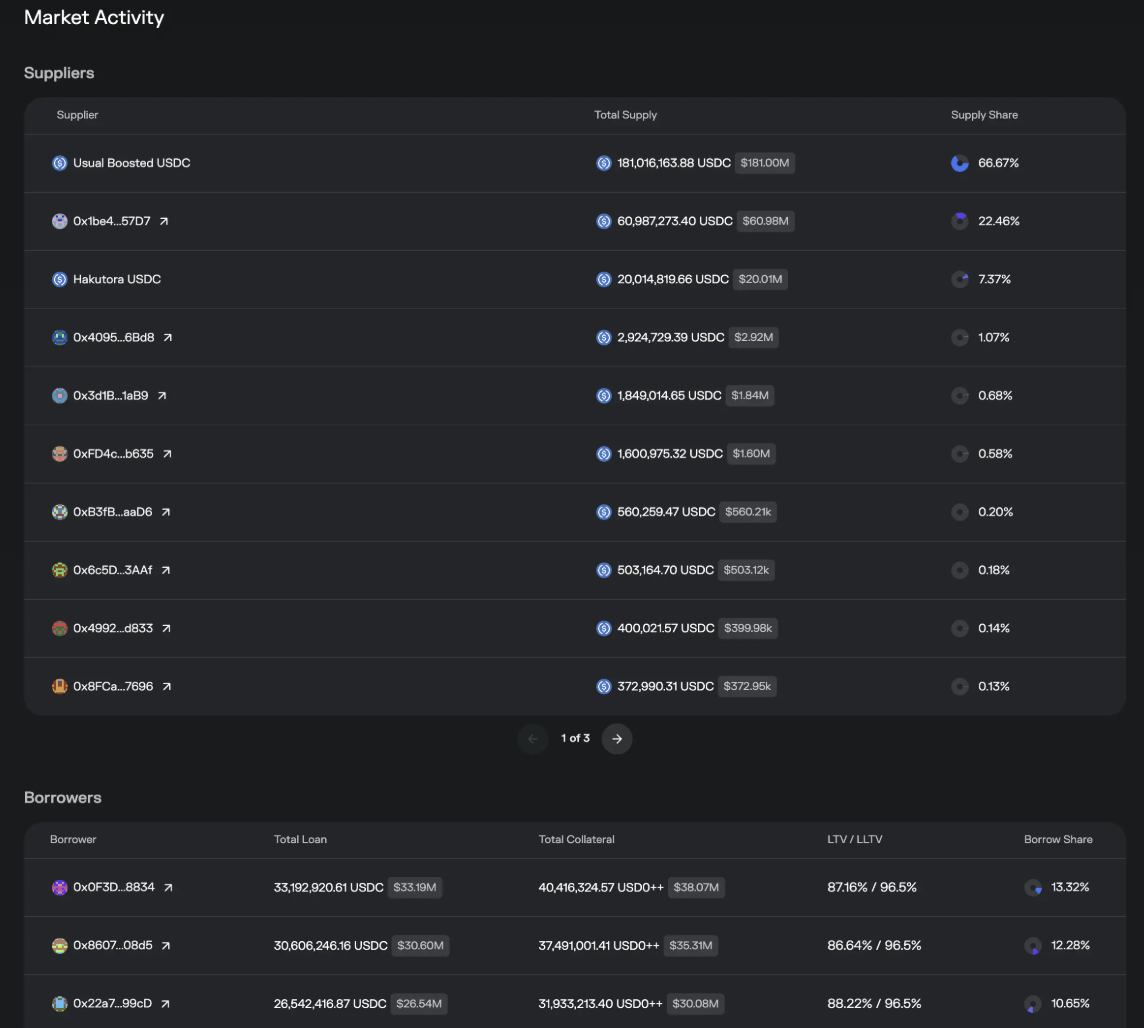
From Suppliers, we see beyond Vaults, some individual addresses (e.g., 0x1be4...57D7) also supply funds here. In advanced sections, we’ll explore why and how these individuals do this.
Borrower list is self-explanatory—who borrowed and how much.
Finally, the warning section
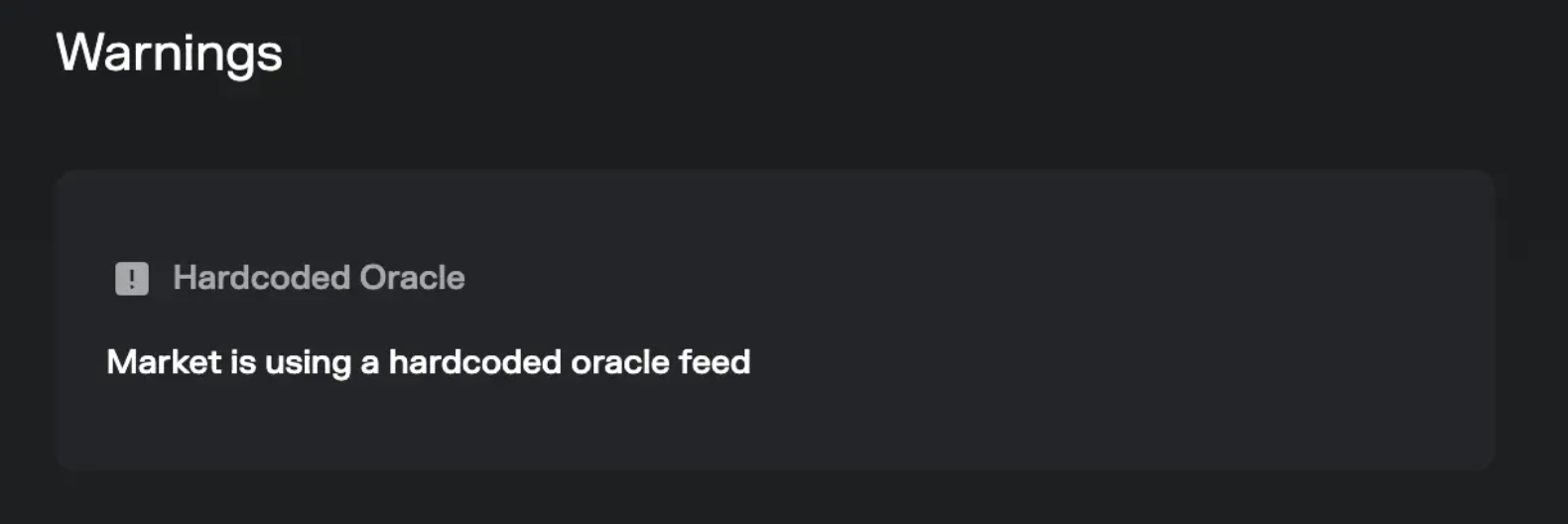
This highlights potential risks in the Market—for example, as mentioned, USD0++ price is hardcoded, which is noted here. Not all Markets show such warnings. However, having a warning doesn’t mean extremely dangerous, nor does absence guarantee 100% safety—respect the market.
That covers all Borrow parameter explanations.
By now, you should have a deeper understanding of the Morpho protocol. If still unclear, read it again, my friend.
Extended question: If actual risk occurs, can you claim compensation from Morpho? The answer is no. (Experienced crypto surfers already know.)

Morpho_Terms_of_Use.pdf
Advanced: Maximizing Yield + Bypassing Performance Fees
When discussing Borrow Markets, we learned most liquidity comes from Vaults, whose funds originate from users. In the image below, we see some individual users directly supplying to Markets (called “direct seeding”).
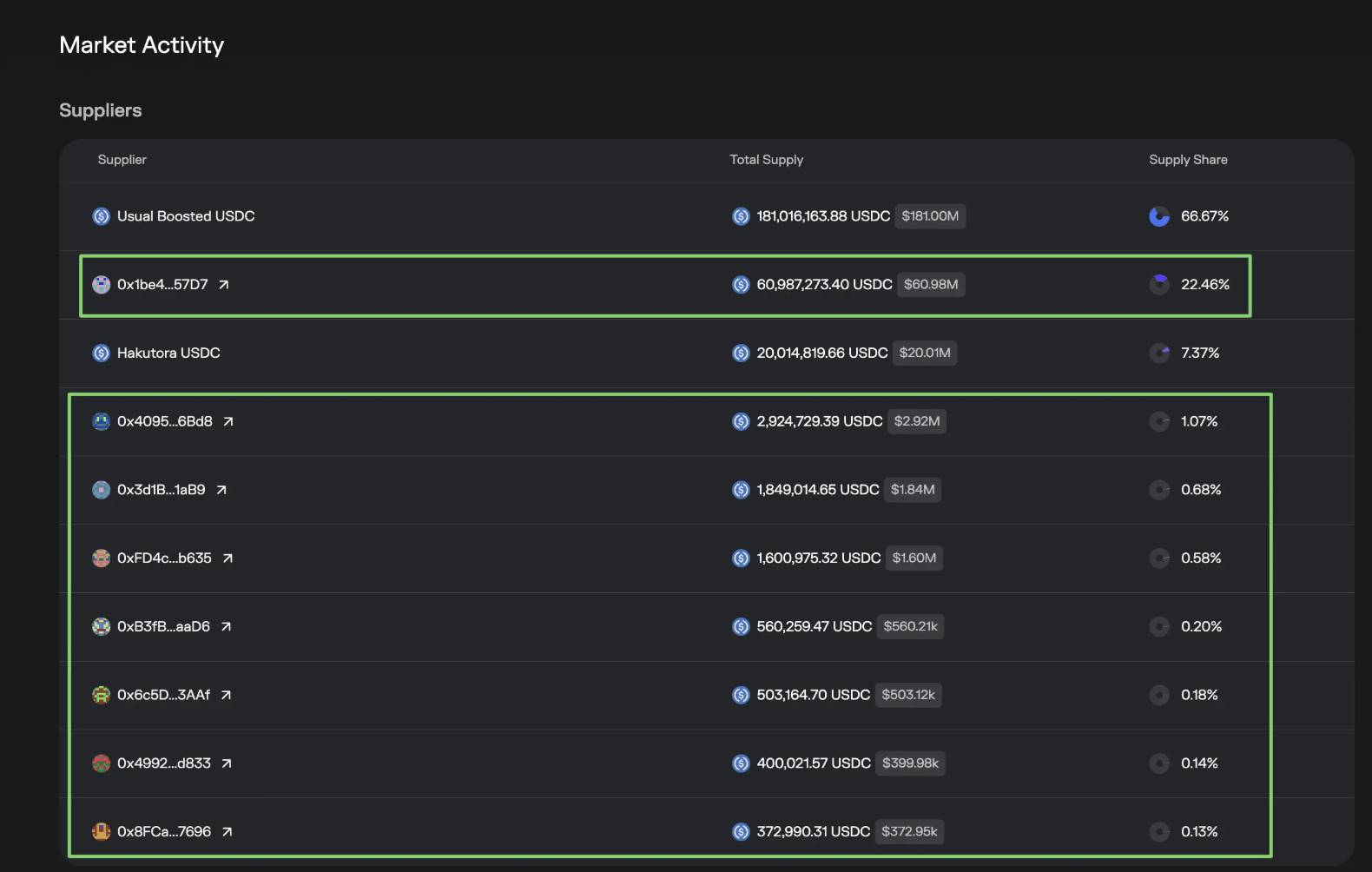
This is possible thanks to Morpho’s permissionless model—anyone can become a Market supplier, including you.
Benefits include:
-
You capture full supply yield. As shown below, Vault yields are averaged across multiple pools. If in 2️⃣ you identify the highest APY and directly seed there, you could boost your return.

-
Second, direct seeding bypasses the Vault, avoiding performance fees and increasing net yield by 1-2%.
Drawbacks include:
-
When Market risks occur and liquidity dries up, you cannot immediately withdraw your funds.
-
You must personally monitor collateral volatility risks. A good fund manager monitors and exits early (e.g., OneKey Hakutora USDC)—that’s why performance fees exist. Of course, some Vaults charge fees but offer little risk control.
Below are instructions for those interested.
WARNING
First-time operations should use small amounts (e.g., 1 USDC) and a new wallet to prevent conflicts with prior actions. Confirm successful Withdraw before scaling up. These steps involve contract interactions—any mistake, contract update, or Market difference could permanently lose your funds. Proceed with caution. No responsibility is assumed here; for educational purposes only. Risk entirely on you.
Again using the 🔗USD0++ / USDC Market as example—adjust accordingly for other Markets. We’re supplying the loan token, i.e., USDC.
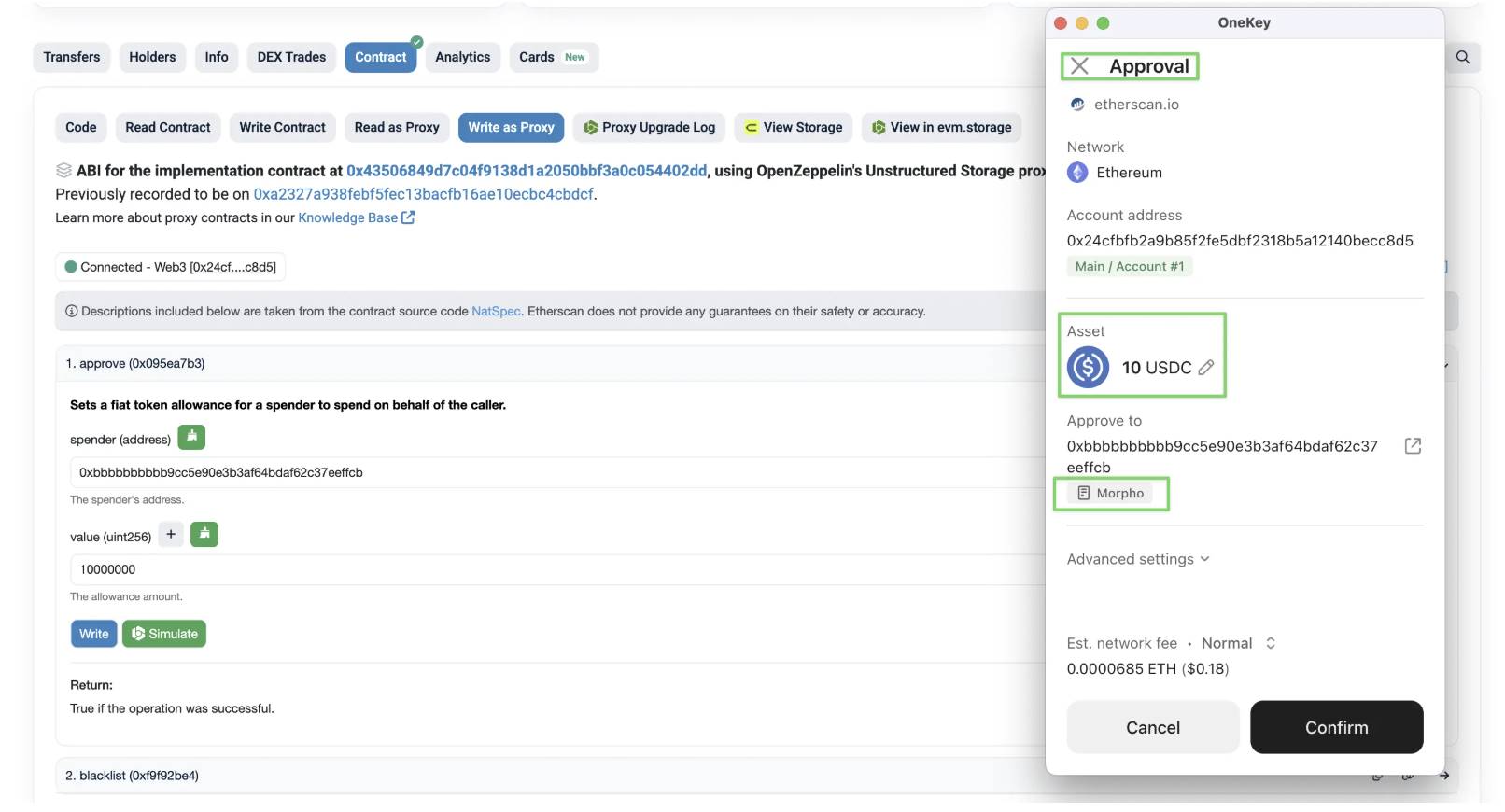
Step 1: Approve USDC for Morpho
Go to the USDC contract:
https://etherscan.io/token/0xa0b86991c6218b36c1d19d4a2e9eb0ce3606eb48#writeProxyContract
Select writeProxyContract, then Connect to Web3
Find the Approve function
Spender: 0xbbbbbbbbbb9cc5e90e3b3af64bdaf62c37eeffcb (Morpho contract)
Value: USDC amount * 1000000
Click Write—ensure your wallet simulation matches expectations
Step 2: Go to USD0++ / USDC Market, collect the following parameters:
LoanToken: 0xA0b86991c6218b36c1d19D4a2e9Eb0cE3606eB48
CollateralToken: 0x35D8949372D46B7a3D5A56006AE77B215fc69bC0
Oracle Address: 0xBf877B424bE6d06cA4755aF2c677120eC71cac53
Interest Rate Model (irm): 0x870aC11D48B15DB9a138Cf899d20F13F79Ba00BC
LLTV: 965000000000000000
code
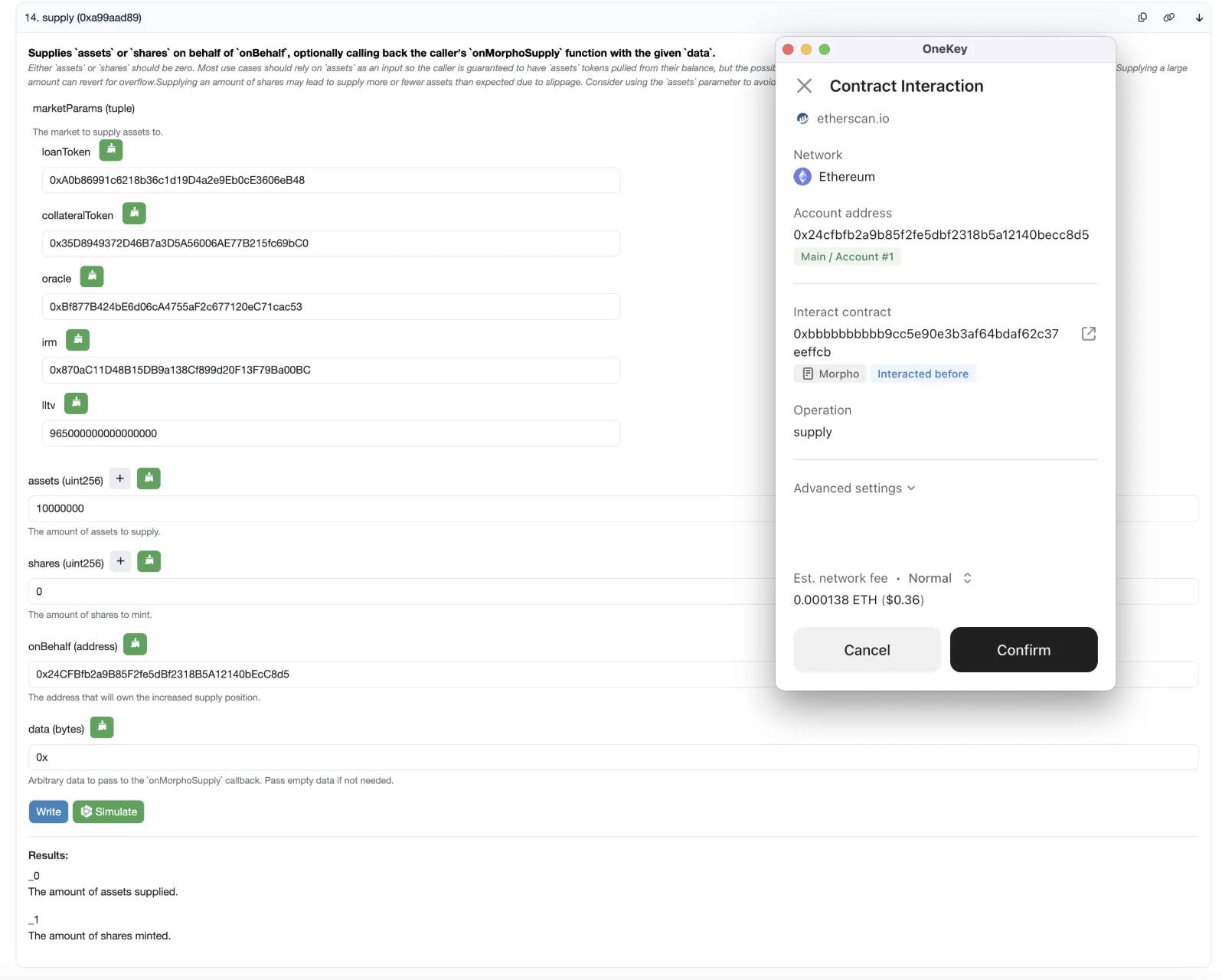
Step 3: Go to Morpho contract
https://etherscan.io/address/0xbbbbbbbbbb9cc5e90e3b3af64bdaf62c37eeffcb#writeContract
Select Contract - WriteContract, then Connect to Web3
Fill in the above parameters sequentially. For the following:
Assets: Amount of USDC to deposit—again, USDC Amount * 1000000
Shares: Enter 0
onBehalf: Your wallet address
Data: Enter 0x
Click Write—ensure your wallet simulation matches expectations
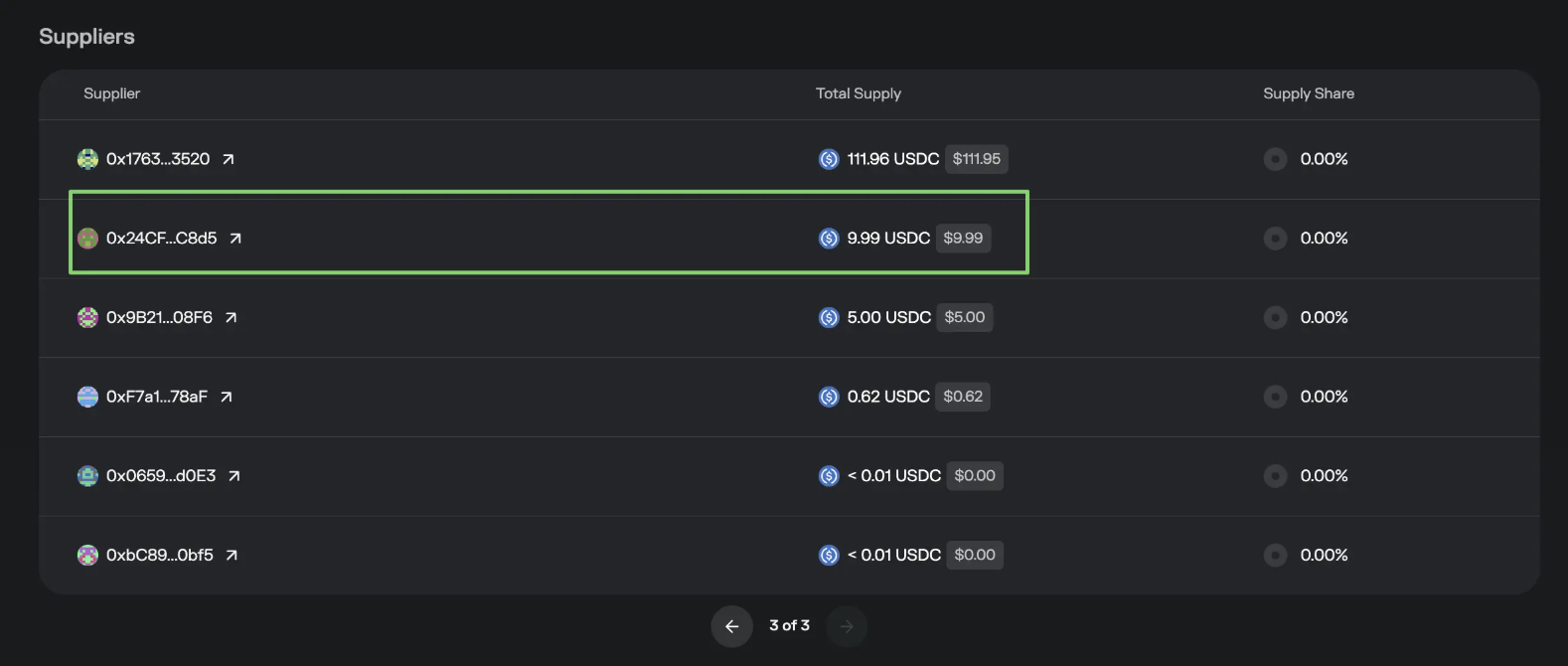
Soon you’ll see your amount and address in the Market’s Supplier list. One downside: you won’t see your position in the website’s Position tab—only in the Market view. However, $Morpho rewards are distributed normally.
Step 4: Prepare for withdrawal—open your deposit transaction in a block explorer, select Logs, find the Supply event, and note the Shares parameter (amount deposited). You’ll need this for withdrawal.

Parameter 3 in the image
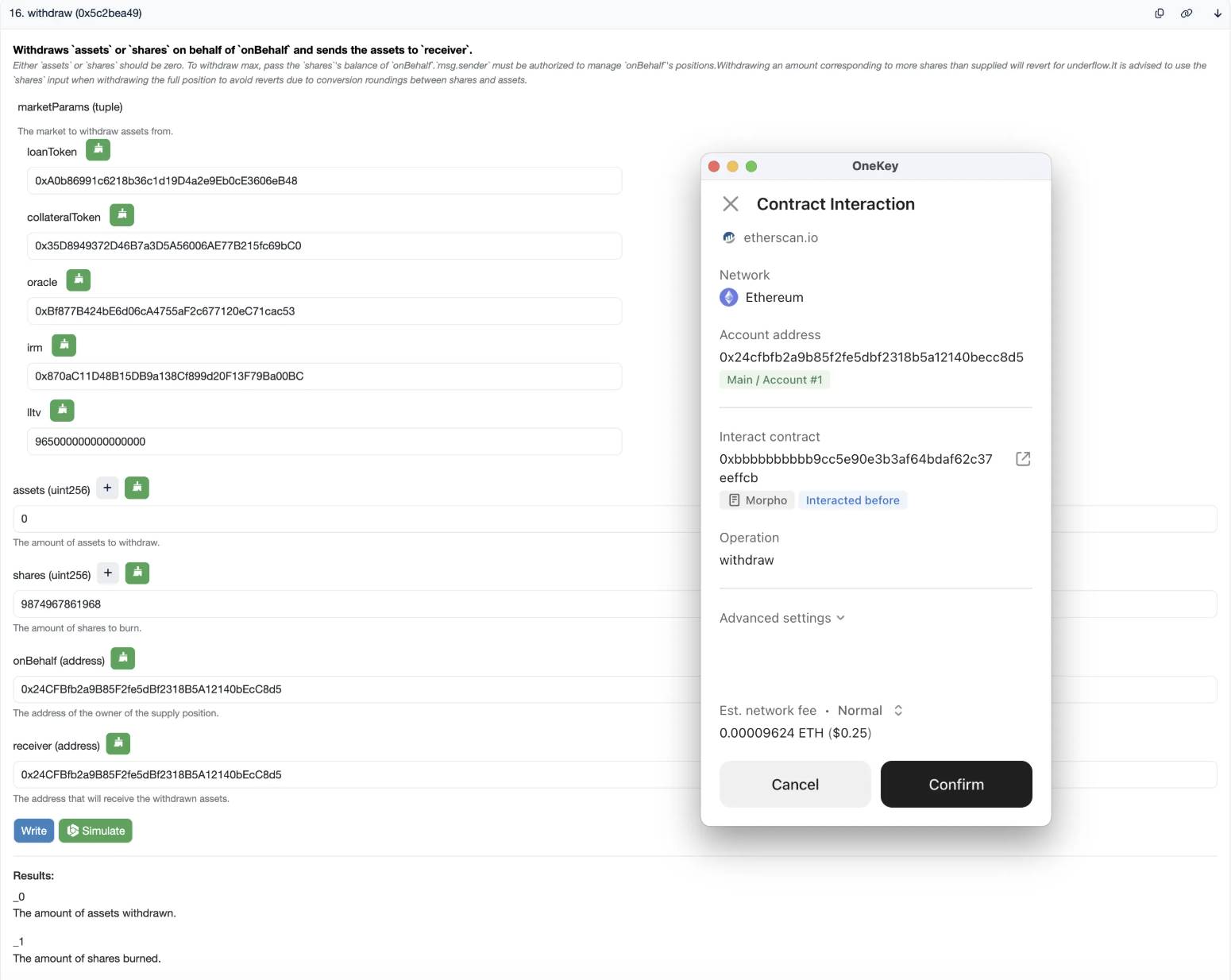
Step 5: Withdraw—go to Morpho contract
https://etherscan.io/address/0xbbbbbbbbbb9cc5e90e3b3af64bdaf62c37eeffcb#writeContract
Select Contract - WriteContract, then Connect to Web3
Fill in the above parameters sequentially. For the following:
Assets: Enter 0
Shares: Enter the number found in Step 4
onBehalf: Your deposit address
Receiver: Your receiving address
Data: Enter 0x
Click Write—ensure your wallet simulation matches expectations
If all goes well, both deposit and withdrawal are complete.
Join TechFlow official community to stay tuned
Telegram:https://t.me/TechFlowDaily
X (Twitter):https://x.com/TechFlowPost
X (Twitter) EN:https://x.com/BlockFlow_News
 @OKxiaohai