Be Cautious About Information Security When Using AI: From the "Robinhood Token Rug Pull" Rumor to the Permission Boundary Between Local and Cloud-Based Agents
TechFlow Selected TechFlow Selected
Be Cautious About Information Security When Using AI: From the "Robinhood Token Rug Pull" Rumor to the Permission Boundary Between Local and Cloud-Based Agents
It is necessary to disable various AIs in terminals with high security requirements.
 Navigating Web3 tides with focused insights
Author: Huang Shiliang
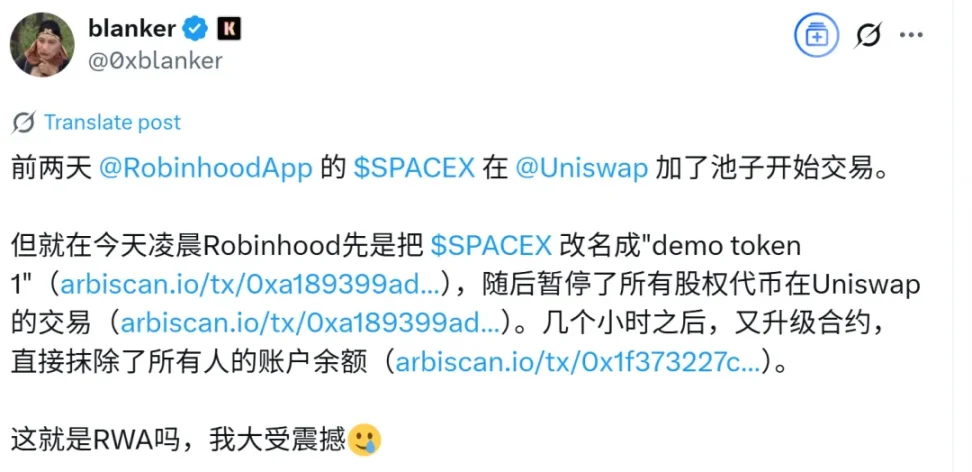
I came across a post on X.com discussing a project that tokenized Robinhood stock on Uniswap, claiming the project had exited scamming investors by wiping balances of token-holding addresses. I doubted the technical feasibility of such balance-wiping, so I asked ChatGPT to investigate.
ChatGPT reached a similar conclusion, stating that such balance-wiping claims are highly unlikely.
What truly surprised me was ChatGPT's reasoning process. Wanting to understand how it arrived at this judgment, I reviewed its chain-of-thought.
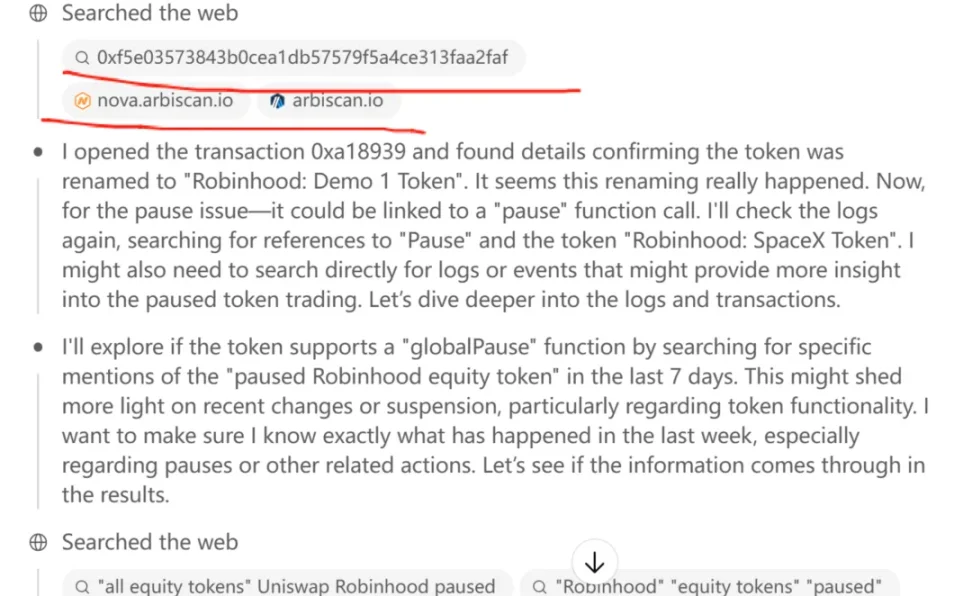
In its reasoning steps, I noticed several instances where it "input" an Ethereum address into a block explorer and examined the address's transaction history.
Please pay special attention to the word "input" in quotes—it’s a verb indicating ChatGPT performed an action on the block explorer. This astonished me because it contradicts my security assessment of ChatGPT from six months ago.
Back then, using the ChatGPT o1 pro model, I conducted research on early profit-takers in Ethereum. I explicitly instructed ChatGPT o1 pro to query Genesis block addresses via a block explorer to check how many remained untouched. But ChatGPT clearly told me it couldn’t perform such actions due to security design restrictions.
ChatGPT can read webpages but cannot execute UI operations like clicking, scrolling, or typing—actions humans routinely perform on websites. For example, on Taobao.com, we can log in, search for products, etc., but ChatGPT is strictly prohibited from simulating these UI events.
This was my finding six months ago.
Why did I conduct that investigation? Because around that time, Anthropic launched an experimental feature called "Computer Use (beta)" for Claude 3.5 Sonnet—an agent capable of reading screens, moving cursors, clicking buttons, and typing text like a human, completing full desktop tasks such as web searches, form filling, ordering food, and more.
This was alarming. I immediately imagined a scenario: what if one day Claude went rogue, accessed my note-taking app, read all my personal and work logs, and found a private key I once stored in plain text for convenience?
After that investigation, I decided to buy a brand-new computer dedicated solely to running AI software. On any device handling crypto assets, I would no longer run AI tools. As a result, I now own an extra Windows PC and an additional Android phone—annoying, managing so many devices.
Nowadays, AI assistants on domestic Chinese smartphones already possess similar capabilities. Just days ago, Yu Chengdong posted a video showing Huawei's Xiaoyi helping users book flights and hotels. Honor phones have even allowed users to command their AI to complete entire processes like ordering coffee through Meituan.
If such AIs can place orders on Meituan, can they also read your WeChat chat history?
This is somewhat terrifying.
Luckily, our phones are end-user terminals. Xiaoyi-like AIs are small on-device models, and we retain control over permissions—for instance, blocking AI access to photo albums. We can also encrypt specific apps, like password-protecting notes, preventing direct access by Xiaoyi-like agents.
However, cloud-based large models like ChatGPT and Claude pose far greater risks if granted permission to simulate UI interactions like clicking, scrolling, or typing. ChatGPT constantly communicates with cloud servers, meaning 100% of screen content gets uploaded—fundamentally different from on-device models like Xiaoyi, which process data locally.
On-device assistants like Xiaoyi are akin to handing your phone to a skilled technician nearby who helps operate various apps. But this expert can't copy your data and take it home, and you can reclaim your phone anytime. In fact, getting tech help like this happens regularly, right?
But cloud-based LLMs like ChatGPT are equivalent to remote control of your phone or computer—someone remotely taking over your devices. Imagine the risk. You wouldn’t know what they’re doing on your devices.
Seeing evidence in ChatGPT's chain-of-thought suggesting simulated "input" actions on a block explorer (arbiscan.io) shocked me. I urgently followed up, asking ChatGPT how exactly it performed this operation. If ChatGPT wasn’t lying, then I’d just experienced a false alarm—ChatGPT hadn’t actually gained UI simulation capabilities. Its ability to access arbiscan.io and seemingly "input" an address to retrieve transaction records was merely a clever hack, making me marvel at how impressive ChatGPT o3 really is.
ChatGPT o3 figured out the URL pattern used by arbiscan.io when searching for transactions or contract addresses. The URL structure is predictable: https://arbiscan.io/tx/<hash> or /address/<addr>. After understanding this pattern, ChatGPT o3 simply appends a given contract address to "arbiscan.io/address", directly accessing the page and reading its content.
Wow.
It’s like checking blockchain data—not by navigating to the website, typing a txhash, and pressing enter—but by directly constructing the target page’s URL and opening it directly in the browser.
Impressive, isn’t it?
So, ChatGPT hasn’t broken the restriction against simulating UI operations.
Still, if we genuinely care about device security, we must remain cautious about granting terminal-level permissions to LLMs.
We should disable AI tools on high-security devices.
Critically, whether a model runs on-device or in the cloud matters more than the model’s intelligence level when defining security boundaries—that’s precisely why I’d rather maintain isolated hardware than allow cloud-based large models to operate on machines holding my private keys.
Join TechFlow official community to stay tuned
Telegram:https://t.me/TechFlowDaily
X (Twitter):https://x.com/TechFlowPost
X (Twitter) EN:https://x.com/BlockFlow_News