A decade-long cybersecurity expert nearly fell victim—newest phishing attacks are spreading
TechFlow Selected TechFlow Selected
A decade-long cybersecurity expert nearly fell victim—newest phishing attacks are spreading
When these 10 warning signs appear, you may already be targeted by hackers.
 Navigating Web3 tides with focused insights
By Christoper Rosa
Translated by AididiaoJP, Foresight News
Even a Cybersecurity Expert Nearly Fell for This Scam
Last weekend, news emerged that a massive dataset containing 16 billion user credentials began circulating online—combining both previously leaked data and newly stolen login information. It remains unclear who updated and re-released this dataset. While much of the database consists of repackaged historical breaches, the recent refresh is deeply concerning. This dataset is considered one of the largest single collections of compromised accounts ever.
Cybercriminals are now leveraging this data to launch sophisticated attacks—and I became one of their targets.
The phishing attack targeting my personal devices and accounts on June 19 was the most intricate I've encountered in my decade-long career in cybersecurity. The attackers first created the illusion that my accounts were under simultaneous assault across multiple platforms, then impersonated Coinbase staff offering "assistance." They combined classic social engineering with coordinated tactics spanning SMS, phone calls, and forged emails—all designed to manufacture false urgency, credibility, and scale. The widespread and authoritative nature of this fabricated attack wave was precisely what made it so deceptive.
Below, I’ll reconstruct the attack step-by-step, detail the red flags I noticed, and share the protective measures I took. I'll also offer key lessons and practical advice to help crypto investors safeguard their assets amid an escalating threat landscape.
This case underscores how historical and newly leaked data can be weaponized for highly targeted, multi-channel attacks. It reaffirms the critical importance of layered security defenses, clear user communication protocols, and real-time response strategies. Both institutions and individual users can draw practical tools from this incident—including verification procedures, domain recognition habits, and response workflows—that help prevent momentary lapses from becoming major security breaches.
SIM Swap Attempt
The attack began around 3:15 PM Eastern Time on Thursday, when I received an anonymous text claiming someone was attempting to trick my mobile carrier into transferring my phone number—a tactic known as SIM swapping.
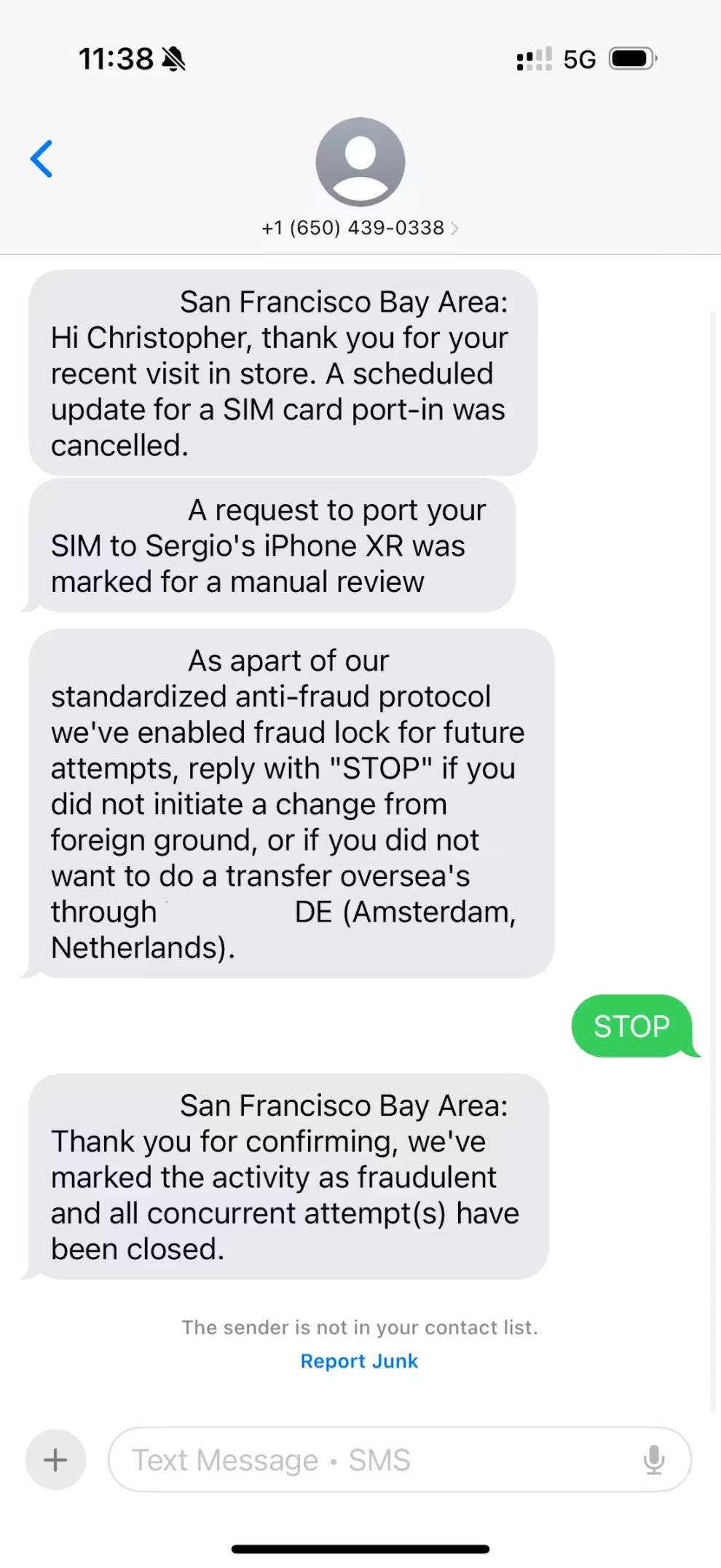
Note that this message did not come from a short code but from a regular 10-digit phone number. Legitimate companies typically use short codes for SMS communications. If you receive a message from an unknown standard-length number claiming to represent a company, it’s likely a scam or phishing attempt.
The messages also contained contradictory details. The first claimed the attempted breach originated in the San Francisco Bay Area, while subsequent ones cited Amsterdam.
A successful SIM swap is extremely dangerous because attackers could intercept one-time passcodes used by most services for password resets or account access. However, this wasn’t a genuine SIM swap—it was merely a setup for a more sophisticated deception to follow.
One-Time Passcodes and Password Resets
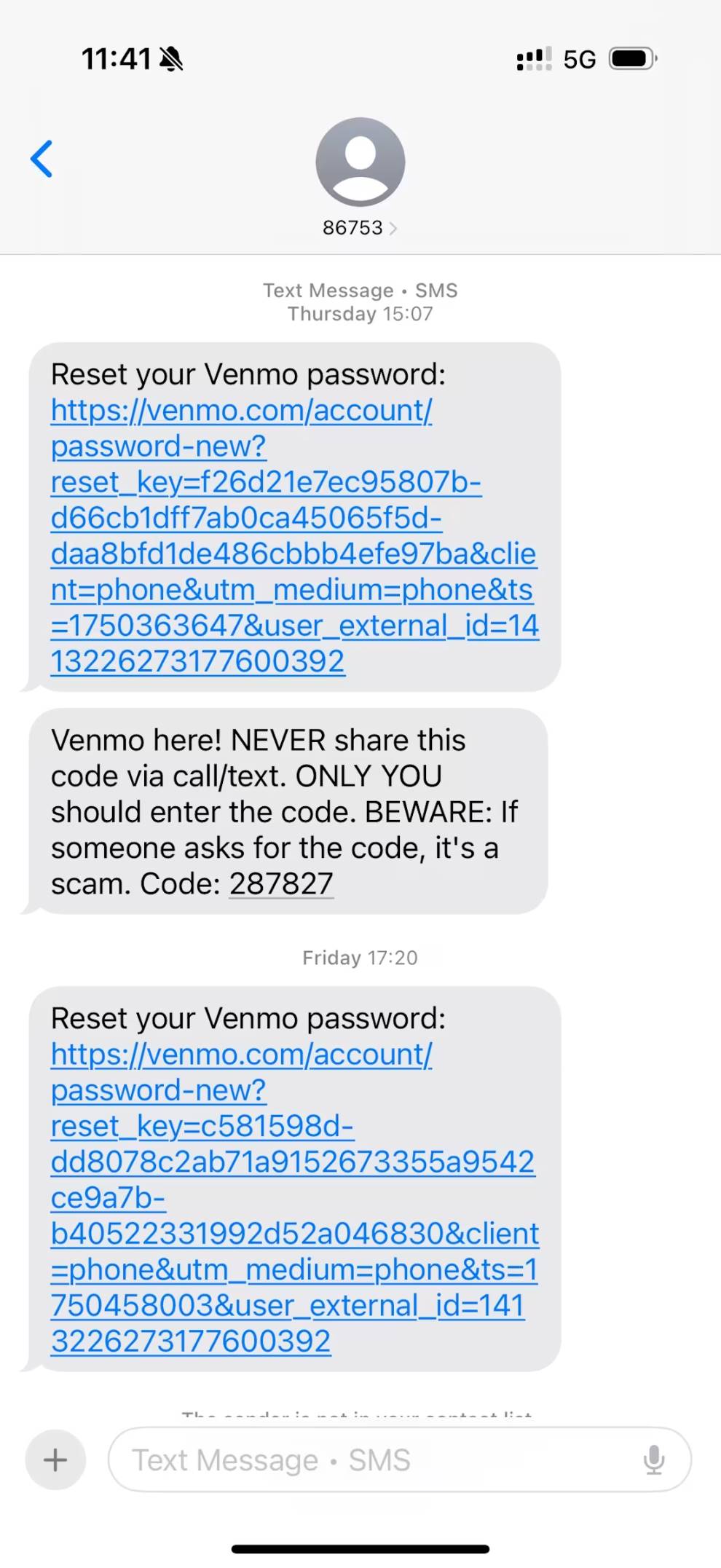
The attack escalated quickly. I started receiving one-time passcodes allegedly from Venmo and PayPal via SMS and WhatsApp. These were intended to make me believe someone was actively trying to log into my financial accounts. Unlike the suspicious carrier texts, these codes actually came from legitimate-looking short codes.
The Coinbase Phishing Call
About five minutes after receiving the texts, I got a call from a California number. The caller, identifying himself as “Mason,” spoke with a native American accent and claimed to be from the Coinbase Investigation Team. He said there had been over 30 attempts in the past 30 minutes to reset my password and gain access to my account through the Coinbase chat interface. According to “Mason,” the attacker had passed the first layer of authentication but failed at the second factor.
He told me the intruder provided the last four digits of my ID, full driver’s license number, home address, and full name—but couldn't supply the complete ID number or the last four digits of the bank card linked to my Coinbase account. Mason explained that this inconsistency triggered an alert within Coinbase's security team, prompting them to contact me directly for verification.
Reputable exchanges like Coinbase never initiate outbound calls unless you’ve submitted a support request via their official website. For more information on proper customer service practices, refer to this Coinbase documentation.
Security Review
After delivering this “bad news,” Mason proposed securing my account by blocking additional attack vectors. He began by discussing API connections and linked wallets, claiming he would revoke access to reduce risk. He listed several integrations including Bitstamp, TradingView, and MetaMask wallets—some of which I didn’t recognize, though I assumed they might be old configurations I’d forgotten.
At this point, my guard was lowering, and I even felt reassured by what appeared to be proactive protection from Coinbase.
Notably, Mason hadn’t yet asked for any personal information, wallet addresses, two-factor codes, or one-time passwords—the usual hallmarks of phishing scams. The interaction felt secure and preventive rather than exploitative.
Covert Pressure Tactics
The first pressure tactic emerged shortly after, using manufactured urgency and vulnerability. After completing the supposed “security review,” Mason claimed that due to my account being flagged as high-risk, the account protection benefit of my Coinbase One subscription had been terminated. This meant my assets in the Coinbase Wallet were no longer covered by FDIC insurance, and if funds were stolen during an attack, I wouldn’t be eligible for compensation.
In hindsight, this should have been an obvious red flag. Unlike bank deposits, cryptocurrency assets are never protected by FDIC insurance. While Coinbase may hold customer USD balances in FDIC-insured banks, the exchange itself isn’t an insured institution.
Mason further warned that a 24-hour countdown had begun, after which my account would be locked. Unlocking it would require a complex and time-consuming process. Even more alarming, he claimed that if the attacker obtained my full Social Security Number during this period, they could potentially steal funds even while the account was frozen.
Later, I consulted Coinbase’s actual support team and learned that locking the account is in fact their recommended security measure. The unlocking process is straightforward and secure: submit a photo ID and a selfie; once verified, access is quickly restored.
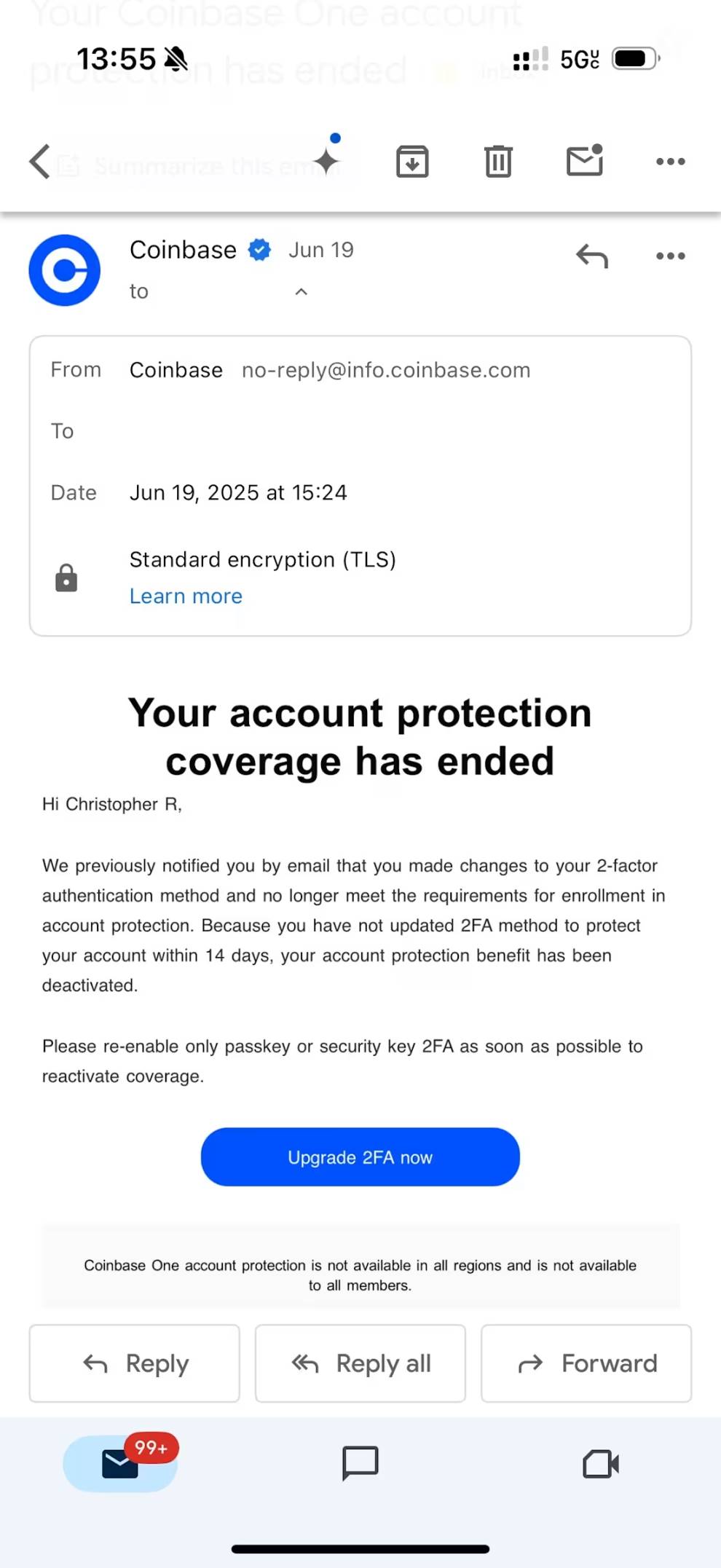
Shortly afterward, I received two emails. The first was a confirmation for subscribing to Coinbase Bytes—a legitimate newsletter automatically sent when someone submits an email via the official site form. This was clearly an attempt to confuse me with a real Coinbase email to enhance the scam’s credibility.
The second email was far more disturbing. Sent from [email protected], it stated that my Coinbase One account protection had been canceled. This message was particularly convincing because it appeared to originate from a legitimate Coinbase domain—if it had come from a suspicious domain, it would have been easy to spot. But seeing it appear under an official address made it seem authentic.
Recommended Remediation Steps
Mason then suggested transferring my assets to a product called Coinbase Vault—a multisig wallet—for enhanced security. He even encouraged me to Google “Coinbase Vault” to verify it was a long-standing, legitimate service offered by Coinbase.
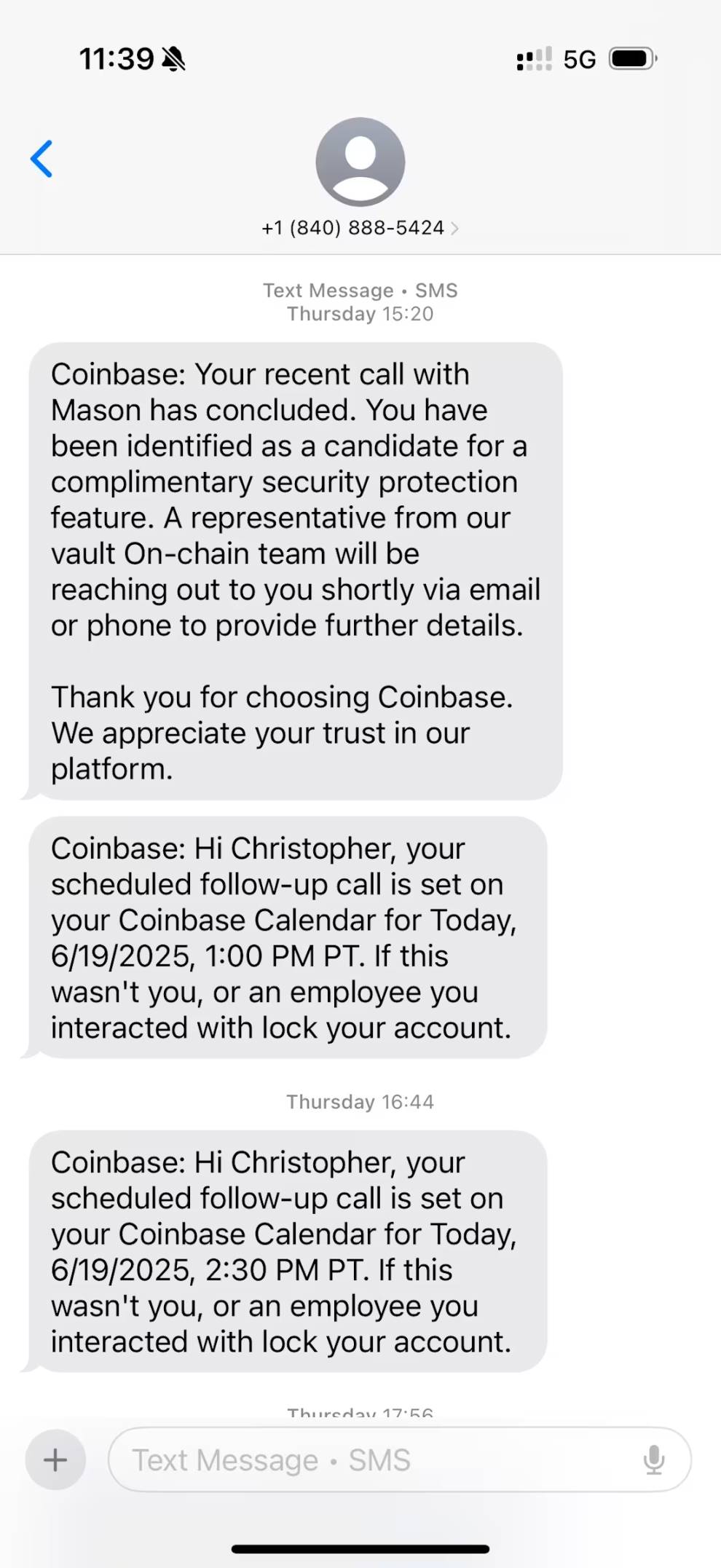
I expressed hesitation about making such a significant change without further investigation. He responded understandingly, encouraging independent research, and supported my decision to first contact my carrier to prevent SIM swapping. He said he’d call back in 30 minutes to continue the next steps. Immediately after hanging up, I received a text confirming the call and scheduled follow-up.
Callback and Coinbase Vault
After confirming with my carrier that no SIM transfer attempts had occurred, I immediately changed all my account passwords. True to his word, Mason called back, and we proceeded to discuss next steps.
By this time, I had confirmed that Coinbase Vault is indeed a real service offered by Coinbase—a custodial solution featuring multi-signature authorization and a 24-hour withdrawal delay for added security, though not equivalent to a true self-custodied cold wallet.
Mason then sent a link to vault-coinbase.com, claiming it allowed me to review the security settings discussed during our initial call. Once reviewed, I could proceed to transfer my assets into the Vault. Here, my professional cybersecurity instincts finally kicked in.
After entering the case number he provided, the page displayed options labeled “API Connections Removed” and a button to “Create Coinbase Vault.” I immediately checked the site’s SSL certificate and discovered the domain—registered only a month prior—had no affiliation with Coinbase whatsoever. While SSL certificates often lend an air of legitimacy, legitimate corporate certificates always clearly identify the organization. This mismatch caused me to halt all actions immediately.
Coinbase explicitly states that it will never use unofficial domains. Even third-party services would operate under subdomains like vault.coinbase.com. Any action involving your exchange account should only be conducted through the official app or website.
I voiced my concerns to Mason, emphasizing that I would only proceed via the official Coinbase app. He argued that doing so would trigger a 48-hour delay, whereas my account would be locked within 24 hours. I again refused to rush, prompting him to claim he would escalate my case to a “Tier 3 Support Team” to reinstate my Coinbase One protection.
After hanging up, I continued verifying the security of other accounts, growing increasingly uneasy.
Call from the “Tier 3 Support Team”
About half an hour later, a number from Texas rang. Another individual with a native American accent identified himself as a Tier 3 investigator handling my Coinbase One restoration request. He claimed the review process would take seven days, during which my account would remain uninsured. He also “helpfully” suggested creating separate Vaults for different blockchain assets—a seemingly professional recommendation, yet notably vague, referring only generally to “Ethereum, Bitcoin, etc.” without specifying actual holdings.
He mentioned sending chat logs to the legal department and then pivoted back to promoting Coinbase Vault. As an alternative, he recommended a third-party wallet called SafePal. Although SafePal is indeed a legitimate hardware wallet provider, this was clearly a trust-building ploy.
When I raised concerns about the vault-coinbase.com domain again, he attempted to reassure me. At this point, the attackers likely realized they couldn’t succeed and ultimately abandoned the phishing attempt.
Contacting Real Coinbase Support
Immediately after ending the second fraudulent call, I submitted a support request via Coinbase.com. A genuine support representative quickly confirmed there were no abnormal login attempts or password reset requests on my account.
They advised immediately locking the account and provided a channel to submit all attack details to their investigation team. I shared all fraudulent domains, phone numbers, and attack vectors, specifically asking about the sender permissions for [email protected]. The agent acknowledged this was a serious issue and promised a thorough investigation by their security team.
Always contact exchange or custodial service support exclusively through official channels. Legitimate organizations never initiate unsolicited outreach to users.
Lessons Learned
Though I narrowly avoided falling victim, this experience left me deeply unsettled—even as a former cybersecurity professional. Without my training, I might well have been scammed. Had this been a random cold call, I would have hung up instantly. It was the carefully orchestrated sequence of events, creating urgency and authority, that made this phishing attack so dangerous.
I’ve distilled the following warning signs and protective recommendations to help crypto investors protect their funds in today’s evolving threat environment.
Red Flags
Coordinated False Alerts Creating Chaos and Urgency
Attackers initiated a series of SIM swap alerts and one-time passcode requests (delivered via SMS and WhatsApp) from services like Venmo and PayPal to create the illusion of simultaneous attacks across multiple platforms. These could likely be triggered with just my phone number and email address—information easily obtainable. At this stage, I suspect the attackers did not yet possess deeper account data.
Mixing Short Codes and Standard Phone Numbers
The phishing messages used a combination of SMS short codes and regular-length phone numbers. While businesses commonly use short codes for official communication, attackers can spoof or recycle them. Crucially, legitimate services never send security alerts from standard 10-digit numbers. Messages from such numbers should always be treated with suspicion.
Requests to Operate Through Unofficial or Unfamiliar Domains
Attackers directed me to a phishing site hosted on vault-coinbase.com—a domain that superficially appears valid but has no connection to Coinbase. Always verify domain names and SSL certificates before entering any information. Sensitive operations should only occur on official company domains or applications.
Unsolicited Calls and Follow-Up Communications
Coinbase and most financial institutions never call users unless a support ticket has been initiated through official channels. Receiving a call from someone claiming to be part of a “Tier 3 investigation team” is a major red flag—especially when paired with fear-based tactics and detailed account protection explanations.
Unsolicited Emergencies and Consequence Warnings
Phishers frequently exploit fear and urgency to prompt hasty decisions. In this case, threats of account lockout, asset theft, and loss of insurance coverage were textbook social engineering techniques.
Requests to Bypass Official Channels
Any suggestion to avoid using a company’s official app or website—especially when framed as “faster” or “more secure”—should raise immediate suspicion. Attackers often provide links that mimic legitimacy but lead to malicious domains.
Unverified Case Numbers or Support Tickets
Providing a “case number” to access a custom-built phishing portal creates an illusion of legitimacy. No legitimate service requires users to verify identity or perform actions through external, case-numbered links.
Mixing Accurate and Inaccurate Information
Attackers blended real personal details (e.g., email address or partial SSN) with vague or incorrect information to boost credibility. Any inconsistencies or ambiguous references to “chains,” “wallets,” or “security reviews” should raise alarms.
Using Real Company Names in Alternative Suggestions
Referencing trusted brands like SafePal—even if legitimate—is often a distraction tactic. It gives the appearance of choice and legitimacy while steering victims toward malicious outcomes.
Excessive Helpfulness Without Verification
The attackers were patient, encouraged independent research, and initially refrained from requesting sensitive data—mimicking real support agents to appear professional. Any unsolicited help that seems “too good to be true” should be treated with skepticism.
Proactive Protection Measures and Recommendations
Enable Transaction-Level Verification on Exchanges
Activate two-factor authentication and verification codes within exchange settings. This ensures every fund transfer or withdrawal requires real-time approval on a trusted device, preventing unauthorized transactions.
Always Contact Service Providers Through Verified, Official Channels
In this case, I contacted my mobile carrier and Coinbase by logging directly into their official platforms and submitting support tickets. This is the safest and only appropriate way to interact with customer support when account security is at stake.
Exchange Support Staff Will Never Ask You to Move, Access, or Secure Funds
They will never request your wallet recovery phrase, ask for your two-factor codes, or attempt remote access or software installation on your device.
Consider Using Multisig or Cold Wallet Storage Solutions
Multisig wallets require multiple approvals before authorizing transactions, while cold wallets keep private keys completely offline. Both methods effectively protect long-term holdings from remote phishing or malware attacks.
Bookmark Official URLs and Avoid Clicking Links from Unsolicited Messages
Manually typing URLs or using trusted bookmarks is the best defense against domain spoofing.
Use a Password Manager to Detect Suspicious Sites and Maintain Strong Passwords
Password managers help prevent phishing by refusing to auto-fill credentials on fake or unrecognized domains. Regularly rotate passwords, and change them immediately if you suspect compromise.
Regularly Audit Connected Apps, API Keys, and Third-Party Integrations
Revoke access for any apps or services you no longer use or don’t recognize.
Enable Real-Time Account Alerts Where Available
Notifications for logins, withdrawals, or security setting changes provide critical early warnings of unauthorized activity.
Report All Suspicious Activity to Official Support Teams
Early reporting helps prevent broader attacks and contributes to overall platform security.
Conclusion
For financial institutions, IT security teams, and executives, this attack highlights how historical data—when repurposed and combined with real-time social engineering—can enable hackers to bypass even the most robust security controls. Threat actors are no longer relying solely on brute-force methods but are executing coordinated, cross-channel strategies that mimic legitimate workflows to gain trust and deceive users.
We must not only defend systems and networks but also learn to recognize threats and act to protect ourselves. Whether working at a crypto firm or managing digital assets at home, everyone must understand how individual vulnerabilities can escalate into systemic risks.
To counter these threats, organizations must implement layered defenses—including domain monitoring, adaptive authentication, anti-phishing MFA, and clear communication protocols. Equally important is cultivating a culture of cybersecurity literacy where every employee—from engineers to executives—understands their role in protecting the organization. In today’s environment, security is not just a technical function but a shared responsibility across individuals and entire organizations alike.
Join TechFlow official community to stay tuned
Telegram:https://t.me/TechFlowDaily
X (Twitter):https://x.com/TechFlowPost
X (Twitter) EN:https://x.com/BlockFlow_News
 @galaxyhq