One Article to Summarize the 10 Hidden Gems of OKX Web3 Tools
TechFlow Selected TechFlow Selected
One Article to Summarize the 10 Hidden Gems of OKX Web3 Tools
Save it!
 Navigating Web3 tides with focused insights
Walking through the on-chain world feels like an endless adventure, where every step brings discovery and surprise. Here, code intertwines with mathematics, innovation merges with tradition, painting vibrant scenes that reveal the infinite charm and potential of blockchain technology.
The OKX Web3 wallet not only provides a one-stop gateway to the on-chain world but also offers a rich collection of Web3 tools to help users explore and participate in the Web3 ecosystem more efficiently while enhancing their overall user experience. Users can access the toolkit via the asset dashboard on the OKX Web3 wallet web platform, or through the OKX Web3 wallet browser extension. This article will detail 10 hidden gems within the OKX Web3 toolkit—let’s embark on this journey together!
Feature One: Faucet Center
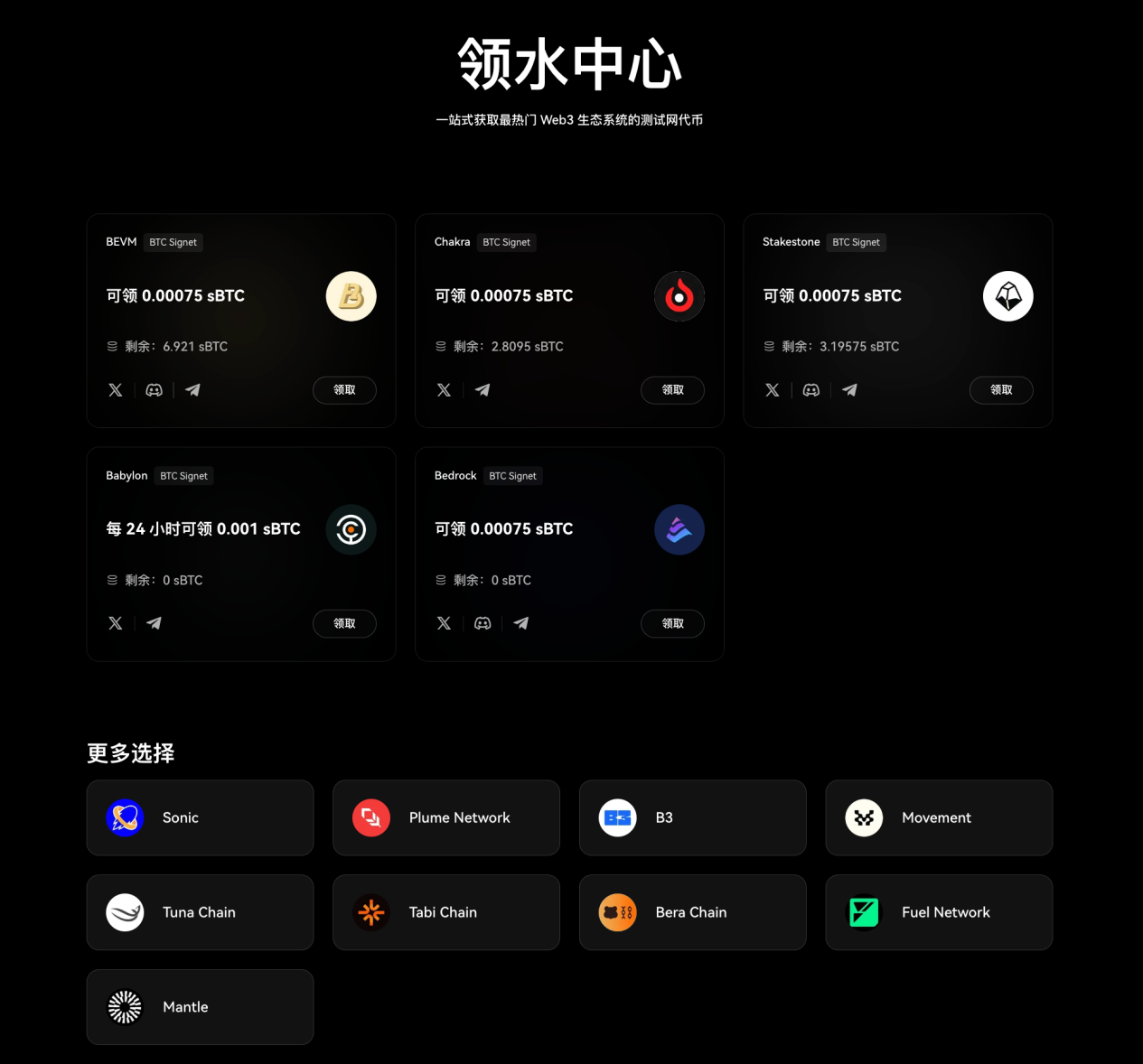
The OKX Web3 Faucet Center provides tokens to help users develop, test, and optimize smart contracts on testnets, as well as obtain testnet tokens from the most popular Web3 ecosystems in one place. This exclusive faucet channel is not only fast and stable but also significantly improves users’ token claiming efficiency.
Currently, it supports claiming testnet tokens from various popular projects, with more promising new ecosystem projects to be added continuously, helping users discover emerging opportunities early. Note that the Faucet Center currently only supports mnemonic phrase wallets and does not yet support private key wallets.
Feature Two: Inscription Center
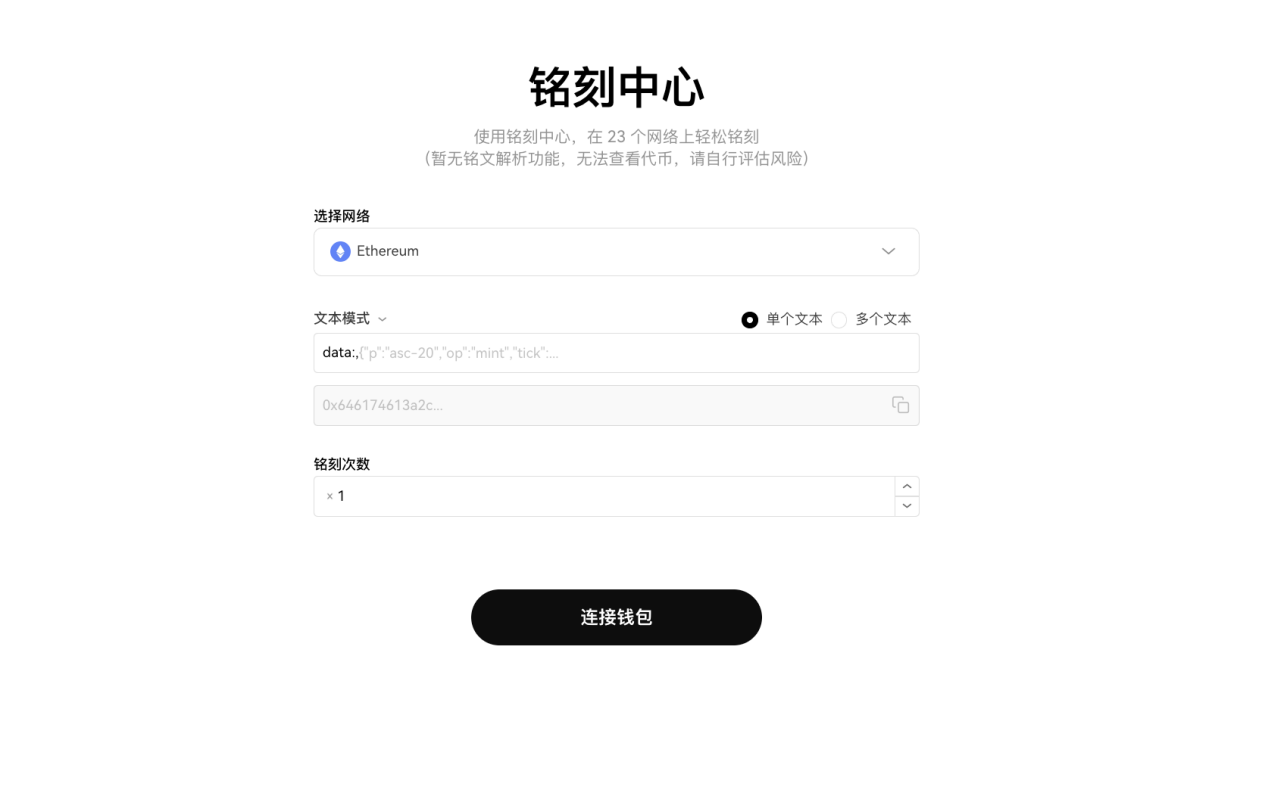
The OKX Web3 Wallet Inscription Center allows users to batch inscribe with a single signature, supporting up to 50 inscriptions at once. Users can choose between text or hexadecimal mode to inscribe single or multiple texts on BTC and major EVM-compatible public chains. The tool is free to use without importing private keys, making it more secure and convenient. Simply enter the inscription name and specify the number of inscriptions to get started—simple and secure.
Currently, OKX Web3 Wallet is the only tool that supports inscription on both mobile and web platforms anytime, anywhere, aiming to help users fully engage with the inscription ecosystem. It already supports Bitcoin inscriptions, Ethereum inscriptions, Solana inscriptions, and more. In the future, the inscription tool will support additional heterogeneous chains.
Feature Three: Batch Transfer
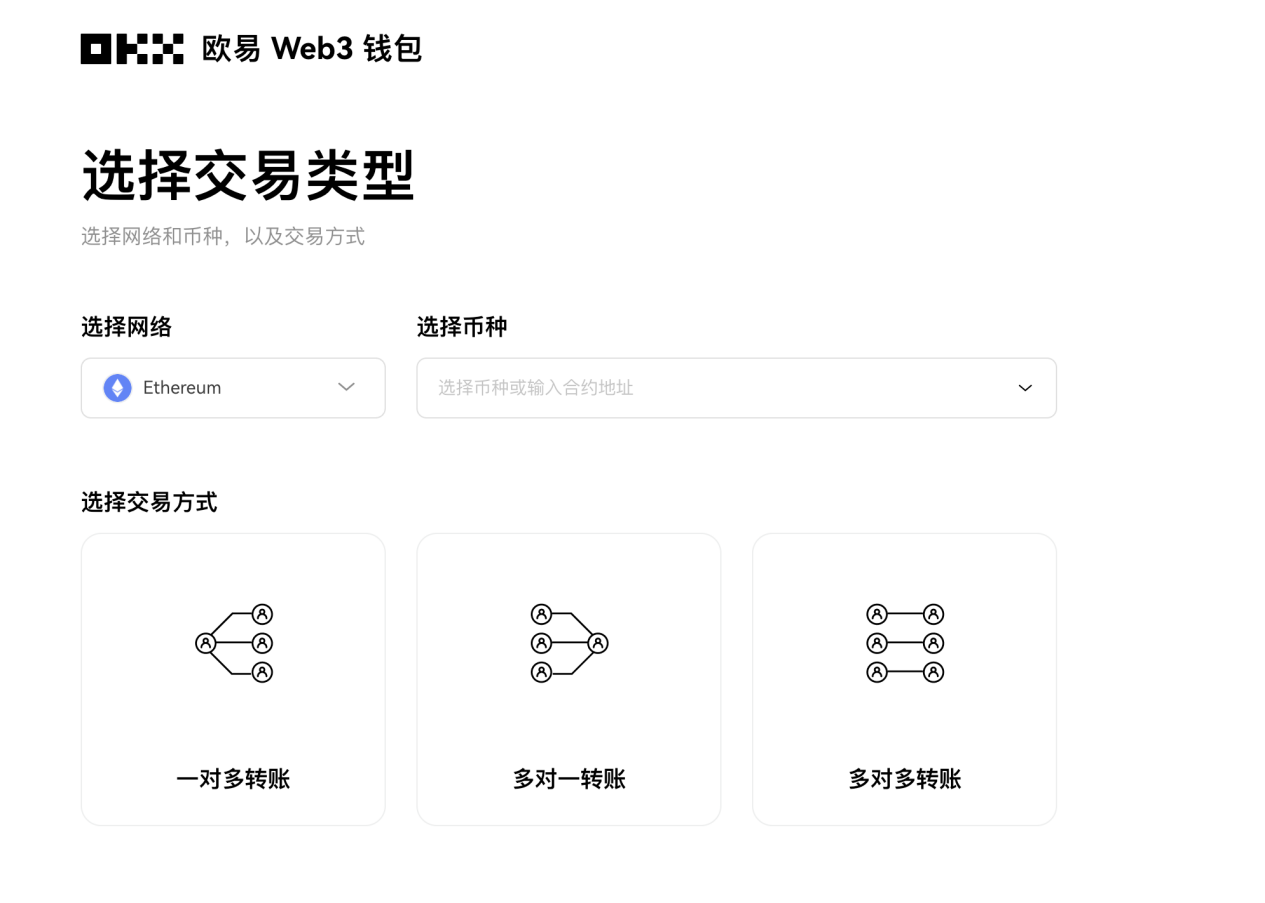
Batch Transfer is a convenient auxiliary tool provided by the OKX Web3 Wallet, enabling secure and easy bulk transfers without importing private keys into third-party tools. It currently supports one-to-many, many-to-one, and many-to-many transfer types. Users can freely select transaction types and send multiple transactions with a single signature, each carrying a unique transaction ID—making it more professional, secure, and convenient. Additionally, Batch Transfer now supports all EVM networks including Ethereum, zkSync, Optimism, Polygon, OKTC, and BNB Chain, with plans to expand support to more networks such as Bitcoin, Solana, SUI, and TRON in the future.
Users need to select the desired network, token, and transaction type, ensuring the sending address has sufficient gas and holds the corresponding token. Then, they can input sender and receiver addresses via batch selection, paste, or file import, and set quantities and other transaction parameters. After initiating the transfer, users can pause or stop it at any time. Upon completion, they can view transaction details or download the transaction history.
Feature Four: Batch Account Creation
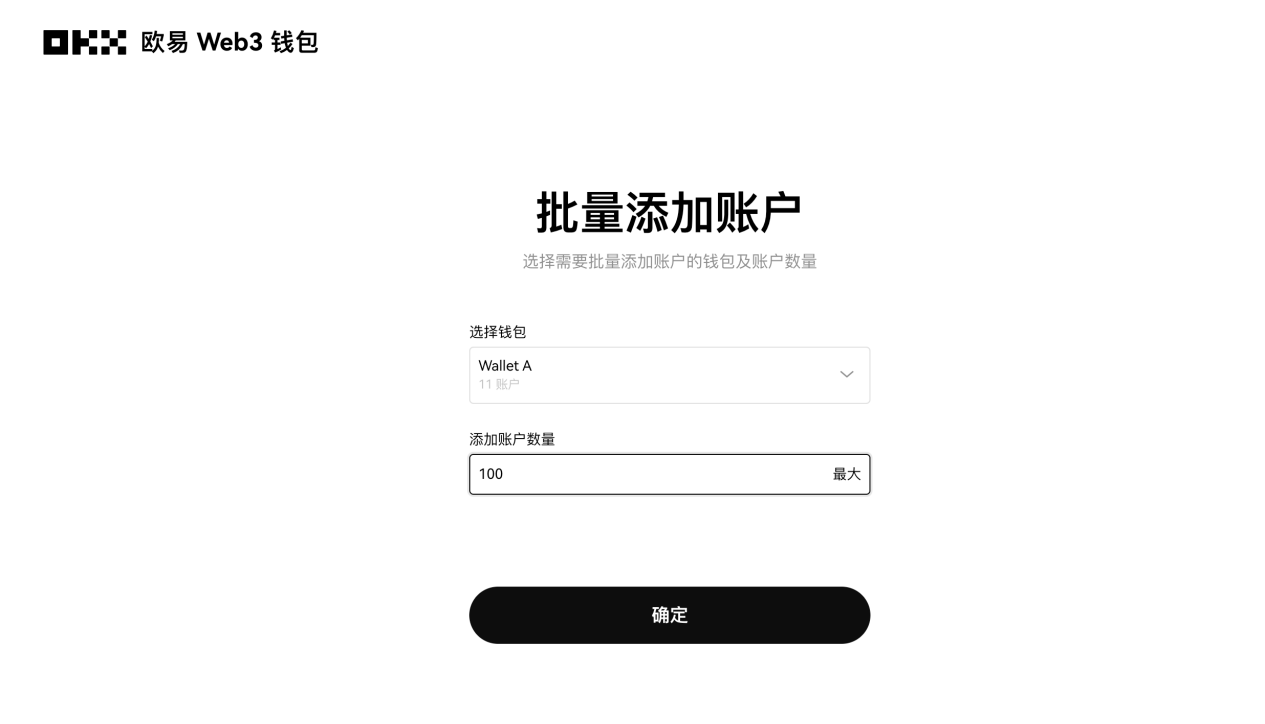
The Batch Account Creation feature in OKX Web3 Wallet allows users to create multiple accounts at once instead of manually creating them one by one. This function is especially valuable for users managing large numbers of accounts, such as developers, traders, and enterprise users. With this feature, users can quickly generate multiple wallet addresses, streamlining large-scale asset management, testing, and deployment operations, greatly improving operational efficiency.
To use it, users simply select the desired Web3 wallet, enter the number of accounts needed, and click confirm to instantly generate multiple new accounts. Currently, the OKX Web3 Wallet supports creating up to 499 accounts in one batch. Once created, these accounts immediately appear in the wallet's account list, where users can configure account names and other settings.
Feature Five: Batch Private Key Import
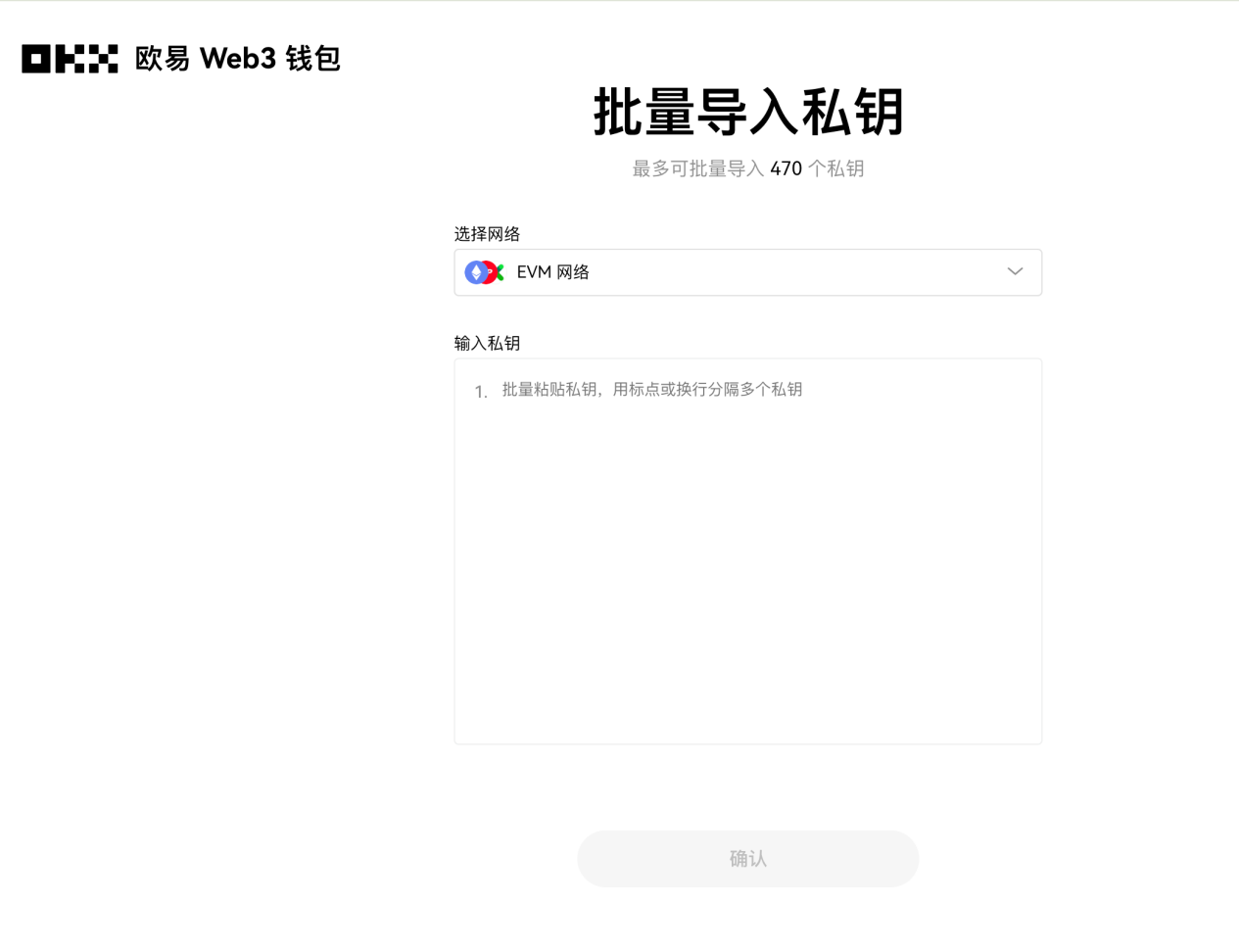
The Batch Private Key Import feature allows users to import multiple private keys into the OKX Web3 Wallet at once, simplifying the process of managing crypto assets and increasing efficiency when handling numerous wallets. Users can select networks such as EVM-based chains, Bitcoin, or Solana, then paste private keys in bulk, ensuring each account’s private key is correctly imported and accessible for asset management before confirming the action.
Note that each private key must follow a specific format so the wallet application can properly read and process them. OKX Web3 Wallet supports separating multiple private keys using punctuation marks or line breaks. Additionally, users should ensure all relevant data and private keys are backed up before performing batch imports to prevent operational errors, data loss, or leaks.
Feature Six: Download Wallet Addresses
The Download Wallet Addresses feature is highly practical, allowing users to easily export and save their wallet address information, saving time otherwise spent manually recording or entering addresses. By simply downloading and saving the file, users can quickly access and use all necessary address details, improving operational efficiency. However, downloaded wallet address files must be stored securely to prevent unauthorized access.
With the OKX Web3 Wallet’s Download Wallet Addresses feature, users can one-click download all wallet addresses in CSV format for easy management. This is particularly important for users managing multiple addresses, enabling quick retrieval and use of required information. Moreover, downloading address data allows users to perform regular local backups or enables seamless import during asset migration and management.
Feature Seven: Solana Meme Coin Hunter
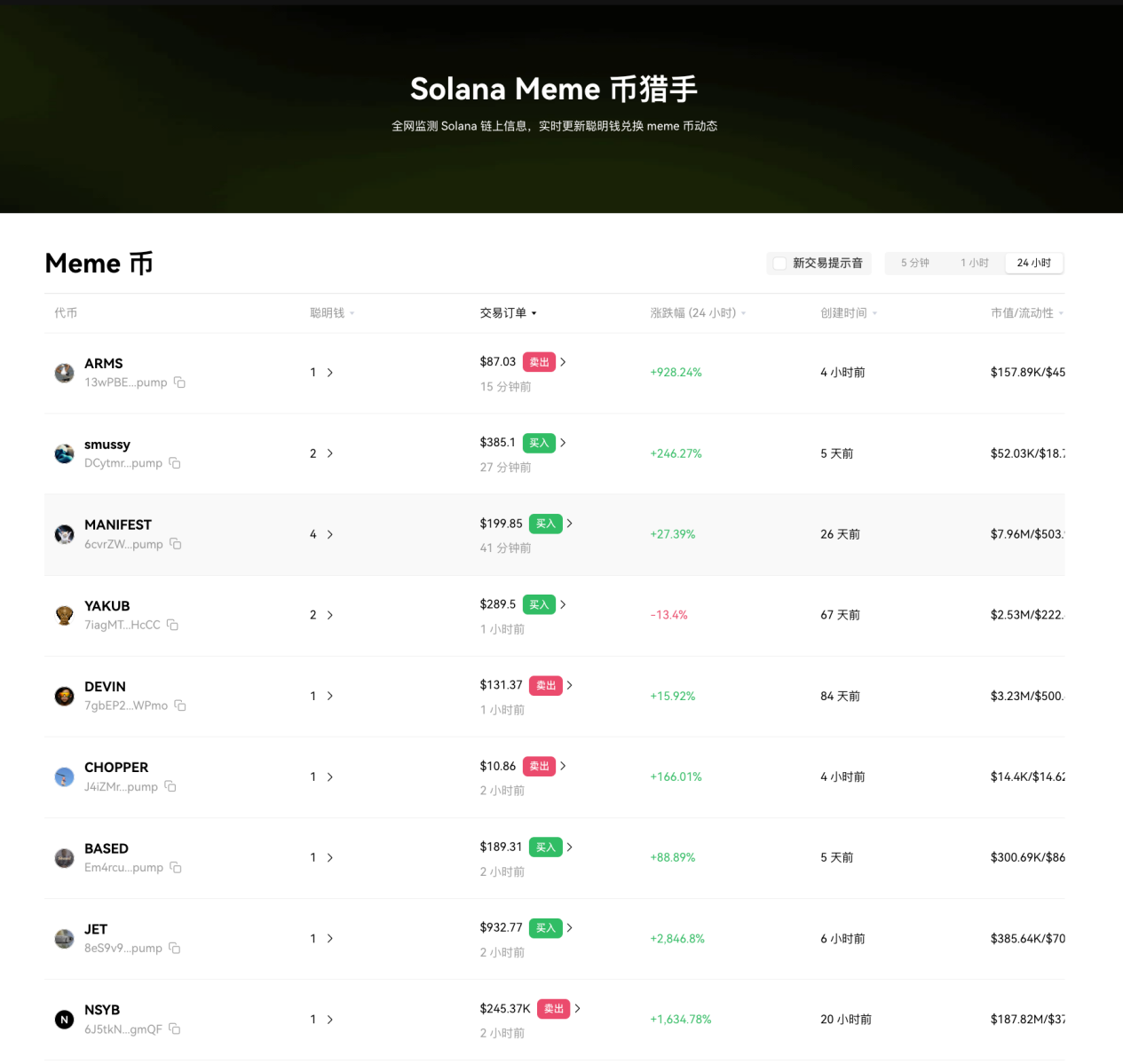
The OKX Web3 Wallet’s Solana Meme Coin Hunter monitors Solana blockchain activity across the network and updates in real-time on "smart money" flows, aiming to help users identify potential trading opportunities as early as possible. Future versions of the Solana Meme Coin Hunter will continue to upgrade, adding display of token-level metrics to provide users with more insights.
According to OKX, the platform only displays Solana Meme projects and related information. This content is not investment advice, nor is it a recommendation or invitation to trade any digital asset or adopt any trading strategy. Meme projects carry high risk—investors should proceed with caution.
Feature Eight: Runes Asset Split and Merge Tool
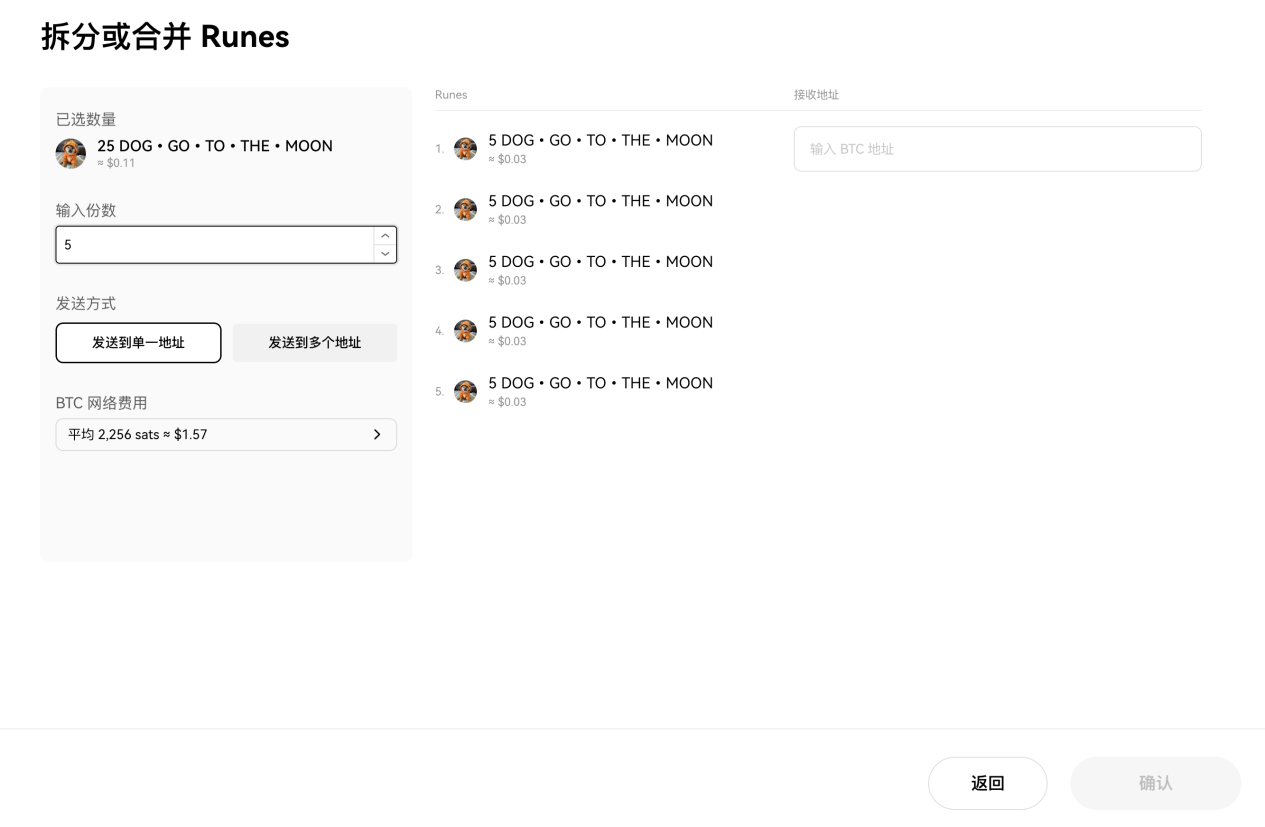
According to official announcements, OKX Web3 Wallet has launched a Runes asset split and merge tool to further enhance user experience. With this tool, users can merge or split Runes assets within their address. During splitting, specified Runes assets can be divided equally into up to 10 portions, with each portion assigned to a designated recipient address.
Currently, this tool is available only on the OKX Web3 Wallet web and browser extension platforms. Web users can access it via the toolbar on the Web3 homepage. Extension users can find and use the tool within the Web3 wallet’s toolkit.
Feature Nine: Gas Monitor
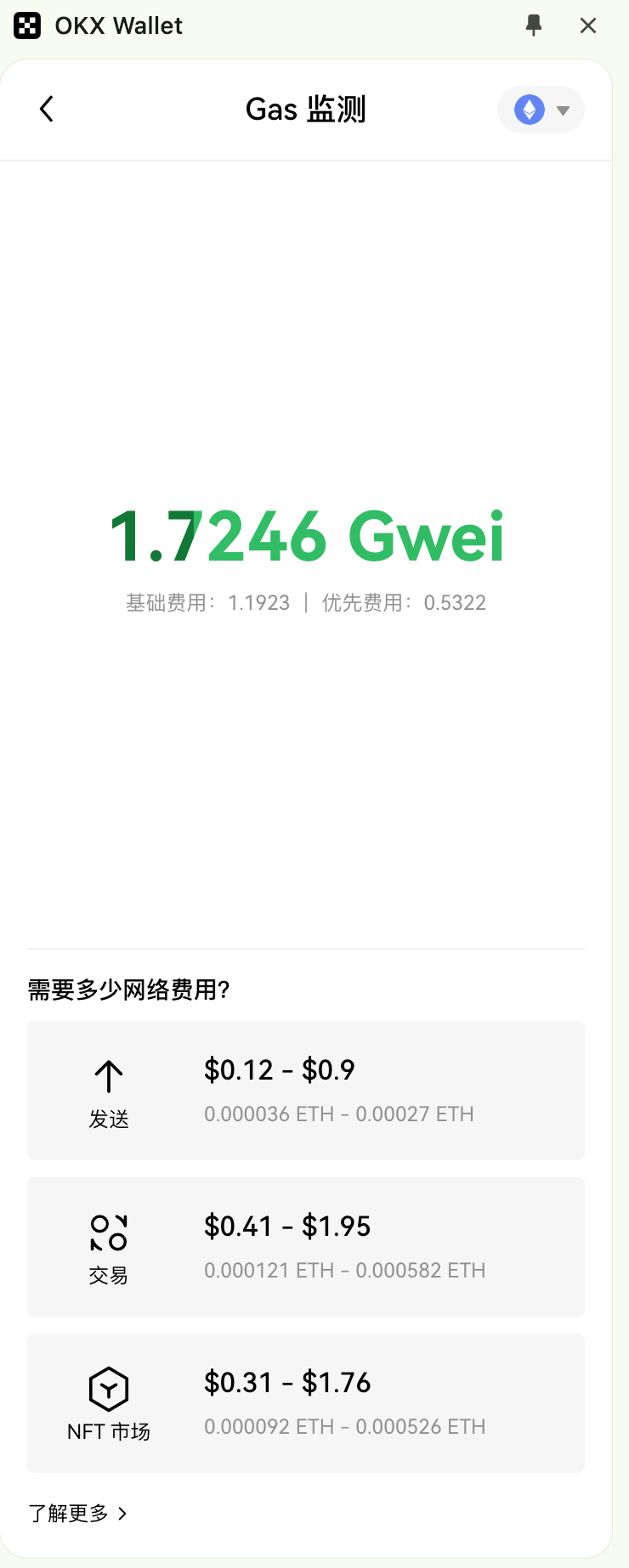
The Gas Monitor is a tool within the OKX Web3 Wallet that tracks and analyzes gas fee conditions on blockchain networks in real time. It provides current gas prices, network congestion status, and fee predictions, helping users formulate appropriate transaction strategies and budget for fees to ensure smooth transactions and cost control.
The OKX Web3 Wallet Gas Monitor displays two types of fees—base fee and priority fee—and shows corresponding gas costs for different scenarios such as sending, swapping, and NFT marketplace activities, meeting diverse user needs. By effectively monitoring and managing gas fees, users can reduce unnecessary expenses and improve transaction success rates.
Feature Ten: Batch Account Renaming
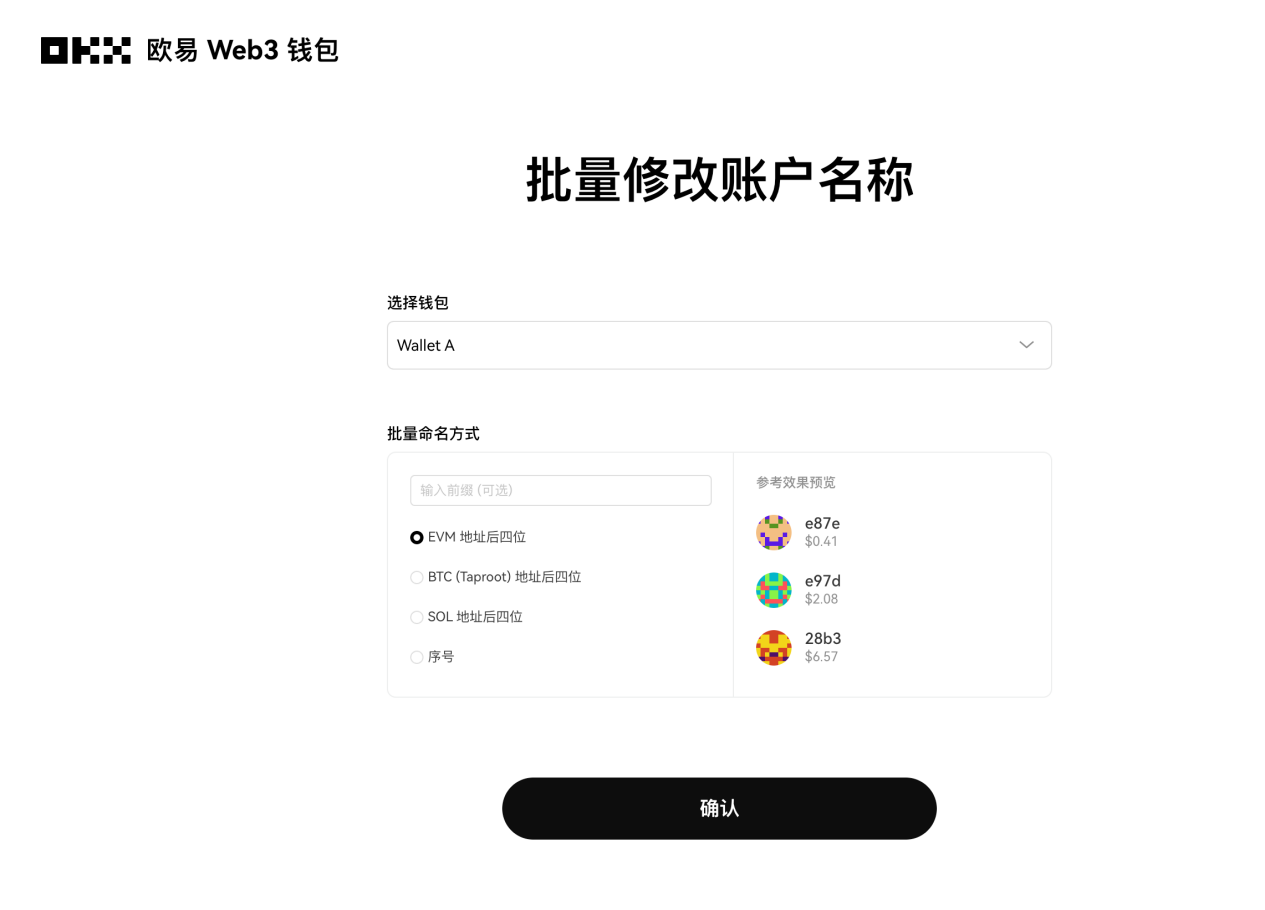
The Batch Account Renaming feature allows users to rename multiple wallet accounts at once rather than editing each manually. This function is particularly useful for users managing a large number of accounts, such as major exchanges, investment institutions, or blockchain developers. With batch renaming, users can quickly standardize account labels, improving management efficiency and organization.
Using the OKX Web3 Wallet’s Batch Account Renaming feature, users select the accounts to rename and choose a naming method, then click confirm to complete the update. Once confirmed, the system updates all selected account names simultaneously and displays the updated list.
Currently, the OKX Web3 Wallet web platform supports the first eight features. The OKX Web3 Wallet browser extension supports all features except the Faucet Center, Inscription Center, and Solana Meme Coin Hunter.
That’s it! We’ve introduced many fun and useful features from the OKX Web3 toolkit. If you're interested, go ahead and try them out now!
Disclaimer
This article is for informational purposes only and should not be considered (i) investment advice or recommendation; (ii) an offer or solicitation to buy, sell, or hold digital assets (including NFTs or others); or (iii) financial, accounting, legal, or tax advice. We do not guarantee the accuracy, completeness, or usefulness of the information provided. Digital assets (including stablecoins and NFTs) are subject to market volatility, involve high risks, may depreciate, and could become worthless. You should carefully consider whether trading or holding digital assets is suitable for you based on your financial situation and risk tolerance. Please consult your legal/tax/investment professionals regarding your specific circumstances. Not all products are available in all regions. The OKX Web3 Wallet and its derivative services are governed by separate terms of service. You are solely responsible for understanding and complying with applicable local laws and regulations.
Join TechFlow official community to stay tuned
Telegram:https://t.me/TechFlowDaily
X (Twitter):https://x.com/TechFlowPost
X (Twitter) EN:https://x.com/BlockFlow_News
 OKX
OKX