Tutorial | B.AI Skills: Minimal Deployment and Operation Guide to Infuse Financial DNA into AI Agents
TechFlow Selected TechFlow Selected
Tutorial | B.AI Skills: Minimal Deployment and Operation Guide to Infuse Financial DNA into AI Agents
Understanding B.AI Skills in One Article: Effortless Deployment and Empowering AI Agents with Efficient Financial Operations
 Navigating Web3 tides with focused insights
Today, as large language models undergo rapid iteration, AI is accelerating the restructuring of productivity across countless industries. Yet, in this exciting process, the industry consistently faces a critical bottleneck in real-world implementation: most current AI Agents remain confined to “information processing” and “conversational interaction.” When it comes to rigorous fund transfers, asset management, or complex financial operations, they often hit a wall—lacking professional execution interfaces—and fall into the dilemma of “understanding user needs but being unable to act.”
To bridge the chasm between “cognition” and “execution,” AI urgently requires a native financial operating system built specifically for it. This is precisely the founding vision behind B.AI. As a pioneer dedicated to building AI-native financial infrastructure, B.AI’s core mission is to lay down a native financial services framework and foundational communication pathways for the vast ecosystem of future AI Agents. To thoroughly dismantle this execution barrier, the B.AI team has deeply encapsulated intricate financial logic atop industry-standard agent architectures—and open-sourced a dedicated Skills module tailored for AI Agent financial operations.
This article walks you through B.AI’s Skills in an accessible, step-by-step manner—demonstrating how they empower AI Agents with genuine financial execution capability—and provides hands-on, beginner-friendly guidance for local deployment and practical invocation.
I. Deconstructing Modular Financial Skills Designed Exclusively for AI Agents
In simple terms, AI models themselves possess only powerful text-processing and logical reasoning capabilities—akin to a “brain” brimming with knowledge but lacking limbs. Skills are the “hands,” “feet,” and “specialized toolkits” that equip this brain. Today, extending AI’s execution power via modular Skills has become a universal standard across major agent frameworks. Skills comprise reusable, task-specific functional instruction sets.
Each Skill offered by B.AI encapsulates highly specialized knowledge from finance and data domains—and delivers a fully automated, unified deployment solution. With minimal setup, AI Agents can execute complex financial operations, payment protocols, and account asset management across platforms—simply by interpreting natural-language instructions.
Its core value lies in three key aspects:
- Expanded Capability Boundaries: Transforms AI from a mere “chat assistant” into a true “intelligent operator” capable of executing financial actions.
- Deterministic Execution: Constrains AI behavior paths so every transaction and query adheres strictly to financial security standards—significantly reducing risks stemming from AI hallucinations.
- LEGO-like Composability: Focuses on delivering high-value, general-purpose financial Skills. These integrate seamlessly with multiple mainstream agent frameworks (e.g., OpenClaw), and individual Skills can interoperate—chaining together into sophisticated financial workflows—to solidify the foundational connection between AI agents and financial infrastructure across the entire network.
II. Skills Installation Guide
Thanks to B.AI’s unified installer, even users without development experience can rapidly complete full-stack local deployment—enabling AI Agents to instantly level up from “general conversation” to “professional financial execution.”
1. Environment Preparation
Before beginning installation, ensure your local development environment is ready:
- An OpenClaw environment—or another compatible agent runtime.
- Node.js: Required across all platforms since the one-click installer uses
npx. - Python 3 & Git: Used for script execution and code cloning.
Tips: After launching the installer script, the system will perform automatic checks; follow on-screen prompts to configure your environment.
2. Run the Installation Command
Open the appropriate command-line interface for your OS (Terminal for macOS/Linux, Git Bash for Windows), copy and paste the following command, then press Enter:npx skills add https://github.com/BofAI/skills.git
The system will prompt you to install the base package [email protected] (version number may be updated); type y to confirm and proceed—the system will then automatically clone the repository.

3. Select Skills On-Demand
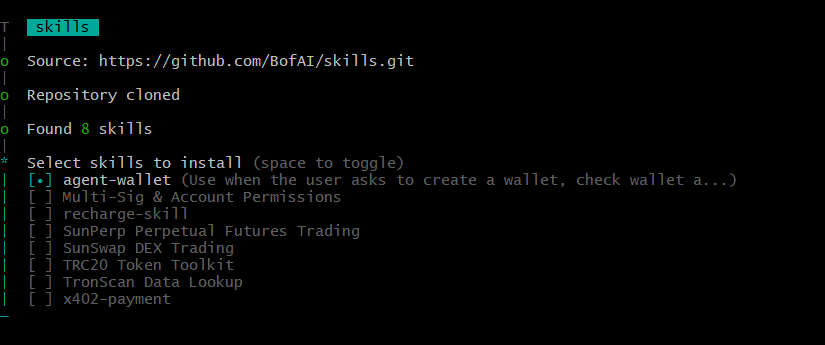
After cloning completes, the terminal will automatically scan and list the eight currently supported core Skills. Use the Up/Down arrow keys to navigate, Spacebar to select or deselect, and Enter to confirm your choices. B.AI’s current Skills include:
- SunSwap DEX Trading: Supports price quotes, token swaps, liquidity provision, and pool operations.
- SunPerp Perpetual Futures Trading: Queries perpetual futures market data, places orders, and manages positions.
- TRC20 Token Toolkit: Performs generic token metadata queries, balance checks, and transfers.
- TronScan Data Lookup: Comprehensive blockchain data, transaction, token, and network-wide statistics queries.
- Multi-Sig & Account Permissions: Native multi-signature workflows and account permission management.
- recharge-skill & x402-payment: Account top-ups and professional payment API resource protocols.
4. Choose Installation Scope
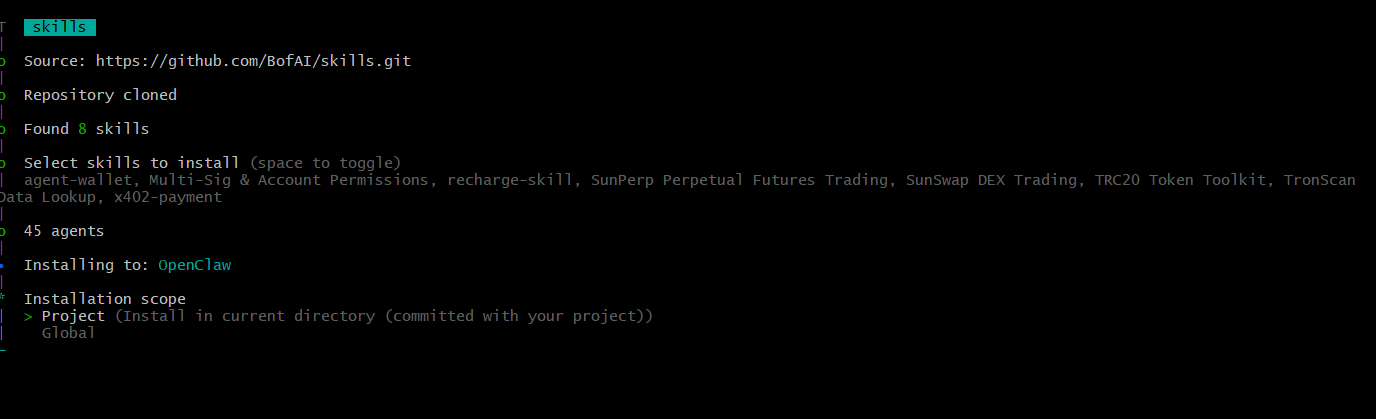
After selecting Skills, the system will ask you to choose the installation scope:
- Project (Recommended): Installs within your current project directory (e.g.,
~\.agents\skills\), enabling seamless version control alongside your project code. - Global: Installs system-wide, making Skills available to all local projects.
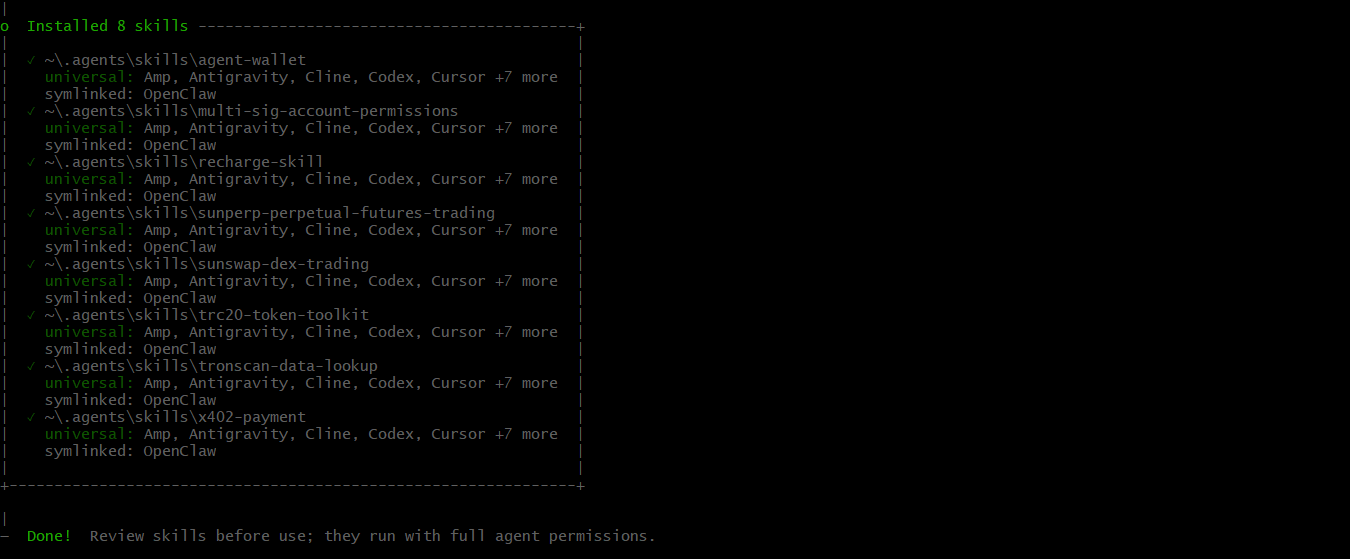
Once selected, the installer automatically handles subsequent file linking and configuration. When the terminal displays “Done” at the bottom, Skills have been successfully installed.
III. Hands-On Interaction Guide Using OpenClaw
Once the installation command finishes executing, your AI Agent (using OpenClaw as an example) is officially equipped with this professional suite of financial operation Skills. Next, you can direct your AI Agent through the following three typical scenarios within OpenClaw’s interactive interface.
Scenario 1: Query Loaded Skills (Status Verification)
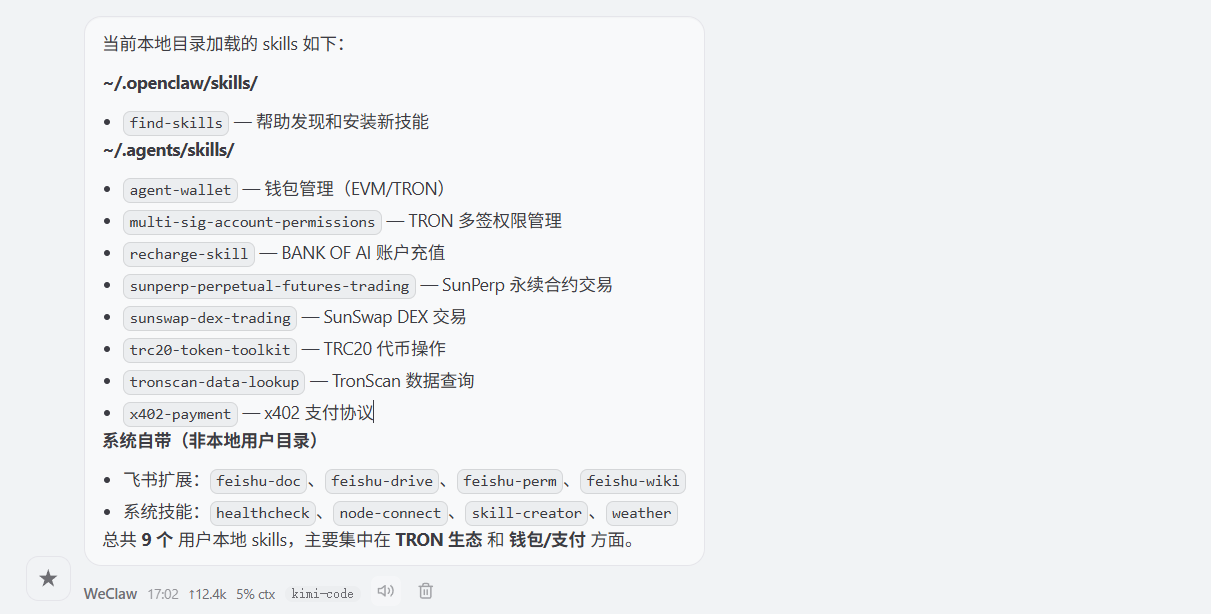
Before initiating complex tasks, if you’d like to verify whether the newly installed tools are active, simply ask your AI in natural language—like taking inventory. For example: “Please check which Skills are currently loaded in your local directory.” OpenClaw will automatically inspect and list deployed core modules—for instance, sunswap-dex-trading, agent-wallet, tronscan-data-lookup, etc.
 Scenario 2: Implicit Triggering (Natural-Language-Driven Execution)
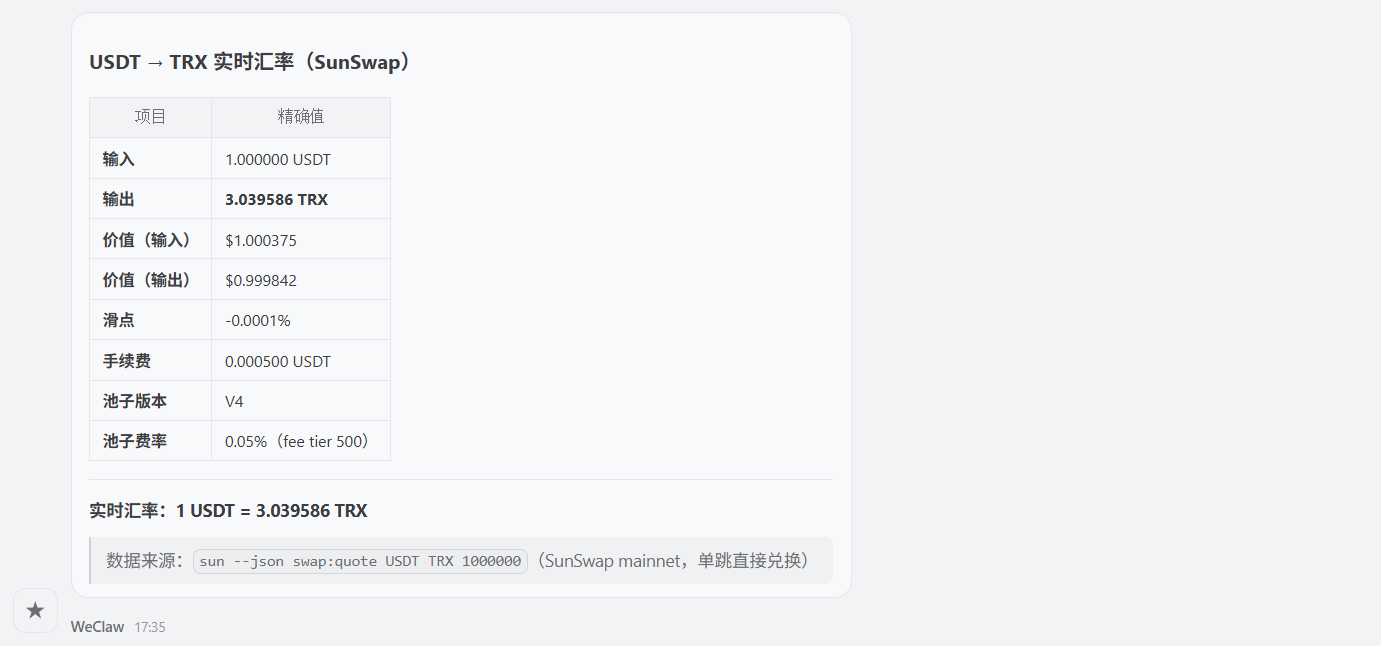
This is the most intuitive human–AI interaction method. You need not reference underlying code files—just state your ultimate goal as you would to a human business assistant. For example: “Please check the current real-time exchange rate for swapping USDT to TRX on SunSwap.” Upon receiving the natural-language instruction, OpenClaw precisely matches and activates the relevant Skill in the background—automatically invoking the required API to retrieve the result and deliver it directly to you.
Scenario 3: Composed Invocation (LEGO-style Seamless Workflow)
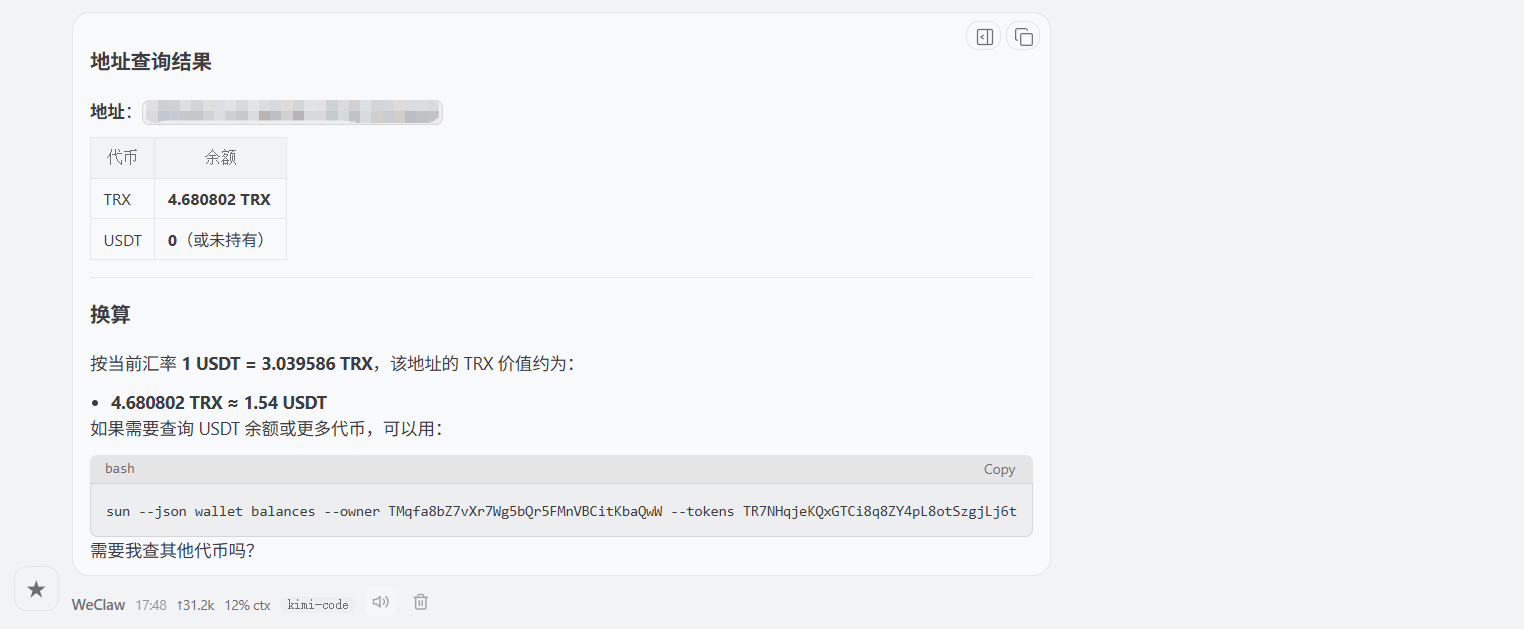
Leveraging Skills’ independent yet interoperable “LEGO” design, users can assign multi-step compound tasks—enabling the AI to autonomously orchestrate different components into a closed-loop workflow. For example: “First, check my current USDT balance at this address [insert your address]; then, using SunSwap’s best current exchange rate, calculate how much USDT I’d receive if I swapped all my TRX.”
Special Note:
The above scenarios showcase the full breadth of B.AI Skills’ capabilities. However, please note: If your instruction to the AI Agent involves actual on-chain transactions—such as fund transfers, token swaps, or multi-signature authorizations—you must use B.AI’s purpose-built Agent Wallet. Agent Wallet is a secure signing environment designed exclusively for AI Agents. During financial task execution, it applies an innovative dual-lock mechanism—“encrypted file + authorization password”—to isolate the AI Agent’s runtime environment securely.
To explore more of B.AI’s foundational agent architecture and cutting-edge features, visit the B.AI official website and join us in ushering in a new era of the agent economy.
Join TechFlow official community to stay tuned
Telegram:https://t.me/TechFlowDaily
X (Twitter):https://x.com/TechFlowPost
X (Twitter) EN:https://x.com/BlockFlow_News