In-depth Analysis of the Optimism Theft Incident: Contract Deployment Replay Attack on Layer 2 Networks
TechFlow Selected TechFlow Selected
In-depth Analysis of the Optimism Theft Incident: Contract Deployment Replay Attack on Layer 2 Networks
Cobo conducts analysis and reproduction of the Optimism theft incident, providing a comprehensive technical interpretation from multiple perspectives including timeline, attack vectors, Ethereum contract address generation, and technical details.
 Navigating Web3 tides with focused insights
Event Overview
At the end of May this year, the Optimism Foundation hired market maker Wintermute to provide liquidity for the OP token. The foundation allocated 20 million OP tokens to the Wintermute team for market-making purposes. During this process, a communication error occurred: Wintermute provided an Ethereum Layer 1 (L1) receiving address that had not yet been deployed on Layer 2 (Optimism). After the foundation sent funds to this L2 address, Wintermute discovered the issue. However, before the account could be fixed, an attacker gained control of the account and began selling off its OP tokens.
Timeline
● May 26 & 27 – The Optimism Foundation sent test transfers of 1 OP and then 1 million OP to the address 0x4f3a120e72c76c22ae802d129f599bfdbc31cb81 provided by the Wintermute team.
● May 27 – The Optimism Foundation transferred the remaining 19 million OP to the same address.
● May 30 – The Wintermute team identified the incorrect account, contacted the Optimism Foundation, and reached out to the Gnosis Safe team for assistance in recovering the funds. After consultation with both the Optimism Foundation and the Gnosis Safe team, they assessed that the account was still secure and could only be recovered by authorized parties with support from Gnosis Safe. They planned to fix the account permissions on June 7.
● June 1 – The attacker deployed a malicious contract hardcoded with the factory address, indicating that the full attack plan had already been finalized.
● June 5 – The attacker launched the attack, took control of the target account, and transferred 1 million OP to Tornado Cash for laundering.
● June 9 – The Wintermute team issued a statement accepting full responsibility, pledging to repurchase all dumped tokens, and requesting the return of the remaining funds. Four hours after the announcement, the attacker transferred another 1 million OP to a private wallet.
Attack Path
1. All Gnosis Safe wallets are deployed via the Gnosis Safe Proxy Factory contract. To gain control of a target address, one must call the proxy factory to deploy a proxy contract at that specific address.
2. Prior to the attack, the proxy factory contract was not yet deployed on Layer 2 (Optimism). The attacker replayed the factory deployment transaction from Layer 1 onto Layer 2, successfully deploying a new factory contract at the same address.
3. By repeatedly calling the createProxy method on the factory contract on Layer 2, the attacker incremented the factory’s nonce until a proxy was deployed exactly at the intended target address.
4. When calling createProxy, the attacker set the masterCopy parameter to a malicious contract under their control. Since masterCopy becomes the implementation logic of the proxy, this gave the attacker full control over the target address.
Ethereum Contract Address Generation
To understand how the attacker could predictably deploy a contract at a specific address, we need to examine Ethereum's contract address generation mechanism.
Contract addresses do not have associated private keys; instead, they are determined at deployment time using either CREATE or CREATE2 opcodes. The CREATE opcode generates an address by RLP-encoding the sender address and its nonce, hashing the result with Keccak-256 (SHA3), and taking the last 20 bytes as the new contract address.
new_address = hash(sender, nonce)
This can be implemented in JavaScript as follows:
const Web3 = require("web3");
const RLP = require("rlp");
const nonce = 0;
const account = "0xa990077c3205cbdf861e17fa532eeb069ce9ff96";
var e = RLP.encode(
[
account,
nonce,
],
);
const nonceHash = Web3.utils.sha3(Buffer.from(e));
console.log(nonceHash.substring(26));
For externally owned accounts (EOAs), the nonce increases by 1 with each transaction. For contracts, the nonce increases by 1 each time a new contract is created.
CREATE2 is typically called from within smart contracts and uses the following formula:
new_address = hash(0xFF, sender, salt, bytecode)
● 0xFF is a constant prefix
● sender is the deploying address
● salt is an arbitrary value chosen by the sender
● bytecode is the code of the contract being deployed
● CREATE2 replaces the incrementing nonce with a user-controlled salt, enabling predictable address derivation.
Technical Details
Layer 1 Proxy Creation Process
From the previous section, we know that to deploy a contract at a specific address on Layer 2, we must first determine how it was deployed on Layer 1. The Wintermute multisig proxy on Layer 1 was created via transaction here, using the Proxy Factory 1.1.1. The method used was createProxy. The implementation of ProxyFactory.createProxy is shown below:
function createProxy(address masterCopy, bytes memory data)
public
returns (Proxy proxy)
{
proxy = new Proxy(masterCopy);
if (data.length > 0)
// solium-disable-next-line security/no-inline-assembly
assembly {
if eq(call(gas, proxy, 0, add(data, 0x20), mload(data), 0, 0), 0) { revert(0, 0) }
}
emit ProxyCreation(proxy);
}
The use of the new keyword here triggers the CREATE opcode under the hood, not CREATE2.
Therefore, calling the same createProxy method on Layer 2 at the same factory address will result in a proxy contract at the same address — as long as the deploying account’s nonce matches the state on Layer 1 during the original deployment.
Replaying Deployment of Gnosis Safe Proxy Factory 1.1.1 on Layer 2
Prior to the attack, the Gnosis Safe Proxy Factory 1.1.1 was not deployed on Optimism. Therefore, the attacker needed to first deploy the factory contract at the same address as on Layer 1.
On Layer 1, the Proxy Factory 1.1.1 is located at 0x76E2cFc1F5Fa8F6a5b3fC4c8F4788F0116861F9B, deployed via transaction here in 2019.
Decoding this transaction here, the raw data is:
{
"nonce": 2,
"gasPrice": {
"_hex": "0x02540be400"
},
"gasLimit": {
"_hex": "0x114343"
},
"to": "0x00",
"value": {
"_hex": "0x00"
},
"data": "xxxx...xxxx",
"v": 28,
"r": "0xc7841dea9284aeb34c2fb783843910adfdc057a37e92011676fddcc33c712926",
"s": "0x4e59ce12b6a06da8f7ec7c2d734787bd413c284fc3d1be3a70903ebc23945e8c"
}
We observe v = 28. According to EIP-155, transactions with v = 27 or v = 28 do not include ChainID in the signature, meaning such transactions can be replayed across chains.
Thus, the Layer 1 contract deployment transaction could be directly replayed on Layer 2 (Optimism). The replayed transaction is available here, which deployed a new Gnosis Safe Proxy Factory at the identical address: 0x76e2cfc1f5fa8f6a5b3fc4c8f4788f0116861f9b.
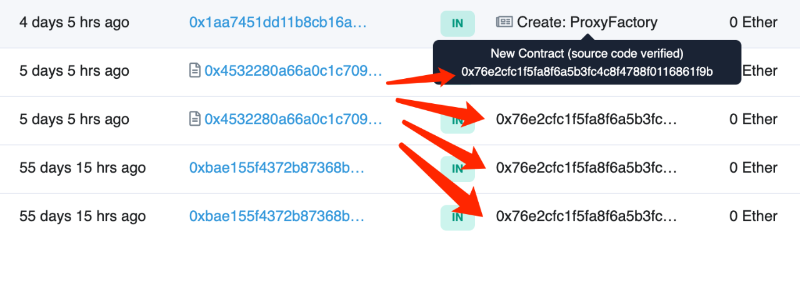
As seen in the image, the contract was created just four days before the attack began, yet shows multiple prior interactions — which are actually failed calls due to the nonexistence of the contract at the time.
At creation, the factory contract’s nonce was 0. Each time a new contract is deployed, the nonce increments by 1. By repeatedly calling createProxy, the attacker increased the nonce until eventually deploying a proxy at the exact target address.
Deploying Proxy at Target Address on Layer 2
Attacker contract: 0xe7145dd6287ae53326347f3a6694fcf2954bcd8a[1]
The attacker used this malicious contract to batch-call the createProxy function of the ProxyFactory[2], setting the masterCopy parameter to their own contract address. This resulted in numerous proxy contracts being created with the attacker’s contract as the implementation, thereby granting them control over any such proxy — including the target.
Detailed process:
The attacker initiated multiple calls from EOA address 1[3] to the attack contract. Each transaction created 162 proxy contracts. Eventually, in transaction here, the proxy at address 0x4f3a120e72c76c22ae802d129f599bfdbc31cb81 was successfully created.
The attacker then used EOA address 2[4] as the owner of the proxy to execute operations on the stolen account.
> eth_call 0x4f3a120E72C76c22ae802D129F599BFDbc31cb81 owner()
0x0000000000000000000000008bcfe4f1358e50a1db10025d731c8b3b17f04dbb
Lessons Learned
With the growing number of Ethereum Layer 2 solutions (such as Optimism, Arbitrum) and sidechains (like xDai, Polygon), assets and dApps are becoming increasingly fragmented across different networks. However, there are fundamental differences in behavior between externally owned accounts (EOAs) and smart contract accounts like Gnosis Safe when crossing chains.
EOAs rely on private keys and can be used across networks seamlessly. In contrast, contract accounts have no private keys and require complex deployment and initialization procedures to establish control and functionality, making them non-portable across chains by default.
Likewise, foundational infrastructure contracts do not automatically exist or mirror identically across different networks.
Therefore, when operating across different network layers, special care must be taken with contract-related actions. Always verify whether contract addresses, bytecode, and states match between the target network and Ethereum mainnet. In complex scenarios, further checks should be made to ensure compatibility of network features and contract behaviors. Never assume that Layer 1 addresses will map seamlessly to Layer 2 or sidechains — doing so risks incidents like the Wintermute loss.
References
[1] Attacker Contract: https://optimistic.etherscan.io/address/0xe7145dd6287ae53326347f3a6694fcf2954bcd8a
[2] ProxyFactory: https://optimistic.etherscan.io/address/0x76e2cfc1f5fa8f6a5b3fc4c8f4788f0116861f9b#code
[3] Attacker EOA Address 1: https://optimistic.etherscan.io/address/0x60B28637879B5a09D21B68040020FFbf7dbA5107
[4] Attacker EOA Address 2: https://optimistic.etherscan.io/address/0x8bcfe4f1358e50a1db10025d731c8b3b17f04dbb
Join TechFlow official community to stay tuned
Telegram:https://t.me/TechFlowDaily
X (Twitter):https://x.com/TechFlowPost
X (Twitter) EN:https://x.com/BlockFlow_News
 Cobo
Cobo