TON Security Guide: A Comprehensive Guide from Wallet Selection to Asset Protection
TechFlow Selected TechFlow Selected
TON Security Guide: A Comprehensive Guide from Wallet Selection to Asset Protection
As the TON ecosystem grows, while seeking high-quality investment projects, don't forget to protect the security of your assets.
 Navigating Web3 tides with focused insights
Author: Keystone Chinese
This year, TON (The Open Network) has attracted significant attention. As a blockchain deeply integrated with Telegram, its vast user base and the wealth-generating effects of new projects have driven users to enter the TON ecosystem in search of their own Alpha.
As the saying goes: where there are people, there's江湖 (a community/arena), and where there’s traffic on a blockchain, hackers will swarm like sharks smelling blood. Being a blockchain with technical characteristics different from EVM, interacting on TON cannot follow the same security habits used on EVM chains.
As a hardware wallet provider actively integrating with the TON ecosystem, we’ve compiled some security recommendations to help you safely embrace the TON ecosystem. 🤗
1. Choosing the Right Wallet
Due to technical differences, popular EVM wallets such as MetaMask and Rabby currently do not support TON. Therefore, we need to install wallets that specifically support TON.
At this point, a high-security wallet becomes crucial. We can evaluate which wallet suits us best by considering whether it is open-source, supports hardware wallets, and—especially—how thoroughly it parses transaction information.
For example, when facing phishing websites on TON, if a hacker attempts to steal certain assets from your wallet, the transaction parsing results between the wallet software OpenMask and TonKeeper @tonkeeper differ significantly, as shown in the image below:
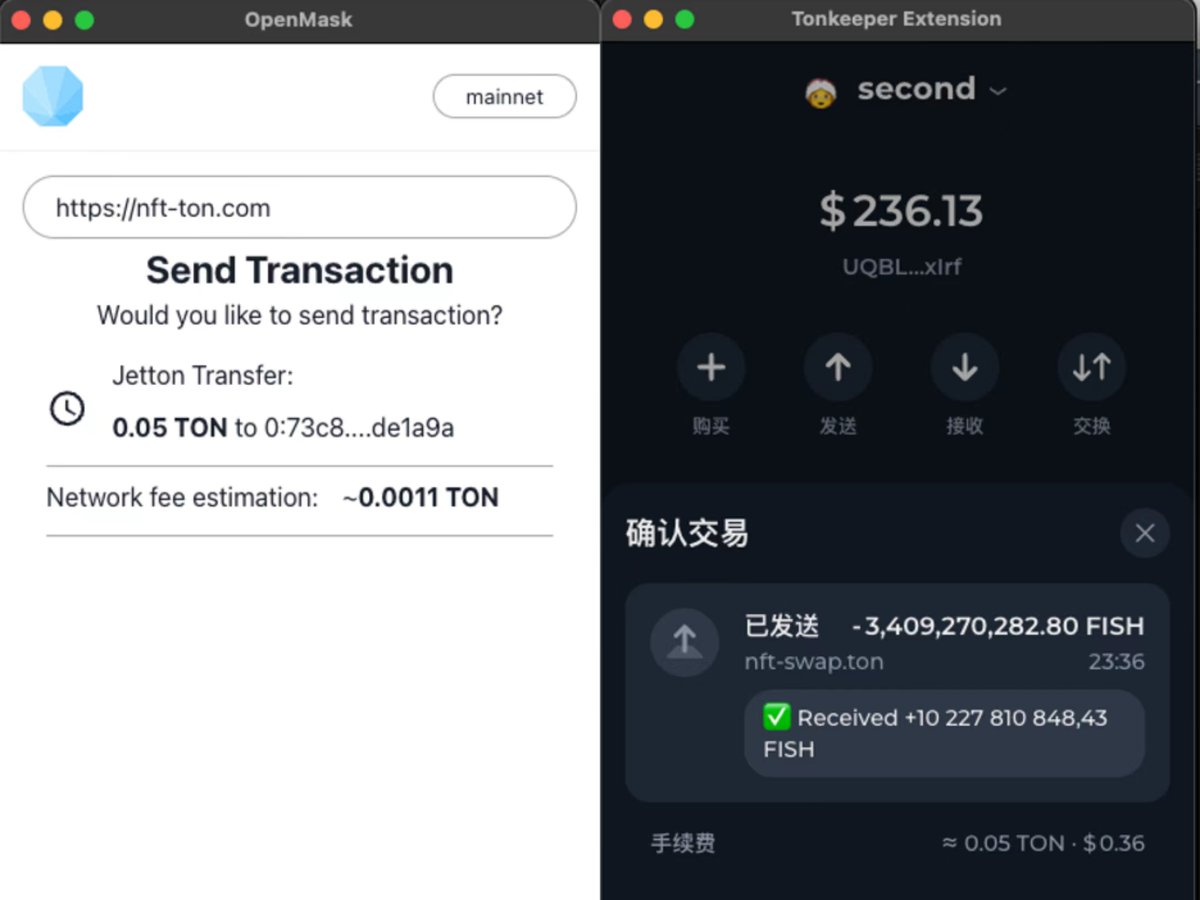
In OpenMask, this appears to be a normal "claim airdrop" transaction—but is that really the case?
The same transaction, however, reveals far more information in TonKeeper, clearly showing that the phishing site is attempting to steal FISH tokens from the wallet. The hacker’s actions are successfully exposed by TonKeeper.
By comparison, which wallet user do you think is more likely to fall victim?
A more secure wallet acts like a "demon-revealing mirror," effectively reducing users’ anxiety in identifying phishing scams. Recently, Keystone has successfully integrated with TonKeeper, and we believe the addition of hardware wallets will dramatically enhance user security on TON.
2. Guarding Against Common Phishing Tactics
Like other blockchains, phishing remains the most common and widespread attack method on TON today. Let’s take a look at the various phishing techniques hackers use on TON:
2.1 Zero-Amount Transfer Phishing
Hackers mass-send 0-amount TON transfers to many addresses, attaching comments such as “Claim 1000 TON airdrop, visit http://xxxxx.com”. Less experienced users may fall for this scam, visiting the phishing website and performing what they believe to be a claim transaction, only to have their valuable assets stolen by hackers.
2.2 NFT Airdrop Phishing
Besides token transfers, hackers also attempt to phish users by airdropping NFTs to their wallets. Besides visually appealing images, these NFTs often contain URLs linking to phishing websites designed to deceive users.
For instance, in the example below, the airdropped NFT contains a fake link to the Fragment marketplace. When users enter the counterfeit marketplace and attempt to list the airdropped NFT for sale, they fall into the hacker’s trap—failing to sell the NFT while having other assets transferred away.
2.3 Beware of TON’s Unique “Transaction Comment” Feature
TON transfer transactions include an optional comment field, which we can understand as a message or附言 in bank transfers. While originally intended as a user-friendly feature, malicious actors have exploited this for phishing.
As shown in the image below, hackers try to trick users into transferring FISH tokens from their wallets, while including a comment stating "Received +xxx,xxx,xxx FISH", misleading users into believing they will receive more FISH tokens than they currently hold—prompting them to confirm the transaction.
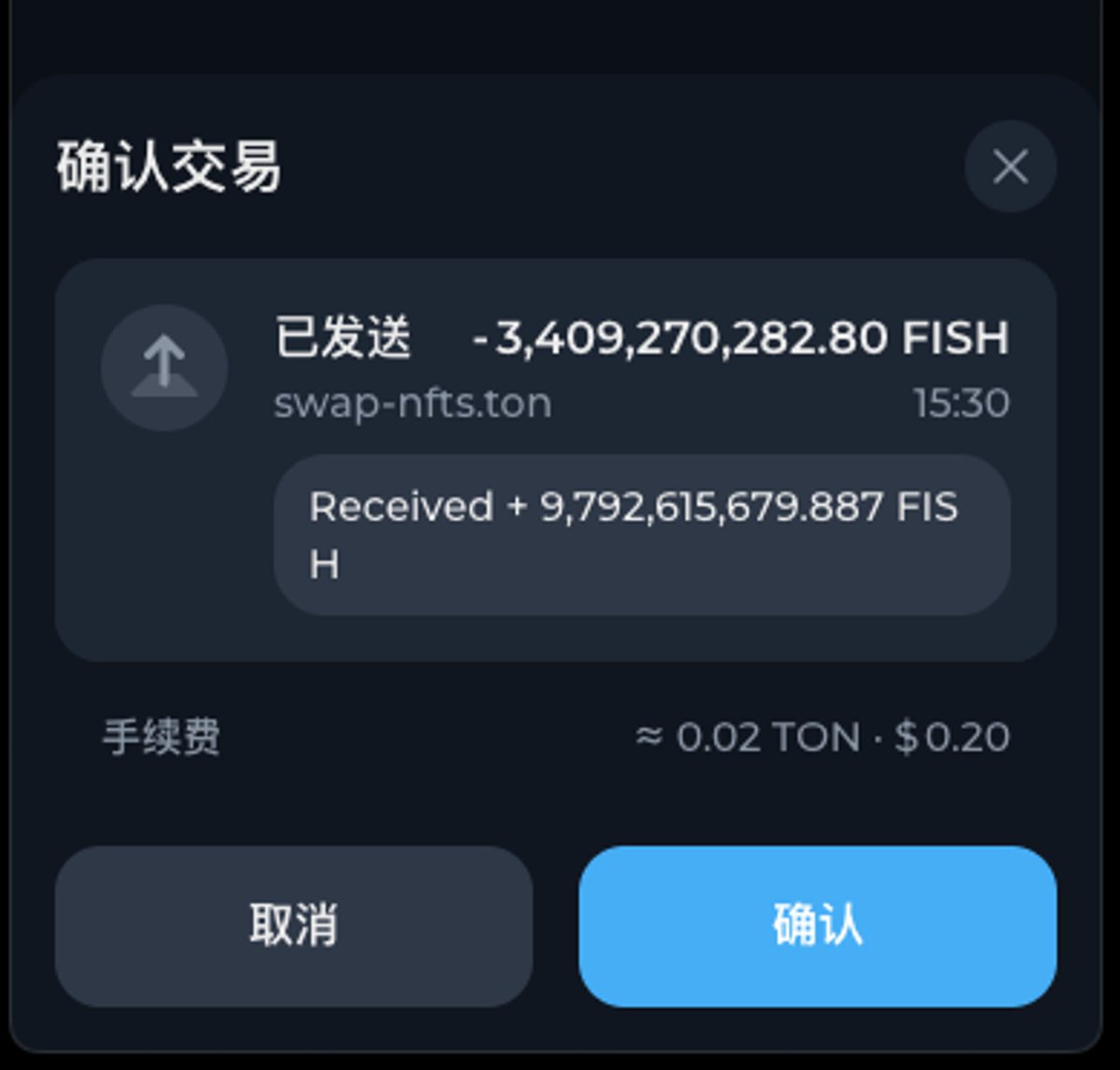
We remind everyone: never trust any content within transaction comments. We also hope that in the future, all wallet applications will provide clearer security warnings regarding transaction comments.
3. Using Blockchain Explorers to Identify Scams
On Ethereum, we commonly use Etherscan to view on-chain data. On TON, the equivalent tools are Tonscan and Tonviewer.
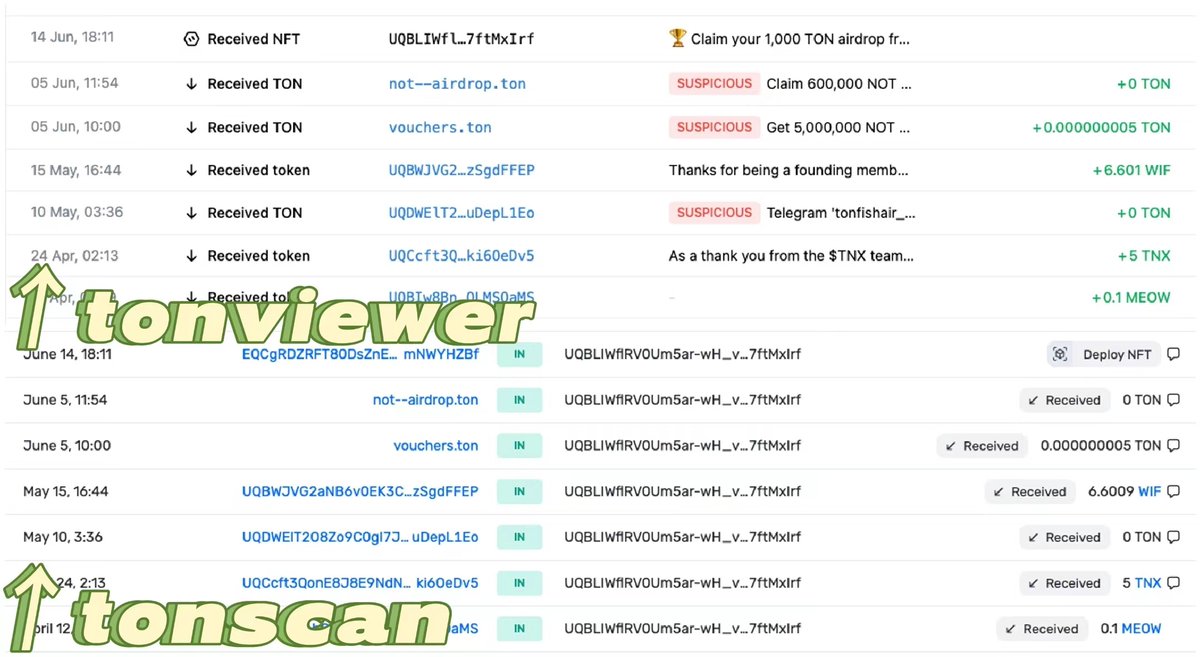
Comparing their security features, Tonviewer stands out in detecting scams: it not only labels suspicious transactions as "SUSPICIOUS," but also marks fraudulent airdropped NFTs with a "SCAM" tag to prevent users from falling victim.
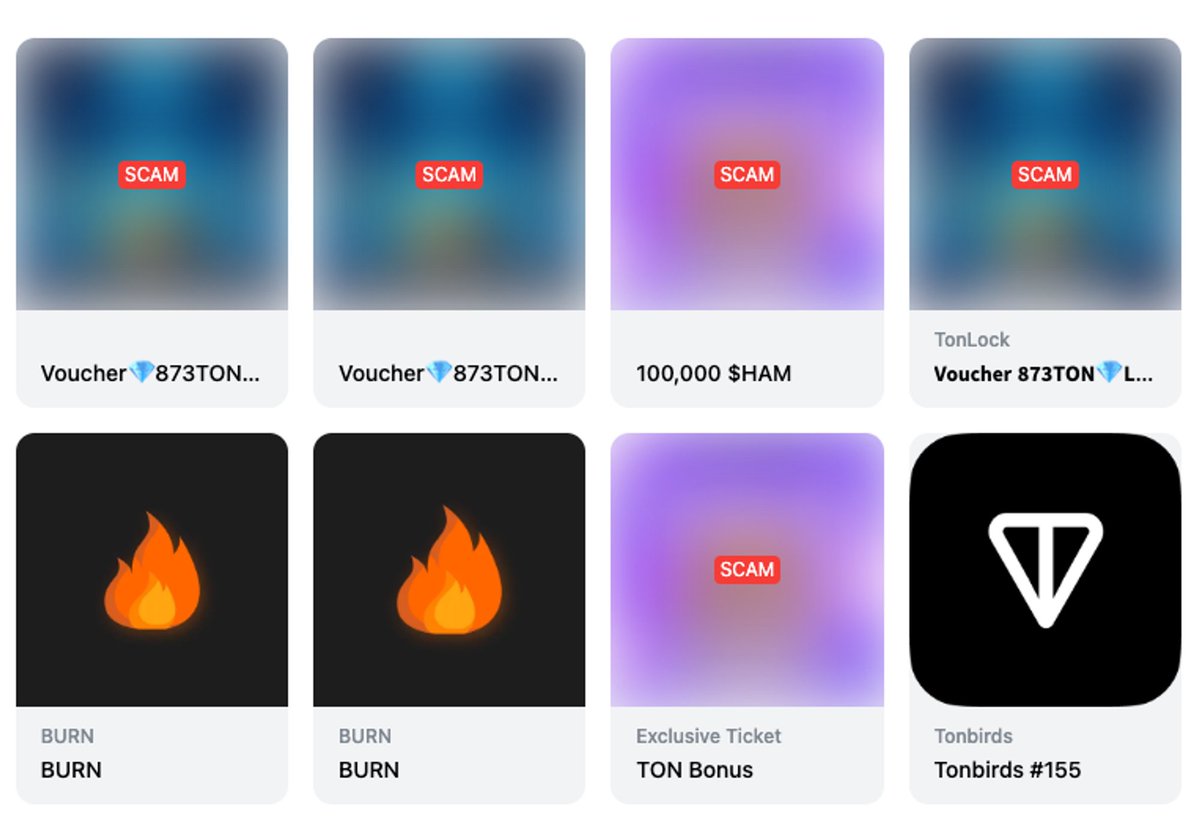
In contrast, Tonscan merely displays raw on-chain data without sufficient security warnings. We recommend that users new to the TON ecosystem prioritize using Tonviewer to check wallet address information.
4. Enhancing Security with Hardware Wallets
On any blockchain, using a hardware wallet to keep recovery phrases offline and perform secondary transaction verification is an effective way to protect assets. Through integration with TonKeeper, Keystone enables TON ecosystem users to enjoy the enhanced security provided by hardware wallets. For hardware wallet users, we offer the following recommendations:
• Store large holdings in a hardware wallet
• Use Keystone’s support for 3 sets of recovery phrases to distribute assets across multiple wallets, avoiding single-point risks
• Carefully review transaction details displayed on Keystone to avoid signing phishing transactions
In the world of blockchain, opportunities often come hand-in-hand with risks. As the TON ecosystem grows, while seeking out high-potential investment projects, don’t forget to protect your asset security. Keystone is committed to continuously BUIDL alongside the TON ecosystem, building a safer interactive environment together.
Join TechFlow official community to stay tuned
Telegram:https://t.me/TechFlowDaily
X (Twitter):https://x.com/TechFlowPost
X (Twitter) EN:https://x.com/BlockFlow_News
 @KeystoneCN