SevenX Ventures: How WebAuthn and Passkeys Can Save the Terrible Crypto Experience?
TechFlow Selected TechFlow Selected
SevenX Ventures: How WebAuthn and Passkeys Can Save the Terrible Crypto Experience?
To ensure transaction security, authorized users must be authenticated.
 Navigating Web3 tides with focused insights
Author: Rui @Ruisnakes, SevenX Ventures
TL;DR
Private keys are essential for signing transactions on Ethereum, but even when managed in human-readable form via seed phrases (also known as "recovery phrases"), private key management remains a nightmare for users. We all know that turning blockchain into a complex game was never the intention.
To ensure transaction security, user authentication is required. As internet security and user experience have evolved, we’ve moved from password-based verification to biometric methods like facial recognition and fingerprint scanning. In this evolution, WebAuthn stands out as a key milestone. This article focuses on three key terms:
-
WebAuthn: A web authentication standard that uses public-key credentials typically created by external authenticators. It enables secure user authentication without passwords.
-
Secure Enclave: A hardware-isolated secure zone within computing devices designed to protect sensitive data. Different versions of Secure Enclaves exist across iOS, Android, and Windows devices. When used with WebAuthn, it acts as an external authenticator, providing hardware-level security. However, because private keys are bound to the local device, cross-device operations become difficult.
-
Passkey: An operating system-level implementation of WebAuthn, customized by various device and system providers. For example, Apple’s Passkey leverages iCloud Keychain-stored keys for cross-device synchronization. However, such approaches are often limited to specific platforms or ecosystems and do not support cross-platform interoperability (e.g., Apple-Android).
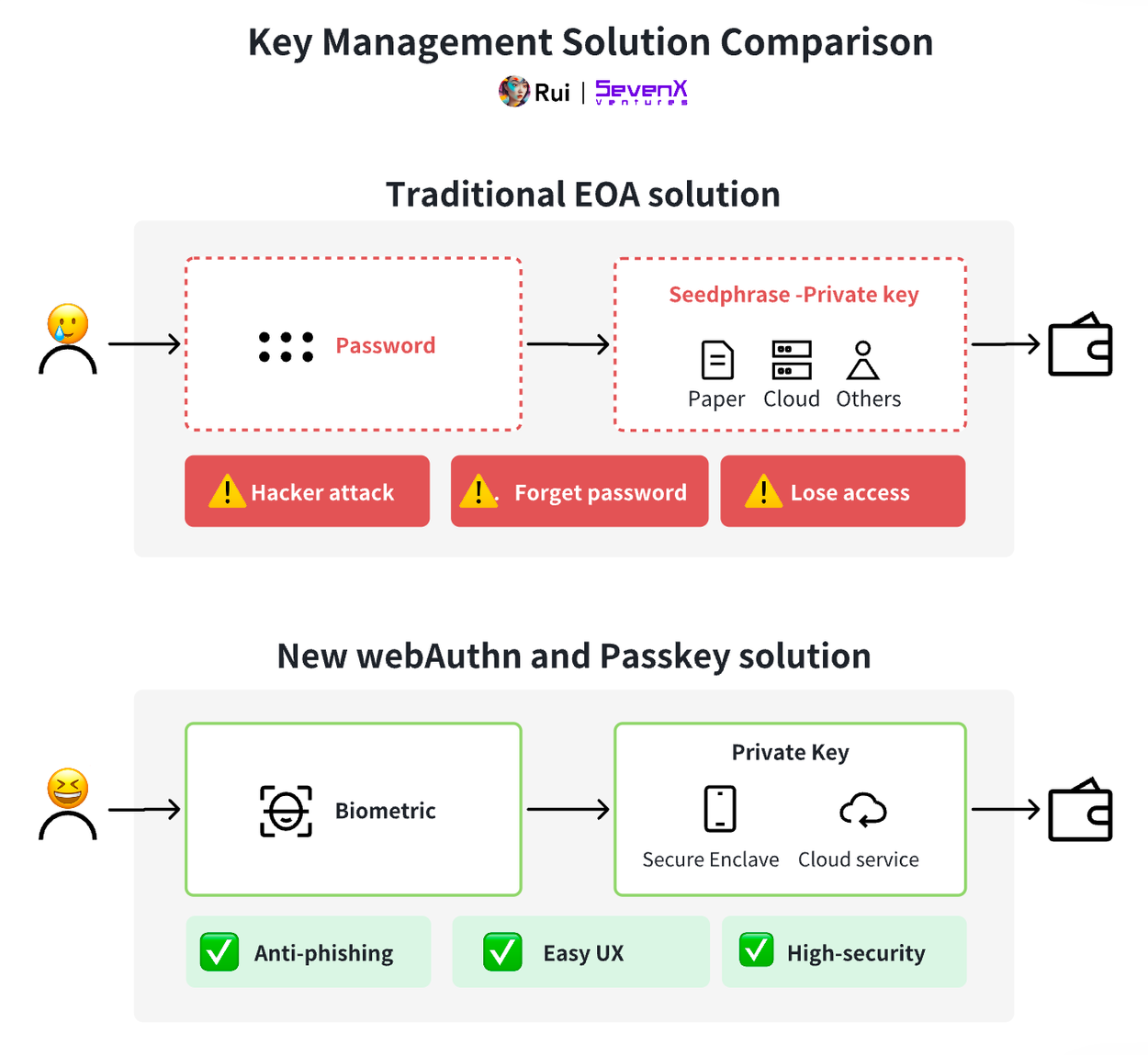
As outlined above, WebAuthn deployment aligns well with our goal for everyday blockchain users—achieving high phishing resistance and seamless user experience. Below is a proposal for integrating WebAuthn into blockchain systems:
-
Key Layer: Users can authenticate using smooth methods like facial recognition or fingerprint scanning. Under the hood, key management is handled by hardware-secured processors (such as Secure Enclave) or cloud services (like iCloud and Google Cloud). I will elaborate later on cross-device and cross-platform challenges.
-
Account Layer: Smart Contract Accounts (SCAs) can assign arbitrary signers (e.g., SE and Passkey) and threshold mechanisms. Their modular design enhances flexibility and upgradability. For instance, SCAs can dynamically adjust signature requirements based on factors like transaction volume, time, or IP address. In contrast, traditional Externally Owned Accounts (EOAs) can be extended via Multi-Party Computation (MPC) services. While this combination offers better interoperability and cost efficiency compared to SCAs, it lacks advanced features provided by SCAs—especially around key rotation, which becomes more challenging.
-
Signature Layer: Ethereum natively supports the k1 curve, but verifying WebAuthn signatures incurs higher costs due to its use of the r1 curve for key generation. Therefore, Layer 2 solutions like zkSync plan to adopt native EIP-7212 r1 curve precompiles. Additionally, third-party services, Solidity verifiers, zero-knowledge (ZK) verifiers, and distributed key management systems offer more cost-effective ways to handle r1 curve signatures.
* Disclaimer:
Technological advancement does not guarantee market success; not all devices and platforms have adopted Passkey; using smart contract accounts may be more expensive than external accounts; proposed solutions will continue evolving with technological progress.
Is Crypto UX Terrible? Blame Horrible Key Management!
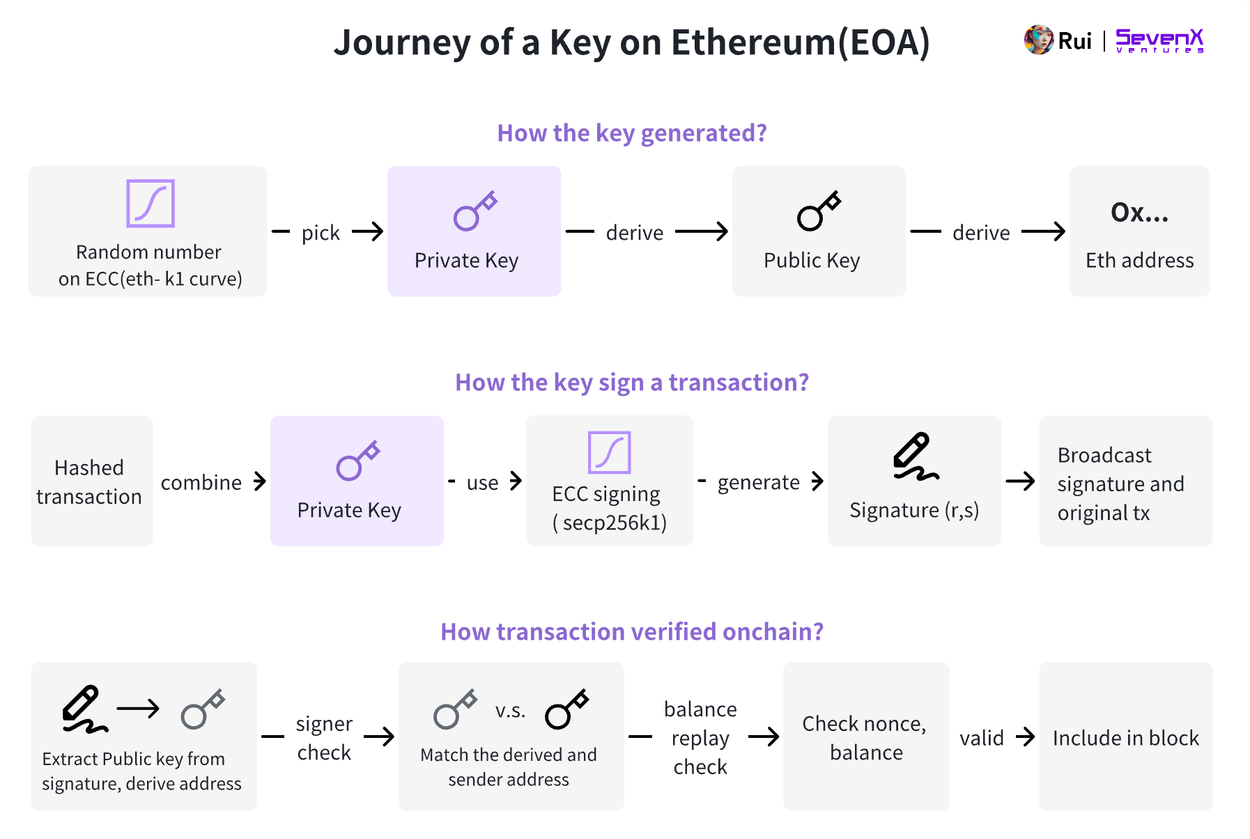
In the blockchain space, true control over assets lies not with users or wallet providers—but with private keys. This key determines whether a transaction on Ethereum succeeds or fails. To understand this better, let's take an externally owned account (EOA) as an example:
-
Key Generation: A random number selected from the secp256k1 elliptic curve serves as the private key. Multiplying this private key by a predefined point on the curve generates the public key. The Ethereum address is derived from the last 20 bytes of the hashed public key. Typically, mnemonic phrases convert the private key into human-readable words for backup, ultimately generating both private and public keys.
-
Signing Transactions: The private key signs a transaction containing details such as nonce, amount, gas price, and recipient address. This process uses the Elliptic Curve Digital Signature Algorithm (ECDSA), which relies on secp256k1, producing a signature composed of (r, s, v) values. The signed transaction and original message are then broadcast to the network.
-
Verifying Transactions: Once received by an Ethereum node, the transaction is validated in the mempool. To verify the signer, the node uses the signature and hash of the transaction to recover the sender’s public key and confirms authenticity by matching the derived address with the sender’s address.
As described above, private keys are critical entities on-chain. Initially, Ethereum accounts—specifically EOAs—relied entirely on a single private key, posing significant risks: losing the private key means losing access to the account.
Many might believe Account Abstraction (AA) is the ultimate solution to UX issues—I’d argue otherwise. AA makes validity rules on Ethereum programmable through smart contract accounts. AA is powerful: it enables parallel transaction execution (abstracting nonce), gas sponsorship, paying gas fees with ERC-20 tokens (abstracting gas), and crucially, breaking fixed signature validation (abstracting ECDSA). Unlike EOAs, smart contract accounts can assign arbitrary signers and signature schemes—such as multisig or scoped session keys. Yet despite increased flexibility and upgradeability, transaction signing still requires keys.
Even converting private keys into 12-word mnemonics, key management remains challenging, exposing users to loss or phishing attacks. Users must choose between complex decentralized solutions and centralized services—neither being ideal.
Why is crypto UX so bad? A large part of the answer lies in poor key management. Users constantly trade off among usability, security, and decentralization. This article explores potential optimal solutions for managing keys.
Key Management Layer
There is no one-size-fits-all solution. The best way to manage keys depends on specific user scenarios and is influenced by many factors: user type (institutional vs. individual), capital size, transaction frequency, and interaction patterns.
Clarification upfront: I won’t use popular terms like “self-custody,” “semi-custody,” or “fully custodial.” True self-custody, in my view, means independently signing transactions without relying on any third party—even some solutions traditionally considered non-custodial (e.g., storing keys in trusted execution environments on decentralized nodes) don’t fully qualify. Judging solutions solely by custody model oversimplifies things and ignores contextual suitability. To evaluate key management approaches more precisely, I propose analyzing them along three dimensions:
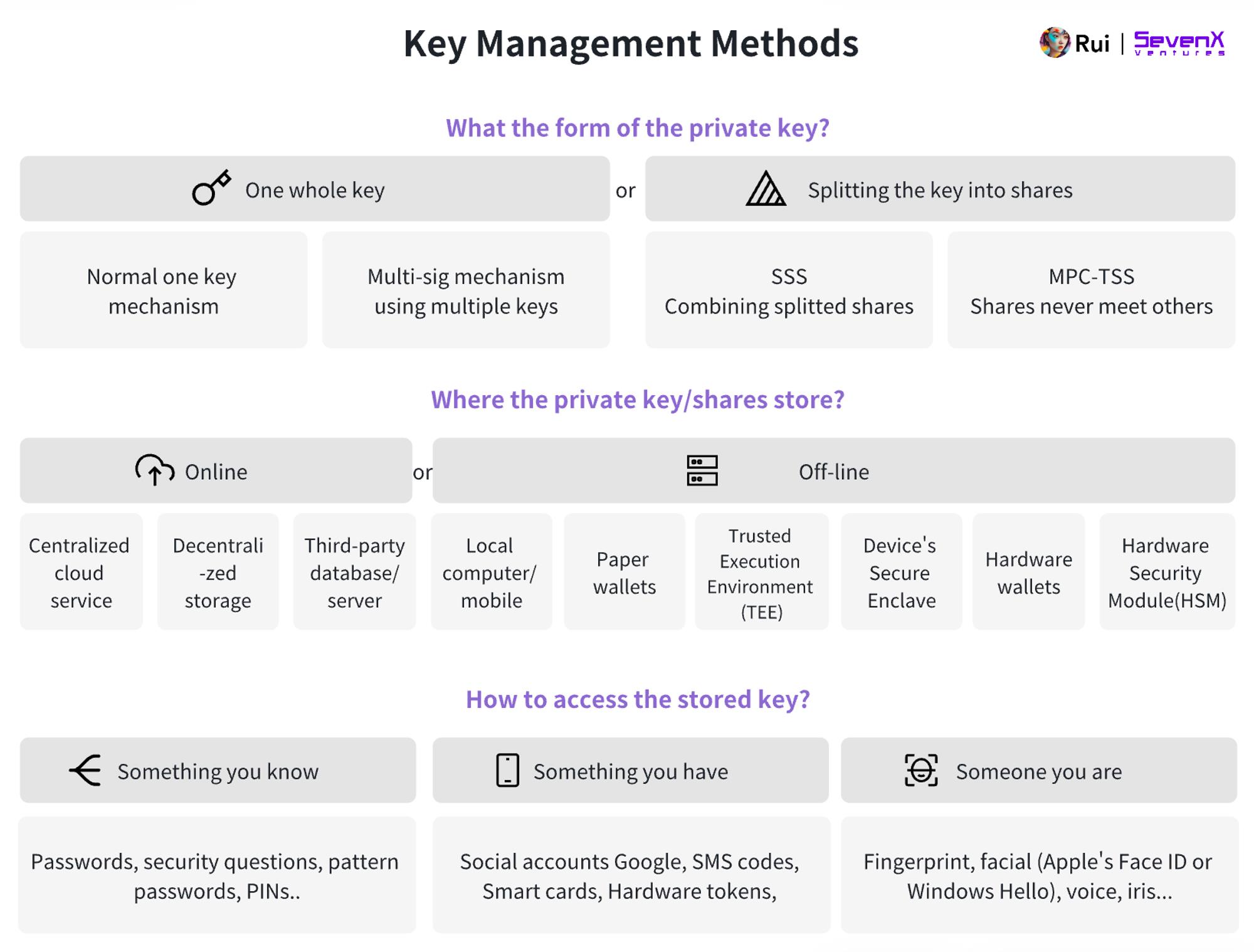
Responsibility
Whether responsibility for key management is distributed among different parties.
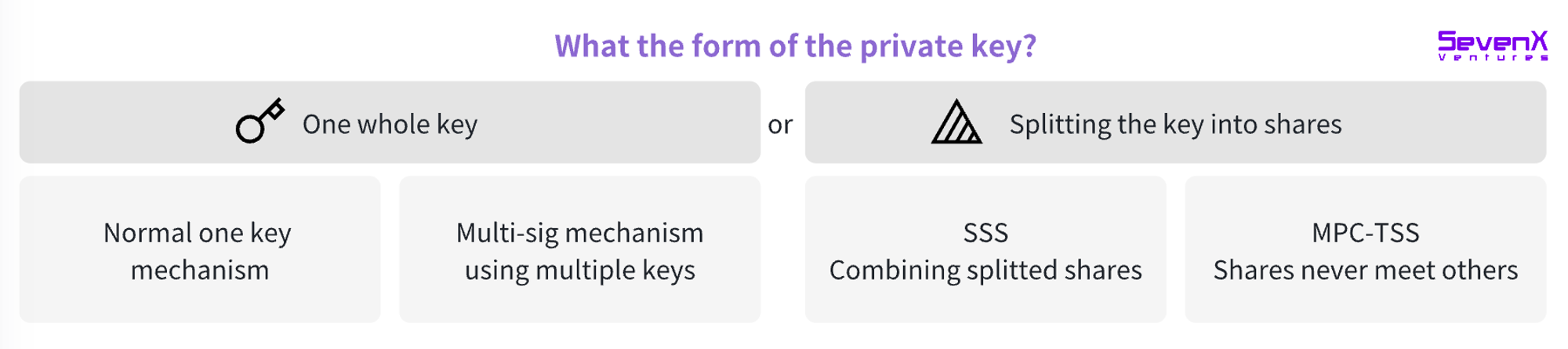
Since individuals often struggle with key management, distributing responsibility naturally becomes a risk mitigation strategy. Examples include collaborative signing using multiple keys (e.g., multisig systems) or splitting a private key via Secret Sharing Schemes (SSS) or Multi-Party Computation (MPC).
-
Multisig: Requires multiple complete private keys to generate a transaction signature. This method involves on-chain communication between signers, resulting in higher fees and reduced privacy since the number of signers is visible on-chain.
-
Secret Sharing Scheme (SSS): A private key is generated at one location and split into shares distributed among parties. Full reconstruction of the private key is needed to sign transactions, potentially introducing vulnerabilities during temporary reassembly.
-
MPC-TSS (Threshold Signature Scheme): An MPC-based cryptographic method allowing multiple parties to jointly compute a result while keeping inputs private. Each party independently creates a key share and signs without ever reconstructing the full key. Off-chain coordination reduces costs and eliminates single points of failure inherent in SSS.
Storage
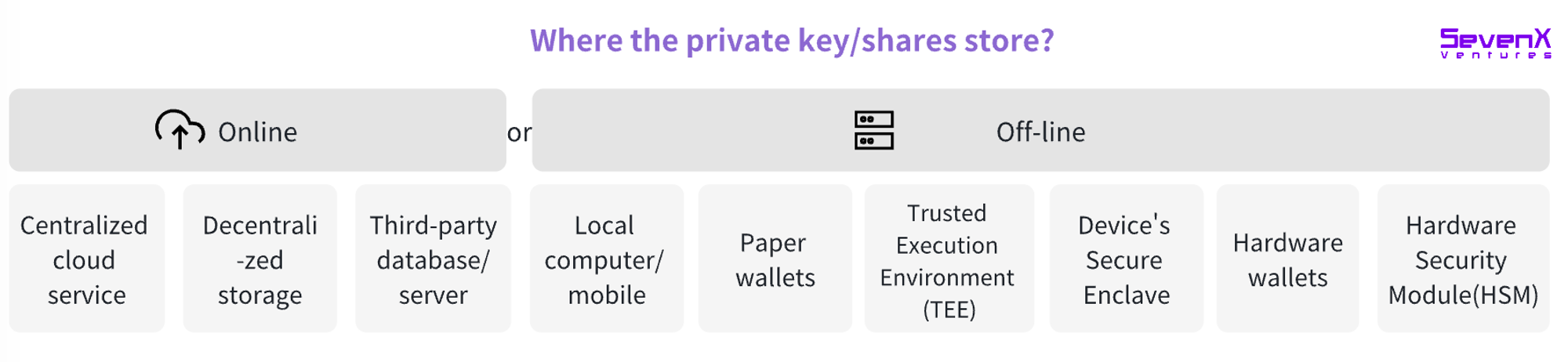
Where keys or key fragments are stored—impacted by security, accessibility, cost, and decentralization.
-
Centralized cloud services (e.g., AWS, iCloud). Convenient for frequent transactions but more vulnerable to censorship.
-
Decentralized storage (e.g., IPFS, Filecoin).
-
Local computer/mobile device: Keys stored in browser secure storage.
-
Paper wallets: Printing private keys or QR codes.
-
Trusted Execution Environment (TEE): A secure area within the main processor that runs or stores sensitive data independently of the primary OS.
-
Secure Enclave: Isolated from the main processor, modern device Secure Enclaves provide an additional security layer, safeguarding sensitive user data even if the application processor kernel is compromised.
-
Hardware wallets: Physical devices like Ledger and Trezor dedicated to securely storing private keys.
-
Hardware Security Module (HSM): Specialized hardware devices for secure key management and cryptographic operations, commonly used in enterprise settings with advanced security capabilities.
Access
How user identity is verified to access stored keys.
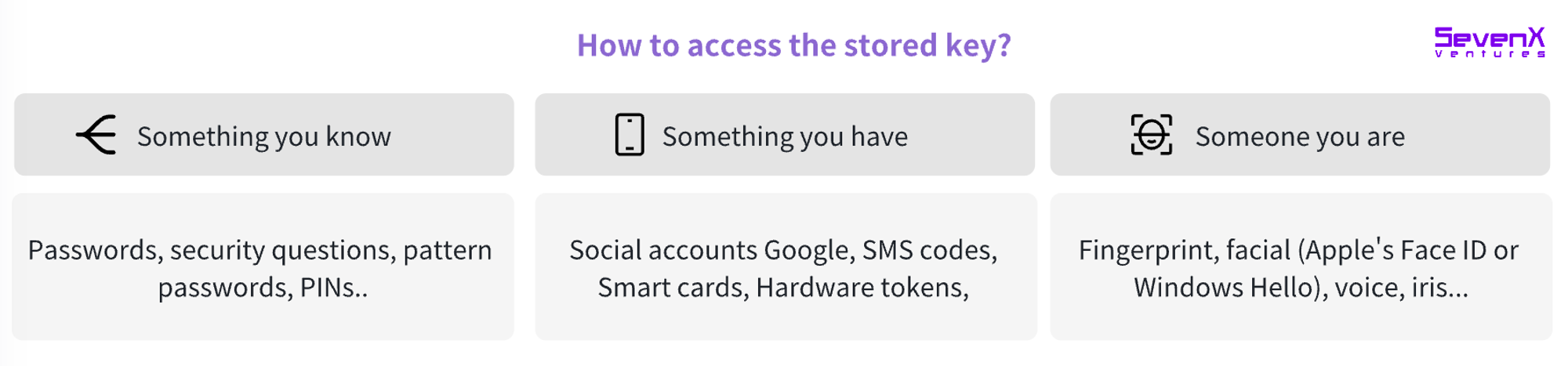
Accessing stored keys requires authentication—to confirm the requesting individual is authorized. Historically, access methods fall into three categories:
-
Something you know: Passwords, PINs, answers to security questions, or specific patterns.
-
Something you have: Smart cards, hardware tokens (time-based one-time passwords), or digital factors like social account verification or SMS codes sent to phones.
-
Something you are: Unique biometric traits such as fingerprints, facial recognition (e.g., Apple Face ID or Windows Hello), voiceprints, or iris/retina scans.
Building on these, two-factor (2FA) and multi-factor authentication (MFA) combine at least two factors—e.g., SMS plus push notification—to strengthen account security.
Analysis of Existing Products
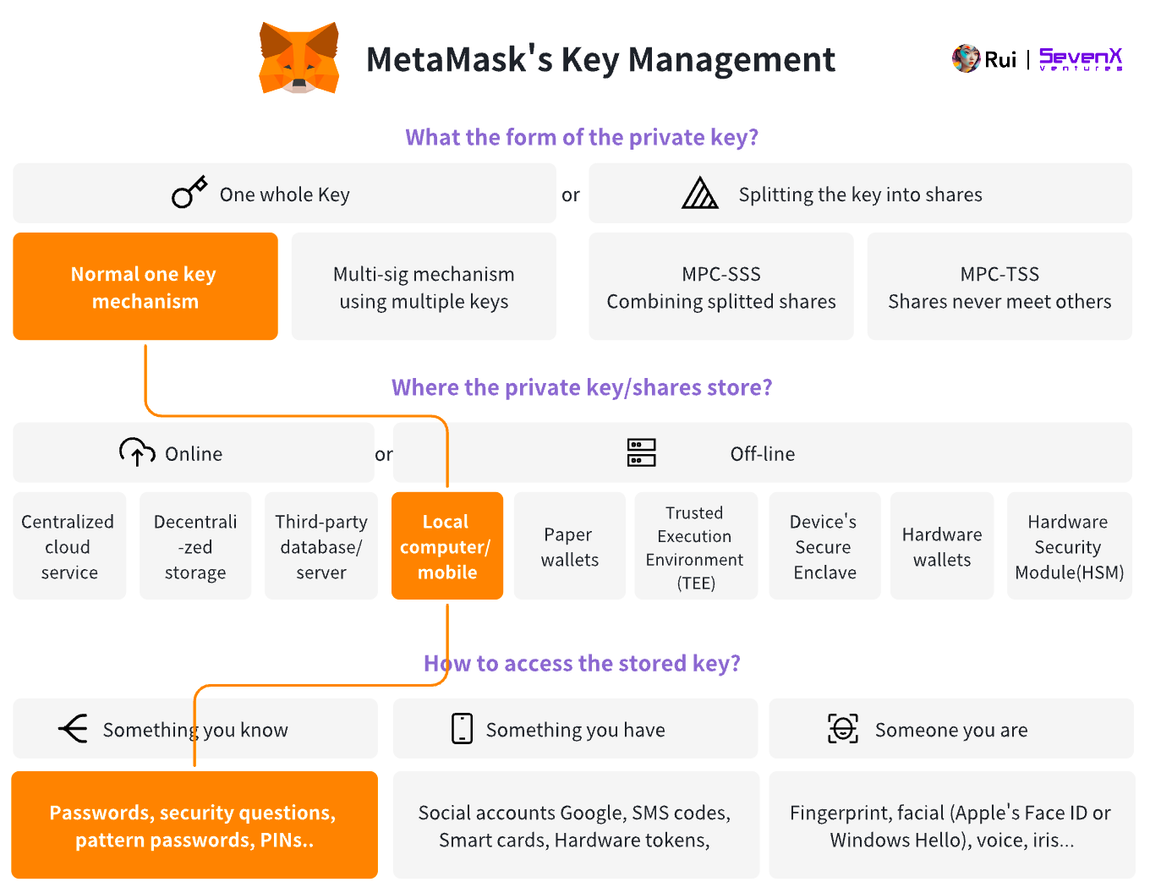
MetaMask allows users to access keys stored in local browser storage using a password.
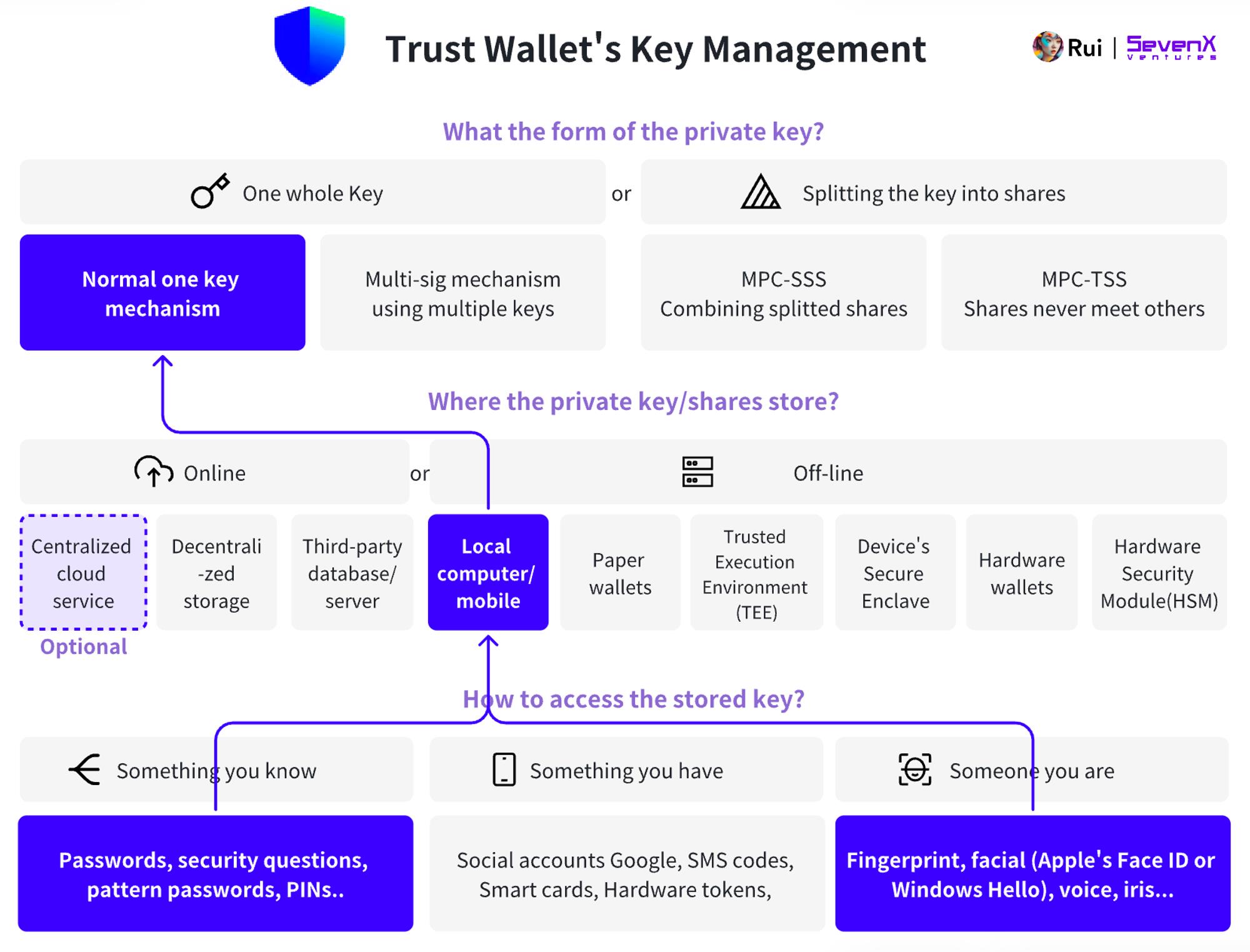
Trust Wallet allows users to access keys stored in local browser storage via password or Face ID, with optional cloud backup of private keys.
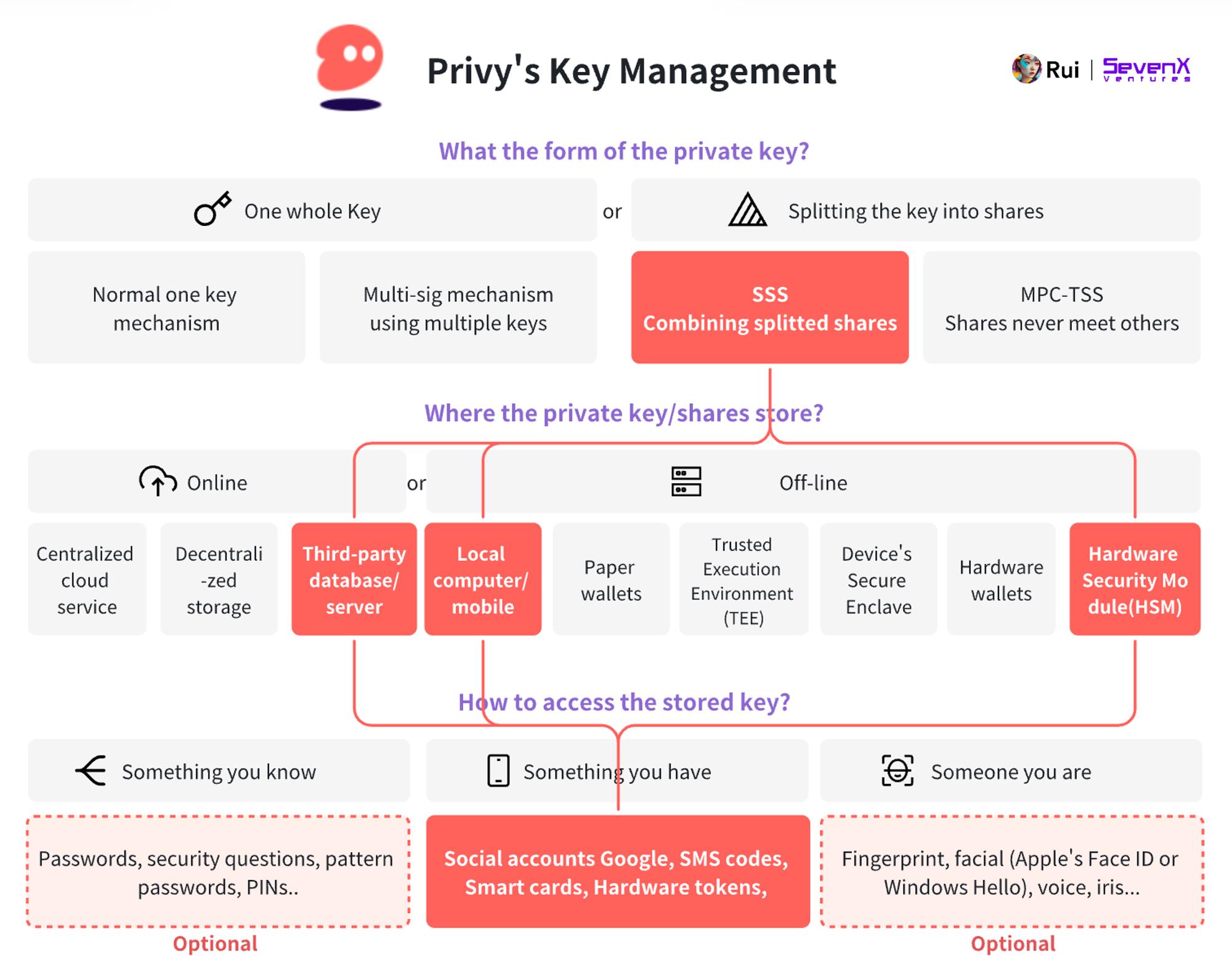
Privy enables social login via email and other methods, using secret sharing to divide the key into three parts:
-
Device shard: Browser - iFrame, mobile - Secure Enclave.
-
Auth shard: Stored by Privy, linked to Privy ID.
-
Recovery shard: User password or encrypted by Privy and stored in HSM.
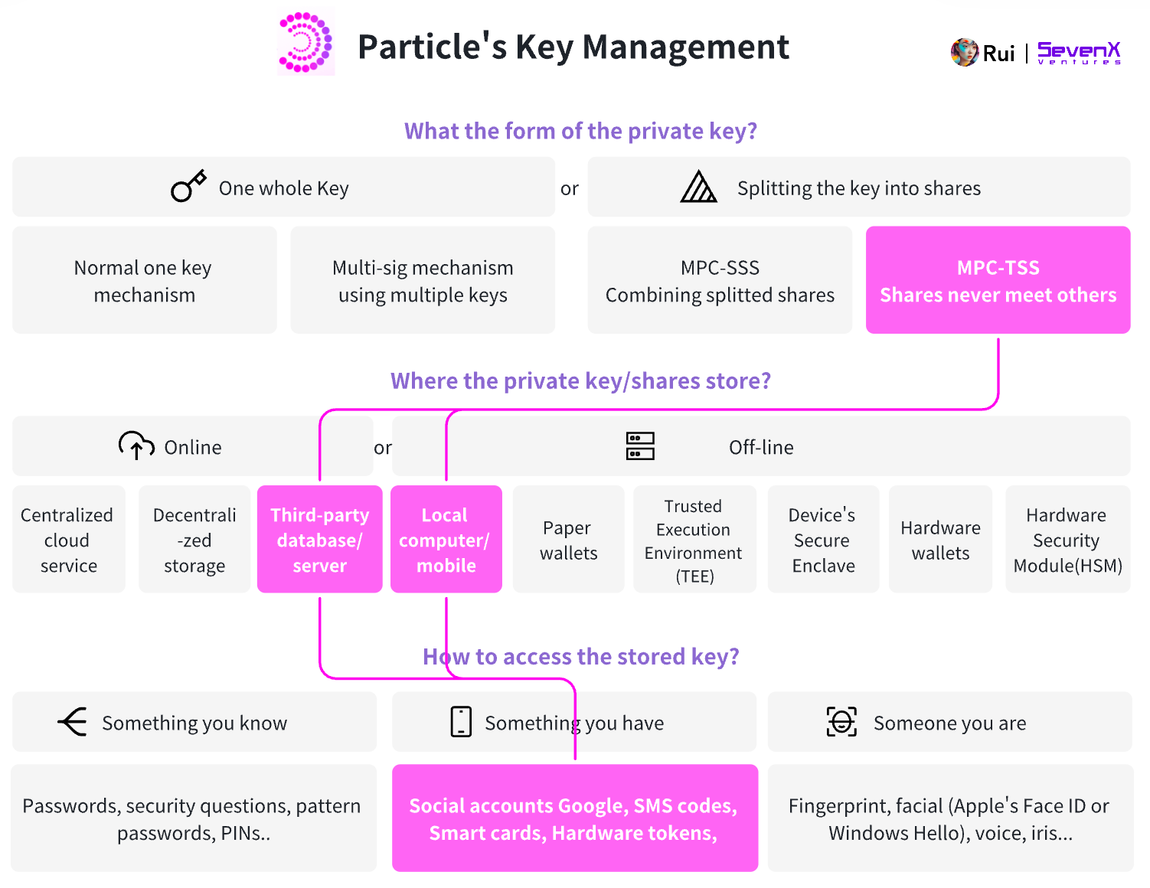
Particle enables social login using MPC-TSS, splitting the key into two parts:
-
Device shard: Browser - iFrame
-
Server shard: Particle’s server
New Solutions
Key Layer: WebAuthn, Secure Enclave, and Passkey
Existing solutions have played a vital role in drawing users toward Web3. Yet challenges remain: passwords can be forgotten or targeted by phishing; 2FA is more secure but cumbersome due to extra steps. Moreover, not everyone wants to delegate key management to third parties—when services restrict direct access, users remain dependent on system availability and integrity.
This leads us to ask: is there a better solution—one offering near trustless operation, high security, and seamless UX? The search brings us to the most effective Web2 practices. As introduced earlier, several terms are central here: WebAuthn as the authentication standard, and Secure Enclave and Passkey as implementations or components tied to it.
WebAuthn
WebAuthn standardizes interfaces for authenticating users on web applications. Instead of passwords, users log in using external authenticators. These can be roaming authenticators (e.g., YubiKey, Titan Key) or platform authenticators (e.g., built-in keychains on Apple devices).
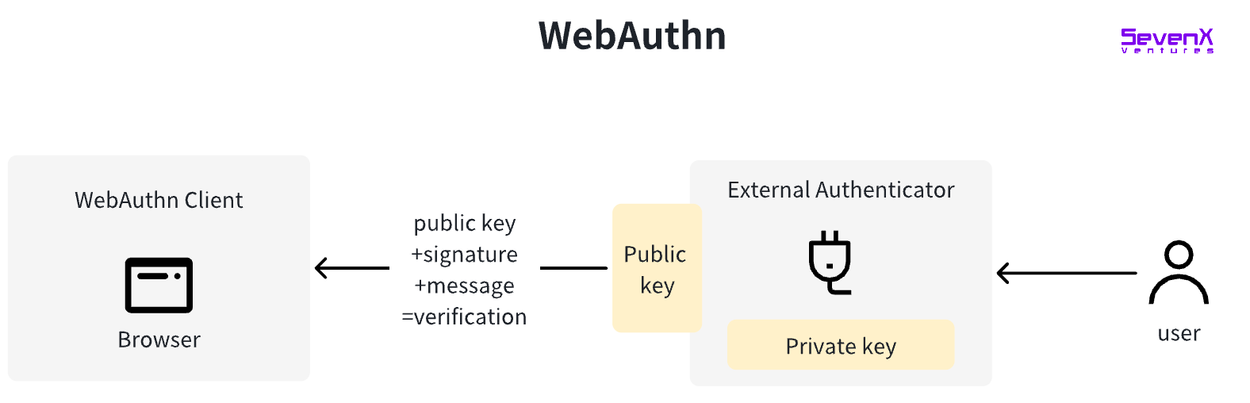
The technology behind WebAuthn was initially developed by the FIDO (Fast IDentity Online) Alliance. In March 2019, W3C officially recognized WebAuthn as a web standard. With its standardization, major browsers—including Google Chrome, Mozilla Firefox, Microsoft Edge, and Apple Safari—adopted WebAuthn, significantly expanding its reach and usability. It is now supported by many advanced devices.
Advantages of WebAuthn:
-
Higher Security: Eliminates reliance on passwords, reducing risks of phishing, brute-force attacks, and replay attacks.
-
Improved UX: Enables simpler, faster login—often just one click or biometric verification.
-
Privacy Protection: No shared secrets transmitted during authentication; websites receive no personal identifying information.
-
Scalability and Standardization: As a web standard, WebAuthn ensures consistency and interoperability across browsers and platforms.
Device-Based WebAuthn, e.g., Secure Enclave
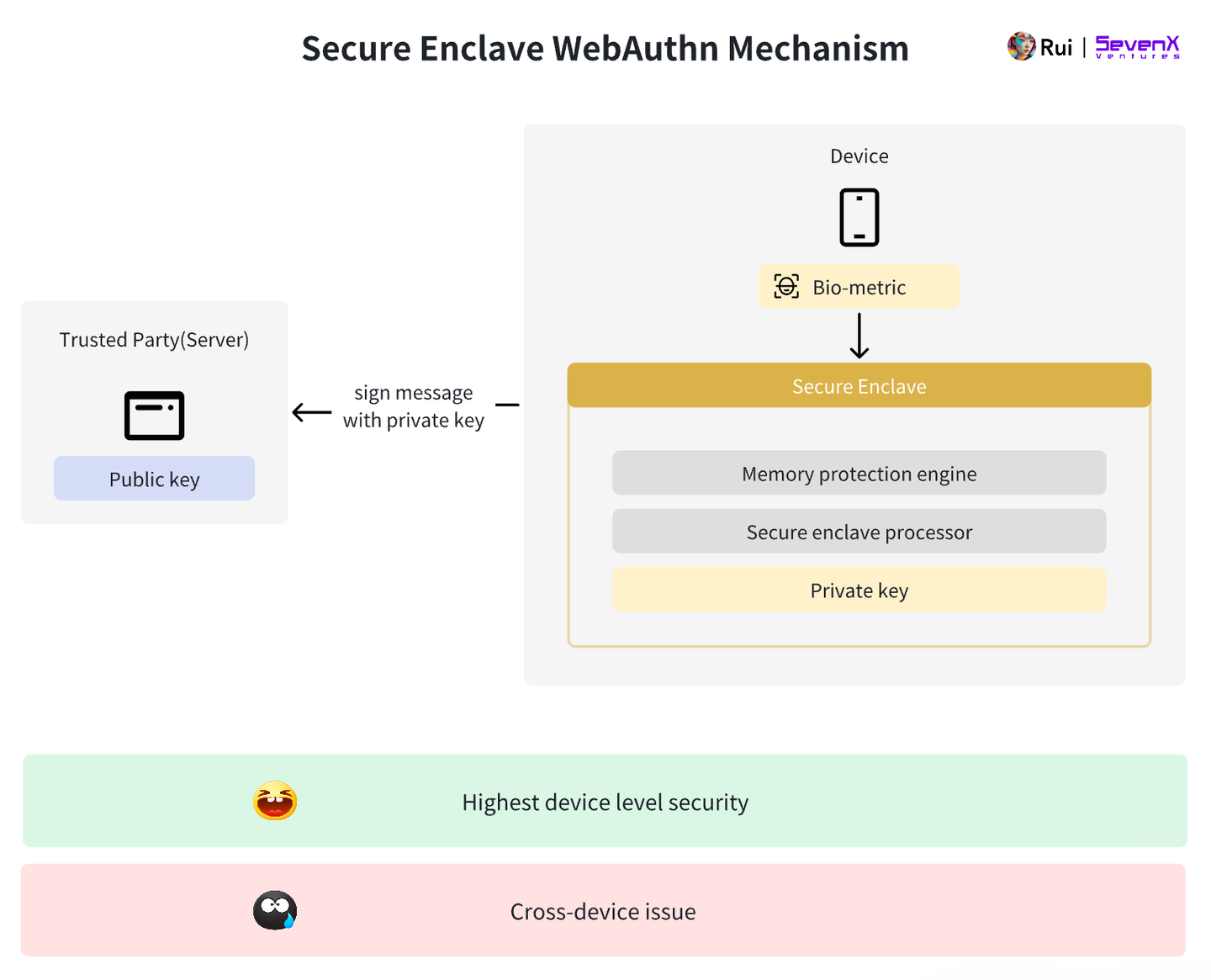
We can now use hardware processors as authenticators—e.g., Apple’s Secure Enclave, Android’s TrustZone, or Google Pixel’s Strongbox.
-
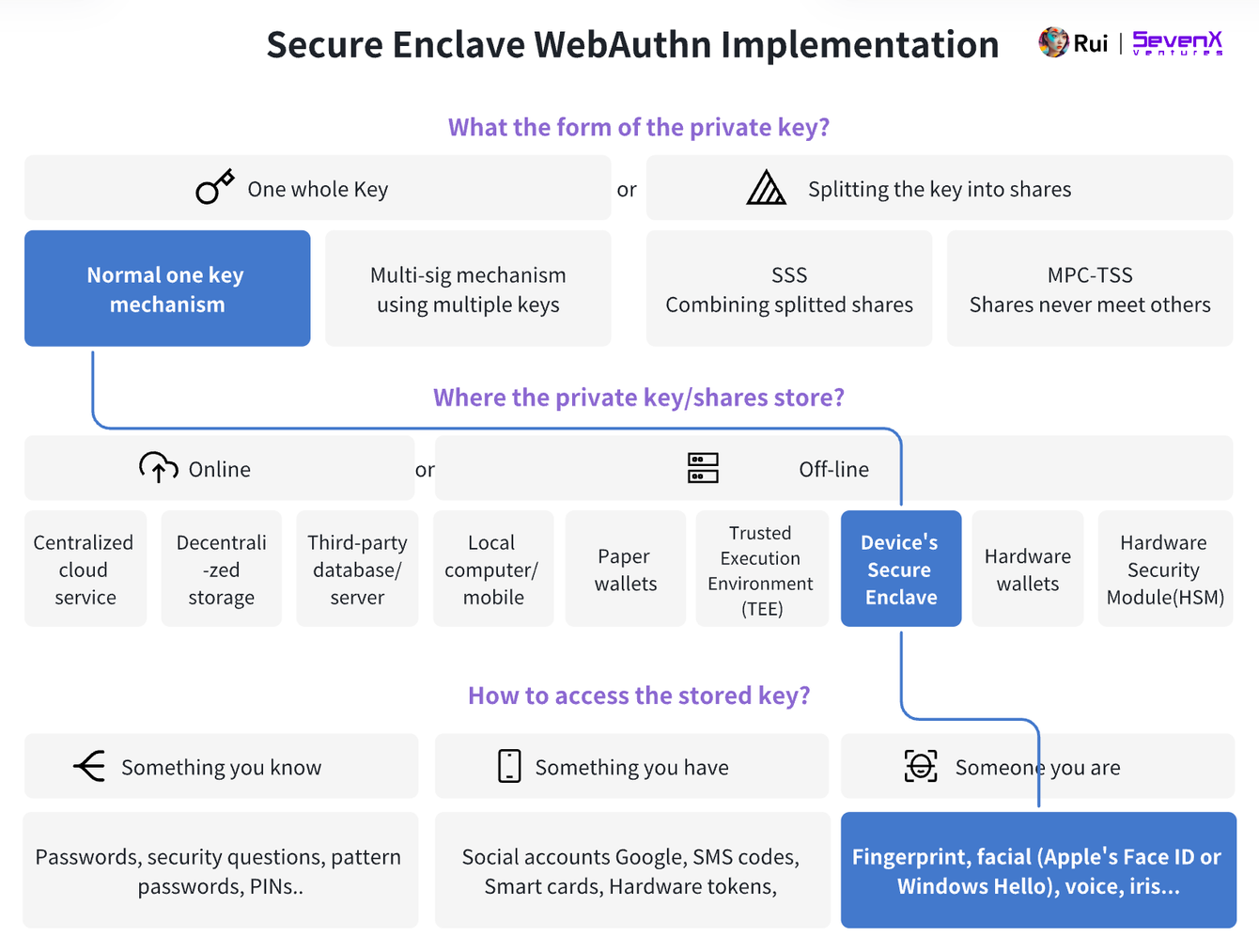
Key Generation: Public-key cryptography generates key pairs per WebAuthn standards, typically using the P-256 r1 curve. The public key is sent to the server; the private key never leaves the Secure Enclave. Users never handle plaintext keys, ensuring private key safety.
-
Key Storage: Private keys are securely stored within the device’s Secure Enclave—a hardened subsystem isolated from the main processor. It protects sensitive data even if the main system is compromised. Accessing raw key material is extremely difficult, which is why highly sensitive data (e.g., Apple Pay, Face ID) is stored here. See deeper technical explanations of how Secure Enclave works.
-
Authentication: Users gain access via facial recognition or fingerprint scan. The Secure Enclave signs the server’s challenge using the private key, and the server verifies using the public key.
Advantages of Device-Based WebAuthn:
-
Hardware-Grade Security: Independent hardware-based key managers like Secure Enclave enhance protection.
-
Phishing Resistance: No need to enter information on potentially compromised devices or websites.
-
Convenient Experience: Offers a more user-friendly flow. Users no longer need to remember complex passwords across sites.
Disadvantages of Device-Based WebAuthn:
-
Device Limitation: If the device is lost or damaged, the private key cannot be exported or retrieved, preventing cross-device usage.
Cloud-Based WebAuthn: Passkey
To overcome cross-device limitations, tech giants introduced cloud-based WebAuthn deployments—Passkey, popularized by Apple.
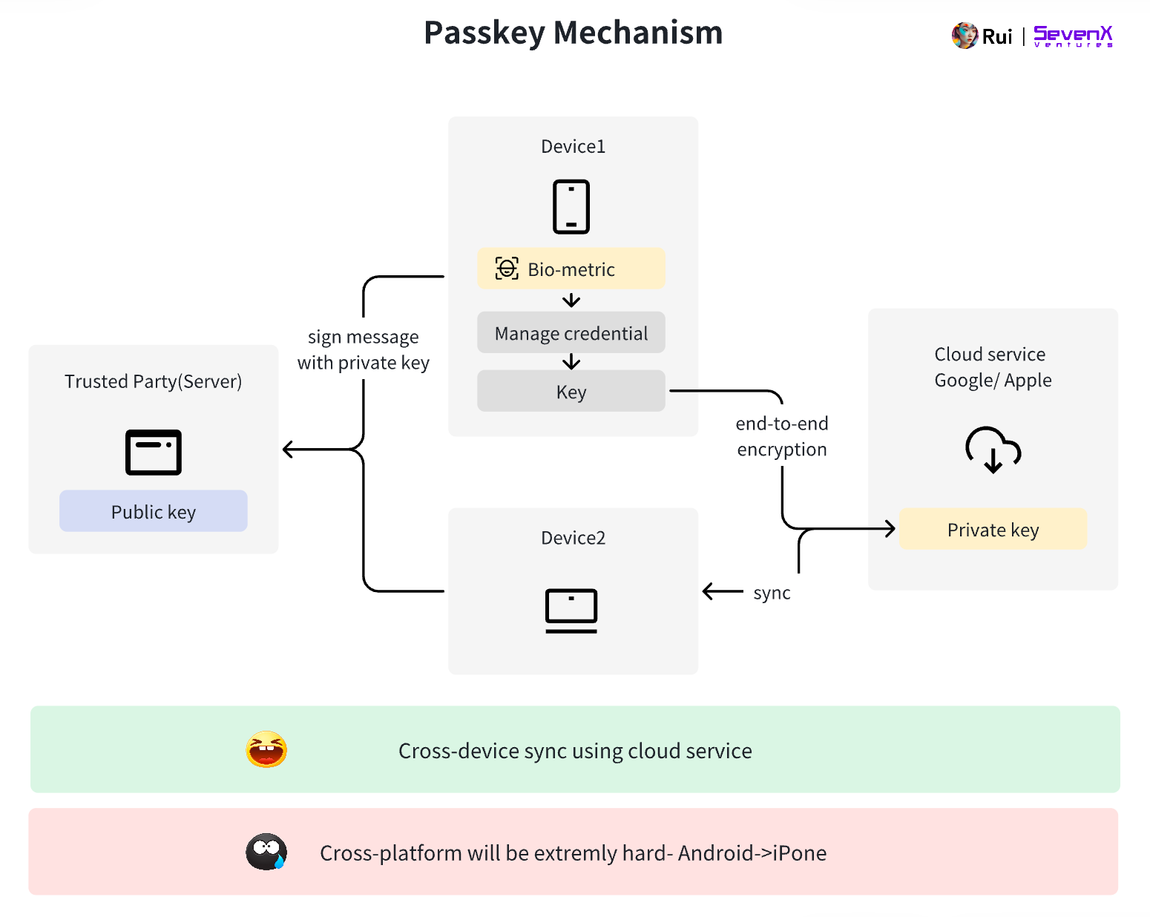
Using Apple’s Passkey as an example:
-
Key Generation: The user’s macOS, iOS, or iPadOS device acts as the authenticator, generating public and private keys when creating an account. The public key is sent to the server; the private key is stored in iCloud Keychain. iCloud Keychain data is encrypted with hardware-bound keys and stored in HSMs. Apple cannot access these keys.
-
Cross-Device Sync: Similar to accessing iCloud—authenticate the iCloud account, receive an SMS code, and enter the password on one of your devices.
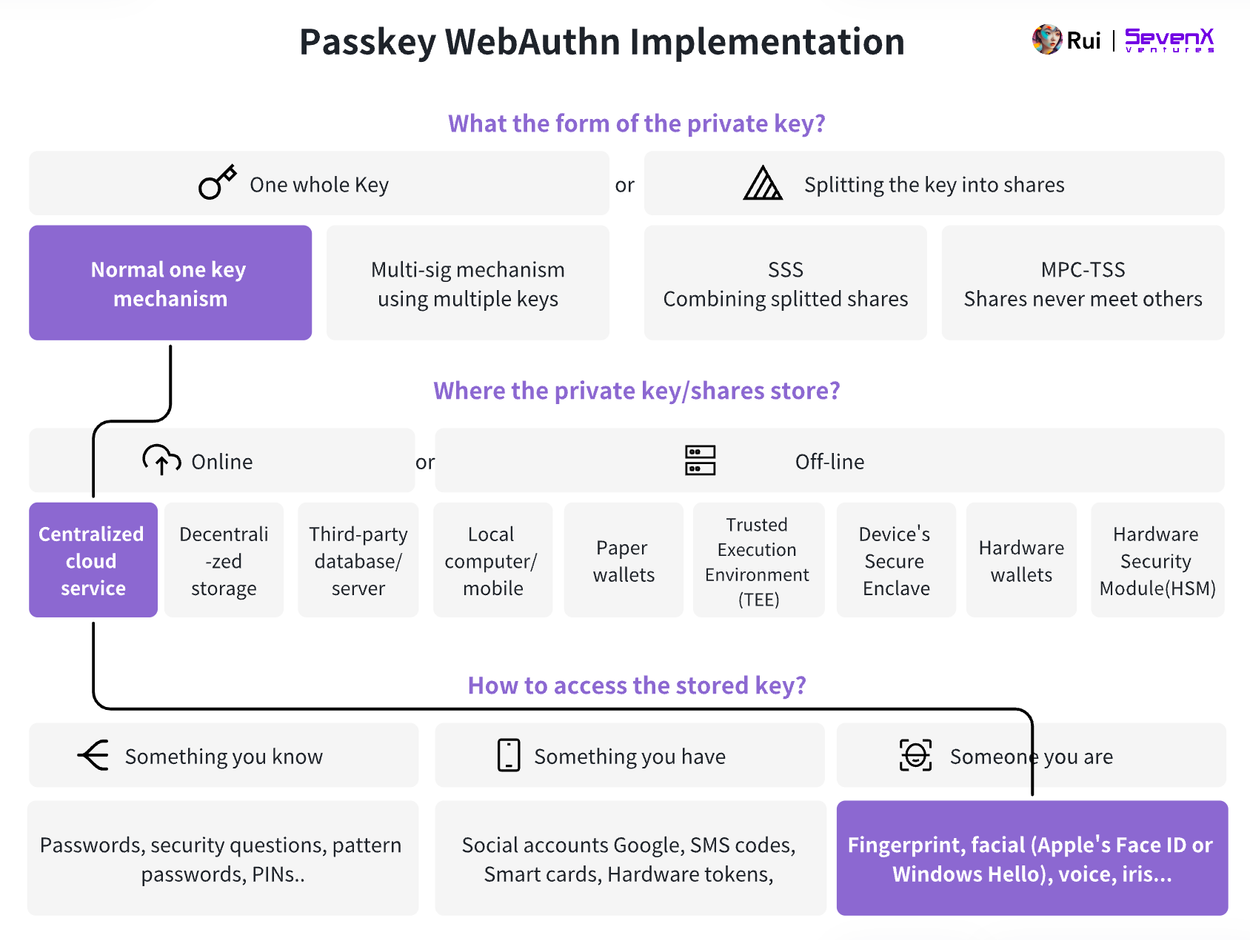
Advantages of Cloud-Based WebAuthn:
-
Cross-Device: Passkey enables convenient access across all frequently used devices. Currently limited to Apple devices. More challenging for Android due to fragmentation in versions and hardware.
-
Anti-Phishing: Same as above.
-
Convenience: Same as above.
Disadvantages of Cloud-Based Passkey:
-
Cloud Dependency: Compared to device-based WebAuthn, cloud-based Passkey shifts the security layer from Secure Enclave hardware to iCloud Keychain, which some may perceive as cloud-hosted. Key considerations: Could the user’s Apple ID be compromised? While iCloud Keychain uses end-to-end encryption, operational errors or vulnerabilities pose risks.
-
Platform Limitations: Using iCloud-based Passkeys on Android devices is highly challenging. Also unlike traditional methods, Apple and Google do not send device-specific assertions, making it impossible to verify the type of device where the key was generated—raising concerns about reliability of keys and associated metadata.
Account Layer: Smart Contract Accounts and Externally Owned Accounts
So far, we see that maintaining hardware-grade security while enabling cross-device and cross-platform compatibility is challenging. Equally important are social recovery options—e.g., adding multiple guardians for enhanced security. Here, blockchain offers promising directions.
Note: When adapting Web2’s WebAuthn to Web3, a key difference emerges: Web2 only needs proof of ownership, whereas Web3 also requires transaction authorization. With only Passkey, developers cannot control the signed message—the message is usually generic (e.g., “sign in”), risking front-end manipulation where users “blindly” sign messages—an issue seemingly minor but actually critical.
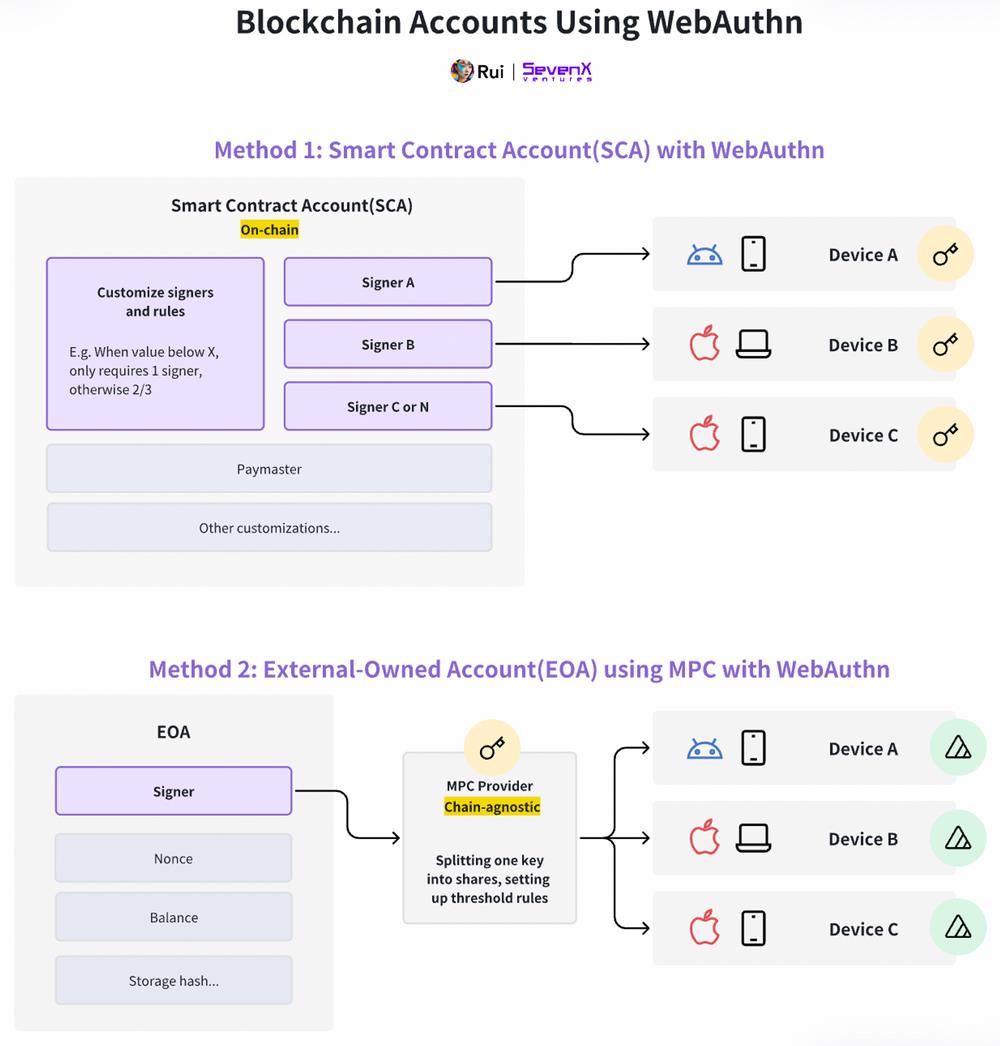
Smart contract accounts are themselves smart contracts—on-chain entities capable of assigning arbitrary signers. This flexibility lets users configure multiple devices and platforms (e.g., Android phone, MacBook, iPhone) as signers. Modular SCAs support upgrades—swapping new signers or changing thresholds from 2/3 to more complex configurations.
Imagine a wallet that dynamically adjusts security: single-signer auth on familiar IPs, but requiring multiple signers for unknown IPs or high-value transactions. With modularity and programmability, innovation is limited only by imagination. Many SCA providers—Safe, Zerodev, Biconomy, Etherspot, Rhinestone—are actively building here, enabled by infrastructure from Stackup, Pimlico, Alchemy, etc.
See my prior research for a comprehensive background on smart contract accounts.
Smart contract accounts can achieve social recovery and cross-device/platform compatibility via MPC services. Though SCAs have fixed signers, MPC providers can split keys into fragments for enhanced security and flexibility. This approach lacks programmable and upgradable features of SCAs—like timelock recovery or easy key revocation. However, MPC isn't tied to specific blockchains, offering superior cross-chain capability and lower cost. Notable MPC providers: Particle Network, Privy, Web3Auth, OKX Wallet, Binance Wallet.
Signature Layer: R1 Support
Let’s step back: On Ethereum, the private key is a random number chosen from the k1 curve, and the signing process uses this same curve.
However, key pairs generated under WebAuthn use the r1 curve. Thus, verifying r1 signatures on Ethereum costs roughly three times more than k1. Here are solutions addressing this:
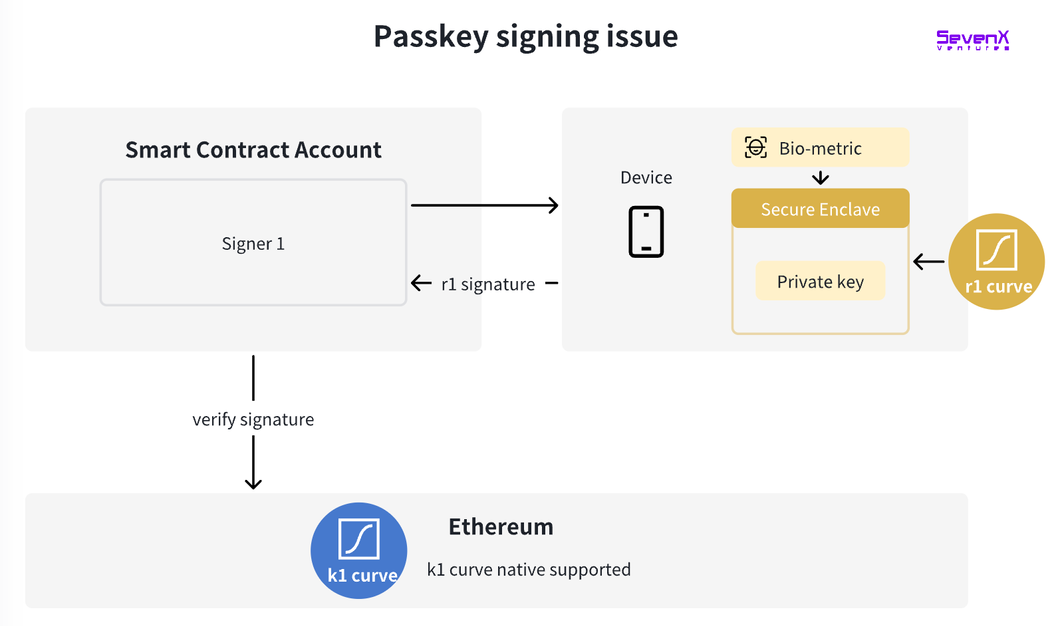
Credit to Dogan for contributions—see his research for deeper insights.
Protocol-Level Solutions:
-
Solution: EIP-7212, precompile supporting secp256r1 curve, proposed by Clave team.
-
Assessment: Creates a precompile contract performing signature verification on “secp256r1” using message hash, signature (r,s), and public key coordinates (x,y). Any EVM chain (especially Ethereum rollups) can integrate this easily. So far, protocol precompiles appear to be the most gas-efficient solution.
-
Implementation: zkSync
Third-Party Services:
-
Solution: Turnkey
-
Assessment: Turnkey TEE ensures private keys are only accessible via user’s Passkey—Turnkey itself never sees them. Still requires trust in service availability.
-
Implementation: Goldfinch
Solidity Verifier Solutions:
-
Solution: FCL’s Solidity Verifier, FCL with precomputed Solidity Verifier, Daimo’s P256 Verifier
-
Implementation: Clave, Obvious Wallet
Zero-Knowledge (ZK) Verifiers:
-
Solution: Risc Zero’s Bonsai, Axiom’s halo2-ecc
-
Assessment: Uses zero-knowledge proofs to verify computations off-EVM, reducing on-chain costs.
-
Implementation: Bonfire Wallet (Risc Zero), Know Nothing Labs (Axiom)
These solutions enable cheaper, viable r1 signature verification within the Ethereum ecosystem. See Dogan’s evaluation.
New Case Studies on WebAuthn
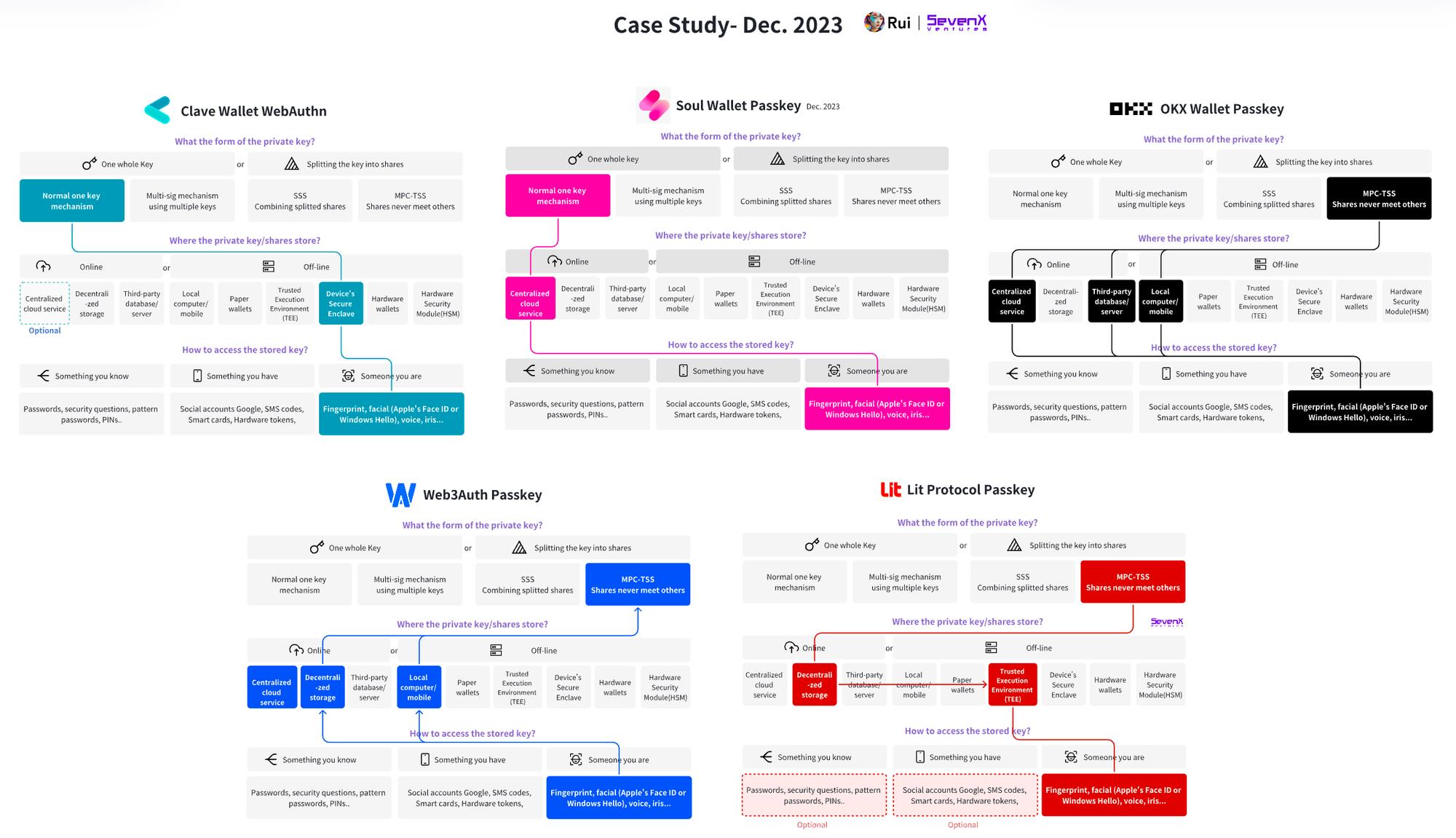
* Note: As of December 2023, most of these solutions are in early stages and subject to change or improvement. These examples are for educational purposes only; always refer to official sources for accurate information.
Clave Wallet: (Secure Enclave WebAuthn) + (Smart Contract Account)
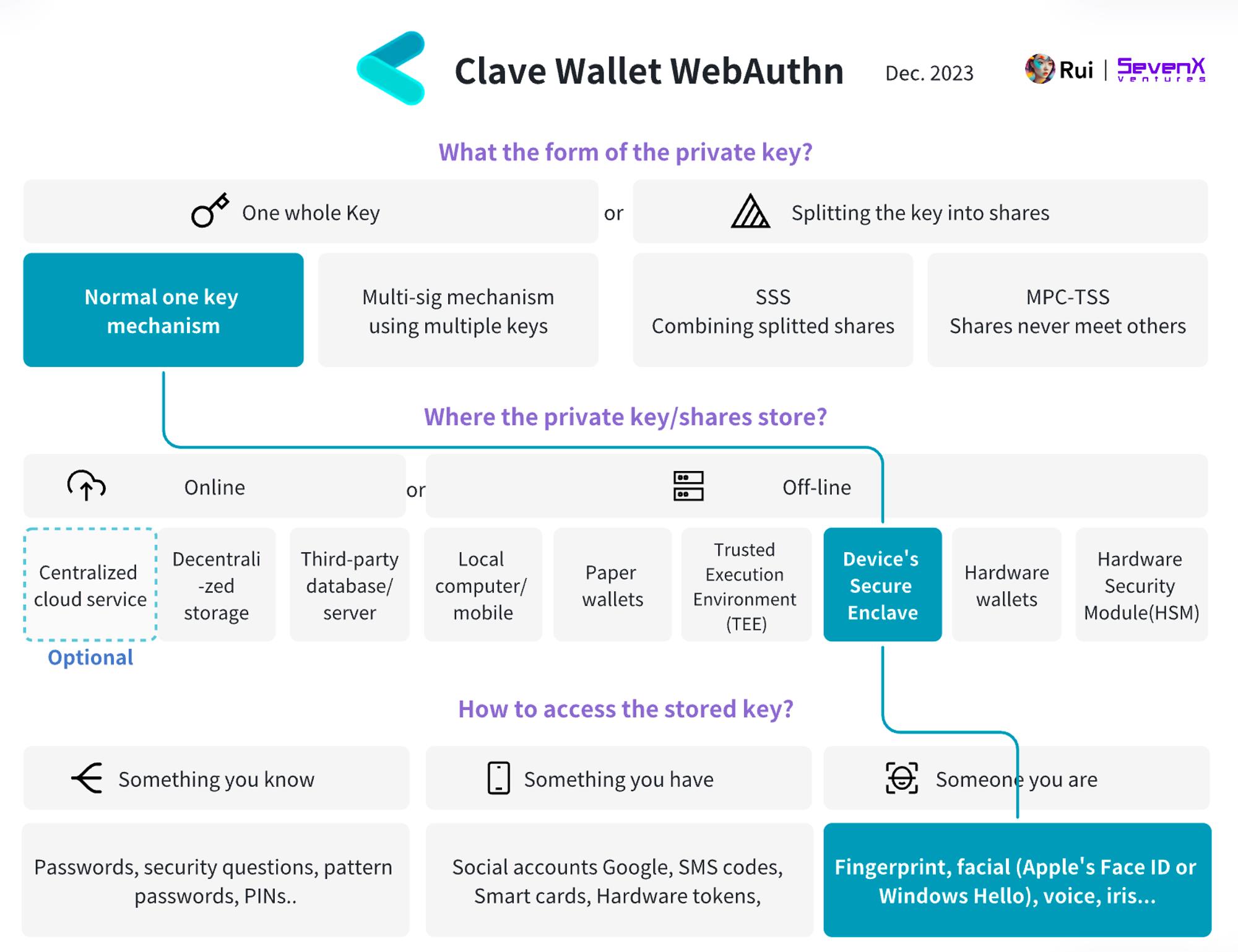
Basic Info:
-
Demo: https://getclave.io/
-
Account: Smart Contract Account
-
Chain: zkSync
Transaction Flow:
-
Key Creation: User performs biometric verification (fingerprint or face scan), generating a key pair inside Secure Enclave—never exposed.
-
Key Signing: App receives transaction message, forwards signing request to Secure Enclave. User approves via biometrics. Secure Enclave signs the message, which is then broadcast to blockchain nodes.
-
Additional Features: Smart contract account enables powerful functions. First, gas sponsorship: via Paymaster, dApps or advertisers can pay gas for users, smoothing transaction flow and enabling ERC-20 payments instead of ETH/native tokens. Also, session keys allow signature-free transactions for a defined period.
Recovery Mechanism:
-
Recovery is managed by Clave’s smart contract on zkSync. Users can cancel recovery within a 48-hour lock-up period to prevent unauthorized actions.
-
Cloud Backup: When enabled, an EOA is created with private key stored in iCloud or Google Drive. Users can access their account from different devices using the cloud-stored key—and can delete or overwrite this backup anytime.
-
Social Recovery: Users can designate friends/family Clave addresses as guardians. If M out of N guardians confirm recovery and don’t cancel, it executes after 48 hours.
Soul Wallet: (Passkey) + (4337 SCA)
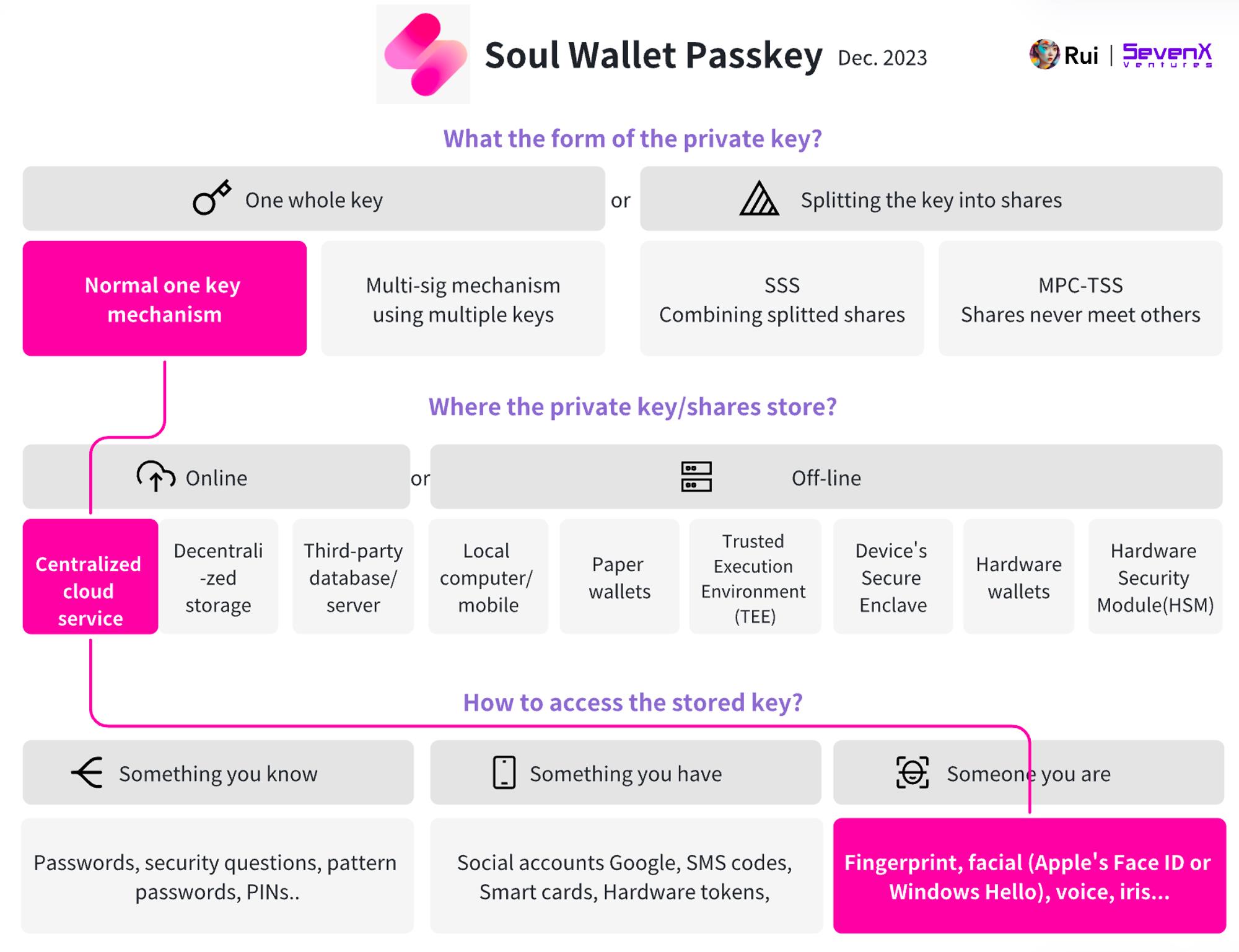
Basic Info:
-
Demo: https://alpha.soulwallet.io/wallet
-
Account: ERC-4337 Smart Contract Account
Join TechFlow official community to stay tuned
Telegram:https://t.me/TechFlowDaily
X (Twitter):https://x.com/TechFlowPost
X (Twitter) EN:https://x.com/BlockFlow_News
 @SevenXVentures