Interactive Tutorial: Sony L2 Network Soneium Testnet
TechFlow Selected TechFlow Selected
Interactive Tutorial: Sony L2 Network Soneium Testnet
Soneium is a public Ethereum Layer 2 blockchain ecosystem developed by Sony's Block Solutions Lab, designed to connect Web3 and Web2 and provide users worldwide with a robust development environment.
 Navigating Web3 tides with focused insights
Author: MetaHunter168
Soneium is a public Ethereum Layer 2 blockchain ecosystem developed by Sony's Block Solutions Lab.
This project aims to inspire emotion and creativity, bridging blockchain technology (Web3) with everyday internet services (Web2), making it easier for users to get started with blockchain. Soneium plans to become a versatile, general-purpose blockchain ready to meet the needs of global users across various industries, providing developers, creators, and communities with a powerful, developer-friendly environment supported by scalable technology.
Interactive Tutorial
1. Join the Discord main channel (join early to secure more roles)
① First, join Discord: https://discord.gg/soneium
② After joining, go to the waiting-room channel and level up by sending messages (slow mode allows one message per minute; send around 20 messages to reach level 4)
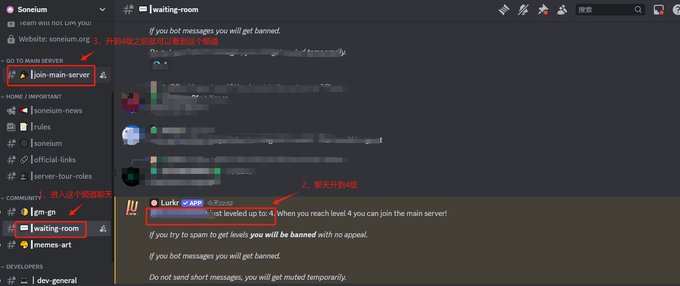
Once you reach level 4 by chatting, you’ll be able to see and access the join-main-server channel. Click "Join Main Server," then click "Click here to join" to enter the main channel.
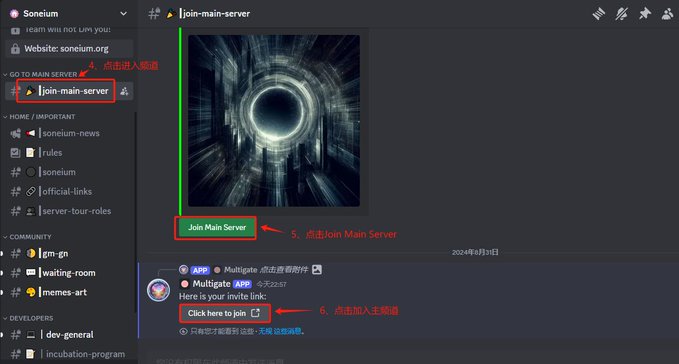
2. Cross-chain interaction (interactions are not one-time; if time permits, interact periodically)
① First, visit the website to claim ETH testnet tokens on the Sepolia chain: https://www.alchemy.com/faucets/ethereum-sepolia
Additional links to claim Sepolia testnet tokens:
https://sepolia-faucet.pk910.de/
https://faucet.quicknode.com/ethereum/sepolia
https://www.infura.io/faucet/sepolia
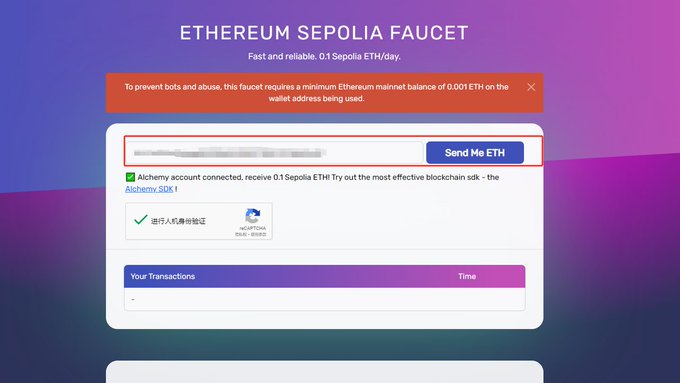
② Next, visit the website to call the contract and claim FAUCET testnet tokens on the Sepolia chain:
https://sepolia.etherscan.io/address/0x5589BB8228C07c4e15558875fAf2B859f678d129#writeContract
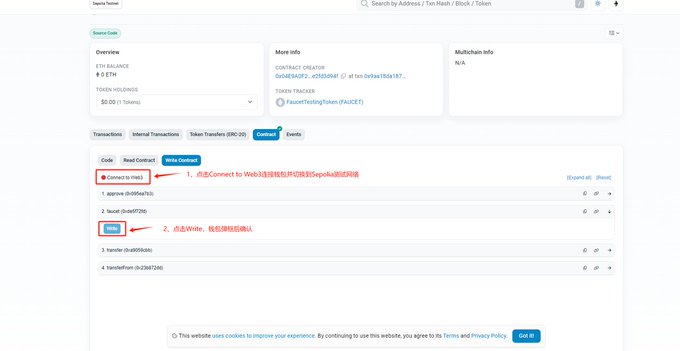
③ Visit the testnet cross-chain website:
https://bridge.soneium.org/en/testnet
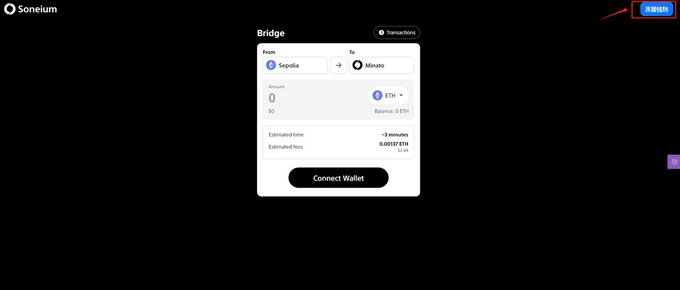
First, click the top-right corner to connect your wallet and switch to the Sepolia testnet.
Enter the amount to bridge, then click "Review deposit."
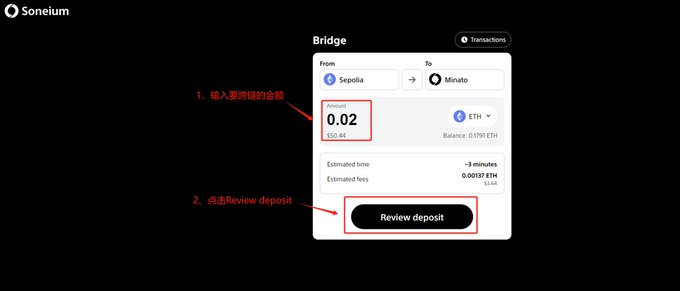
Then click "Initiate deposit," confirm in the wallet pop-up window.

④ Select the FAUCET token, enter the bridging amount, and click "Review deposit." After the page redirects, click "Approve and deposit," then confirm in the wallet pop-up (the process is similar to step ③, so not repeated here).

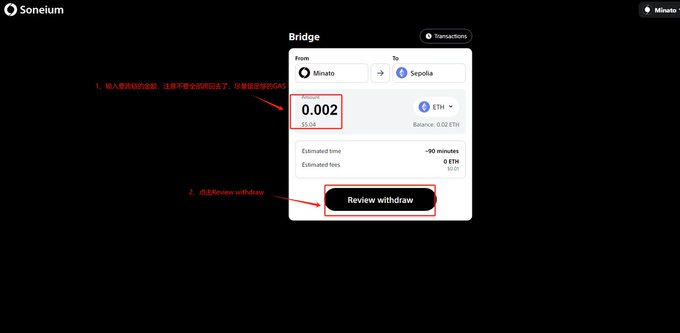
⑤ Click the arrow in the middle of the Bridge to switch networks. In the wallet pop-up, approve and switch to the Minato network.

Enter the amount to bridge (do not bridge all funds back; reserve sufficient GAS), then click "Review withdraw."
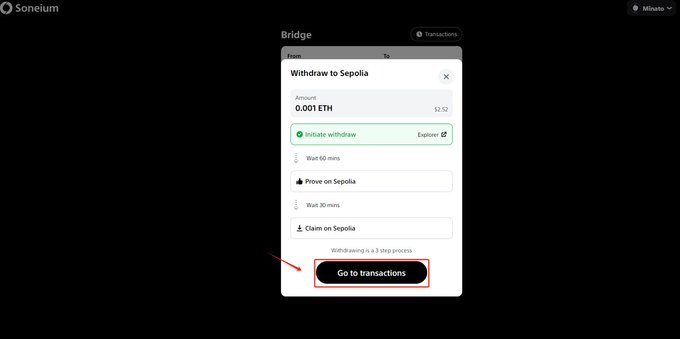
Click "Initiate withdraw," then confirm in the wallet pop-up.
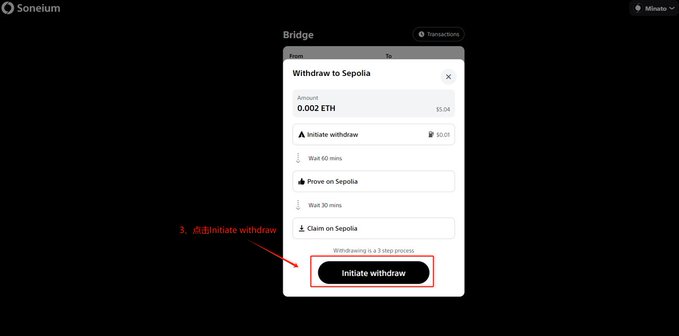
⑥ Withdrawing from Minato back to Sepolia takes about 1 hour. After 1 hour, switch your network back to L1-Sepolia and manually claim the tokens to complete the process. First, click "Go to transactions."
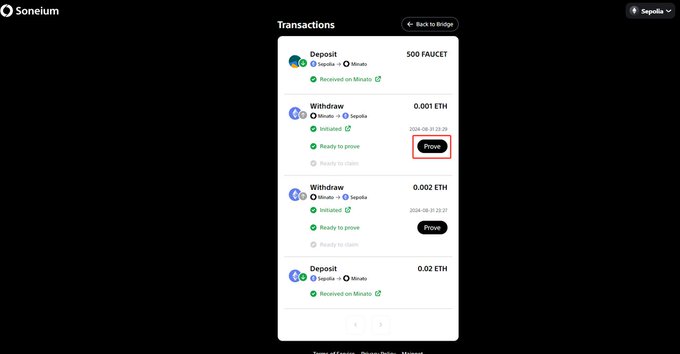
Then click "Prove," and confirm in the wallet pop-up (this also requires about 30 minutes of waiting).
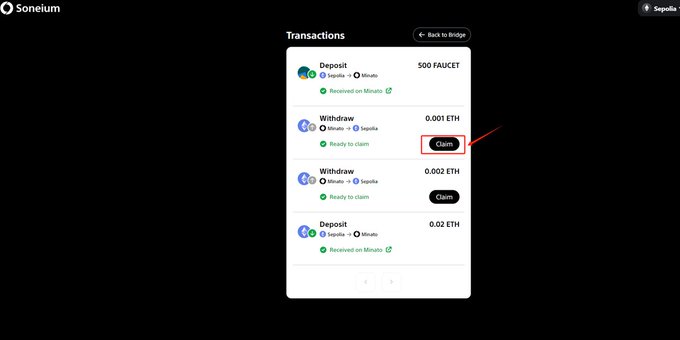
Click "Claim," then confirm in the wallet pop-up.
3. The scalable network AstarNetwork has率先 transitioned from the Astar zkEVM network to Soneium.
https://testnet.verylongswap.xyz/swap
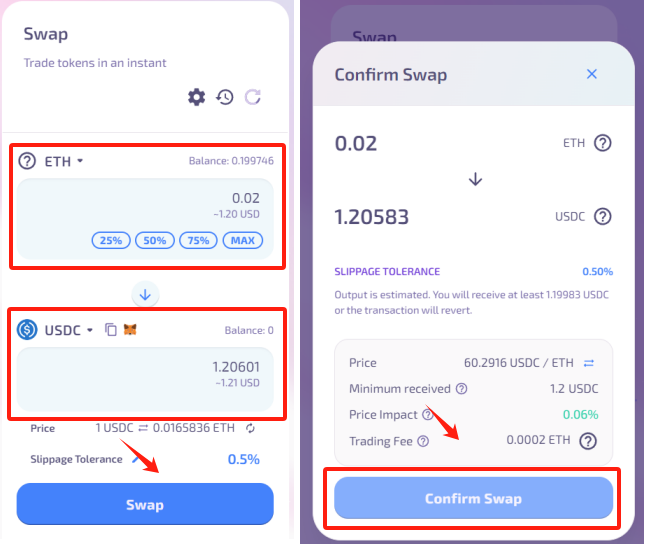
① Interaction: Open the webpage, connect your wallet at the top-right corner, and switch the network to Minato.
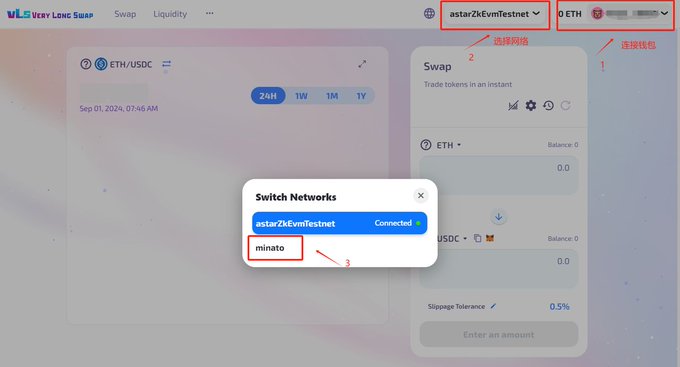
Select a trading pair and fill in the amount to swap.
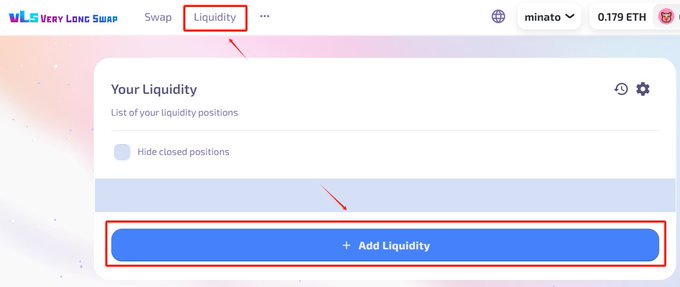
② Add liquidity: Select "Liquidity" at the top, then click "ADD Liquidity."
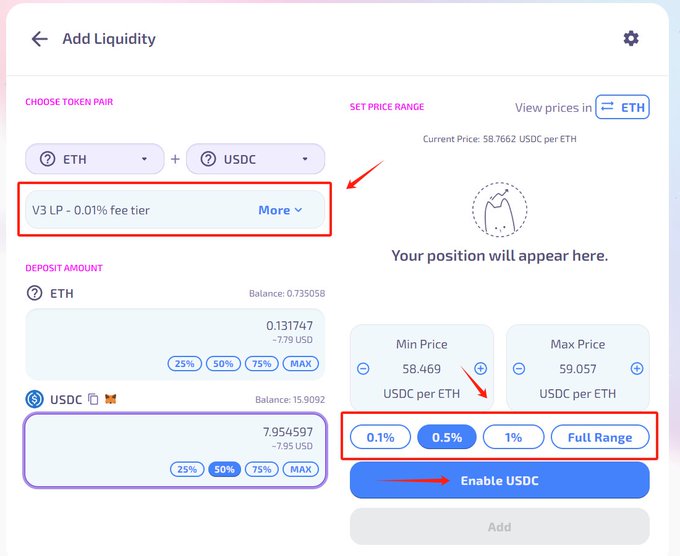
Since you previously swapped USDC, select the ETH-USDC trading pair. First, check the fee tier, then select the price range percentage, enter the amount of liquidity to add, and click "Enable USDC."
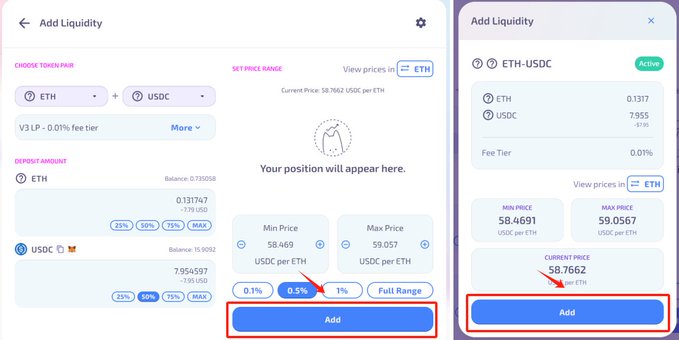
After the page redirects, click "ADD" twice.
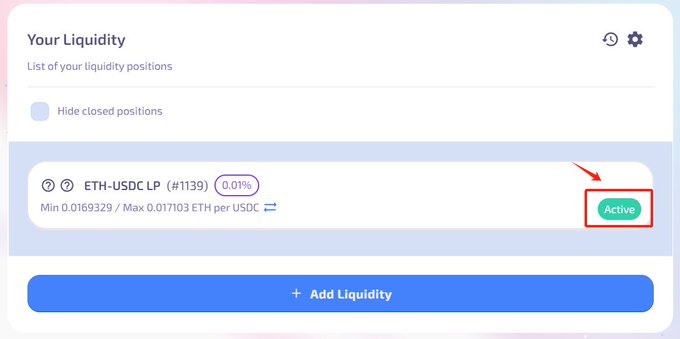
Return to the previous page, select "Active," and withdraw part of the liquidity.
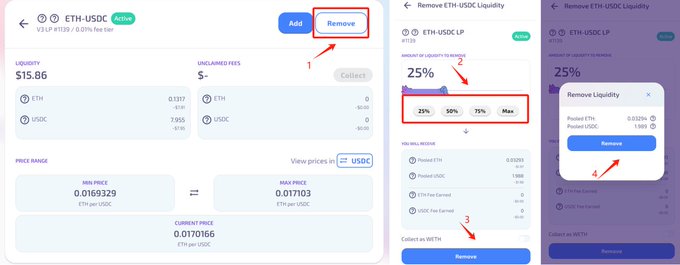
Click "Remove," select the percentage of liquidity to withdraw, then click "Remove."
4. Complete two Layer3 tasks (currently only two tasks; stay tuned for future updates)
① Task One:
https://app.layer3.xyz/quests/the-soneium-minato-testnet?slug=the-soneium-minato-testnet
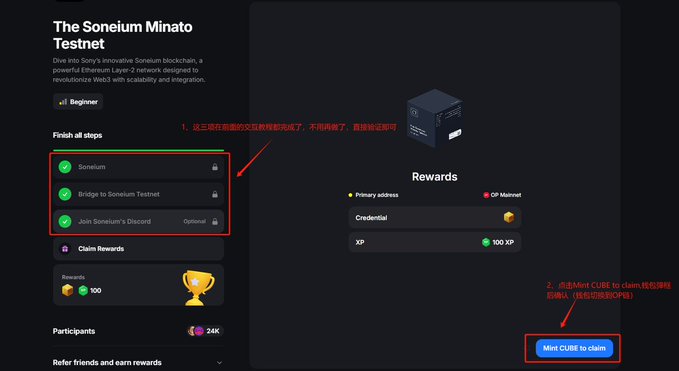
The three subtasks (cross-chain and joining the Discord group) have already been completed in the earlier tutorial steps. Simply verify them to finish, then click "Mint CUBE to claim" and confirm in the wallet pop-up (on the OP chain, requires minimal GAS).
② Task Two: https://app.layer3.xyz/quests/trending-now-soneium?slug=trending-now-soneium
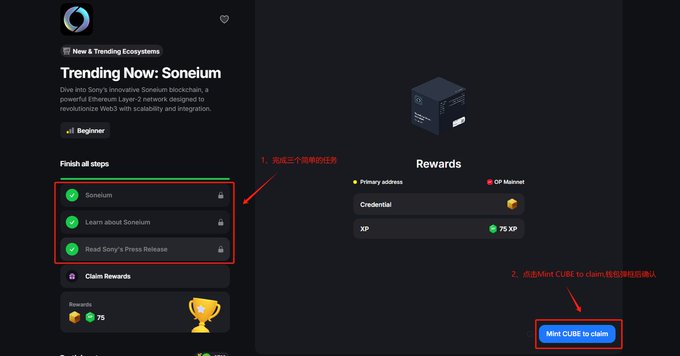
The three subtasks are very simple—open the Soneium blog and read Sony’s press release. After completing the tasks, click "Mint CUBE to claim" and confirm in the wallet pop-up (on the OP chain, requires minimal GAS).
5. waveX, a perp DEX platform built on the Soneium chain, @waveX_fi (optional for those interested)
Currently, you can play a Telegram mini-game and invite friends to join: https://t.me/wavex_treasurehunt_bot
After participating in the Telegram mini-game, visit the website to submit your wallet address and receive USDT on the BSC chain.
Website: https://gleam.io/fMTSs/treasure-hunt-airdrop-event
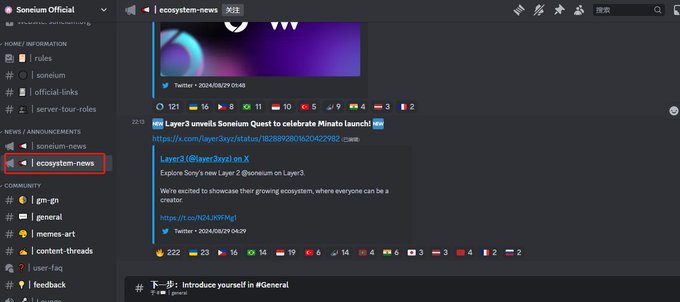
6. Additionally, pay close attention to the ecosystem-new channel in Discord.
This channel will provide updates on the latest developments in Soneium's ecosystem projects and DApps.
That concludes the tutorial.
Join TechFlow official community to stay tuned
Telegram:https://t.me/TechFlowDaily
X (Twitter):https://x.com/TechFlowPost
X (Twitter) EN:https://x.com/BlockFlow_News
 @MetaHunter168