Simplify the Complex: Understand OKX's Smart Copy Trading Mode in One Article to Boost Trading Efficiency
TechFlow Selected TechFlow Selected
Simplify the Complex: Understand OKX's Smart Copy Trading Mode in One Article to Boost Trading Efficiency
Smart copy trading is the latest upgrade of OKX's futures copy trading product, a new model that is more efficient and convenient.
 Navigating Web3 tides with focused insights
Author: OKX
In the cryptocurrency space, copy trading has become a highly popular trading strategy, allowing investors to replicate the trades of successful traders in hopes of achieving similar investment returns. Today, many trading platforms offer copy trading features to meet users' everyday needs.
As the current market leader with the most comprehensive copy trading functionality and the most mature copy trading ecosystem, OKX announced on March 4 a major upgrade to its copy trading feature, aiming to deliver a more intelligent trading experience. At the heart of this upgrade is the launch of a new Smart Copy Trading mode, enabling users to conduct copy trading more effortlessly.
1. Key Features and Advantages of Smart Copy Trading Mode
Smart Copy Trading is the latest enhancement to OKX’s futures copy trading product—an even more efficient and user-friendly model. As widely known, OKX's futures copy trading function is designed to provide the most intuitive, simple, and transparent experience for both futures traders and copiers, maximizing profitability and mutual benefits. Users can now follow professional traders in futures trading without manually opening or closing positions or monitoring the market.
The introduction of Smart Copy Trading aims to lower the barrier for users engaging in futures copy trading. Specifically, this new mode automatically calculates investment amounts and sets order parameters based on the proportion of funds used by the lead trader. Each time a position is opened, the platform calculates the order size for the copier based on the ratio of the trader’s margin to their account equity, then replicates the trader’s order parameters accordingly.
For example: A trader has 10,000 USDT in account equity and uses 1,000 USDT (10% of equity) to open a 5x leveraged cross-margin long position on BTCUSDT perpetual futures. If a copier sets an investment amount of 1,000 USDT, the system will automatically allocate 1,000 USDT × 10% = 100 USDT as the position cost, using 5x leverage in a cross-margin long on BTCUSDT perpetual futures—mirroring the trader’s setup.
Currently, Smart Copy Trading supports one-click following after setting an investment amount. Users no longer need to configure complex parameters—the lead trader manages risk and return on their behalf, enabling effortless and efficient profit generation. Compared to the previous Custom Copy Trading mode, this new approach is significantly simpler, requiring just two steps to begin earning. After selecting a preferred professional trader, investors only need to set their investment amount (minimum 100 USDT) and tap the "Copy Now" button to complete setup. This innovative design dramatically lowers the entry barrier to futures copy trading—beginners unfamiliar with trading parameters can easily start copying with one click and steadily earn returns.
Overall, the main advantages of Smart Copy Trading are reflected in four aspects:
- One-click Copying: Users simply enter their investment amount to start copying instantly—no need to configure other complex parameters, enabling truly convenient and efficient trading.
- Smart Allocation with Synchronized Risk Control: Investment amounts are calculated proportionally based on the lead trader’s fund allocation. Leverage and margin modes remain consistent between trader and copier, enabling better risk and return management by the lead trader.
- Position Isolation: Manual trading positions and copy trading positions are isolated, reducing interference between the two.
- Capital Isolation: Dedicated funds for dedicated purposes—reducing the risk of excessive leverage that may arise from using the same capital to follow multiple traders.
Moreover, OKX has also fully upgraded its Copy Trading User Center, adding new sections for “Copy Details” and “Profit Breakdown,” offering users more intuitive displays of trading data and earnings composition. Users can easily view detailed transaction records for each trader they follow, while clearly understanding how their profits are generated. This redesign aims to enhance user experience, making it easier for users to manage and analyze their trading performance.
“The launch of Smart Copy Trading reaffirms our leadership in automated trading. With this innovation, we deliver a smoother and more secure copy trading experience. The new feature simplifies operations while strengthening risk management, meeting diverse user needs and risk preferences. This upgrade represents a significant improvement to our existing copy trading ecosystem, enabling more users to access safe and efficient copy trading services,” said an OKX product executive.
2. How to Use Smart Copy Trading Mode?
After outlining the core features and benefits of OKX’s Smart Copy Trading mode, here comes the key part—how can users set it up? Below is a simple guide:
Step 1:Browse or search for traders of interest. On the trader’s profile page, click the “Copy Now” button to enter copy settings.
Step 2:Select Copy Mode: Smart Copy Trading.
Step 3:Set Copy Parameters
- Investment Amount (USDT) (Required): The total dedicated amount for following this trader (minimum 100 USDT), which will be isolated and reserved in your trading account.
- Immediately Copy Open Positions:
When enabled, if the trader currently holds open positions, your account will immediately copy them at market price based on the proportional fund allocation. When disabled, no existing positions will be copied—your account will only begin following the trader’s new orders.
You can check the trader’s profile page under “Current Positions” to decide whether to enable immediate position copying.
- Copy Stop Loss: The maximum loss amount you are willing to accept when copying this trader. Once the preset stop-loss threshold is reached, the system will automatically terminate the copy relationship and handle any remaining positions according to your settings.
Step 4:Click “Copy Now” and confirm the information to successfully start copying.
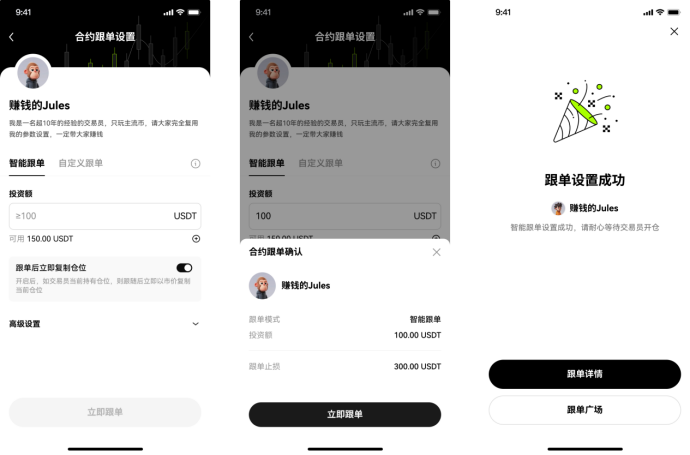
After establishing the copy relationship, users can go to the Copy Trading homepage, click “My Copies” to view current and historical copy performance, earnings, and other details. Alternatively, users can click “Manage” under “Copy Details” to adjust investment amounts, modify stop-loss settings, or unfollow the trader.
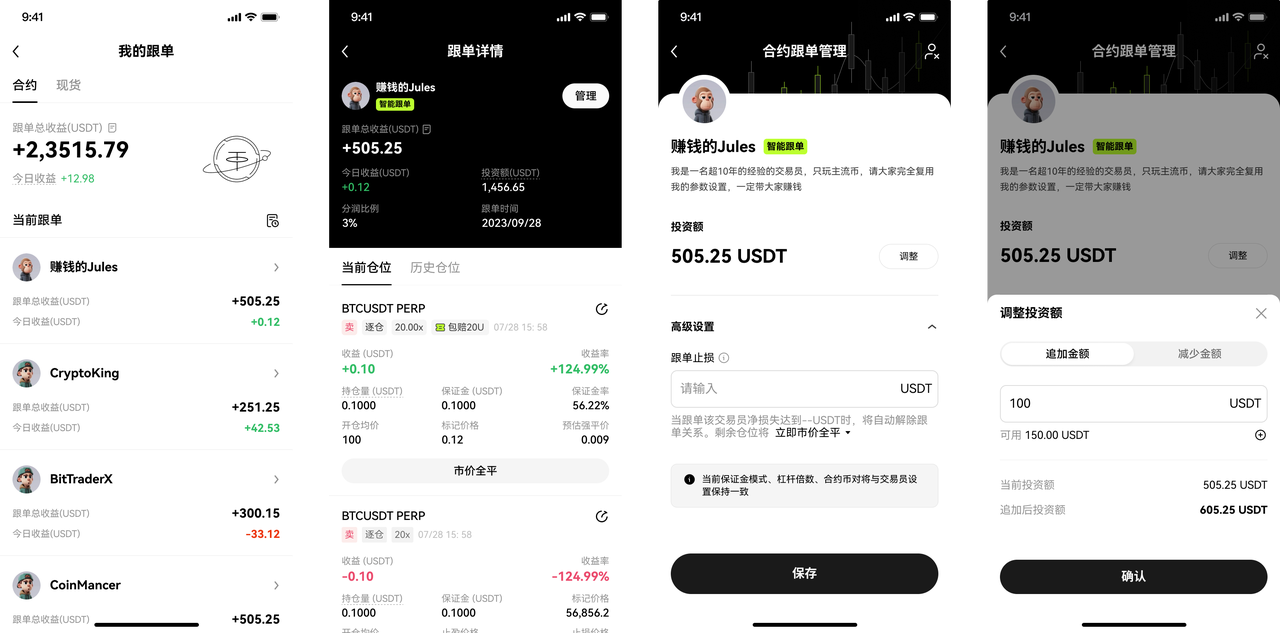 Currently, OKX offers the most comprehensive range of copy trading modes in the market. Users can choose Smart Copy Trading based on their investment preferences, or continue using the familiar Custom Copy Trading mode. Unlike Smart Copy Trading, Custom Copy Trading allows users to follow with a fixed amount or proportional allocation, giving them full control over risk and return and improving capital efficiency.
3. Rooted in Trading Fundamentals, Building a Complete Copy Ecosystem
In reality, whether it's the copy trading ecosystem or other product offerings, OKX has always adhered to the fundamental principle of putting users first when building its product suite. Currently, OKX’s copy trading ecosystem leads the industry, primarily consisting of three categories: Futures Copy Trading, Spot Copy Trading, and Strategy Copy Trading.
The recently upgraded Smart Copy Trading mode specifically refers to enhancements within the Futures Copy Trading product. Currently, Futures Copy Trading includes two modes: Smart Copy and Custom Copy. In Smart Copy mode, users fully entrust position risk and return management to the lead trader, enabling effortless and efficient profit generation. Custom Copy mode is OKX’s classic offering, allowing users to follow multiple traders simultaneously using the same capital, while customizing investment amounts, leverage, and other parameters—maximizing capital utilization. Users can select the mode that best suits their preferences and experience level.
Spot Copy Trading involves OKX curating high-quality traders while enabling users to automatically replicate their spot trade entries, allowing users to seize optimal timing without constant market monitoring. It caters to both beginners and experienced investors alike. Futures Copy Trading is similar to Spot Copy Trading but operates with leverage.
Strategy Copy Trading is a system built within OKX’s Strategy Square, where top-performing strategy providers are selected by the platform. Users can run copy strategies with one click, automatically triggering and stopping at optimal times, effortlessly capturing strategy-based returns. Currently, Strategy Copy Trading supports grid and martingale-type strategies.
Ultimately, regardless of the type, the essence of all copy trading products is to help more investors maximize profits. As a technology-driven exchange deeply committed to user-centricity, OKX understands this well. The team consistently embraces a philosophy of simplifying complexity in product development, designing intuitive tools while ensuring asset security. “We’re seeing increasing numbers of new users adopting copy trading. While continuing to innovate, OKX places user fund safety above all else—enhancing POR transparency to meet traditional financial audit standards—continuously leading the industry in security and transparency. We aim to make users not only worry-free but also confident,” a spokesperson noted frankly.
Join TechFlow official community to stay tuned
Telegram:https://t.me/TechFlowDaily
X (Twitter):https://x.com/TechFlowPost
X (Twitter) EN:https://x.com/BlockFlow_News
 OKX
OKX