




Four Major AI Video Tools Go Head-to-Head: A Complete Guide to Mastering Them
TechFlow Selected TechFlow Selected
Four Major AI Video Tools Go Head-to-Head: A Complete Guide to Mastering Them
Pick an AI tool that best suits you.
 Navigating Web3 tides with focused insights
By: Mu Mu
The AI video tools赛道 is getting increasingly competitive, with constant upgrades overwhelming users. Notably, Gen-2, Pika 1.0, Stable Video Diffusion, and Magic Animate have become the most commonly used video generation products, backed by powerful large AI models.
Although current large video models are still unable to achieve ultra-high capabilities such as "generating a full movie from a text description of a story," they can already create vivid videos through a series of prompts and have developed strong multimodal abilities such as image-to-video generation.
TechFlowPost tested four major AI video tools to help you get started quickly. Please note that it's best to use English when entering prompts for all these tools, as results generated with English prompts tend to be better than those with Chinese. Here, we also hope domestic Chinese AI video generation tools can catch up soon and deliver great products tailored for Chinese users.
Runway Gen-2
Gen-2, developed by Runway Research, is the first publicly available text-to-video generation tool. Its features—including text/image-to-video, video stylization, image expansion, one-click background removal, erasing specific elements in videos, and training custom AI models—make it arguably the most powerful AI video generation and editing tool currently available.
Compared to Gen-1, Gen-2 has made significant improvements in text-to-video generation. Consider the prompt "raccoon play snow ball fight in sunny snow Christmas playground" (a raccoon having a snowball fight in a sunny snowy Christmas playground). In terms of both image quality and composition, Gen-2 performs exceptionally well. However, it sometimes misses keywords—for instance, the output may fail to reflect "Christmas" or "snowball fight."
Just recently, Runway launched a new feature called "Motion Brush," which allows users to turn static images into dynamic content simply by brushing over areas they want animated. The Motion Brush is extremely user-friendly: select an image, brush the area you'd like to animate, set the desired motion direction, and the previously static image will come to life accordingly.
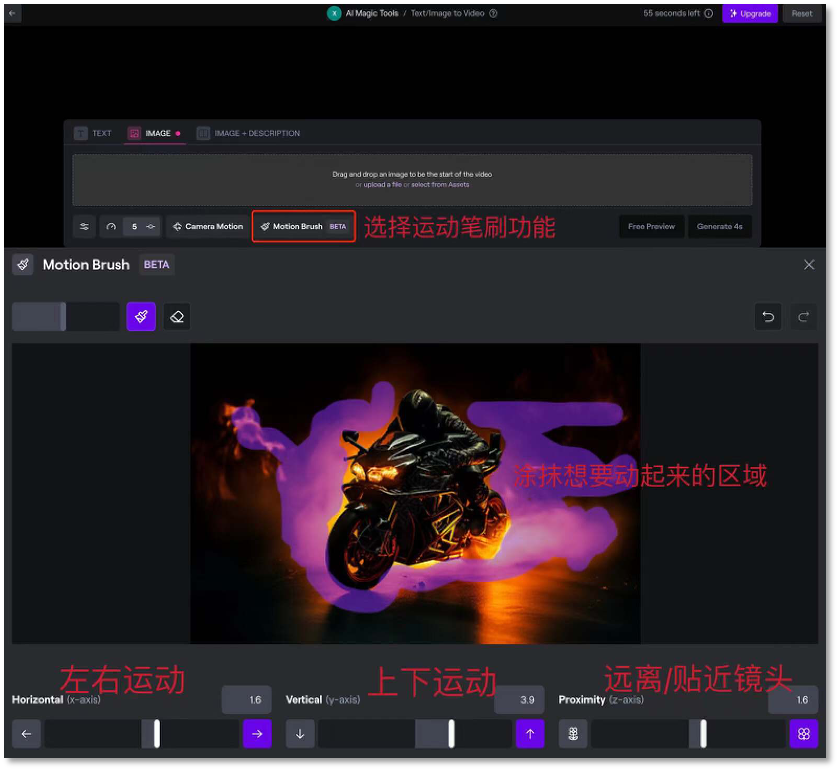
However, Motion Brush currently has some limitations. It works best for slow movements and struggles with fast motions like vehicles speeding by. Additionally, only the brushed areas animate, while the rest of the image remains nearly static, making it difficult to fine-tune motion trajectories for multiple objects simultaneously.
Currently, free Runway accounts can generate 4-second videos, consuming 5 credits per second, with a maximum of 31 videos, and watermarks cannot be removed. For higher resolution, watermark-free, and longer videos, you’ll need to upgrade your account.
Moreover, if you're interested in learning about AI video creation, try Runway TV, a channel launched by Runway that loops AI-generated videos 24/7. These AI videos might even spark some creative inspiration.
Website: https://app.runwayml.com/video-tools/teams/wuxiaohui557/ai-tools/gen-2
Pika 1.0
Pika 1.0 is the first official release from Pika Labs, an AI startup founded by a team of Chinese origin. Pika 1.0 not only generates 3D animations, anime, cartoons, and cinematic clips but also enables style transfer, canvas expansion, and advanced video editing. It excels particularly at producing anime-style visuals and short videos with cinematic effects.
Among its features, the most popular is the "AI Magic Wand"—a local editing function. Just months ago, this capability was only emerging in AI image generation; now, Pika’s "local editing" lets users modify specific parts of subjects or backgrounds within videos, and it's remarkably simple: upload a video clip; select the region to edit in Pika’s console; input a prompt describing what should replace it.
Beyond local editing, Pika 1.0 brings Midjourney’s "image expansion" feature into the video domain—the first time this has been achieved in AI video generation. Unlike the often glitchy "AI expand" filters seen on platforms like TikTok, Pika 1.0’s video expansion is reliable, natural-looking, and logically coherent.
Currently, Pika 1.0 offers free access, though users must apply for trial access. If you’re still waiting in line, try logging in via Discord on the official website. Similar to Midjourney, users create content in the cloud using Discord, where they can experience both text-to-video and image-to-video functionalities.
After joining Pika 1.0’s Discord server, click any channel under Generat, type “/”, select “Create,” then enter your prompt in the pop-up text box.
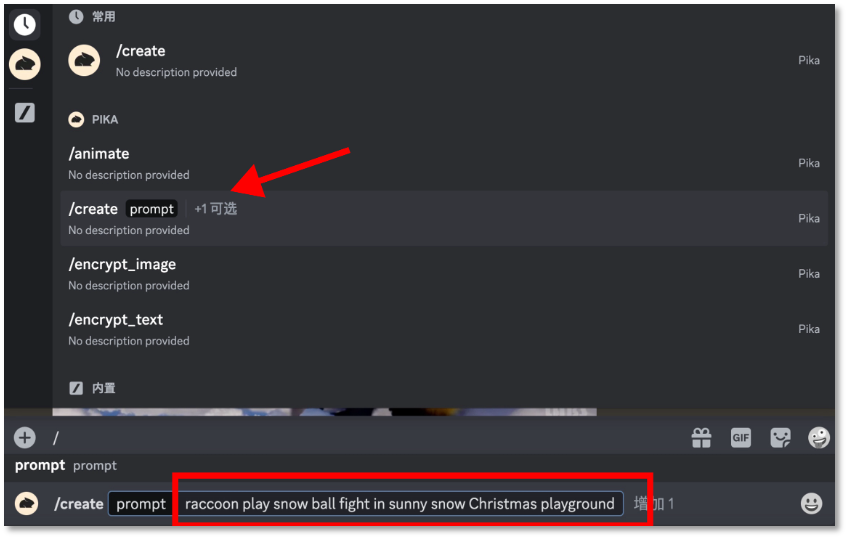
Compared to Gen-2, Pika 1.0 demonstrates better understanding of prompts, though its image quality still lags slightly behind—likely due to its cloud-based rendering.
To generate video from an image, type “/” and choose “animate,” upload an image, then add a descriptive prompt.

Pika 1.0’s image-to-video performance is on par with Gen-2.
Website: https://pika.art/waitlist
Stable Video Diffusion
On November 22, Stability AI released an open-source AI video generation project: Stable Video Diffusion (SVD). According to Stability AI’s official blog, the new SVD supports text-to-video and image-to-video generation, and enables conversion of objects from single-view to multi-view perspectives—i.e., 3D synthesis. Its output quality rivals that of Runway Gen-2 and Pika 1.0.
There are currently two ways to use it online: one is the demo version released by the official team on Replicate, and the other is a newly launched web platform. Both are free to use.
We tested the first option because it supports parameter adjustments and is relatively easy to operate: upload an image, adjust parameters such as frame count, aspect ratio, and overall motion. However, the downside is that generation results are somewhat random, requiring repeated tuning to achieve the desired outcome.
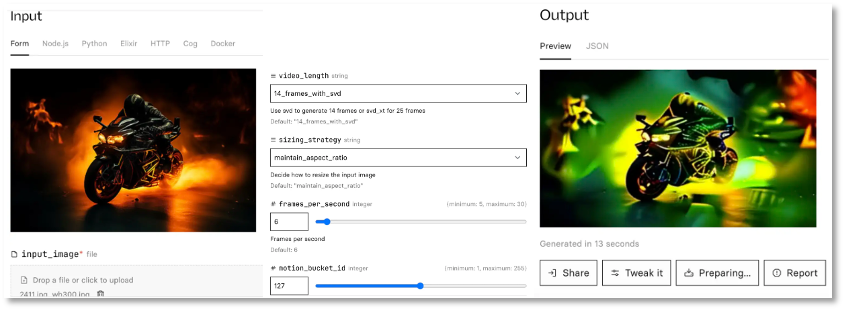
Currently, Stable Video Diffusion is just a base model and hasn't been fully productized. However, the team has indicated plans to expand further and build an ecosystem similar to Stable Diffusion, continuously improving the model based on user feedback regarding safety and quality.
Website: Demo and online version
-
https://replicate.com/stability-ai/stable-video-diffusion
-
https://stable-video-diffusion.com/
Magic Animate
MagicAnimate is a diffusion-model-based method for portrait animation, designed to enhance temporal consistency, preserve the authenticity of reference images, and improve animation fidelity. It was jointly developed by Show Lab at the National University of Singapore and ByteDance.
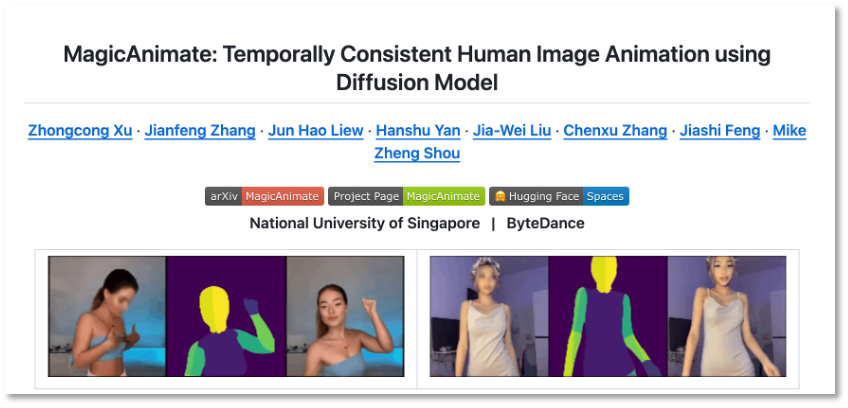
In simple terms, given a reference image and a pose sequence (video), MagicAnimate can generate an animated video that follows the pose movements while preserving the identity features of the reference image. The operation is very straightforward—just three steps: upload a static portrait photo; upload a demo video showing the desired motion; adjust parameters.
MagicAnimate also provides instructions for local deployment on GitHub—enthusiasts are encouraged to give it a try!
Website: https://github.com/magic-research/magic-animate
Join TechFlow official community to stay tuned
Telegram:https://t.me/TechFlowDaily
X (Twitter):https://x.com/TechFlowPost
X (Twitter) EN:https://x.com/BlockFlow_News