Crypto Anti-Hacking Guide: Multiple Measures to Protect Your Assets
TechFlow Selected TechFlow Selected
Crypto Anti-Hacking Guide: Multiple Measures to Protect Your Assets
Don't become the person who's forced to learn security after losing everything or a significant amount of assets.
 Navigating Web3 tides with focused insights
Author: INSIGHTFUL
Translation: TechFlow
Disclaimer
This guide does not guarantee anything and is not written from the perspective of a "crypto or cybersecurity expert," but rather as an ongoing learning effort based on multiple sources and personal experience.
For example, I myself was scammed early in my journey due to FOMO and greed (fake live stream scams and fake MEV bot scams), which prompted me to spend time seriously learning, setting up, and understanding security.
Don't be the person who only learns about security after losing everything—or a significant amount of assets.
Hack or User Error?
"Hacks" or compromises involving wallets, tokens, or NFTs generally fall into two main categories:
-
Abuse of previously granted token approvals.
-
Leakage of private keys or seed phrases (most commonly affecting hot wallets).
Token Approvals
Token approvals are permissions that allow smart contracts to access and transfer specific types or amounts of tokens from your wallet.
Examples include:
-
Granting OpenSea permission to move your NFTs so you can sell them.
-
Allowing Uniswap to use your tokens for swaps.
As background, virtually everything on the Ethereum network besides ETH itself consists of ERC-20 tokens.
A feature of ERC-20 tokens is the ability to grant approval rights to other smart contracts.
These approvals are necessary at some point if you want to perform core DeFi activities such as swapping or bridging tokens.
NFTs are either ERC-721 or ERC-1155 tokens; their approval mechanisms are similar to ERC-20 but tailored for NFT marketplaces.
The initial token approval prompt in MetaMask (MM) provides several pieces of information, the most relevant being:
-
The token you're approving
-
The website you're interacting with
-
The smart contract you're interacting with
-
The ability to edit the quantity of token permissions
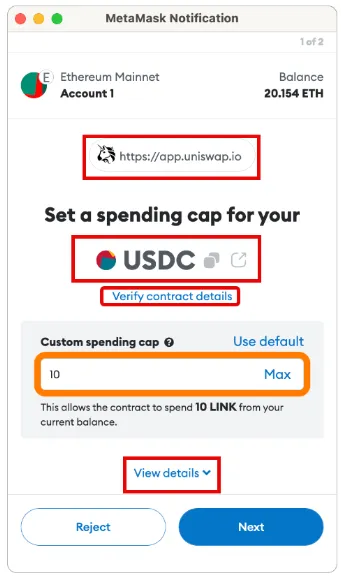
Under the full details dropdown, we see one additional piece of information: the approve function.
All ERC-20 tokens must have certain characteristics and properties outlined in the ERC-20 standard.
One of these is the ability for a smart contract to move tokens based on the approved amount.
The danger with these approvals lies in granting permission to a malicious smart contract, which could result in your assets being stolen or drained.
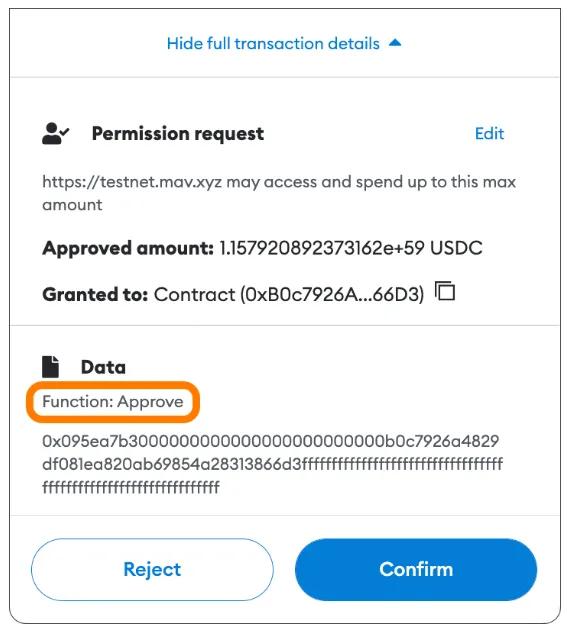
Unlimited vs. Custom Limited Approvals (ERC-20 Tokens)
Many DeFi applications default to requesting unlimited ERC-20 token approvals.
This is done to improve user experience—making it more convenient by avoiding future additional approval transactions, thus saving time and gas fees.
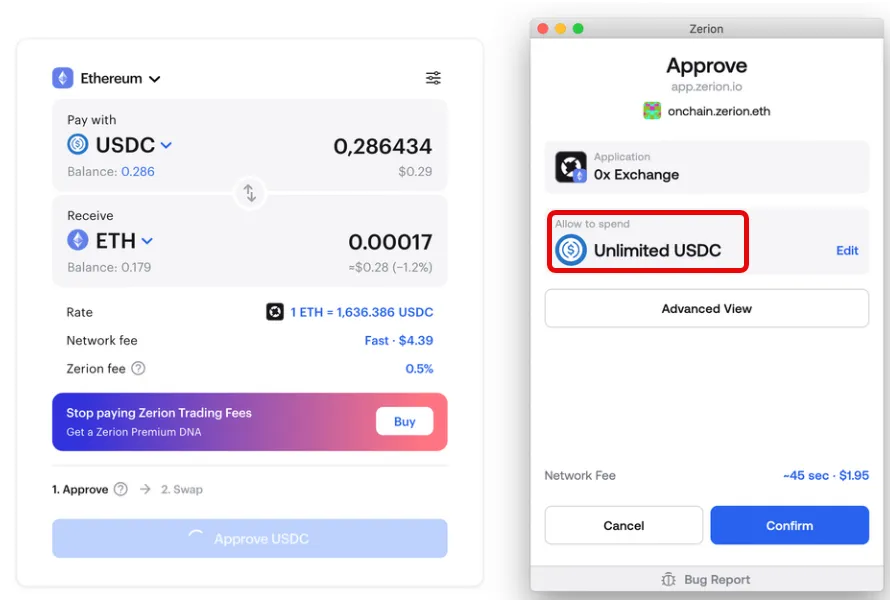
Why this matters:
Allowing unlimited token approvals can expose your funds to risk.
Manually setting token approvals to a specific amount limits how many tokens a dApp can move unless you sign a new, larger approval.
This reduces your risk if a smart contract is exploited. If you've granted unlimited approval to a dApp that later suffers a vulnerability, you could lose all approved tokens from any wallet holding those assets and having granted that approval.
For example, Multichain’s WETH (WETH being the ERC-20 wrapped version of ETH) suffered exactly this kind of exploit.
This widely used bridge was attacked due to abuse of prior unlimited token approvals, resulting in user funds being stolen.
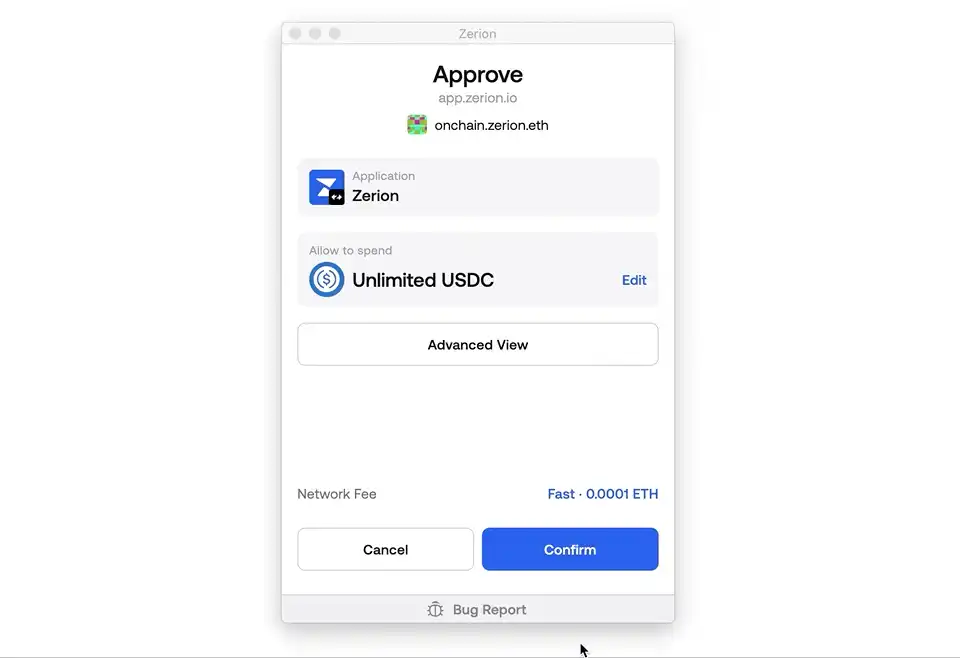
Below is an example (using Zerion wallet) showing how to change a default unlimited approval into a manual limited one.
NFT Approvals
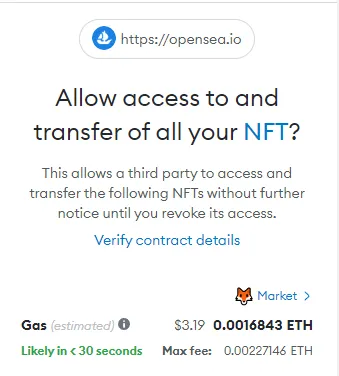
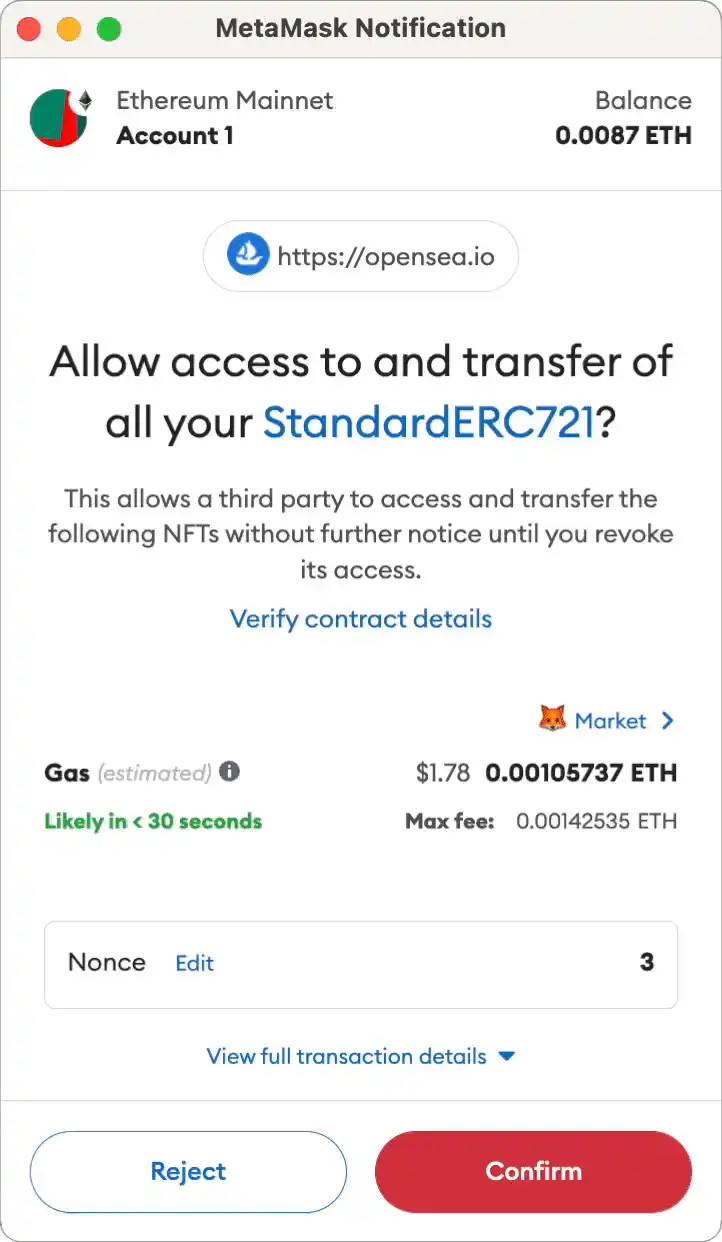
"setApprovalForAll" is used for NFTs.
This is a commonly used but potentially dangerous approval, typically granted to trusted NFT marketplaces when you want to sell your NFTs.
It allows the marketplace's smart contract to transfer your NFTs. So when a buyer purchases your NFT, the marketplace's contract can automatically send it to them.
This approval grants access to all NFT tokens within a specific collection or contract address.
Malicious websites or contracts can also exploit this to steal your NFTs.
Example of Malicious Use of "setApprovalForAll"
A classic case of "wallet draining" during FOMO around free mints looks like this:
A user visits a malicious website they believe to be legitimate.
-
When they connect their wallet, the site can only view its contents.
-
However, the malicious site scans the wallet for the highest-value NFT and prompts the user via MetaMask (MM) to "set approval for all" on that NFT's contract address.
-
The user thinks they’re minting an NFT, but in reality, they’re granting a malicious contract permission to move their tokens.
-
The scammer then steals the tokens and quickly liquidates them into bids on OpenSea or Blur before the items are flagged as stolen.
Signatures vs. Approvals
Approvals require gas fees because they involve on-chain transaction processing.
Signatures, however, cost no gas and are often used to log in to dApps, proving control over a wallet.
Signatures are usually low-risk, but they can still be exploited to misuse prior approvals granted to trusted sites like OpenSea.
For ERC-20 tokens, you can also modify approvals via gasless signatures thanks to the recent introduction of the permit functionality on Ethereum.
You can observe this when using decentralized exchanges (DEXs) like 1inch.
Key Takeaways on Token Approvals
Be cautious when granting any approval—always verify which tokens you're approving and for which smart contract (use Etherscan).
Reduce your approval risks:
-
Use multiple wallets (approvals are wallet-specific)—never sign approvals from your vault or high-value wallet.
-
Ideal: minimize or completely avoid granting unlimited approvals for ERC-20 tokens.
-
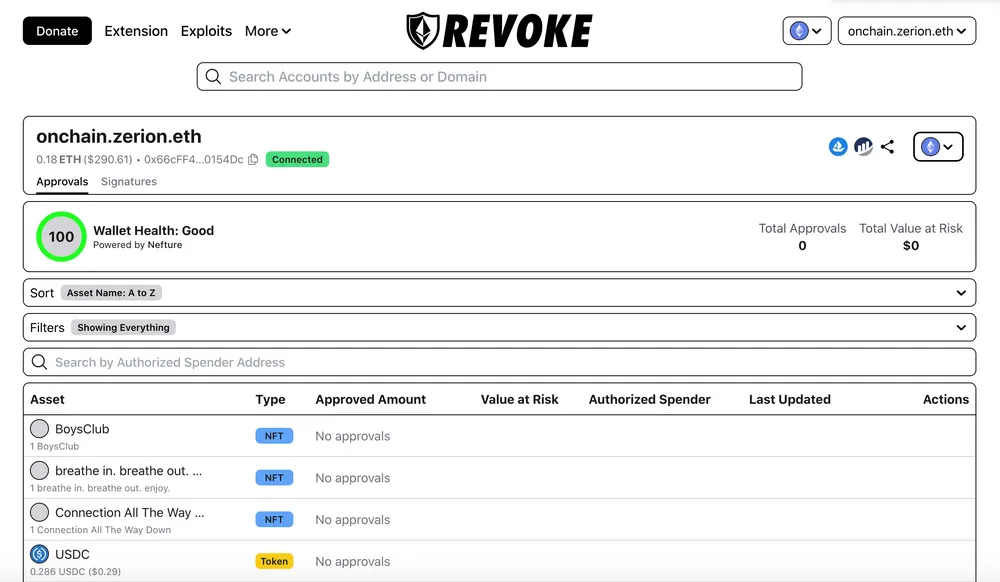
Regularly check and revoke approvals via Etherscan or revoke.cash.
Hardware / Cold Wallets
Hot wallets are connected to the internet through your computer or phone, with keys and credentials stored online or locally in your browser.
Cold wallets are hardware devices where keys are generated and stored completely offline and physically near you.
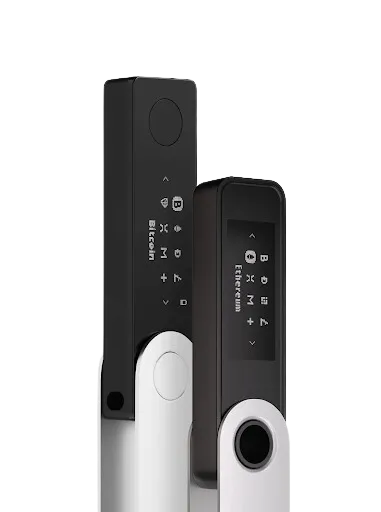
Given that a Ledger costs around $120, if you hold more than $1000 in crypto assets, you should probably buy and set up a Ledger. You can connect your Ledger to MetaMask (MM) to enjoy the same functionality as hot wallets while maintaining greater security.
Ledger and Trezor are the most popular options. I prefer Ledger due to its best compatibility with browser wallets like Rabby and MM.
Best Practices When Buying a Ledger
Always purchase from the official manufacturer's website—never from eBay or Amazon, as devices may be tampered with or preloaded with malware.
Ensure the packaging is sealed upon receipt.
During the first setup, Ledger generates a recovery phrase (seed phrase).
Only write down the seed phrase on physical paper, or etch it onto a metal plate for long-term durability against fire and water damage.
Never take photos of or type the seed phrase on any keyboard—including your phone—as this digitizes it, turning your cold wallet into an insecure hot wallet.
Cryptocurrency assets are not stored on the hardware wallet itself, but rather "in" the wallet derived from the seed phrase.
The seed phrase (12–24 words) is everything and must be protected at all costs.
It grants complete control and access to all wallets generated under that seed phrase.
The seed phrase is not device-specific; you can "import" it into another hardware wallet as a backup (if needed).
If the seed phrase is lost or damaged, and the original hardware wallet is also lost, damaged, or locked, you will permanently lose access to all your assets.
There are various methods for storing seed phrases, such as splitting it into parts, increasing physical separation between segments, and hiding them in non-obvious places (e.g., inside a soup can at the bottom of your fridge, buried somewhere on your property).
At minimum, you should have 2–3 copies, one of which should be made of steel to survive fire and water.
A "private key" is similar to a seed phrase but applies only to a single specific wallet. It's commonly used to import hot wallets into new MetaMask (MM) accounts or within automation tools like trading bots.
The 25th Word - Ledger
Besides the original 24-word recovery phrase, Ledger offers an optional extra security feature.
Passphrase is an advanced feature allowing you to add a 25th word of up to 100 characters of your choice to your recovery phrase.
Using a passphrase generates a completely different set of addresses that cannot be accessed with just the 24-word recovery phrase alone.
Beyond adding a security layer, a passphrase enables plausible deniability if you're ever under duress.
If using a passphrase, store it securely or memorize it precisely, character by character and case-sensitive.
This is the only and final defense against "$5 wrench attacks"—physical threats demanding access.
Why go through the trouble of setting up a hardware wallet?
Hot wallets store private keys in internet-connected environments.
It's extremely easy to be deceived, misled, or manipulated online into revealing these credentials.
With a cold wallet, attackers would need physical access to your Ledger or your seed phrase to reach your assets.
Once a seed phrase is compromised, all associated hot wallets and their assets are at risk—even those that never interacted with malicious websites or contracts.
Common Ways People Have Been "Hacked" in the Past
-
Common ways people have been "hacked" via hot wallets (due to leaked seed phrases) include:
-
Being tricked into downloading malware—through job offer PDFs, beta game downloads, running macros via Google Sheets, or fake versions of legitimate websites and services.
-
Interacting with malicious contracts—FOMO minting on imitation websites, or engaging with unknown airdrops or received NFT contracts.
-
Sending or entering private keys and seed phrases into "customer support" forms, chatbots, or related programs.
Join TechFlow official community to stay tuned
Telegram:https://t.me/TechFlowDaily
X (Twitter):https://x.com/TechFlowPost
X (Twitter) EN:https://x.com/BlockFlow_News