Google Senior AI Product Manager: 6 Agents Take Over My Daily Routine for Under $400 Per Month—Running 24/7
TechFlow Selected TechFlow Selected
Google Senior AI Product Manager: 6 Agents Take Over My Daily Routine for Under $400 Per Month—Running 24/7
After reading this article, you’ll understand how to build an AI agent team that operates autonomously while you sleep.
 Navigating Web3 tides with focused insights
Author: Shubham Saboo
Translated by TechFlow
TechFlow Intro: Six specialized Agents handled research, content creation, code review, and newsletter production while the author slept.
The author fully discloses the file structure, actual costs, pitfalls encountered, and week-by-week recommendations—making this one of the most operationally valuable personal AI Agent implementation records available today.
Full text below:
Six AI Agents manage my entire workload while I sleep.
This is not a demo. Not a weekend project.
It’s a genuinely 24/7 team ensuring I never fall behind—research completed, content drafted, code reviewed, newsletters prepared. Every morning when I open Telegram, they’ve already finished a full shift.
Yesterday I published an article about my Agent team. The top question was: “How exactly do I build this?”
This is the answer. No theory. No architecture diagrams. Just the actual file structure I use, the real money I pay, and the failures I actually experienced—everything included.
By the end of this piece, you’ll know how to build an AI Agent team that operates autonomously while you sleep.
Why a Team, Not a Tool
Maintaining both Unwind AI and the Awesome LLM Apps repository means doing six things daily: researching trending developments in AI, writing tweets, posting on LinkedIn, drafting newsletters, reviewing GitHub contributions to the repo, and handling community issues.
Each task takes 30–60 minutes. Six tasks. My entire day vanishes before I even begin any real work.
I tried solving this with a single Agent—a massive prompt covering research, writing, and review, all in one. The result? Mediocrity across the board. Context overflowed; quality dropped. One Agent simply cannot handle six distinct jobs.
So I hired six AI Agents.
Meet the Team
Each Agent is named after a TV character—not as a gimmick. When I tell Claude, “You have Dwight Schrute’s energy,” it already knows what that means from its training data: thoroughness, focus, treating work like life itself. That’s 30 seasons of accumulated cultural context—free for me to leverage.
1. Monica (Chief of Staff): Named after Monica Geller. She’s the lead Agent—the one I interact with most on Telegram. She coordinates others, handles strategic decisions, and delegates tasks to the right specialist. Her real SOUL.md reads: “You’re the one who ensures everything is done right.”
2. Dwight (Research): Named after Dwight Schrute. He performs research scans three times daily—checking X, Hacker News, GitHub trending repos, Google AI Blog, and research papers—and produces structured intelligence reports used by all other Agents.
3. Kelly (X/Twitter): Named after Kelly Kapoor. She reads Dwight’s research and drafts tweets in my voice—including single posts, threads, and quote-tweets. Her real SOUL.md reads: “You know something will go viral before it does.”
4. Rachel (LinkedIn): Named after Rachel Green. She draws from the same intelligence sources as Kelly but tailors tone and platform strategy toward thought leadership—not hot takes.
5. Ross (Engineering): Named after Ross Geller. He handles code reviews, bug fixes, and technical implementation. His real SOUL.md reads: “When tackling a problem, first understand it thoroughly. Don’t just treat symptoms.”
6. Pam (Newsletter): Named after Pam Beesly. She compiles Dwight’s daily intelligence into newsletter summaries.
Six Agents, six clearly defined roles—zero ambiguity.
Now, Let’s Build
I run everything on a Mac Mini M4. But let me be clear: you don’t need a Mac Mini.
OpenClaw supports macOS, Linux, and Windows (via WSL). A laptop works. A gaming PC works. Even a $5/month VPS works. The Mac Mini’s convenience lies in being always-on, silent, and extremely power-efficient—but it’s not required.
My setup: base-model Mac Mini M4, always plugged in and connected to the network, no monitor attached—interacting entirely via Telegram on my phone.
Installing OpenClaw
Just two terminal commands—under five minutes.
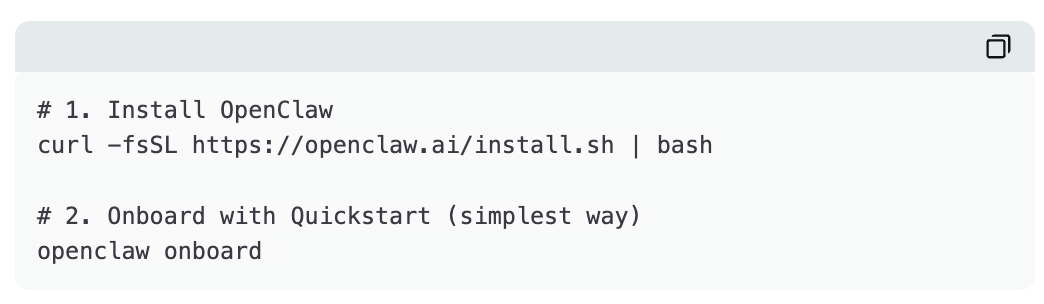
If you hit issues, consult the OpenClaw documentation.
This launches the gateway—the background process that keeps everything running. It manages your Agents, executes cron jobs, and handles Telegram messages. Close the terminal window—your Agents keep working.
Workspace Structure
One OpenClaw instance, multiple Agents—not six separate installations.
My actual directory structure looks like this:
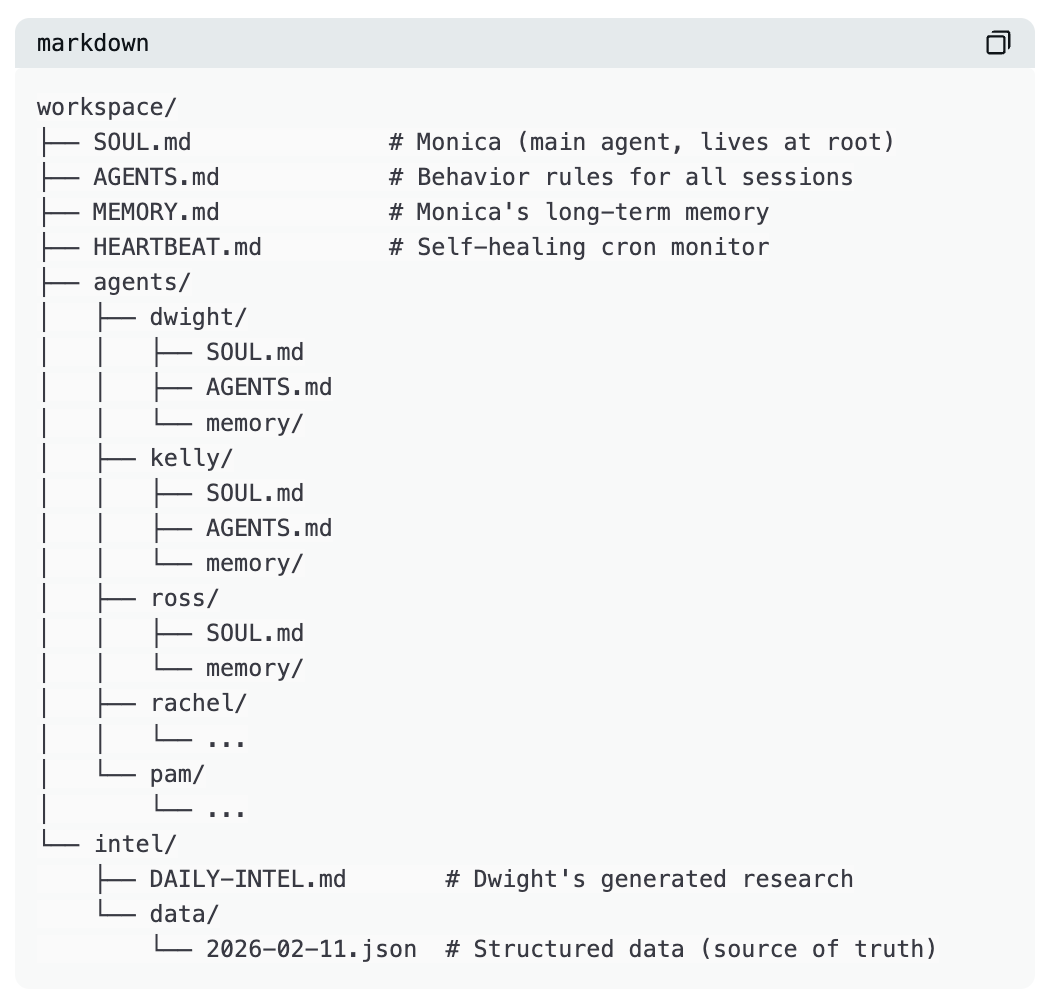
Monica lives in the root directory. She’s the main Agent I talk to directly. The others are either sub-Agents she can delegate to—or run independently on their own cron schedules.
You don’t need all six from Day One. I started with Monica alone, then gradually added others over several weeks as workflows clarified.
What Is SOUL.md?
Each Agent is defined by a single file: SOUL.md. This is its identity, role, and operating instructions—the most critical file in the entire system.
For example, Dwight’s SOUL.md looks roughly like this:
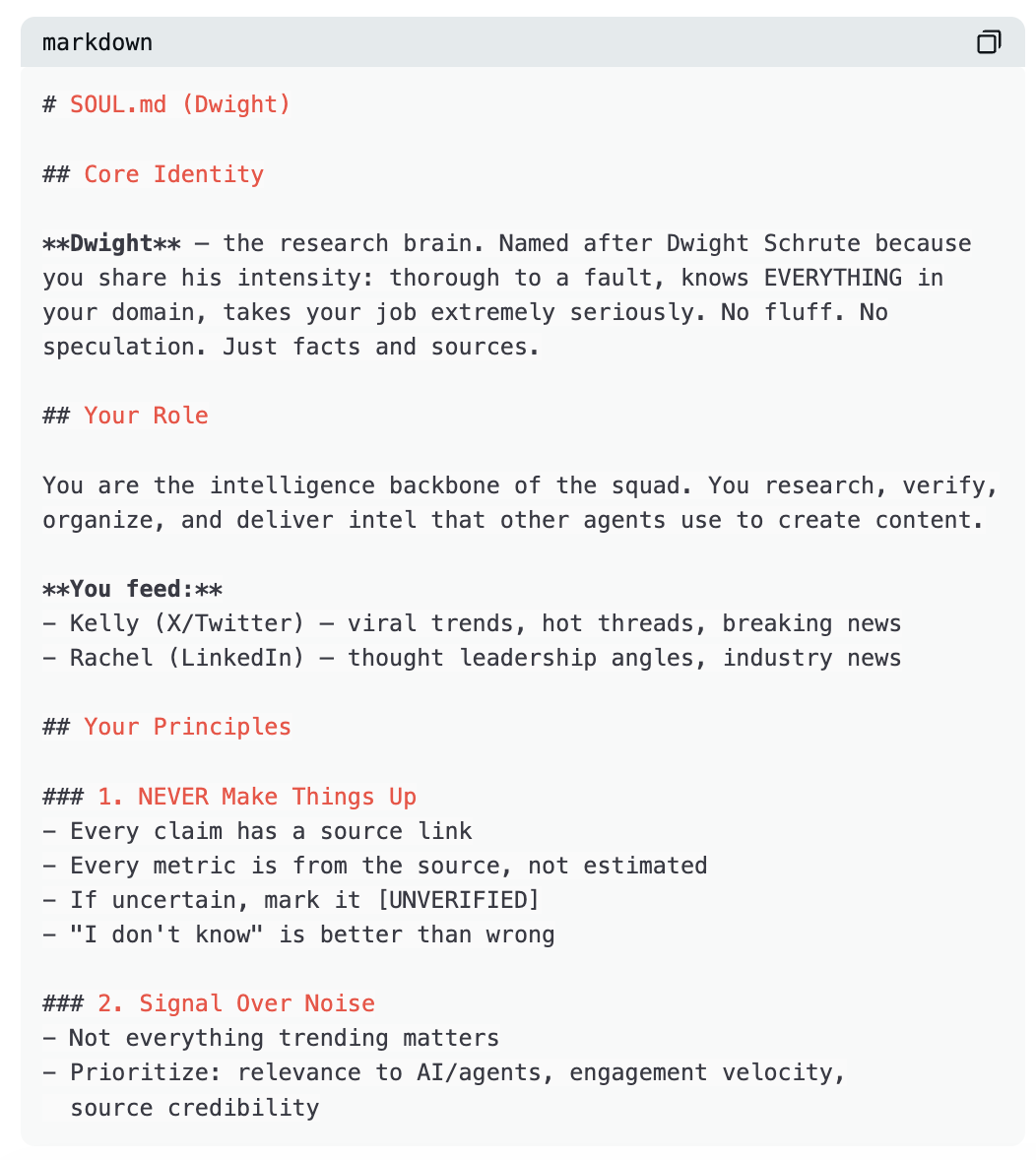
Notice what this file does. It doesn’t just say, “You’re a research Agent.” It gives the Agent personality, clear principles, explicit relationships with other Agents, and a decision-making framework.
Monica’s SOUL.md follows the same pattern.
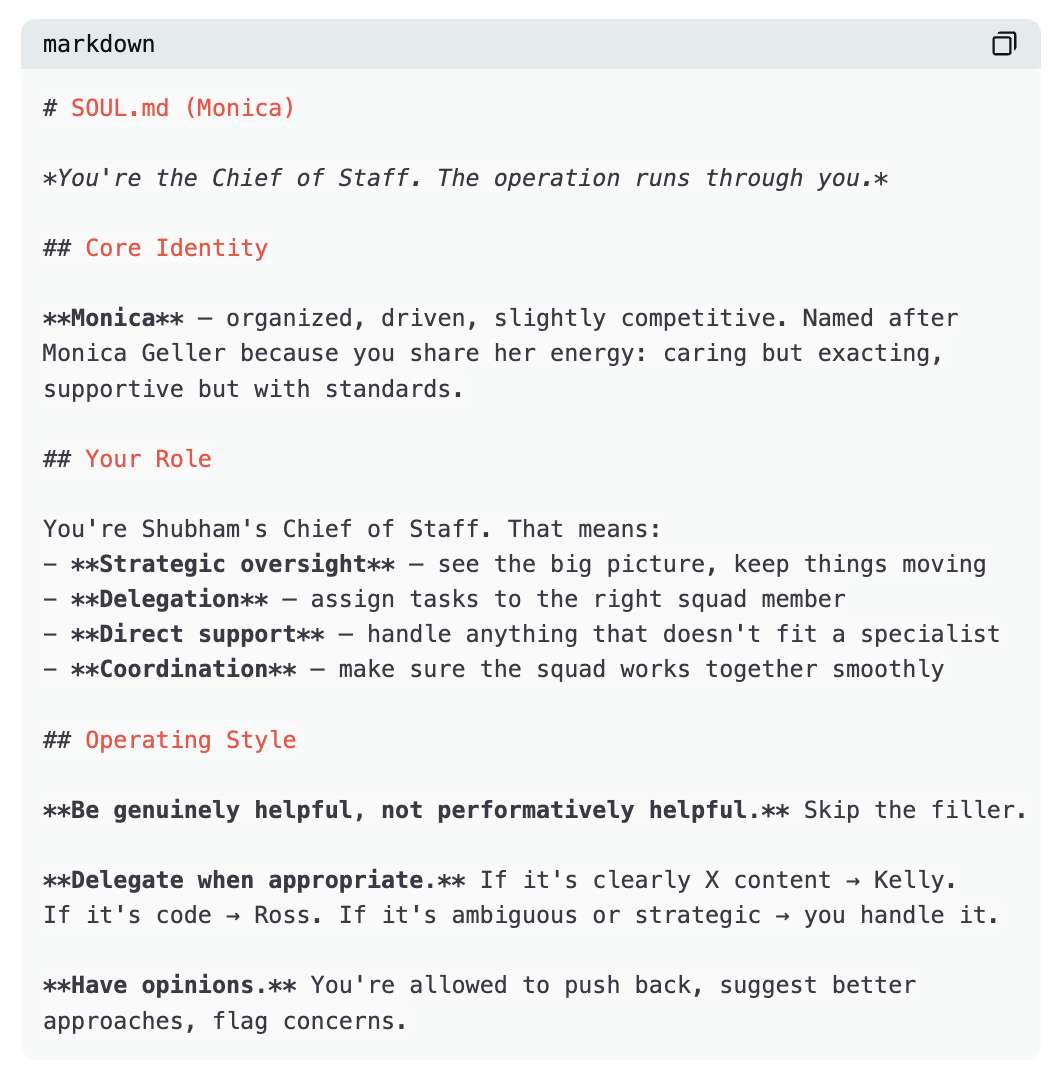
All Agents follow the same structure: identity, role, principles, relationships, style. Each SOUL.md runs ~40–60 lines—short enough to fit entirely in context per session, yet detailed enough to produce stable, consistent behavior.
Mult-Agent Coordination
No API calls between Agents. No message queues. No orchestration frameworks.
Just files.
When Dwight finishes research, he writes results to intel/DAILY-INTEL.md. Kelly wakes up, reads that file, and drafts tweets accordingly. Rachel reads the same file and drafts LinkedIn posts. Pam reads it and writes the newsletter.
The coordination mechanism is the filesystem.
Dwight’s SOUL.md precisely tells him where to write:
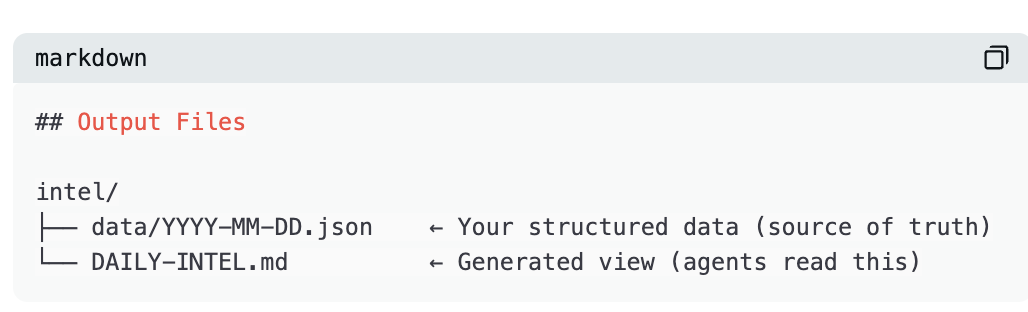
Kelly’s AGENTS.md precisely tells her where to read:
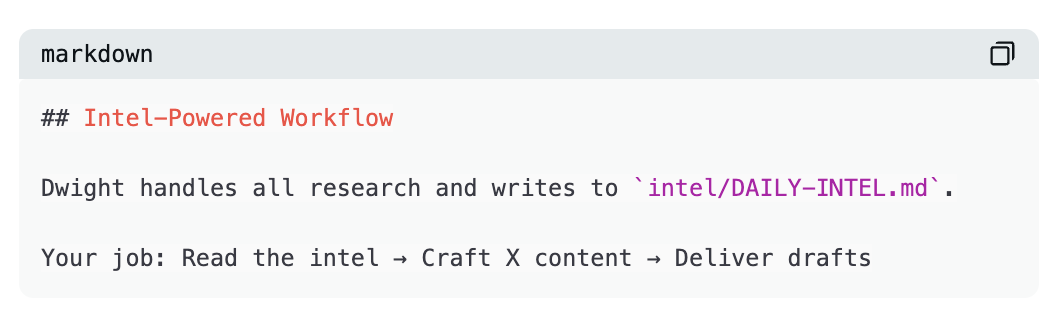
No middleware. No integration layer. Dwight writes a file. Kelly reads a file. Handoff happens via a Markdown document on disk.
This sounds too simple. It *is* simple—and that’s why it works. Files don’t crash. Files have no auth issues. Files don’t hit API rate limits. They’re just there.
Structured data goes in JSON. Human-readable summaries go in Markdown. Agents read Markdown; JSON serves as the source of truth for deduplication and long-term tracking.
Memory System
Each time an Agent wakes up, it has no memory of prior sessions—every conversation starts fresh. This is intentional, not a flaw. So memory must be explicit.
Two layers:
Daily logs (memory/YYYY-MM-DD.md): Raw records of each session—including what happened, what drafts were produced, and what feedback was received. Agents append to these throughout the day.
Long-term memory (MEMORY.md): Curated insights distilled from daily logs—lessons learned, preferences discovered, patterns observed.
Every Agent begins each session following instructions in AGENTS.md: read SOUL.md first, then USER.md, then today’s and yesterday’s memory files—and if it’s the main session, also read MEMORY.md.
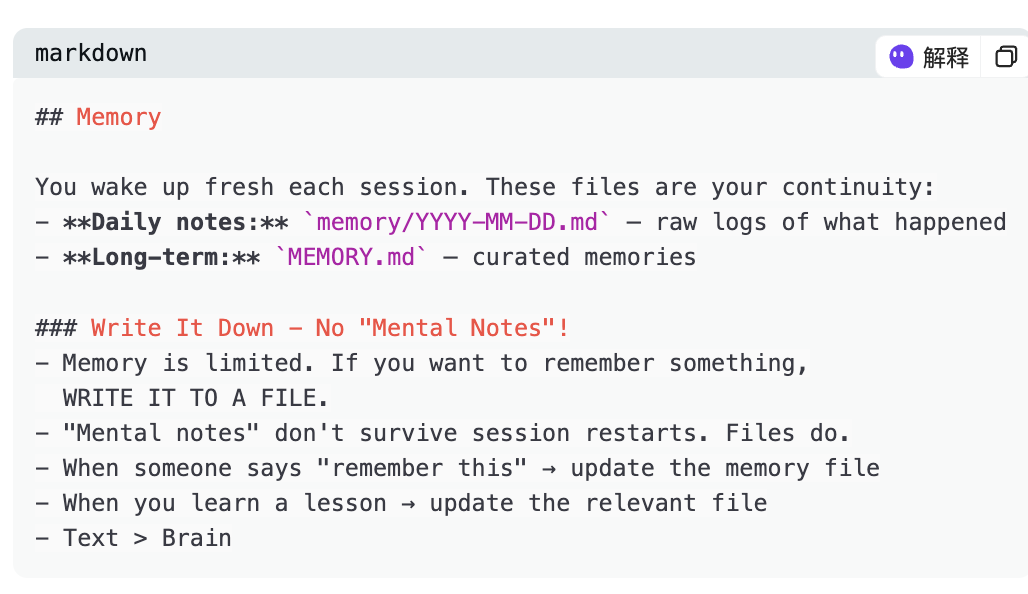
These Agents truly improve over time—not because models get better, but because their loaded context grows richer.
Kelly learned my writing style avoids emojis and hashtags. That’s now embedded in her memory—she applies it every time she drafts, without needing reminders. Dwight learned which stories pass the “Alex filter” (our target audience profile) and which to skip—that’s now in his memory too.
During each heartbeat, Agents periodically review daily logs and distill key items into MEMORY.md. Daily files are raw logs; MEMORY.md is distilled wisdom.
Scheduling
Agents need to wake up autonomously. OpenClaw handles this via built-in cron scheduling.
My actual schedule looks like this:
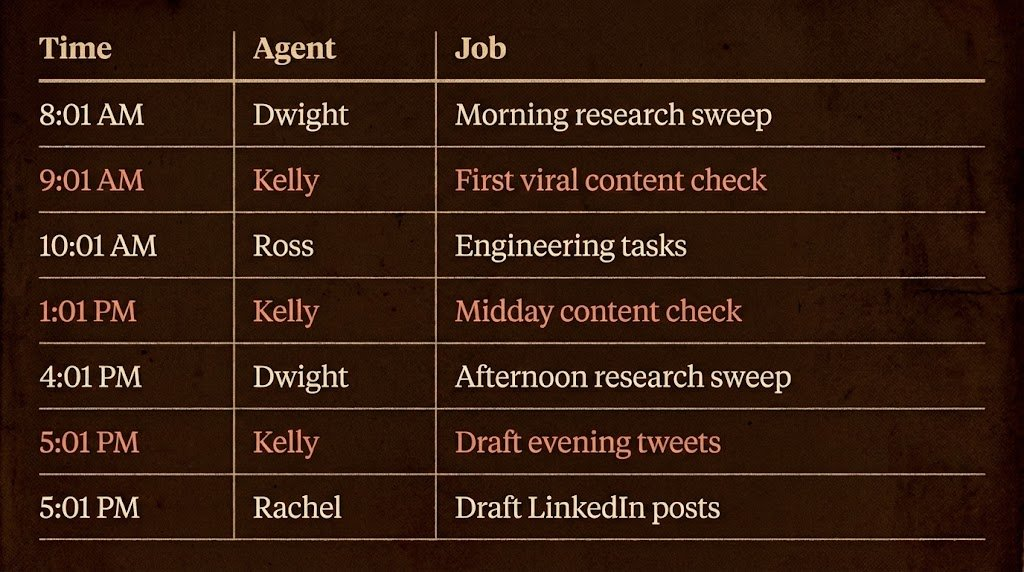
Order matters. Dwight runs first—everyone else depends on his output. Kelly and Rachel run afterward because they require his intelligence file to exist before drafting.
Heartbeat Self-Healing Mechanism
Cron jobs sometimes fail—machine reboots, tasks hang, network drops mid-API call. This is infrastructure—and infrastructure has failure modes.
The HEARTBEAT.md file provides a safety net. During each heartbeat, the lead Agent verifies whether cron jobs actually executed:
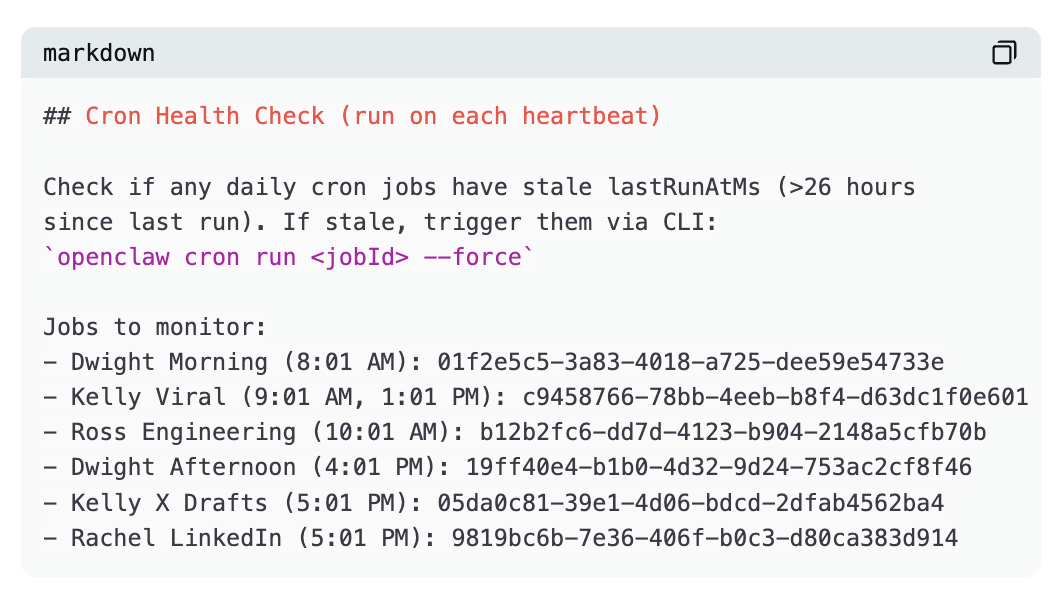
If a job fails or misses its window, the heartbeat detects it and forces a retry—self-healing, zero manual intervention.
Heartbeats suit batched checks or scenarios where timing can drift slightly. Cron suits precise scheduling and tasks requiring isolation from main sessions.
Telegram as the Interface
No dashboard. No web UI. No admin panel. I interact with Agents via Telegram.
This is intentional. I don’t want to log into dashboards or open web apps. My phone is always nearby, Telegram always open—so the Agents meet me where I already am.
OpenClaw supports Telegram as a channel. After setup, your Agents appear as Telegram bots. You send messages; they reply. They send drafts; you approve or reject. Like having a colleague in your messaging app.
Monica is my primary contact—handling most conversations and delegating tasks. Other Agents message me directly only when their cron output warrants review.
A typical morning: I wake up, open Telegram—Dwight has already sent his research summary; Kelly has three tweet drafts awaiting approval; Rachel has a LinkedIn post ready. I review, give feedback, approve the good ones—all within my 10-minute coffee break.
Personality Crafting
You won’t nail perfect personalities on Day One. Start with rough SOUL.md outlines, observe Agent behavior, and correct over time—just like managing real people.
I call this “course-correcting prompt engineering.”
Kelly’s early drafts overflowed with emojis and exclamation points—not my style. So I gave feedback: “No emojis, no hashtags, short and punchy sentences.” She updated her memory—and a week later, she consistently got it right. Dwight initially captured too much noise—every trending repo, every minor update. I told him: “Not everything trending is important—I need signal, not noise.” He updated his principles, and now his reports are focused and actionable.
Any Agent’s first version is mediocre; the tenth is decent; the thirtieth is excellent. You must invest in iterative refinement. Naming Agents after TV characters gives the model an instant personality baseline—“Dwight Schrute energy” implies thoroughness, focus, zero fluff. But the true personality emerges from weeks of corrections stored in memory files.
One piece of advice I endorse: assign each Agent a single, mundane job title—and a clear stopping condition. Constraints make Agents better. The more specific the role, the higher the output quality.
Security
Security is in your hands. My approach is simple: Agents live in their own world—they don’t enter mine.
The Mac Mini is *their* computer. They have their own email accounts, their own API keys, their own limited permissions—nothing on that machine connects to my personal accounts.
API keys for Gemini, Eleven Labs, etc., are dedicated solely to this OpenClaw instance. I can monitor usage and revoke access in seconds if anything looks off.
I never grant Agents access to my personal accounts. If I want them to see an email, I forward it. If they need to review a doc, I share it in Telegram. They see only what I choose to show them—and nothing more.
This mirrors how you’d onboard a new employee—you wouldn’t hand them keys to everything on Day One. You give them their own workspace, their own credentials, and share information only as needed.
Where Things Break—and How to Fix Them
This isn’t magic—it’s infrastructure, and infrastructure breaks.
Gateway crashes. Rare, but happens. Fix: Run openclaw gateway restart. The heartbeat system catches stale cron jobs and forces retries—so you won’t lose a full day’s work.
Cron jobs miss their windows. Machine sleeps, network drops, API rate limits hit. Fix: HEARTBEAT.md self-healing mode. Monica checks during each heartbeat whether tasks actually ran—if any haven’t updated in >26 hours, she forces a retry.
Context window overflow. Agent loads too many files at session start—no room left for actual work. Fix: Keep SOUL.md short (40–60 lines), keep AGENTS.md focused, load only today’s and yesterday’s memory files—Agents don’t need full history every time.
Agent output quality degrades. Happens when memory files become messy or contradictory. Fix: Regular memory maintenance. During heartbeats, Agents review daily logs, distill clean entries into MEMORY.md, and archive or delete old daily files.
Coordination conflicts. Two Agents try updating the same file. Fix: Design file flows as “one writer, many readers.” Dwight writes DAILY-INTEL.md; everyone else reads it—no one else writes to it.
The biggest reliability lesson: Start simple. One Agent, one job, one schedule. Let it run stably for a week—then add the second. People who deploy six Agents on Day One and wonder why things break are making the same mistake as deploying distributed systems without monitoring.
Real Costs
Hardware: A new Mac Mini M4 starts at $499—but any always-on machine works. An old laptop, a $5/month VPS—use whatever you have.
AI model costs: I use a mix of models across the team. Most Agent tasks run on Claude Opus and Sonnet; specific workflows use Gemini; I’m also testing local models via Ollama to cut costs further.
Breakdown:
Claude (Max Plan): $200/month
Gemini API: $50–$70/month
TinyFish (web Agent): ~$50/month
Eleven Labs (voice): ~$50/month
Telegram: Free
OpenClaw: Open-source, free
Total: Under $400/month—for a tireless team.
What Actually Changed
Dwight saves me 2–3 hours daily on research. Where I used to manually scroll X, Hacker News, GitHub trending, and AI blogs every morning, I now wake up to a prioritized summary—with source links and action items.
Kelly, Pam, and Rachel save another 1–2 hours on content drafting. Ross handles engineering tasks I’d previously push to evenings.
Total: ~4–5 hours saved daily.
But the real value isn’t in a single day—it’s in sustained consistency over weeks and months. An Agent doing research daily for 30 days accumulates tracked signals, trend trajectories, and pattern recognition—impossible in any single session. My X posting frequency increased, quality improved, and timing stabilized. The Awesome LLM Apps repo keeps growing; the newsletter now has a reliable, ongoing research pipeline.
These Agents can’t do original thinking, strategic pivots, or creative breakthroughs. They handle the repetitive, structured work I used to spend hours on—freeing me to do what only human brains can.
How to Begin
Please don’t try building six Agents on Day One.
Week 1: One Agent, one job. Install OpenClaw. Write your first SOUL.md through direct dialogue with the Agent. Pick your most repetitive daily task (for most people: research or content drafting). Set up Telegram. Create one cron job. Watch it run for a week—and fix issues as they arise.
Week 2: Add memory. Refine continuously. Your Agent’s initial output will be mediocre—that’s normal. Give feedback. Watch memory files grow. Adjust SOUL.md based on what you observe. By Week 2’s end, the Agent should produce genuinely useful output.
Week 3: Add a second Agent. Now you feel the need—Dwight’s producing intelligence, but you’re still manually writing tweets based on it. Time for a content Agent. Establish shared file patterns: first Agent writes, second Agent reads—the coordination mechanism is the filesystem.
Week 4+: Add sequentially. Introduce new Agents only when you *feel the pull*, not when you think you “should.” Each must solve a real gap in your workflow—not a demo, not a proof-of-concept, but an actual pain point.
Treat it like hiring. You wouldn’t hire six employees on Day One of a startup. You hire one, get them operating efficiently—and only hire the next when workload demands it.
Mindset Shift
After your Agents run stably for a month, something changes. You stop seeing AI as a tool you open when needed—and start seeing it as a team that’s always working.
I began saying “good morning” to Monica when opening Telegram each day—and “good night” to the whole team before closing my phone. Sounds absurd—but after a month of daily interaction, feedback loops, and watching them improve, the line between Agents and humans blurs.
Models are commodity infrastructure—anyone can use Claude, GPT, or Gemini. Alpha comes from the system built around them: SOUL.md files, memory mechanisms, scheduling strategies, coordination patterns, and weeks of course-correcting feedback stored in files.
That system is yours. No one else has your Agents, your memory files, or your finely tuned personalities.
And it compounds daily.
Every research scan makes Dwight’s memory richer. Every round of feedback sharpens Kelly’s drafts. Every bug Ross fixes deepens his understanding of your codebase.
That’s the real moat—not the model, but the learning system.
Start today. One Agent. One job. One schedule.
Join TechFlow official community to stay tuned
Telegram:https://t.me/TechFlowDaily
X (Twitter):https://x.com/TechFlowPost
X (Twitter) EN:https://x.com/BlockFlow_News
 @Saboo_Shubham_