Monad testnet is live—here's the simplest guide to get started
TechFlow Selected TechFlow Selected
Monad testnet is live—here's the simplest guide to get started
Territorial waters, interaction, and experiential projects explained in one article.
 Navigating Web3 tides with focused insights
Written by: TechFlow
Yesterday, the Monad testnet was officially announced to have launched, with testnet features dynamically upgrading in sync with the mainnet.
As a leading parallel EVM, Monad aims to improve Layer 1 network performance and enhance EVM execution efficiency through parallel processing, thereby unlocking the potential of the EVM ecosystem.
The official whitepaper states that Monad can achieve a processing capacity of up to 10,000 TPS, comparable to Solana's performance, while maintaining 100% bytecode compatibility with Ethereum—meaning Ethereum smart contracts can easily be migrated to run on Monad. Imagine the future of Solana+ETH convergence.
The primary market has already recognized Monad’s potential. In April, Monad Labs announced a $225 million funding round led by Paradigm—the largest cryptocurrency financing so far this year—bringing its total raised funds to $244 million.
TechFlow will guide you step-by-step through exploring the Monad testnet, aiming to secure substantial rewards from this top-tier project.
1. Connect wallet and claim testnet tokens
1.1 Wallet setup
-
Automatically configure wallet
The current Monad testnet supports mainstream wallets such as Phantom / OKX / Uniswap Wallet. Visit monadtestnet.phantom.com to automatically add the network.
-
Or manually add testnet parameters
Network Name: Monad Testnet
RPC URL:
https://testnet-rpc.monad.xyz
Chain ID: 10143
Currency Symbol: MON
Block Explorer URL:
https://monad-testnet.socialscan.io//
1.2 Claim faucet tokens
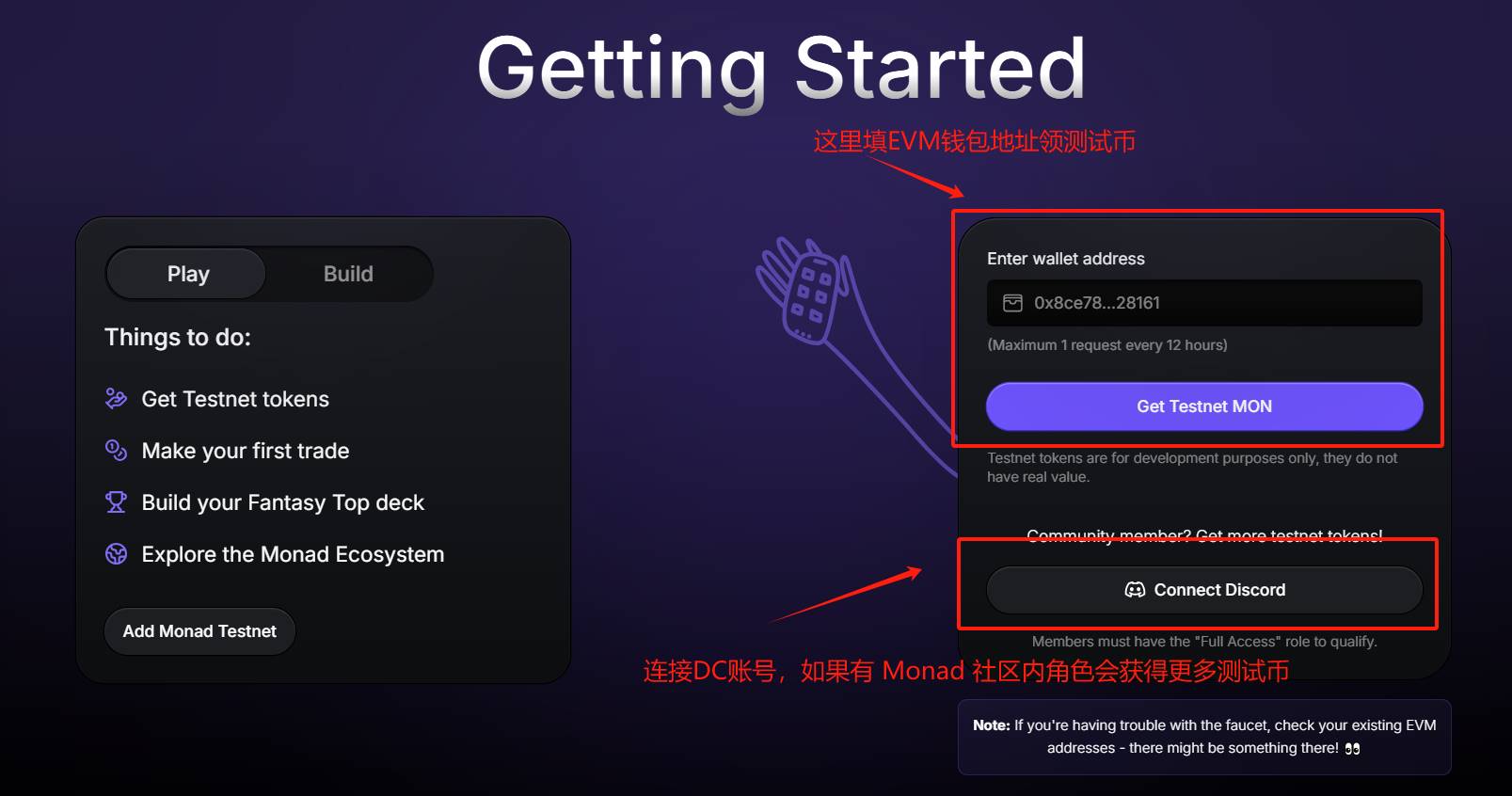
After connecting your wallet on the Monad testnet official website, link your wallet to claim testnet tokens.
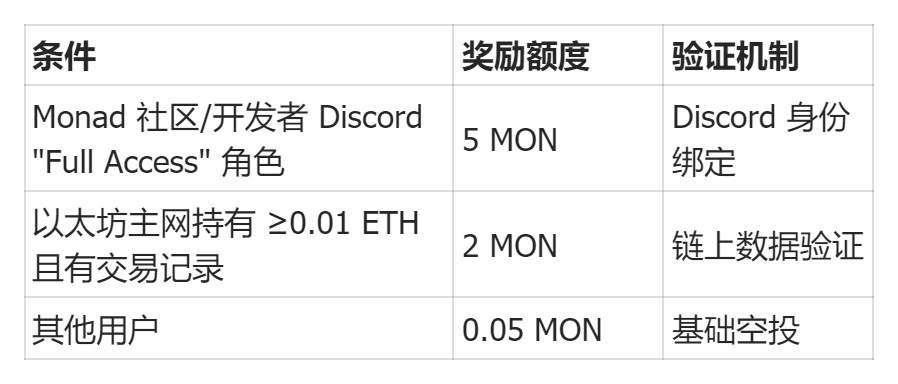
Different allocation rules apply based on address interaction history. The official token distribution rules are as follows:
We recommend joining the Monad Discord community, completing verification, and staying actively engaged to obtain the Monad role. Monad places significant emphasis on community building, and active members may enjoy many implicit future benefits. (Note: The verification bot is currently congested; try multiple times.)
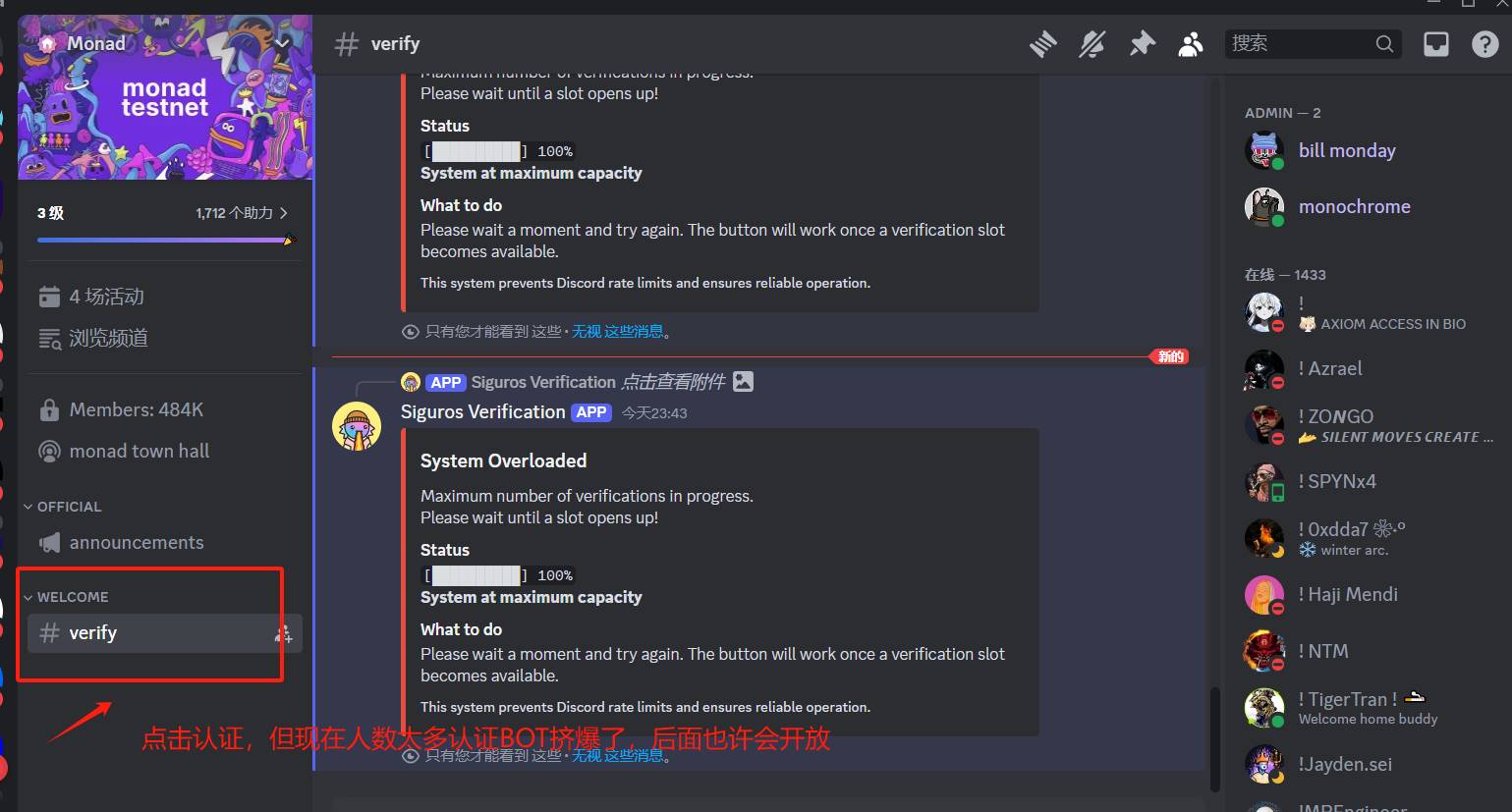
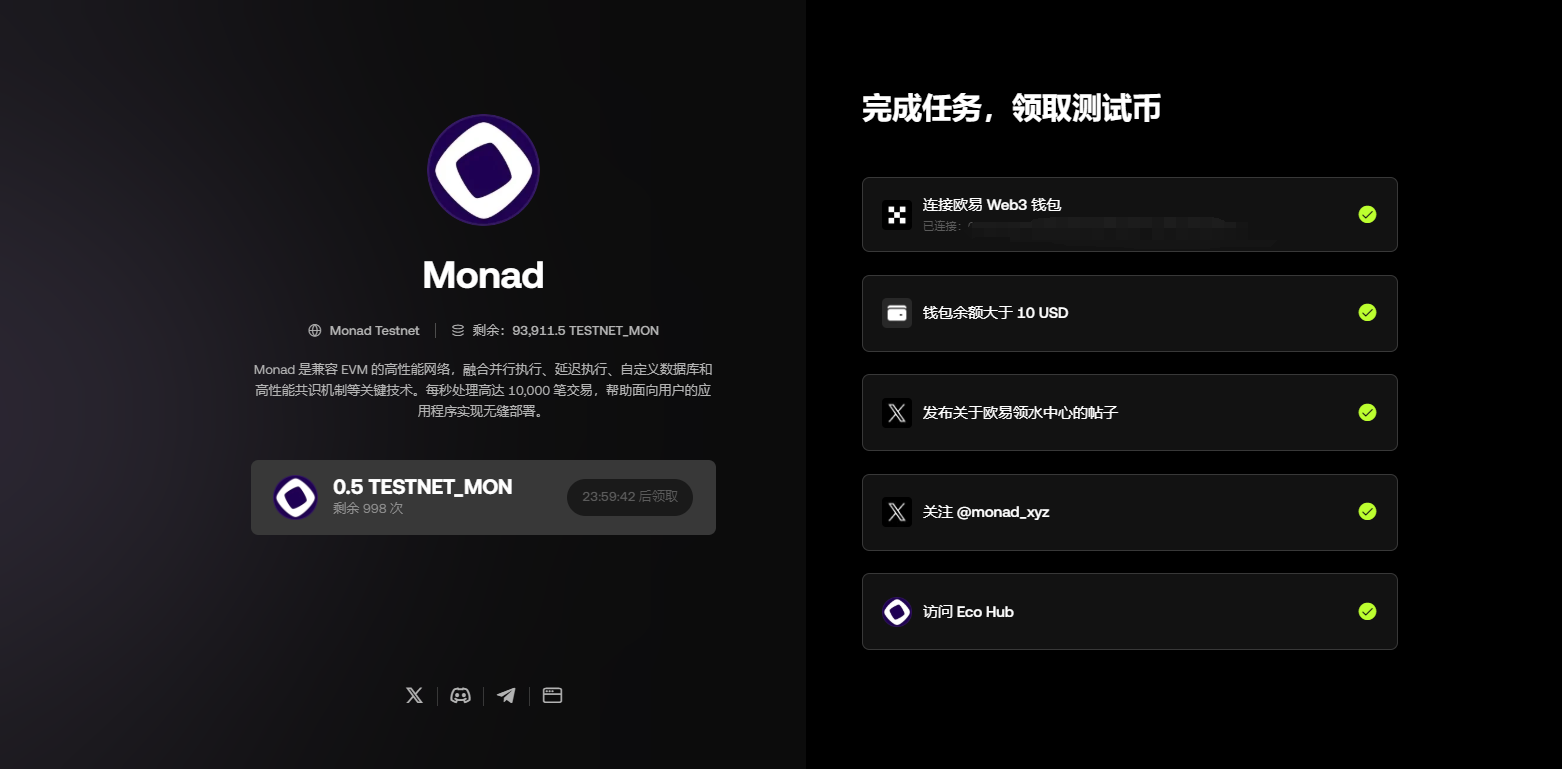
Note: The official faucet channel allows claims every 12 hours. It is recommended to complete Discord identity verification first to increase your allocation quota. If the official faucet is congested, use the OKX Faucet Center: https://www.okx.com/zh-hans/web3/faucet/monad?id=66, complete simple tasks to receive 0.5 MON test tokens
2. Ecosystem exploration
2.1 Token trading
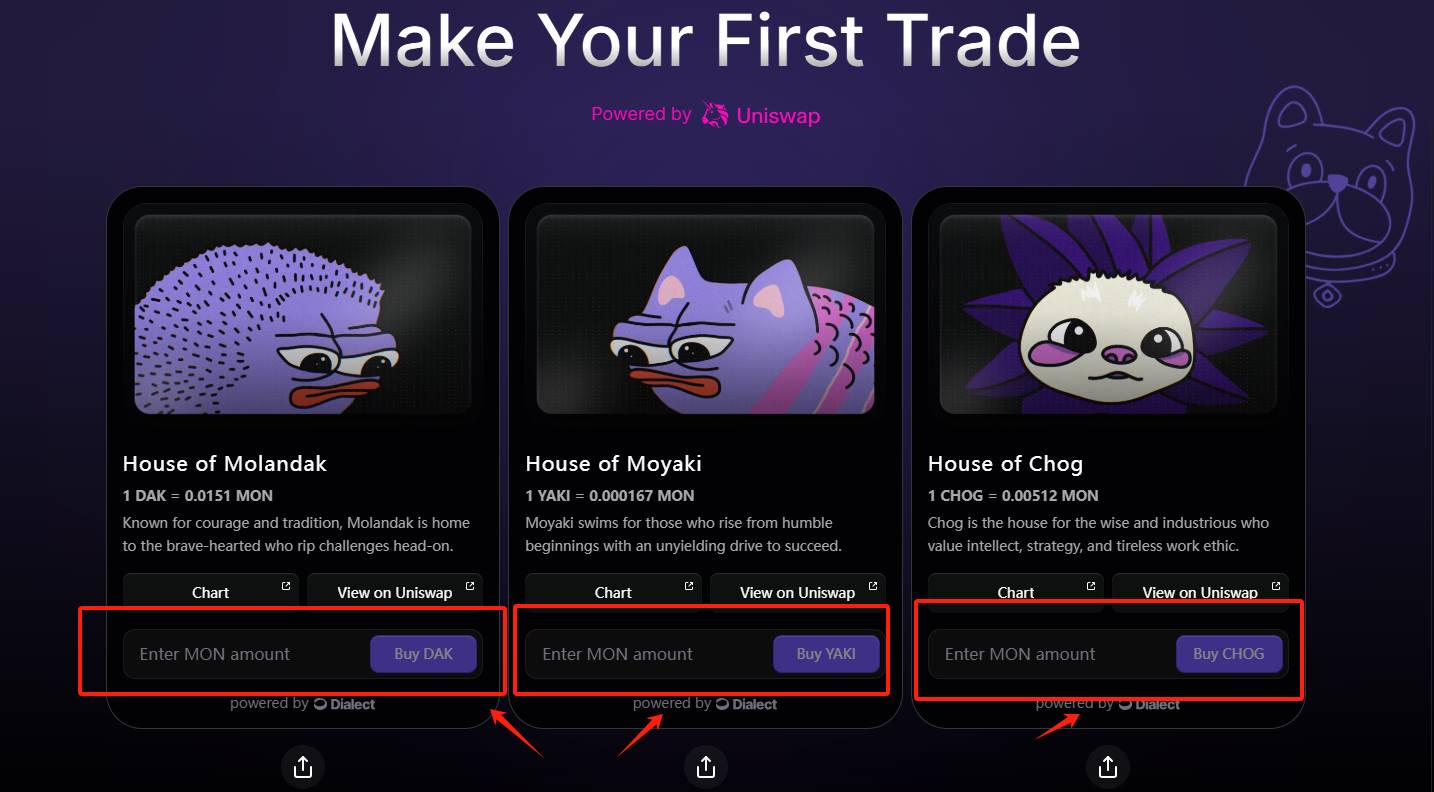
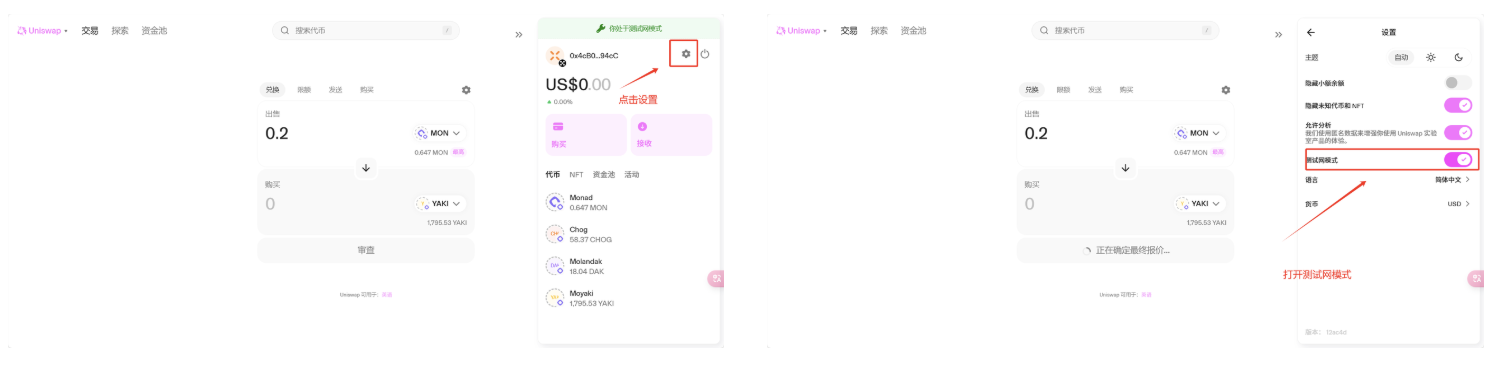
Through the Monad official website or Uniswap testnet mode, you can use test tokens $MON to exchange for other tokens. Be sure to allocate your $MON wisely—consider purchasing small amounts of all three available tokens.
Official site purchase: Scroll down on the faucet page and buy directly.
Uniswap purchase: Enable testnet mode via settings, then connect your wallet and enter the token contract to trade.
2.2 Interact with ecosystem applications
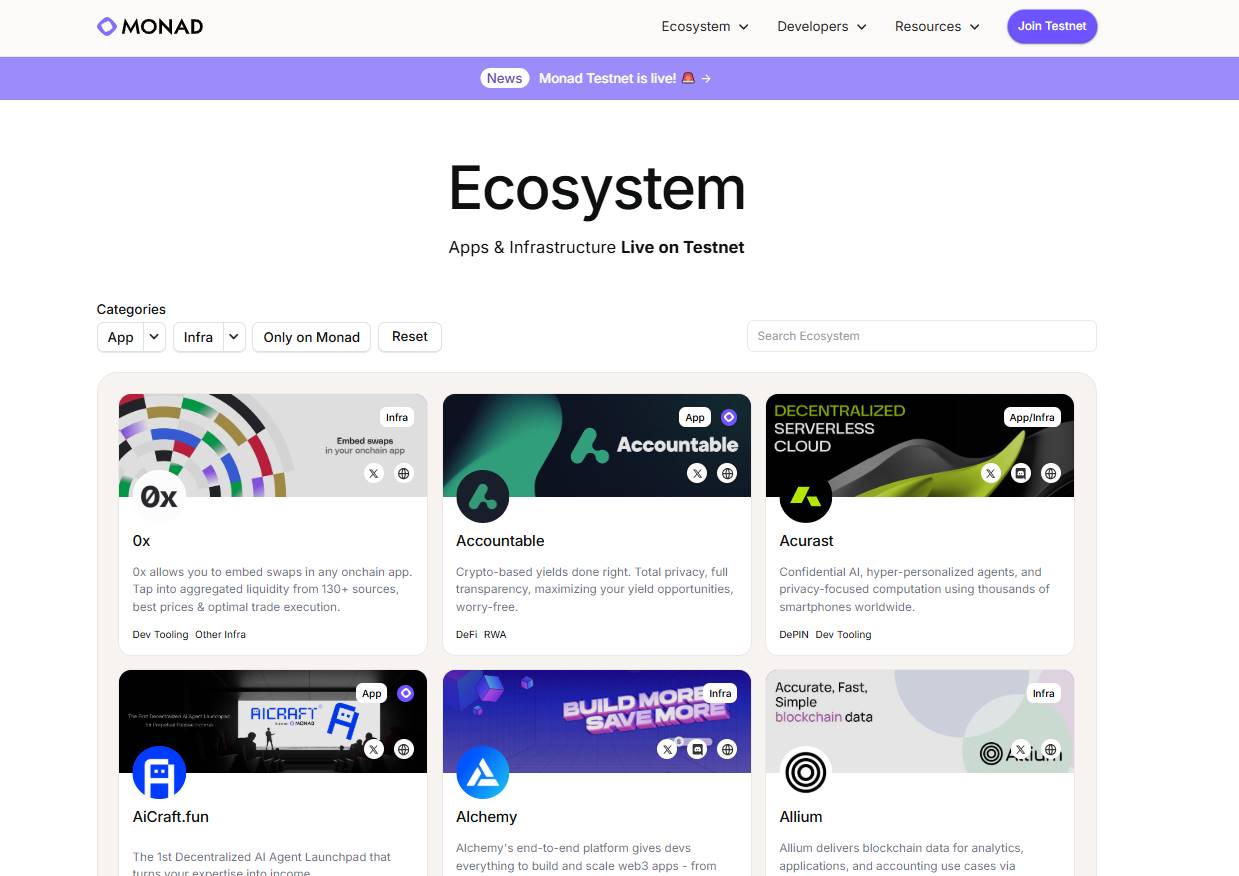
Monad's official Ecosystem Page has been updated to list projects already live on the testnet. This article uses Fantasy Top and Kuru as interactive examples.
-
Fantasy Top
Currently, Fantasy Top is the only highlighted project listed on the Monad testnet homepage. Fantasy Top is a card game integrating SocialFi elements, tokenizing KOLs with social media influence. Players can use $MON to purchase cards and form battle decks—direct access to gameplay is available immediately.
First, visit the Fantasy Top official website:
https://monad.fantasy.top/
Click "Register" and log in using your Google or X account.
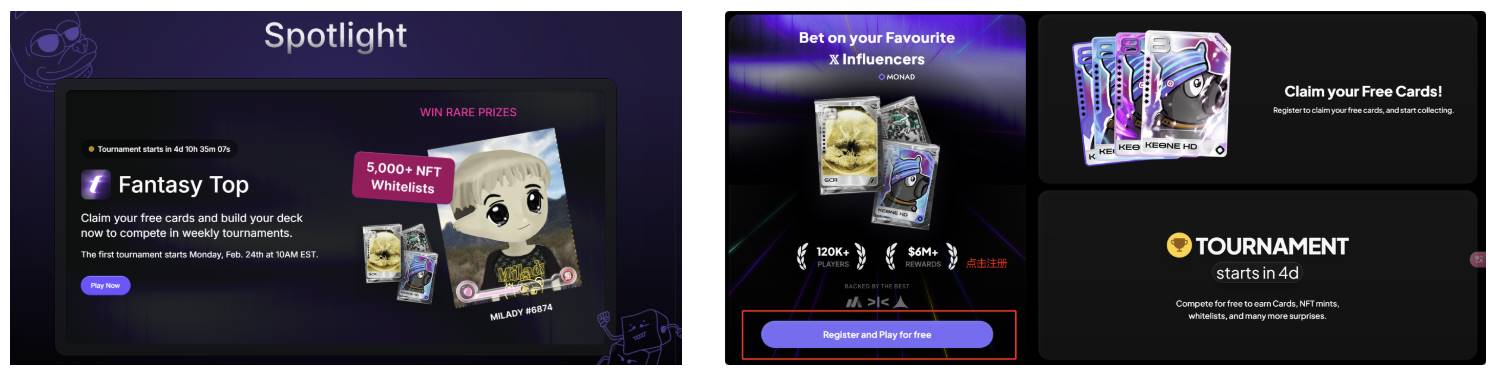
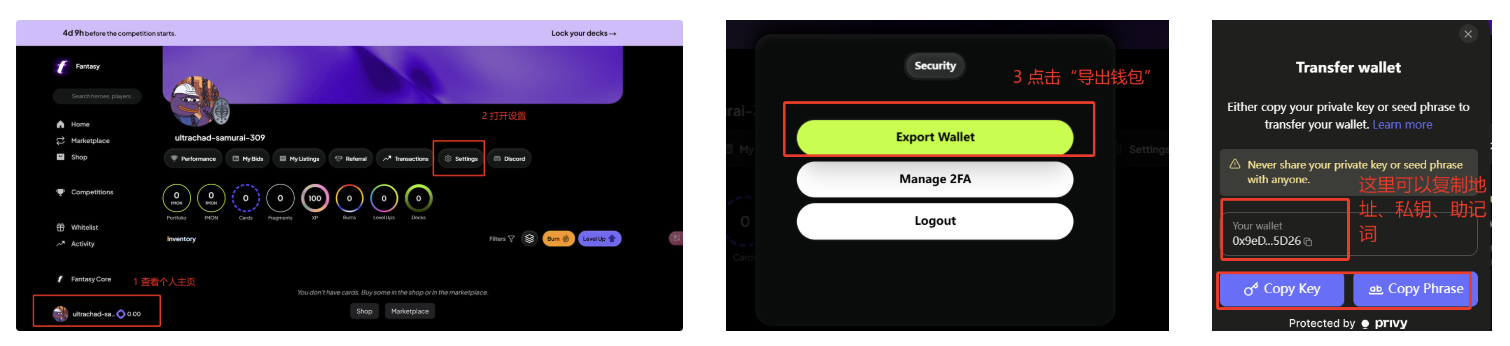
Upon entering the app, a dedicated wallet will be automatically generated. Transfer previously claimed $MON test tokens into Fantasy Top's built-in wallet to purchase cards. View the built-in wallet address via the personal settings page:
In the store, use $MON to purchase in-game currency Fragments. Fragments are used to buy card packs. After purchasing a certain number of card packs, you can participate in a lucky draw wheel. Also, scroll down on the card pack purchase page to check in daily for free lottery entries.
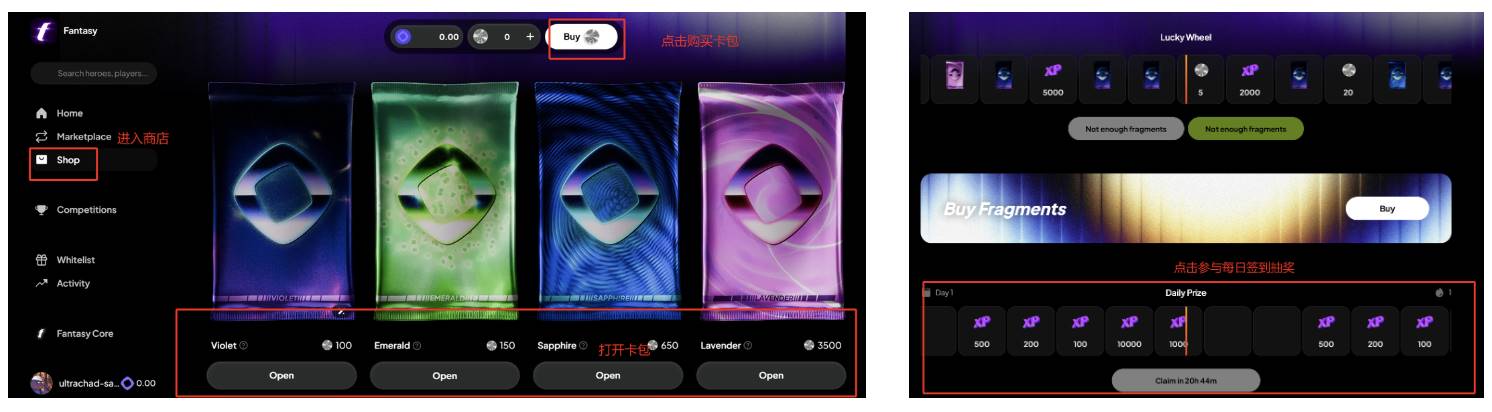
Besides opening card packs, an in-app marketplace allows free trading of cards priced in $MON:
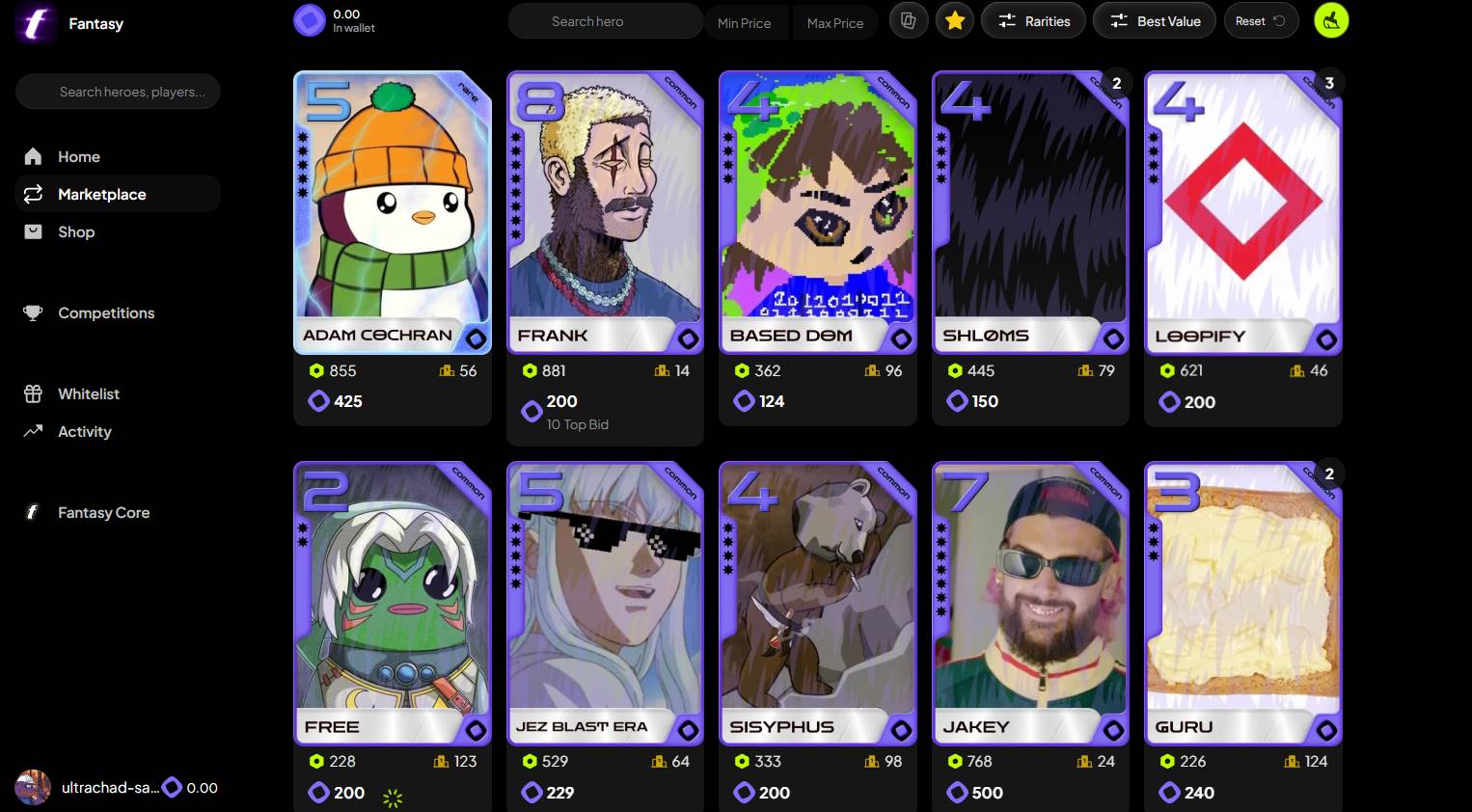
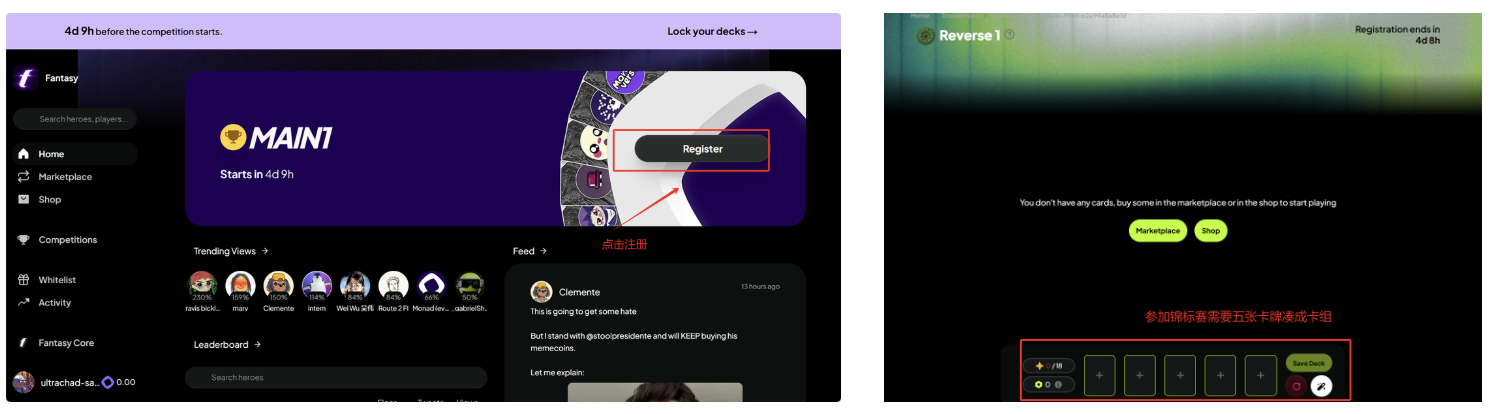
Once you own five cards to form a deck, users can join tournaments. Register on the homepage and choose different competition tiers—the higher the tier, the more generous the rewards.
-
Kuru Exchange
KuruExchange is a native decentralized order book exchange on Monad. Its Central Limit Order Book (CLOB) offers superior performance over AMMs, enabling market makers to actively quote liquidity and providing users with better prices and lower slippage.
Previously accessible only via Discord community entry, Kuru is now open for testnet experience.
First, visit the Kuru homepage:
https://www.kuru.io/markets
Register by connecting your wallet. After logging in, a dedicated Kuru wallet will be created. Deposit $MON into this new wallet either directly or via the Deposit interface—the result is the same.
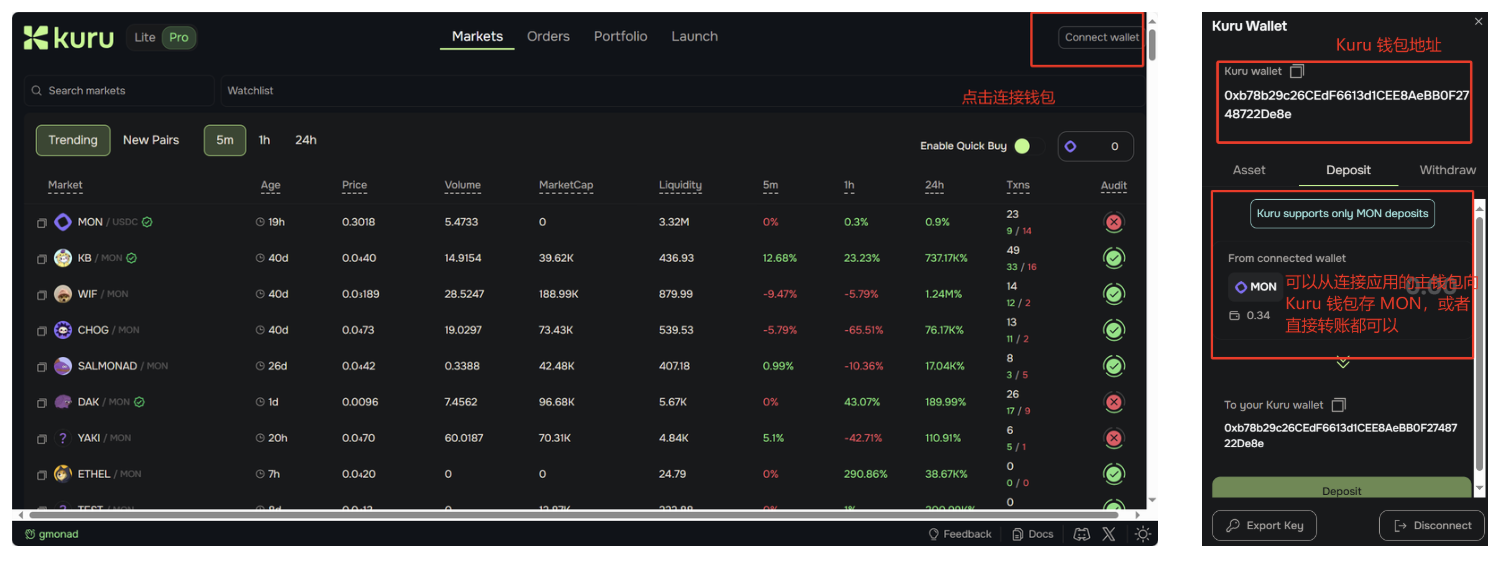
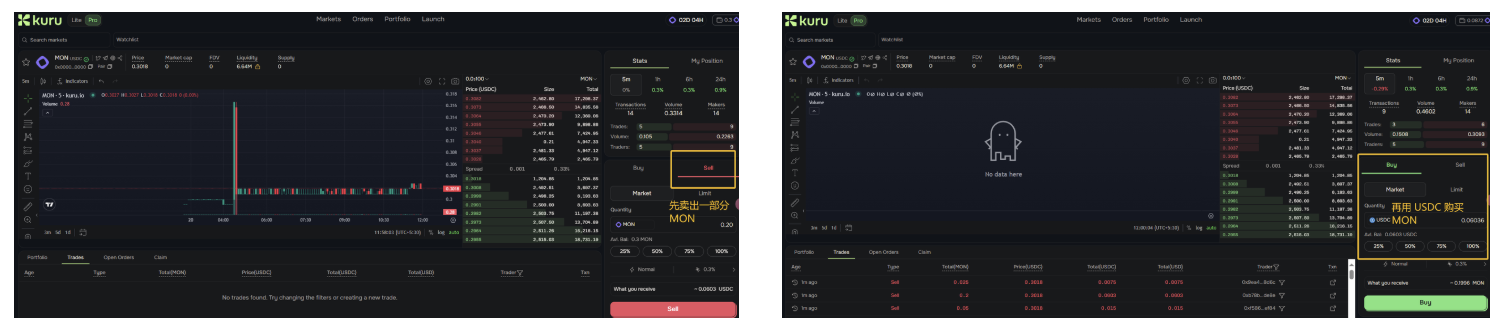
After depositing $MON, select the MON/USDC trading pair on the homepage. First convert $MON to $USDC, then convert $USDC back to $MON. Repeat this process several times (some loss is expected).
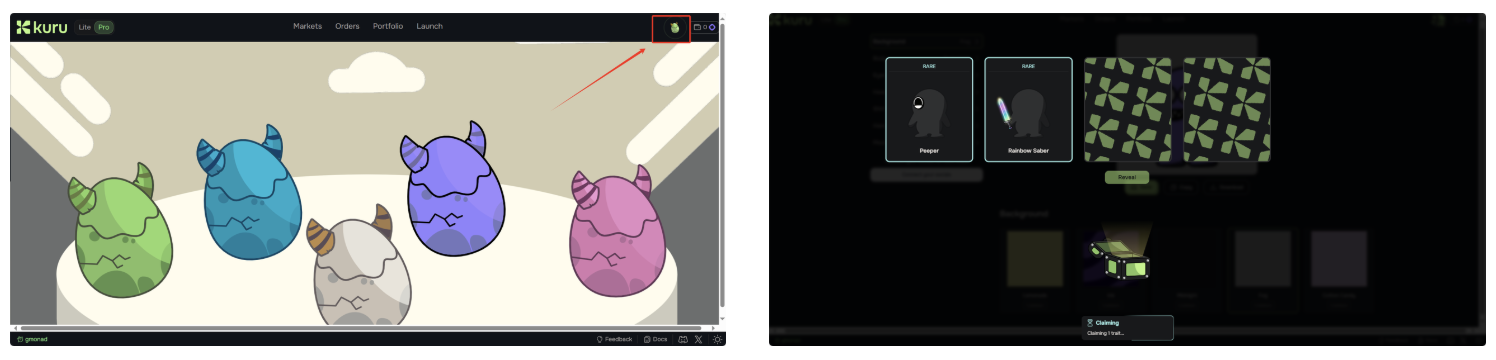
You can also click the pet egg icon in the upper right corner to randomly receive a pet and draw some cards (exact utility unknown).
In addition to interacting with various applications, current daily tasks include staying active on Discord and regularly claiming $MON test tokens from the official website and OKX faucet center, as well as participating in ecosystem token trading.
Further reading:
-
Injecting Solana's DNA into EVM: Can Monad Spark an "EVM Spring"?
-
A comprehensive guide to participating in Monad-native projects
-
Monad Official X Account: https://x.com/monad_xyz
-
Monad Discord Community: https://discord.gg/monad
-
Monad Performance Whitepaper: https://docs.monad.xyz
Join TechFlow official community to stay tuned
Telegram:https://t.me/TechFlowDaily
X (Twitter):https://x.com/TechFlowPost
X (Twitter) EN:https://x.com/BlockFlow_News
 深潮TechFlow