


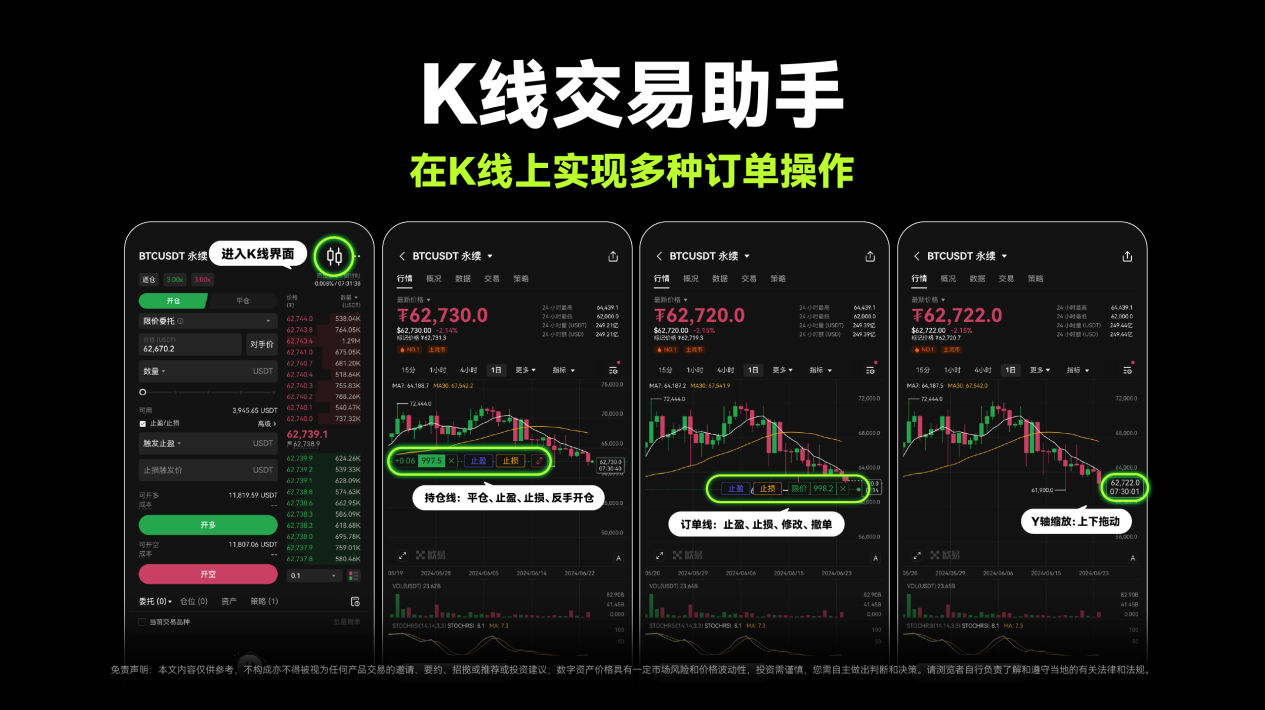
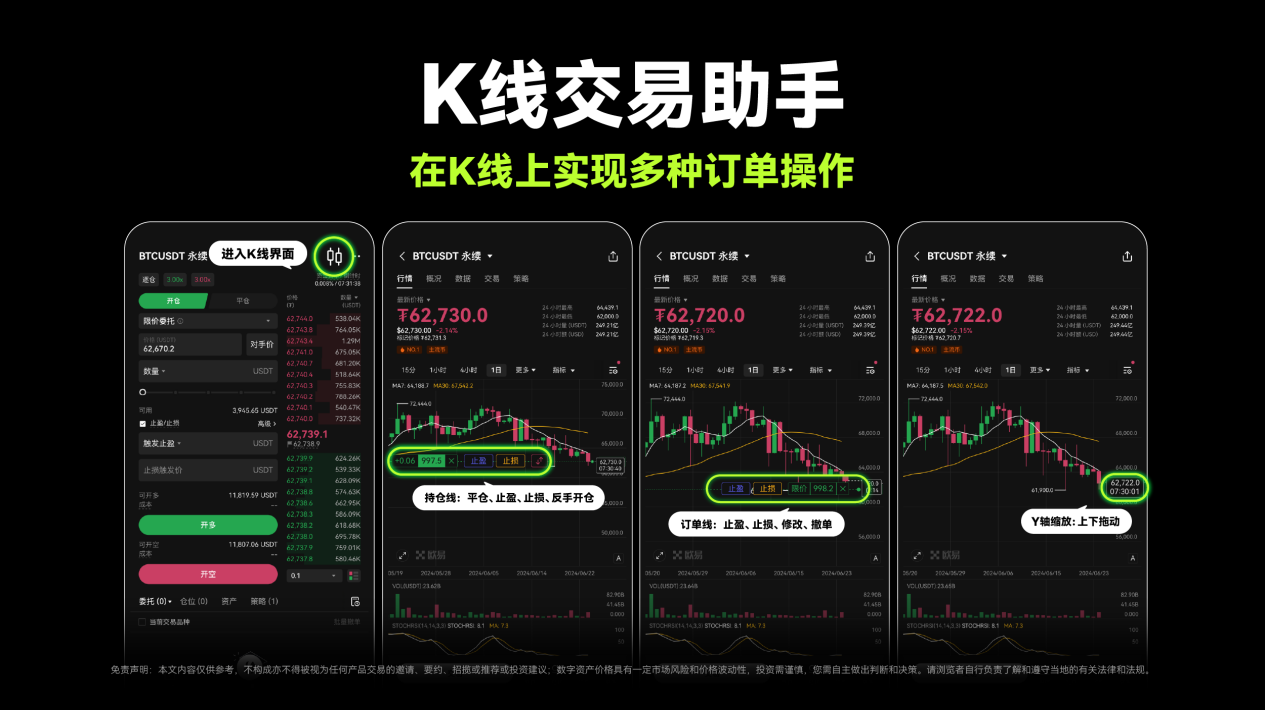
Enhanced interaction: OKX launches K-line trading assistant, boosting both user trading efficiency and experience
TechFlow Selected TechFlow Selected
Enhanced interaction: OKX launches K-line trading assistant, boosting both user trading efficiency and experience
OKX pays attention to every user feedback and values each user experience.
 Navigating Web3 tides with focused insights
As users glide their fingertips across smartphone screens, their demands for trading tools evolve in real time.
Examples include personalized, tailor-made tools; AI and big data-driven automated tools; low-barrier solutions for real-time trading; and transparent, secure systems. In the digital era, the evolution of trading tools is profoundly reshaping the landscape and future of the crypto industry.
How can leading Web3 technology companies like OKX create products that are simple, elegant, secure, and user-friendly, while continuously meeting diverse trading needs and delivering seamless experiences? This has become a key direction for product innovation at OKX. Delivering a frictionless user experience stems from OKX’s deep understanding of user needs and meticulous attention to product details. From CEX to Wallet, OKX values every user feedback and prioritizes every interaction. By listening closely to users, continuously refining the experience, and driving sustained innovation, OKX aims to deliver exceptional products and experiences.
Recently, OKX launched a major upgrade to its K-line functionality with the official release of the "K-Line Trading Assistant." This new feature enables users to conduct precise market analysis using charting tools and data indicators, while also streamlining order and position management—enhancing both trading efficiency and strategy execution. As an essential and practical trading tool, OKX’s "K-Line Trading Assistant" empowers users to navigate market volatility with greater confidence.
OKX is among the first exchanges in the industry to offer smooth K-line trading assistance on mobile apps. This article dives into the core features, usage guide, application scenarios, and underlying technology of OKX's "K-Line Trading Assistant," helping users quickly understand and leverage this powerful tool.
Common Scenarios & Key Features
Alice is a short-term trader who, during a highly volatile trading session, identified an ideal entry point. However, due to delays when switching between the K-line chart and the trading page, she missed the optimal buying opportunity, losing 10% of potential gains.
Bob is a novice trader who calculated a precise stop-loss level based on the K-line chart. But when navigating to the trading page to set up the stop-loss order, the transition was clunky and interrupted his operation. As a result, he failed to set the stop-loss in time and suffered significant losses when the market reversed.
Charlie is a futures trader who frequently checks K-line charts and places orders during intraday trading. Operating under prolonged high pressure, he made a critical mistake—submitting a buy order instead of a sell—leading to an avoidable loss.
David is an average trader who believed a market reversal was imminent after analyzing the K-line chart. He switched to the trading page to close his position, but during the transition, the chart failed to update in real time. Acting on outdated information, he made a wrong decision and incurred a loss.
Alice’s missed trade, Bob’s failed stop-loss setup, Charlie’s operational error, and David’s flawed judgment—all highlight a common challenge. In the 24/7 crypto market, K-line charts serve as a vital reference for price trends. Yet, inefficiencies such as switching between the K-line and trading interface hinder traders who heavily rely on technical analysis, calling for a more optimized trading experience.
With the "K-Line Trading Assistant," OKX seamlessly integrates trading decisions directly into the K-line interface. Users can now analyze charts and execute trades simultaneously—simply by tapping key points on the K-line to place orders or manage positions—eliminating constant toggling between the chart and order screen. This simplifies workflows, boosts trading efficiency, and helps users respond faster to market movements.
For instance, users can modify existing orders directly from the K-line chart via OKX’s "K-Line Trading Assistant." Additionally, OKX’s "K-Line Trading Assistant" now uniquely supports closing positions or reversing trades directly from the position line, along with Y-axis zooming for detailed views—allowing rapid adjustments based on market dynamics. With a clean interface and smooth interactions, it delivers a more fluid trading experience.
Feature Breakdown & Usage Guide
After placing an order, users can tap the button in the top-right corner to switch to the K-line view, where they can perform multiple order operations directly on the chart.
Specifically, OKX’s "K-Line Trading Assistant" offers two core functionalities: K-line analysis and K-line trading.
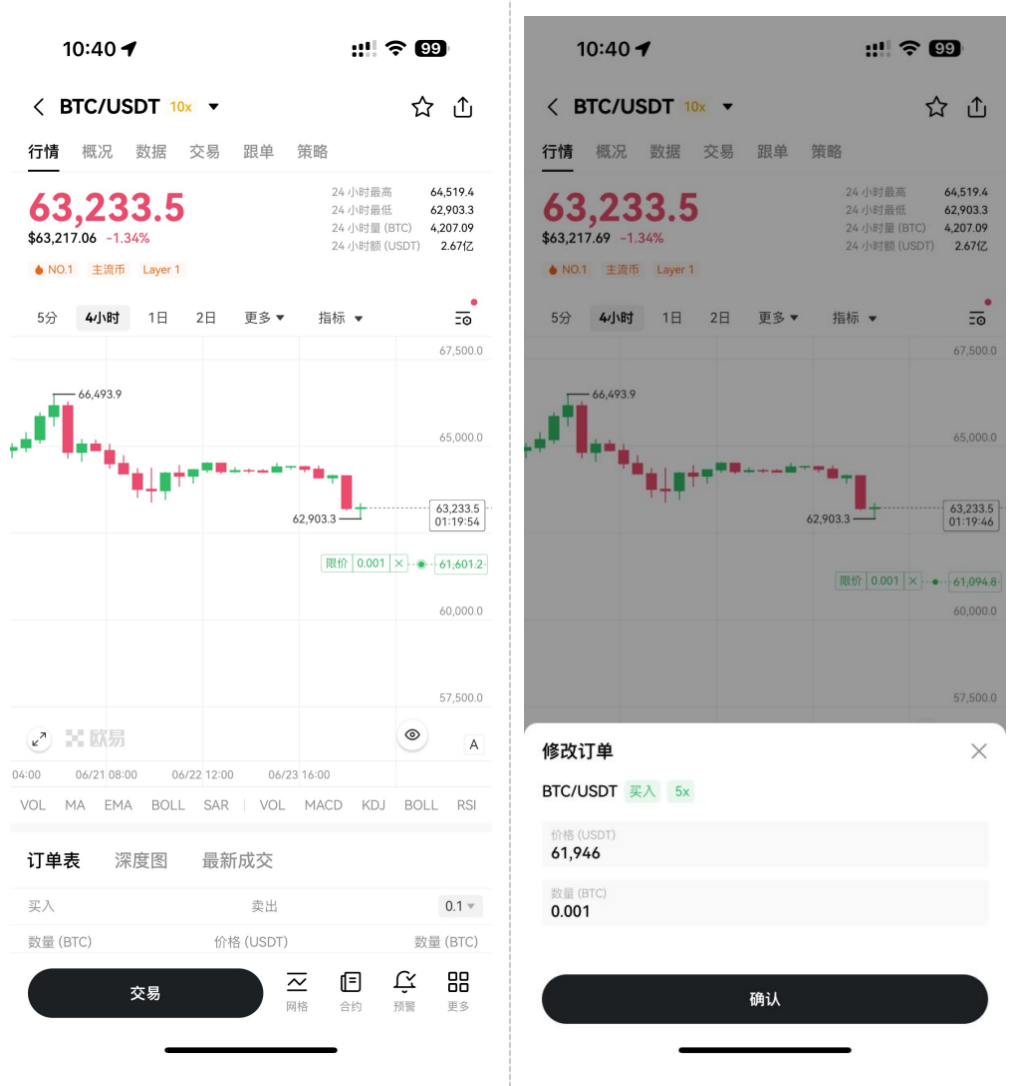
(1) K-Line Trading
First, Order Lines
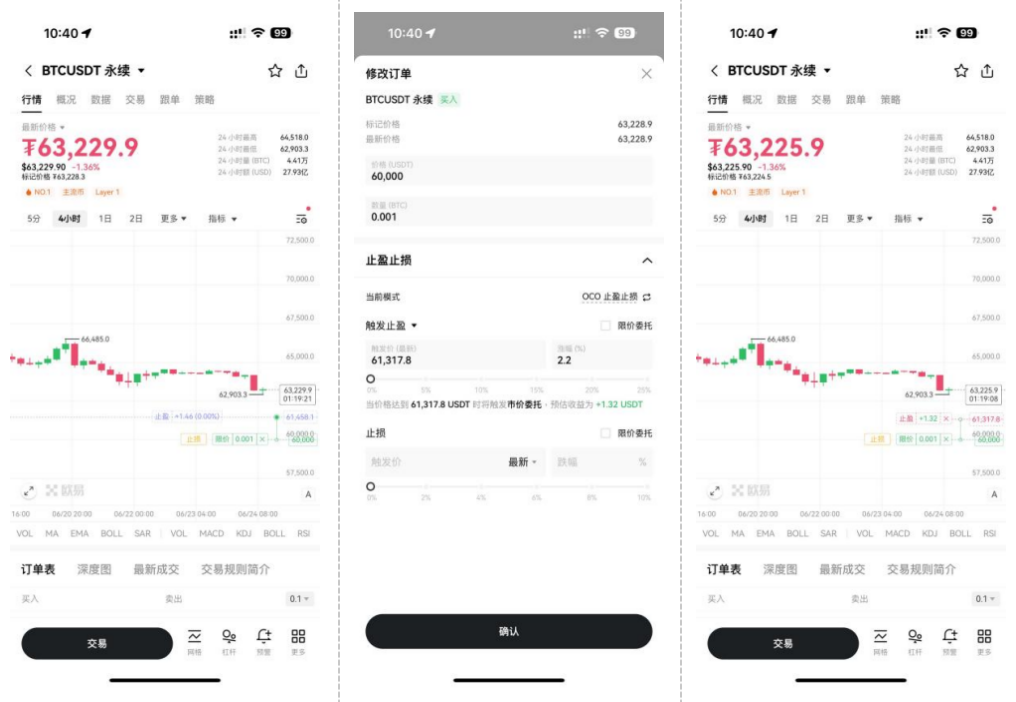
Modify order price or quantity. Users can drag the order line to a desired price level on the OKX K-line interface. Upon dragging, a “Modify Order” pop-up appears, allowing changes to the asset price or quantity. Confirming the adjustment finalizes the order modification.
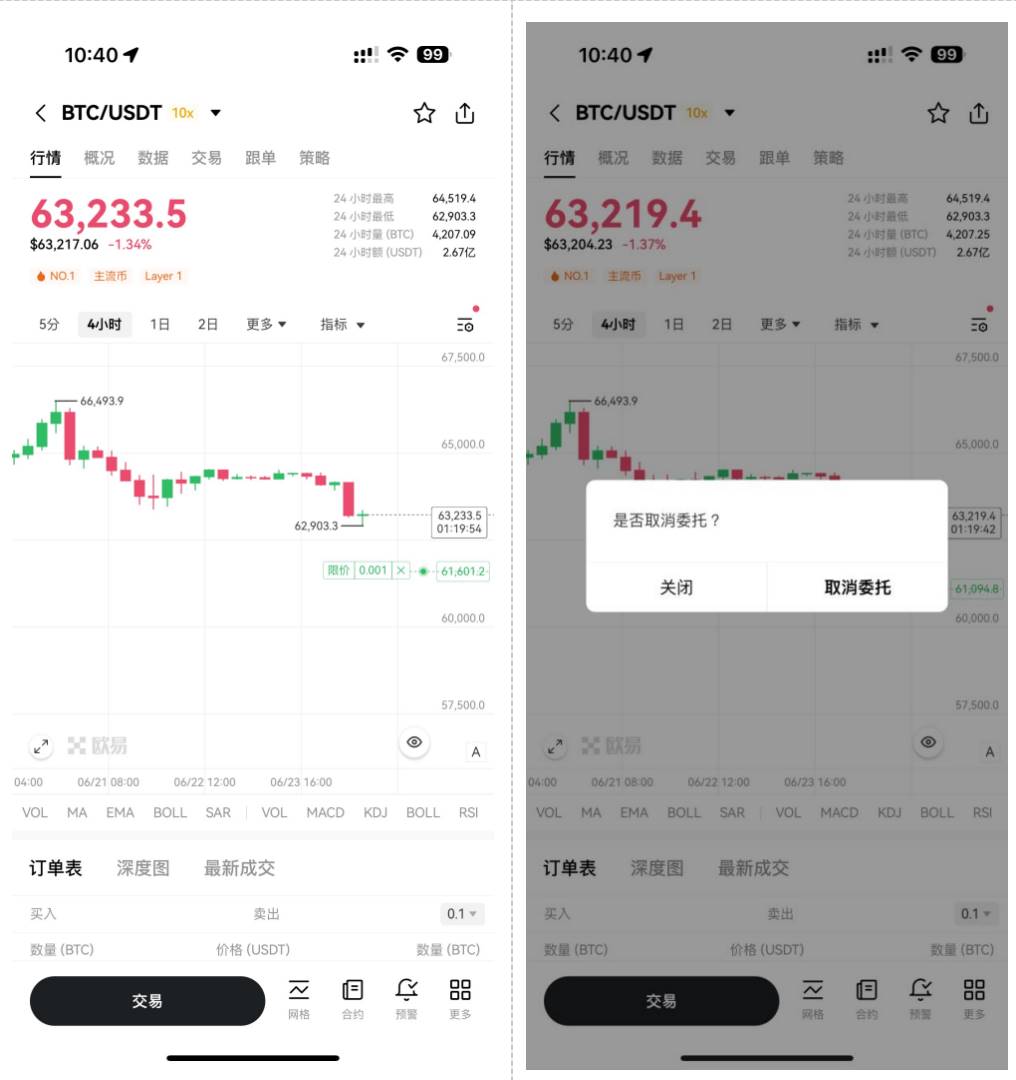
Cancel orders. In focus mode, tapping the order line reveals a “Cancel” button. Clicking it prompts confirmation. Once confirmed, the cancellation request is executed and the order line is removed from the chart.
Set or modify take-profit/stop-loss (TPSL). Users can configure TPSL at the order level via the order line. Dragging the take-profit (TP) or stop-loss (SL) marker to a target price triggers the “Modify Order” pop-up, enabling precise adjustments to TP/SL price or volume. After confirmation, the TPSL order is placed. For convenience, the estimated profit and loss (P&L) is displayed directly on the TPSL line. Users may also edit or cancel any existing TPSL settings.
Second, Position Lines
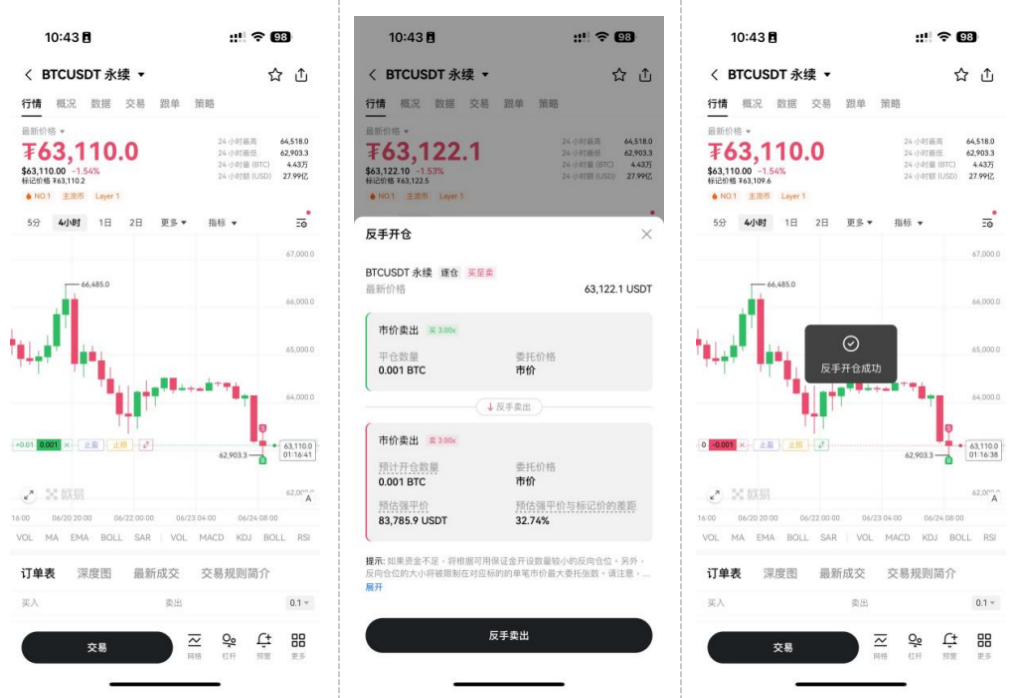
Reverse positions. Futures traders can click the [↑↓] reverse button on the position line to instantly switch to an opposite position. Clicking it brings up a confirmation window showing details. Once confirmed, the system executes the reversal, updating the position line with the new status and color.
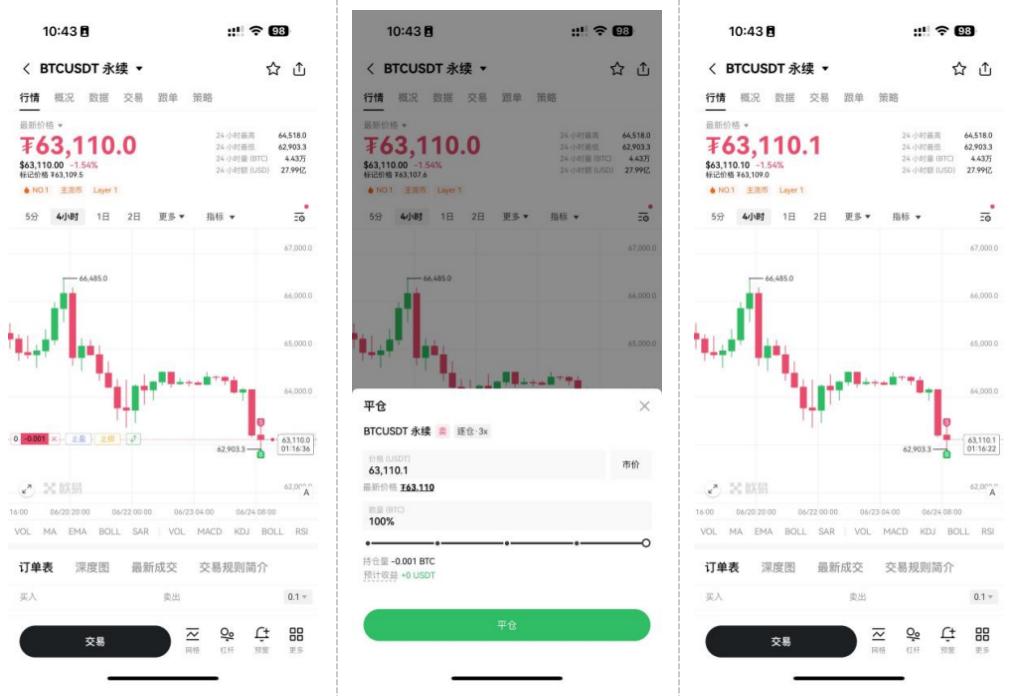
Close positions instantly. In focus mode, users see an [x] close button. Tapping it opens a confirmation window where they can specify the exit price and size. Upon confirmation, the close request is sent. If fully closed, the position line disappears from the chart.
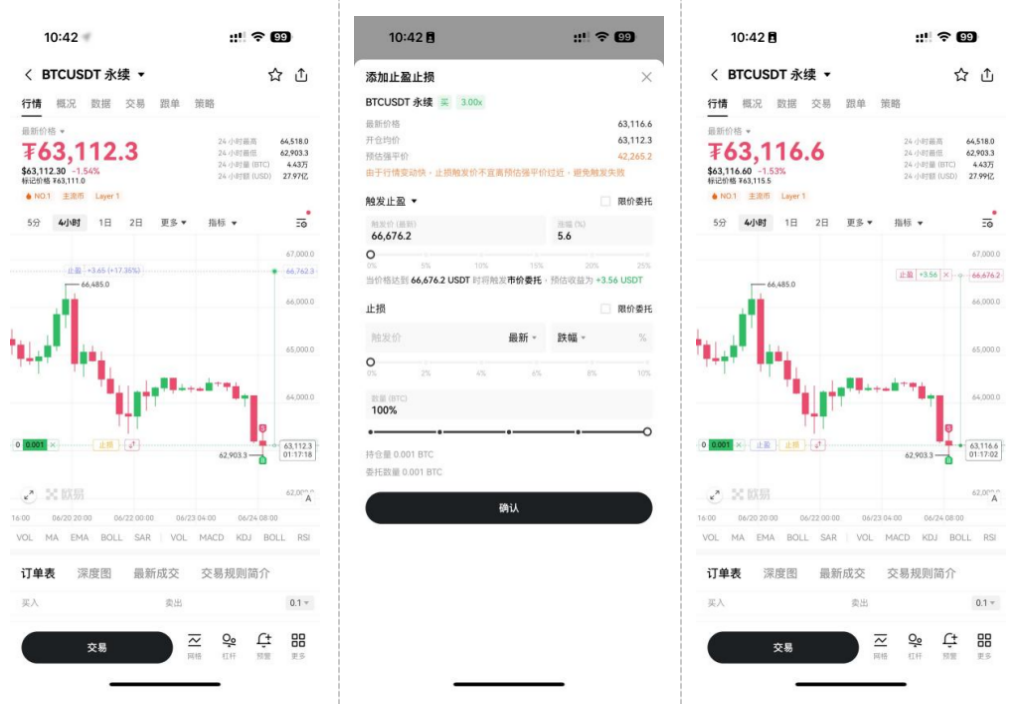
Position-level take-profit/stop-loss (TPSL). Users can set TPSL directly from the position line. By dragging the TP or SL marker to a desired price, they can dynamically preview the expected PnL. Once configured, the projected PnL appears on the TP/SL line and updates automatically if related order changes occur. Users can also modify or remove TPSL settings anytime.
Third, Trade History Tracker
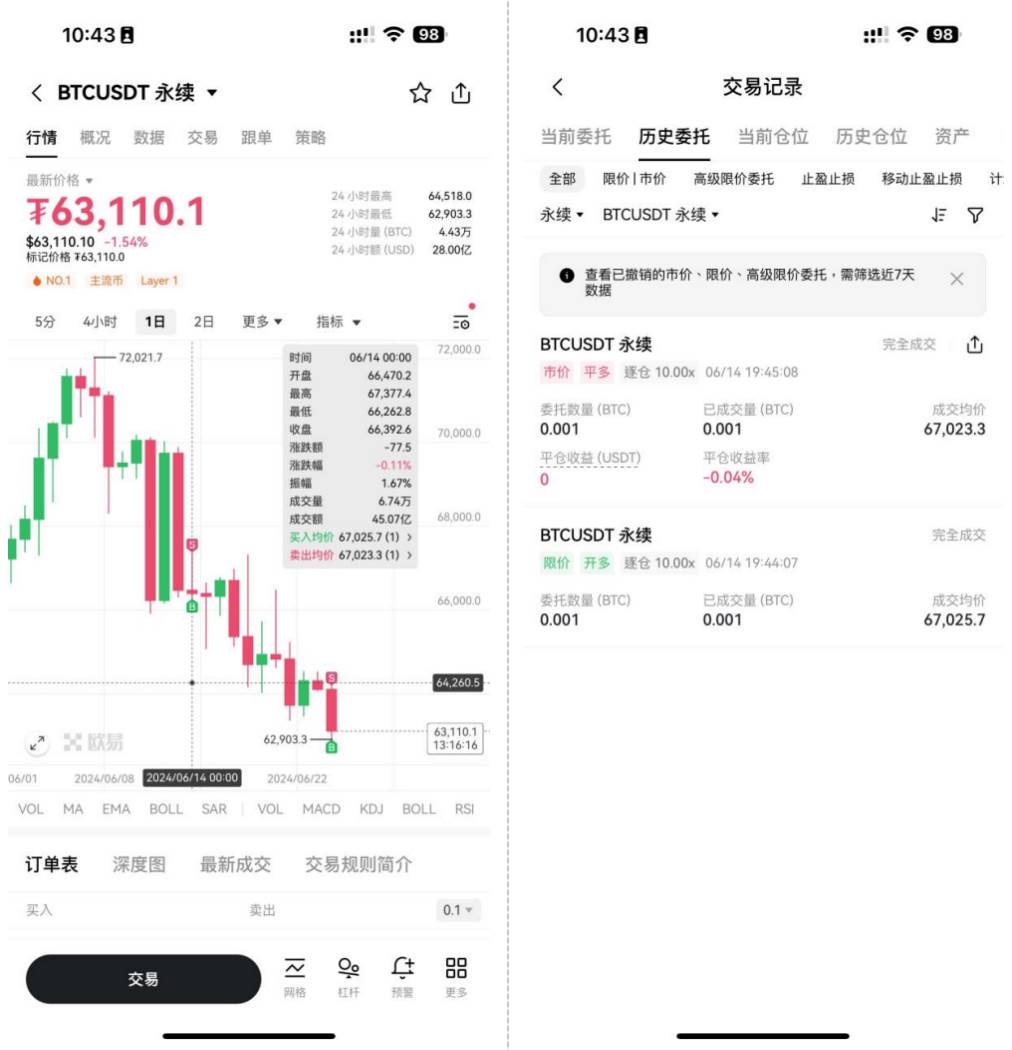
Trade History Tracker. This feature allows users to view their trading history directly on the K-line chart. Additionally, OKX provides one-click access to the full order history page for more detailed records.
Fourth, User Settings & Customization
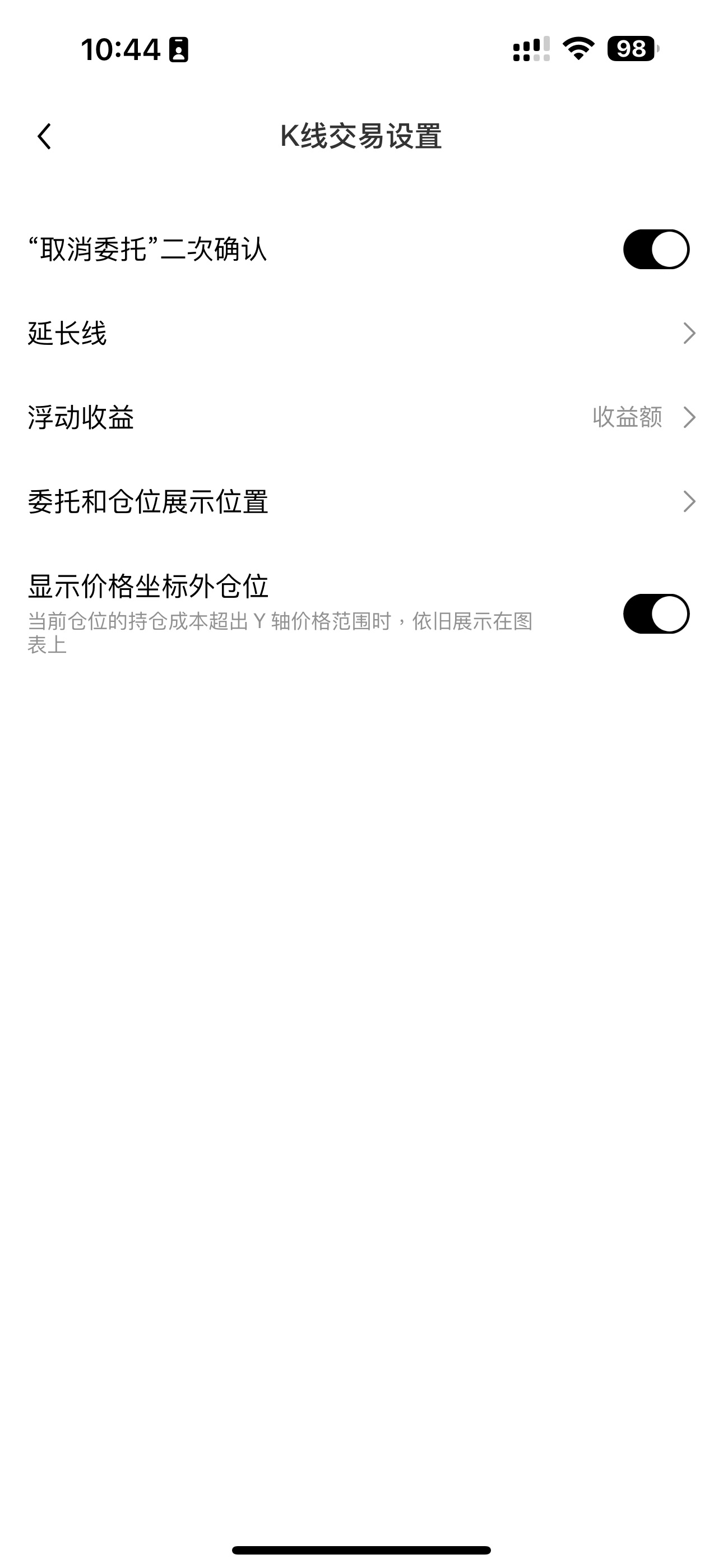
Toggle persistent position line visibility. The OKX K-line chart supports keeping the position line always visible—even if the entry price falls outside the Y-axis range. When users tap the position line, the chart automatically returns to the Y-axis range, making it safer and easier to set TPSL.
Hide position lines. If users disable the “Show all positions” option in settings, the position line will disappear when the entry price goes beyond the Y-axis range.
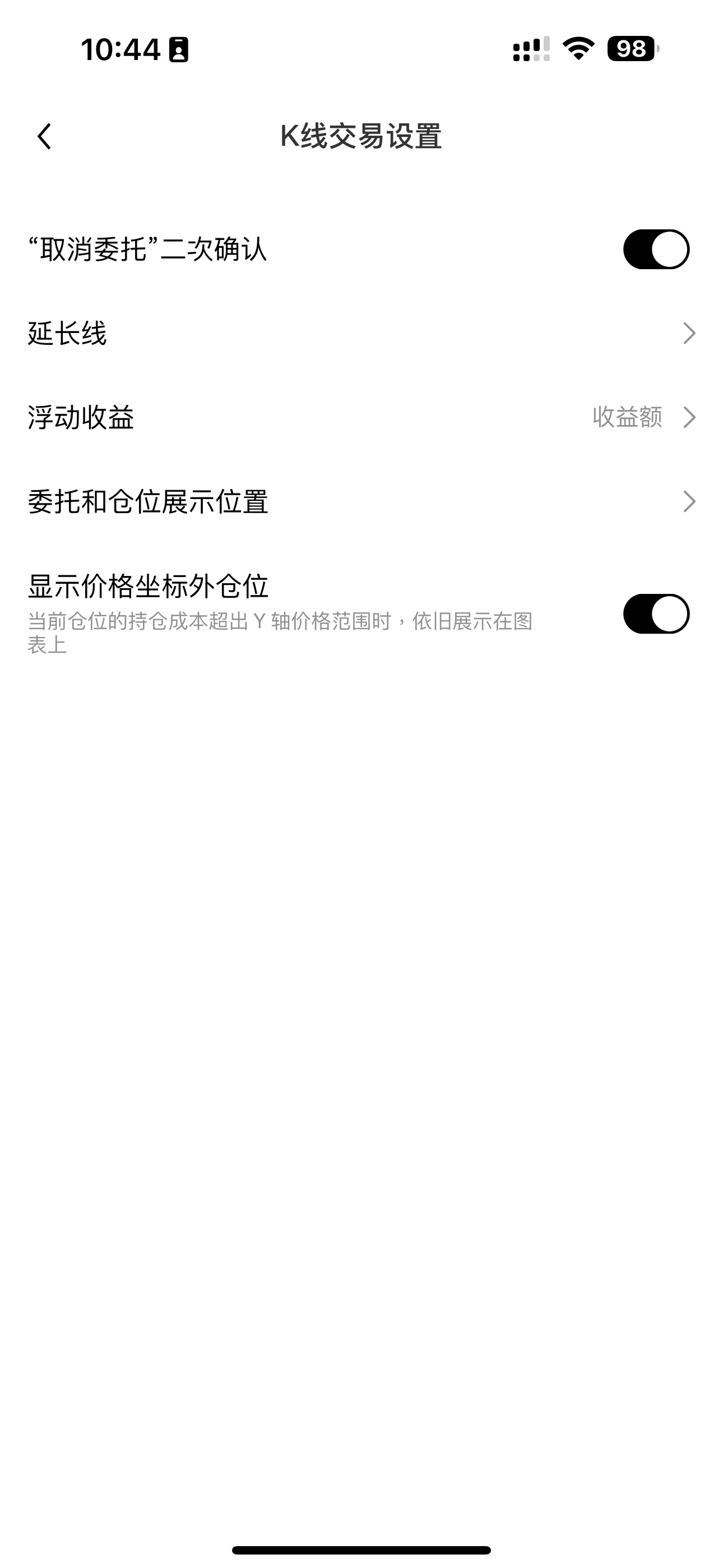
Display PnL value or ratio. Users can choose to show either the PnL value or PnL ratio on order and position lines via the display settings.

(2) K-Line Analysis
On the analysis front, OKX enhances precision and usability through professional drawing tools, rich data indicators, and customizable visual styles.
This upgrade introduces several practical new features to K-line analysis—including integrating key trading metrics as chart indicators, enabling drawing tools in full-screen mode, and supporting Y-axis scaling for refined analysis—delivering a significantly improved user experience.
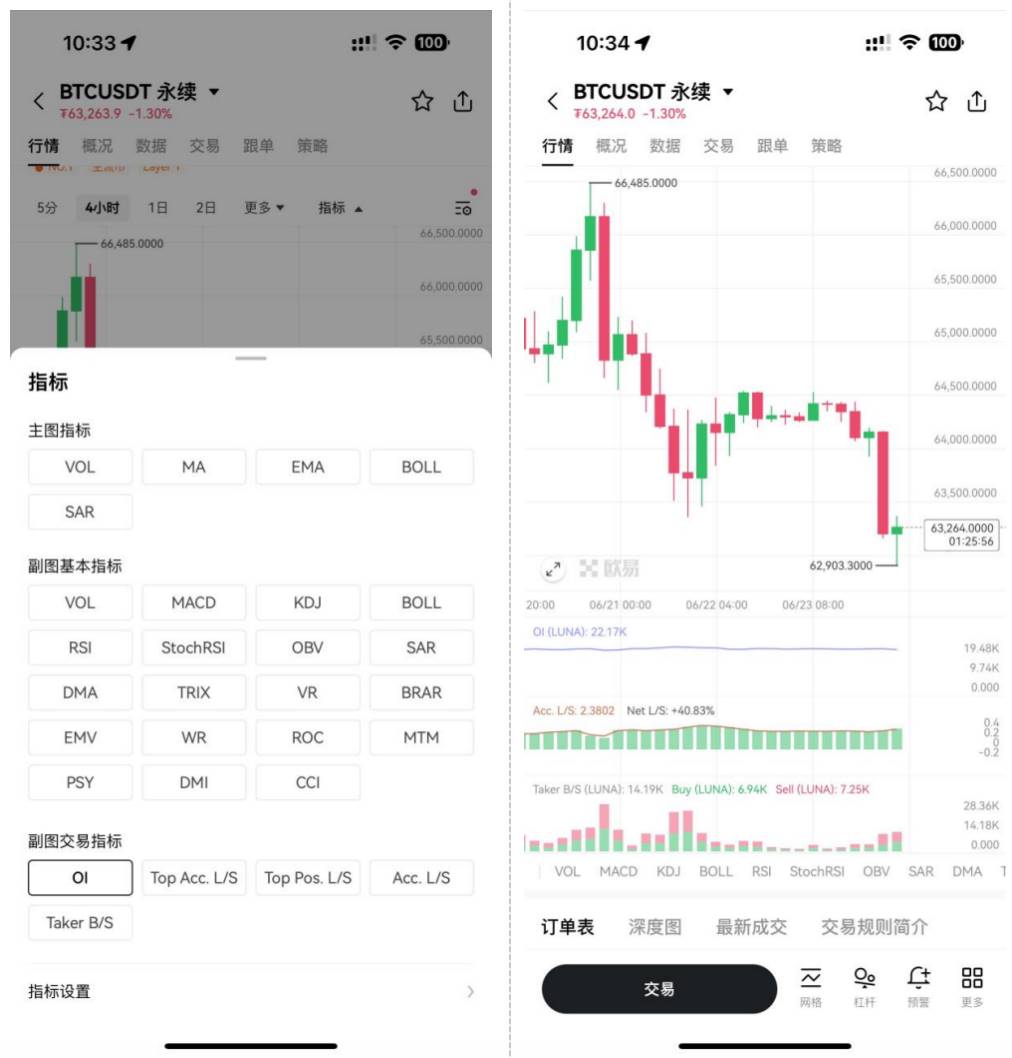
First, new trading data indicators. Users can now add key trading data as indicators directly onto the K-line chart for intuitive access. Currently, OKX supports five types: open interest, top traders’ long/short account ratio, top traders’ position ratio, overall long/short account ratio, and active buy/sell order volume—with plans to expand this list in future updates.
Second, drawing tools in full-screen mode. OKX’s K-line chart now supports full-screen mode and manual Y-axis scaling, making it easier to draw trendlines, Fibonacci retracements, and other annotations. More importantly, all drawings are saved on OKX’s backend servers and synchronized across devices, eliminating concerns about lost work or redundant actions between OKX’s mobile app and desktop platform.
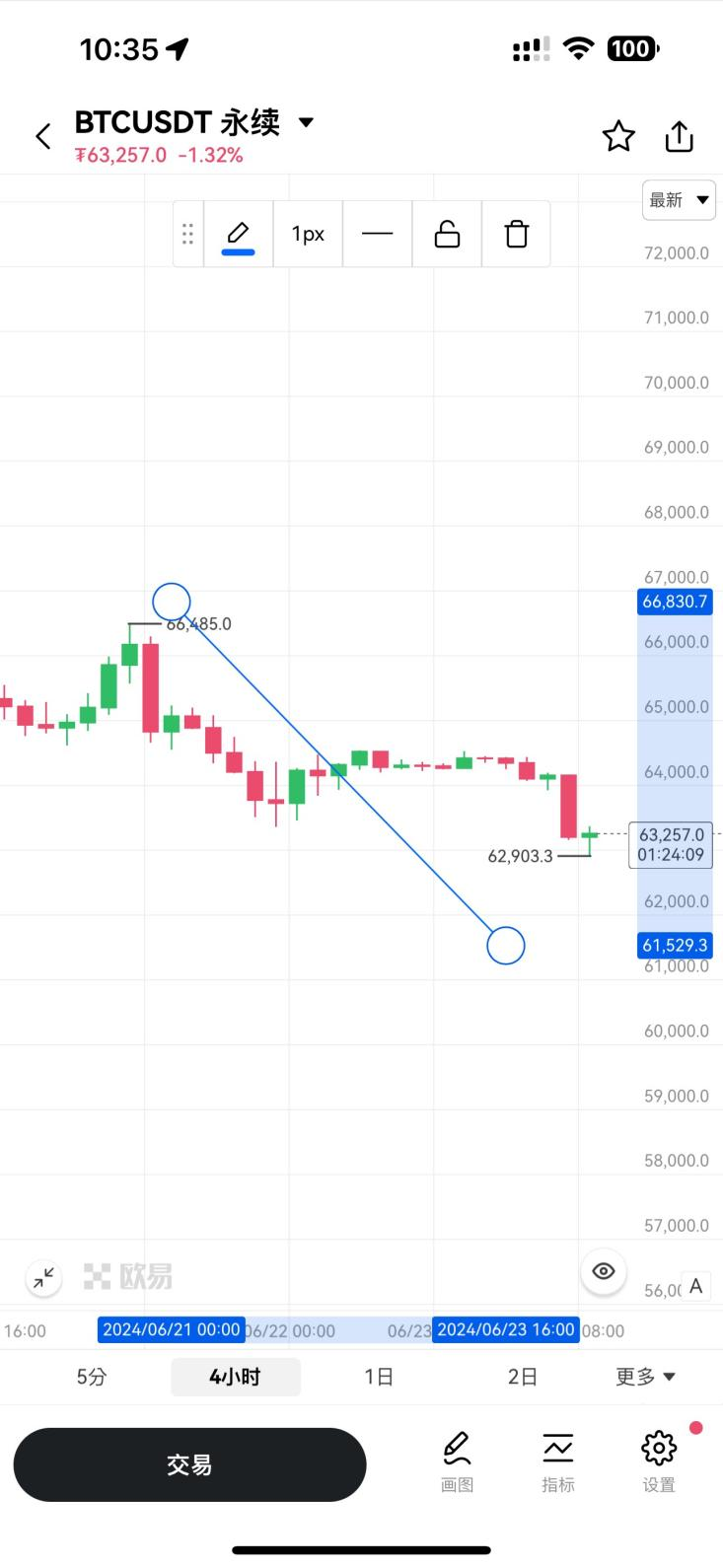
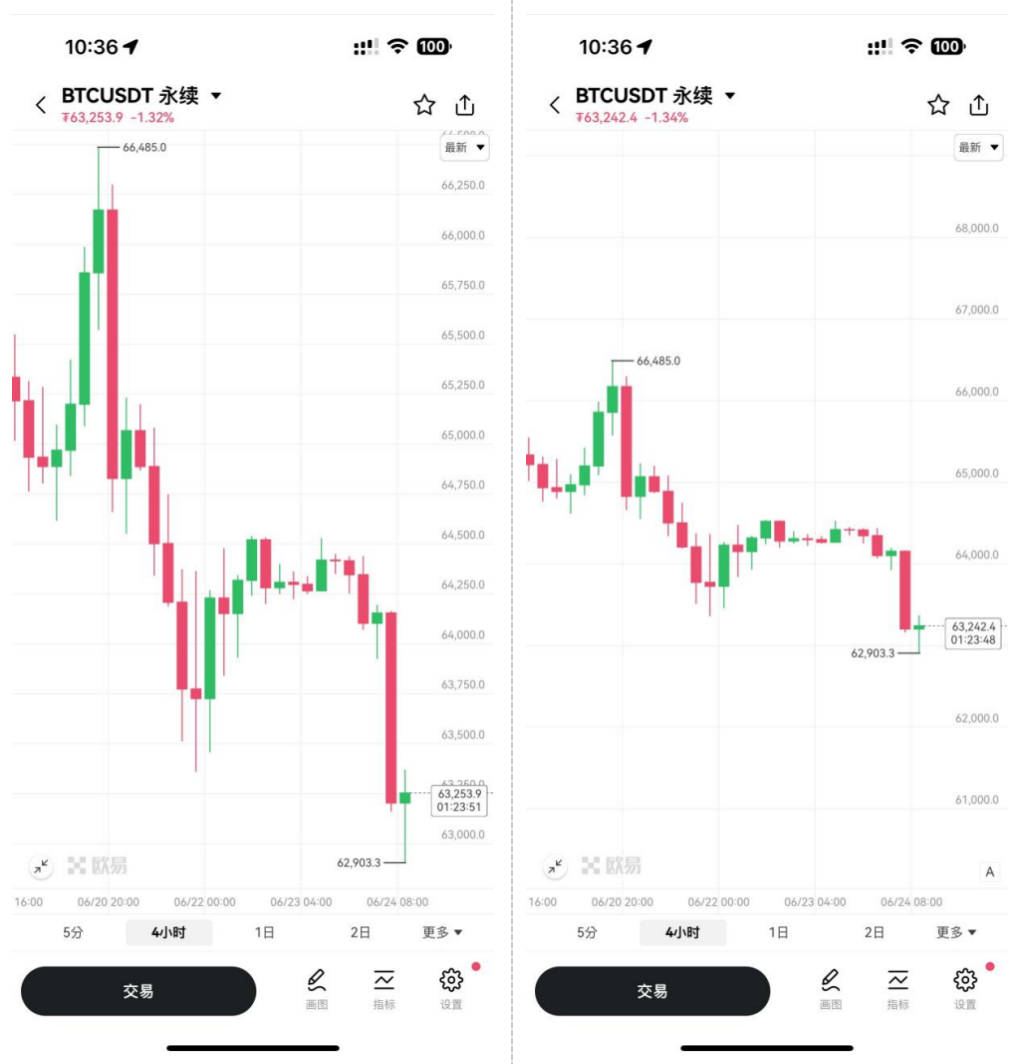
Third, Y-axis scaling support. The OKX K-line chart now allows manual adjustment of the Y-axis scale, enabling more comfortable viewing and navigation. Users can also pan and zoom the chart to precisely select entry points, further enhancing trading accuracy. This personalized control makes task-switching faster and smoother.
Focusing on User Experience, OKX Advances Smart Trading
Details make the difference.
On one hand, OKX focuses on product details, actively listens to user needs, and continuously improves user experience through technological innovation. With the “K-Line Trading Assistant,” OKX further integrates technical analysis with trading operations, creating a seamless workflow that enhances usability and convenience, delivering a smoother, more fluid trading experience. As Amazon founder Jeff Bezos once said, “The customer experience determines whether they’ll come back to us.”
On the other hand, OKX continues to innovate in smart trading and next-generation financial tools, optimizing interactions and advancing intelligent interfaces to improve user convenience and efficiency—making system operations feel more natural and effortless. For example, with the “K-Line Trading Assistant,” users can visually track market trends and make quick trading decisions, enabling smarter, more efficient interactions that help them better adapt to market complexity.
As pioneers in fintech, crypto platforms continue to drive innovation in digital asset trading. As markets mature and user expectations rise, advanced trading tools are becoming a core competitive advantage for digital asset exchanges. Balancing technological leadership with user needs and experience remains a critical challenge for every Web3 technology company.
Users are highly sensitive—they will always shift to the product offering the best experience.
Disclaimer
The information provided in this article and related services is for general informational purposes only and does not constitute, nor should it be construed as: (i) investment advice, trading advice, or investment recommendation; (ii) an offer or solicitation to buy or sell digital assets; or (iii) financial, accounting, legal, or tax advice. OKX does not guarantee the accuracy, completeness, or usefulness of such information. Digital assets (including stablecoins and NFTs) involve high risk and may depreciate or become worthless. Digital assets are not insured. Past performance is not indicative of future results. You should carefully consider whether trading or holding digital assets is suitable for you based on your financial situation, investment objectives, experience level, and risk tolerance. Please consult your legal, tax, and investment professionals regarding your specific circumstances. You are solely responsible for understanding and complying with applicable local laws and regulations.
Join TechFlow official community to stay tuned
Telegram:https://t.me/TechFlowDaily
X (Twitter):https://x.com/TechFlowPost
X (Twitter) EN:https://x.com/BlockFlow_News
 OKX
OKX