








Understanding the BTTC Cross-Chain Process in One Article
TechFlow Selected TechFlow Selected
Understanding the BTTC Cross-Chain Process in One Article
Zero-threshold cross-chain guide: Step-by-step tutorial on using BTTC to enable free flow of assets between TRON, Ethereum, and BNB Chain.
 Navigating Web3 tides with focused insights
In today's multi-chain Web3 ecosystem, enabling the free flow of assets and data is key to building a truly open internet. As a high-performance scaling solution specifically designed to solve cross-chain interoperability, BitTorrent Chain (BTTC) has become an indispensable infrastructure within the TRON ecosystem, providing critical support for decentralized networks through its groundbreaking cross-chain architecture.
As of 2025, the BTTC ecosystem has attracted over 14 million addresses, processed more than 290 million transactions cumulatively, and deployed over 7.6 million smart contracts. Daily on-chain transaction volume and Gas consumption continue to rise, demonstrating strong network activity, robust growth momentum, and widespread adoption as an underlying platform. This market-proven solution is continuously unlocking the immense potential of the TRON ecosystem to connect with the broader multi-chain world.
Meanwhile, as the TRON ecosystem expands, BTTC is committed to delivering core value to users by offering seamless and low-cost channels for interacting with external chain assets. Users can securely transfer their assets to the BTTC network first and then bridge them to the target chain (supporting interoperability between TRON, Ethereum, and BNB Chain), completing secure asset transfers through precise coordination between two-way verification and smart contracts:
1. Asset Transfer (Source Network → BTTC): Transfer assets from the source network to the BTTC network.
2. Cross-Chain Bridging (BTTC → Target Network): Transfer assets from the BTTC network to the target network.
3. Final Receipt (on Target Network): Receive and use the assets on the target network.
The BitTorrent Bridge currently supports cross-chain transfers of BTT, TRX, JST, NFTs, SUN, USDD, and WIN, and offers three flexible cross-chain transfer modes to suit different use cases:
● Manual Receive: Full amount arrives at destination; ideal for users familiar with target chain operations. Note: The receiving address on the target chain must have sufficient funds to cover Gas fees for the final receipt.
● Auto Receive: Enables instant "one-click" receipt. A decentralized Relayer automatically receives the assets and pays the Gas fee, with the service cost deducted directly from the transferred amount.
● Auto Receive + Gas Top-Up: Allows immediate participation in the target chain’s ecosystem after bridging. The Relayer receives the assets, pays the Gas fee, and also deposits a small amount of native Gas token into the receiving address for future transactions. Service costs are deducted from the transferred amount.
This article will walk through the full process for all three modes using a cross-chain transfer from TRON Network to BSC Network as an example.
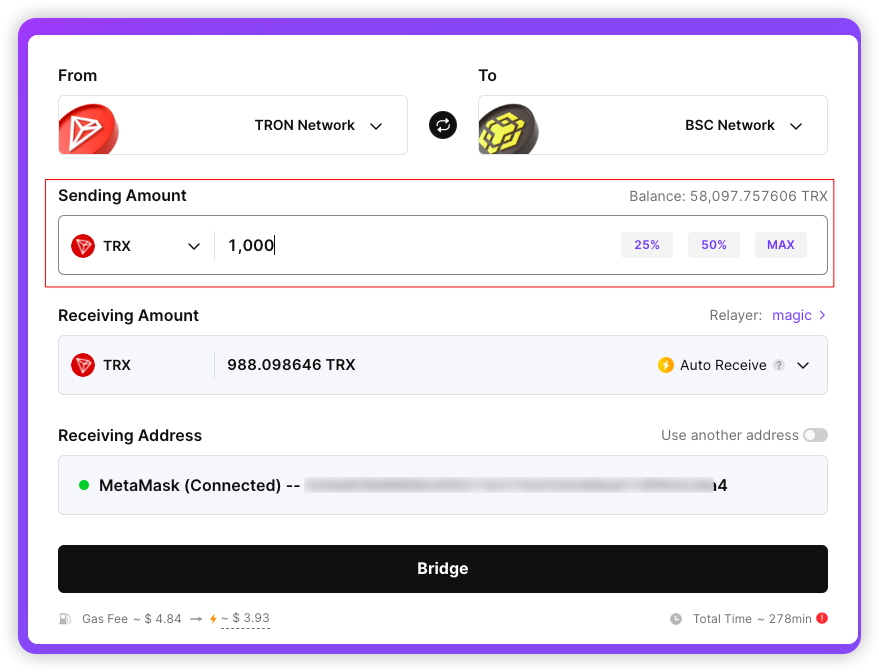
1. Fill in Basic Information
● Connect your wallet and select TRON Network and BSC Network as the source and target networks from the "From" and "To" dropdown menus.
● The receiving address defaults to your connected wallet address. To specify a different recipient, click "Use another address" and enter the desired address. Double-check the address carefully, as transactions cannot be canceled or modified once initiated.
● Choose the token and enter the transfer amount under "Sending Amount." The system will display the estimated received amount in real time.
2. Manual Receive Mode
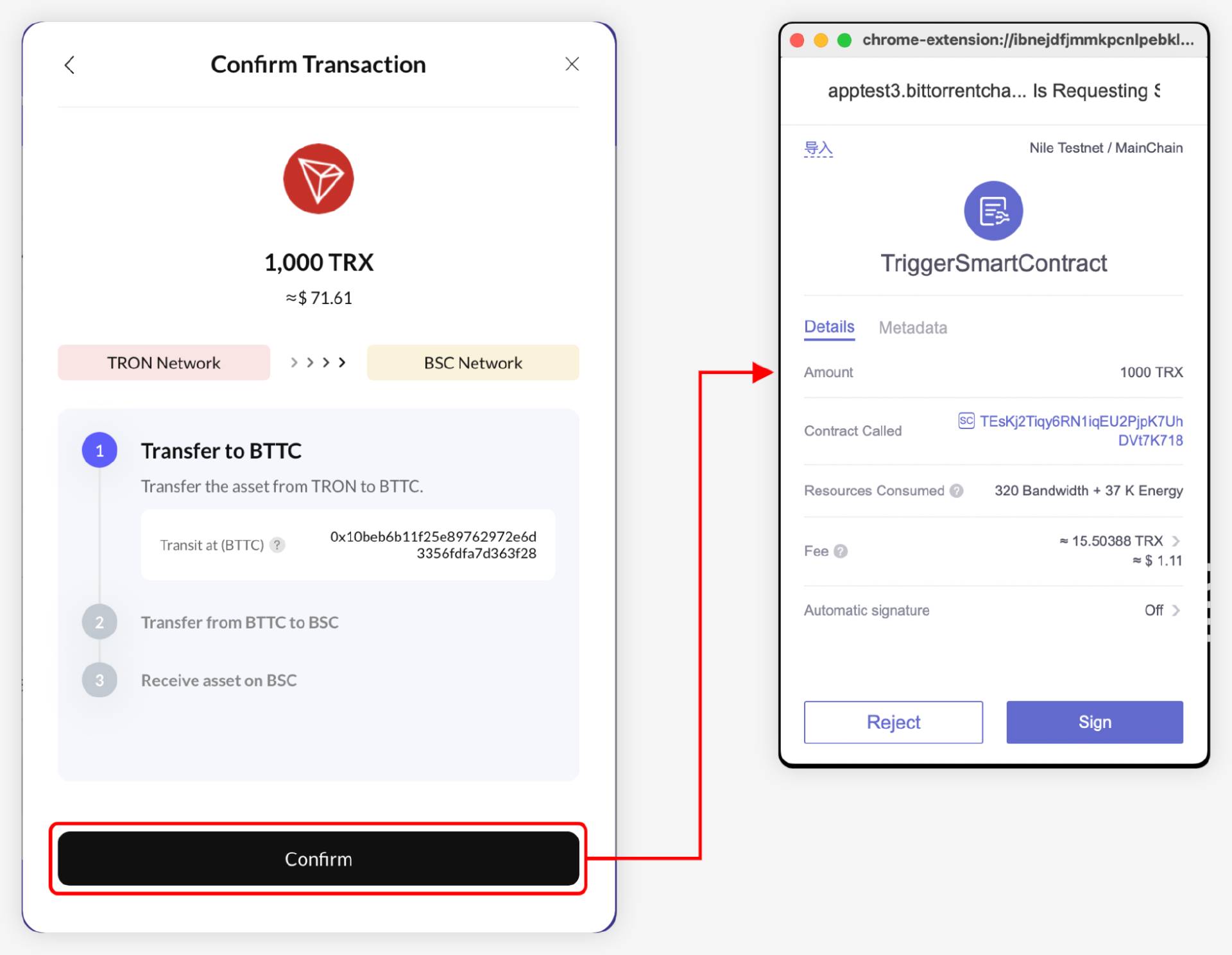
● Initiate Bridge (TRON → BTTC)
Select "Manual Receive" mode, then click "Bridge." Review the estimated arrival time and required Gas fee on the interaction page, then confirm and authorize.
● Asset Arrives at BTTC, Execute Cross-Chain (BTTC → BSC)
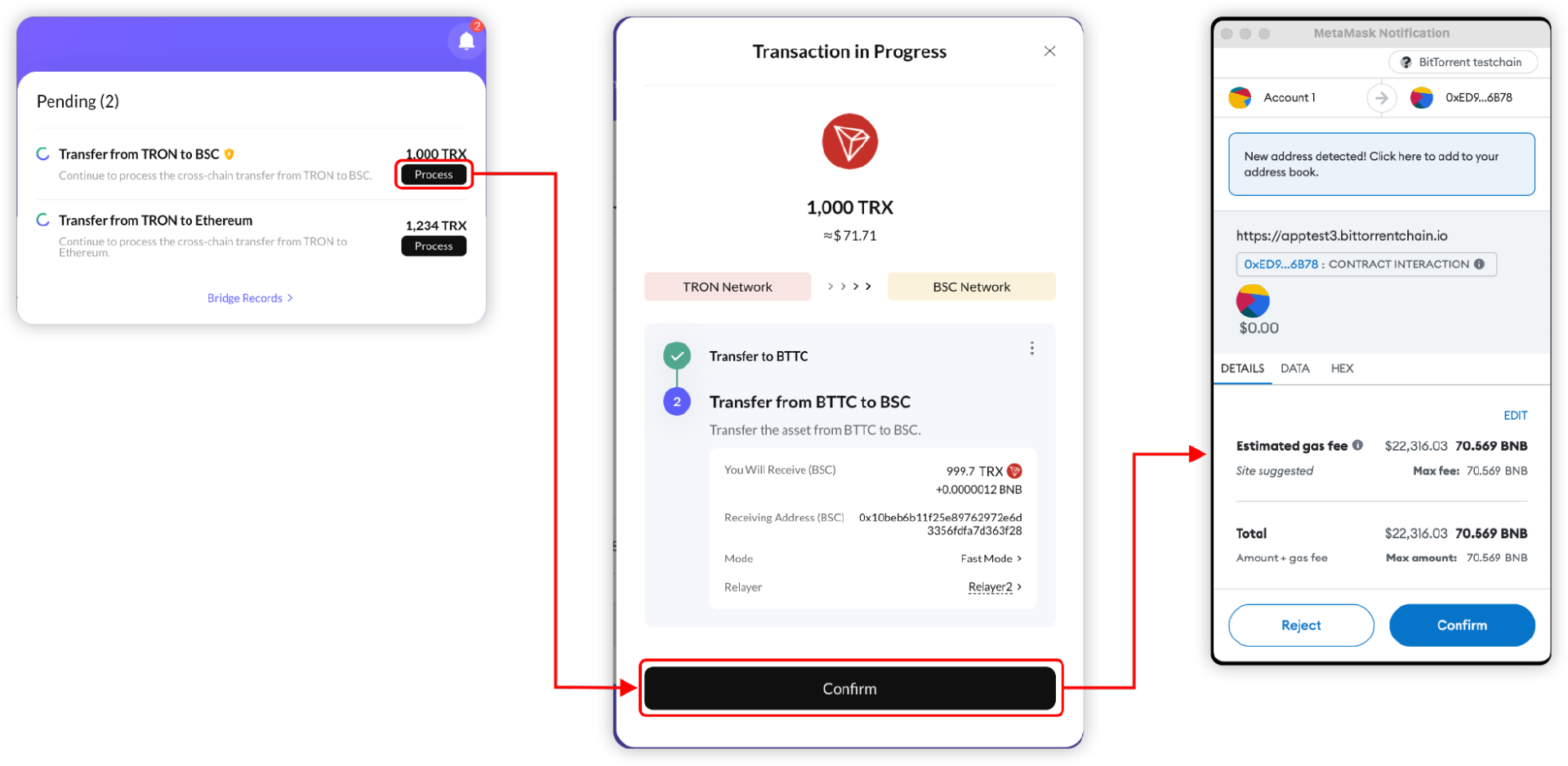
Once the asset reaches the BTTC receiving address, you’ll see a notification in the top-right "Notifications" section of the page. Click "Process" to view transaction details. After confirming the information, authorize your wallet on the BTTC Network to initiate the cross-chain transfer.
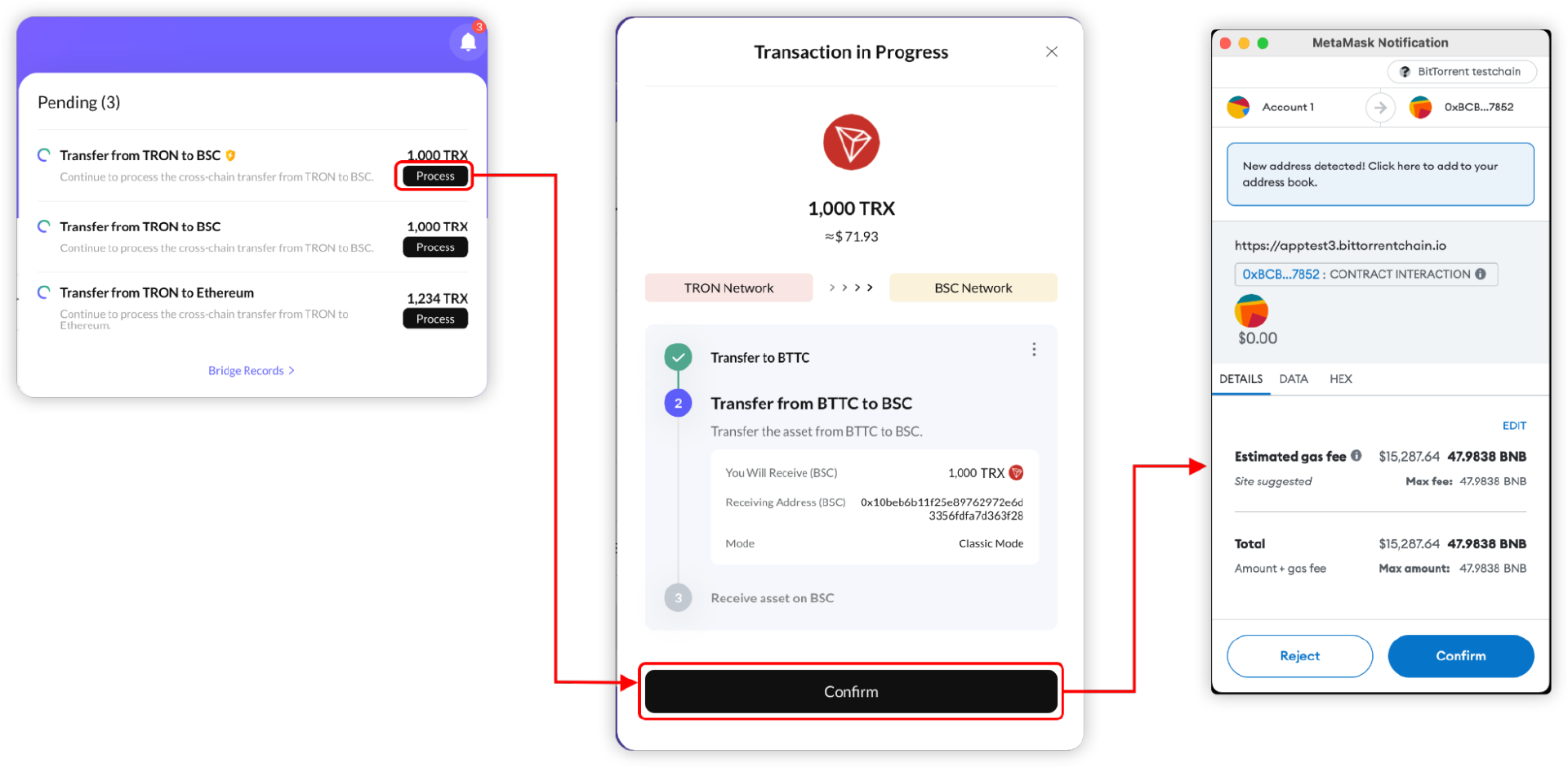
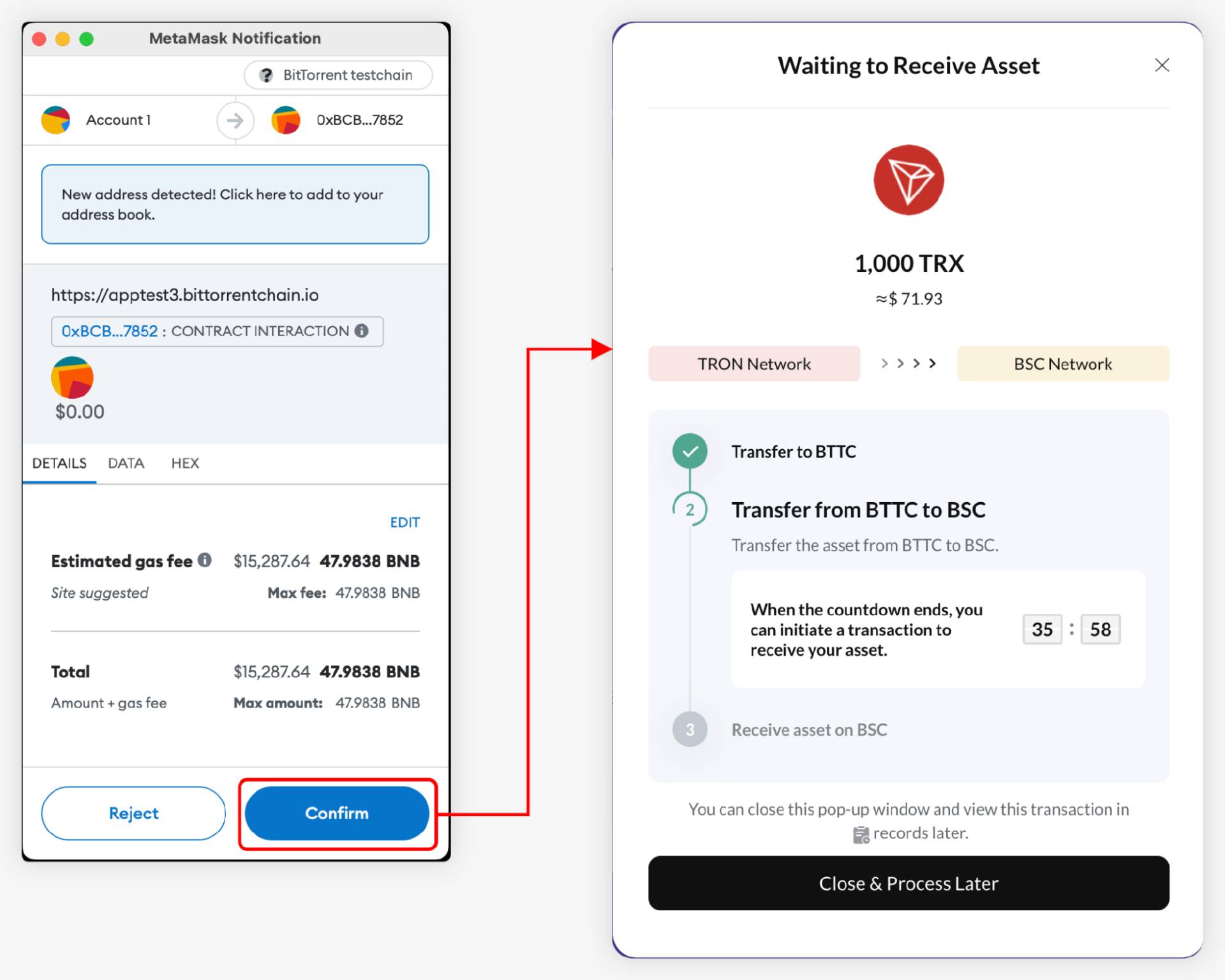
The interface will show the estimated arrival time and cross-chain fee. Under normal conditions, this step takes about 30 minutes, though it may take longer during periods of network congestion (processing time depends on real-time network conditions).
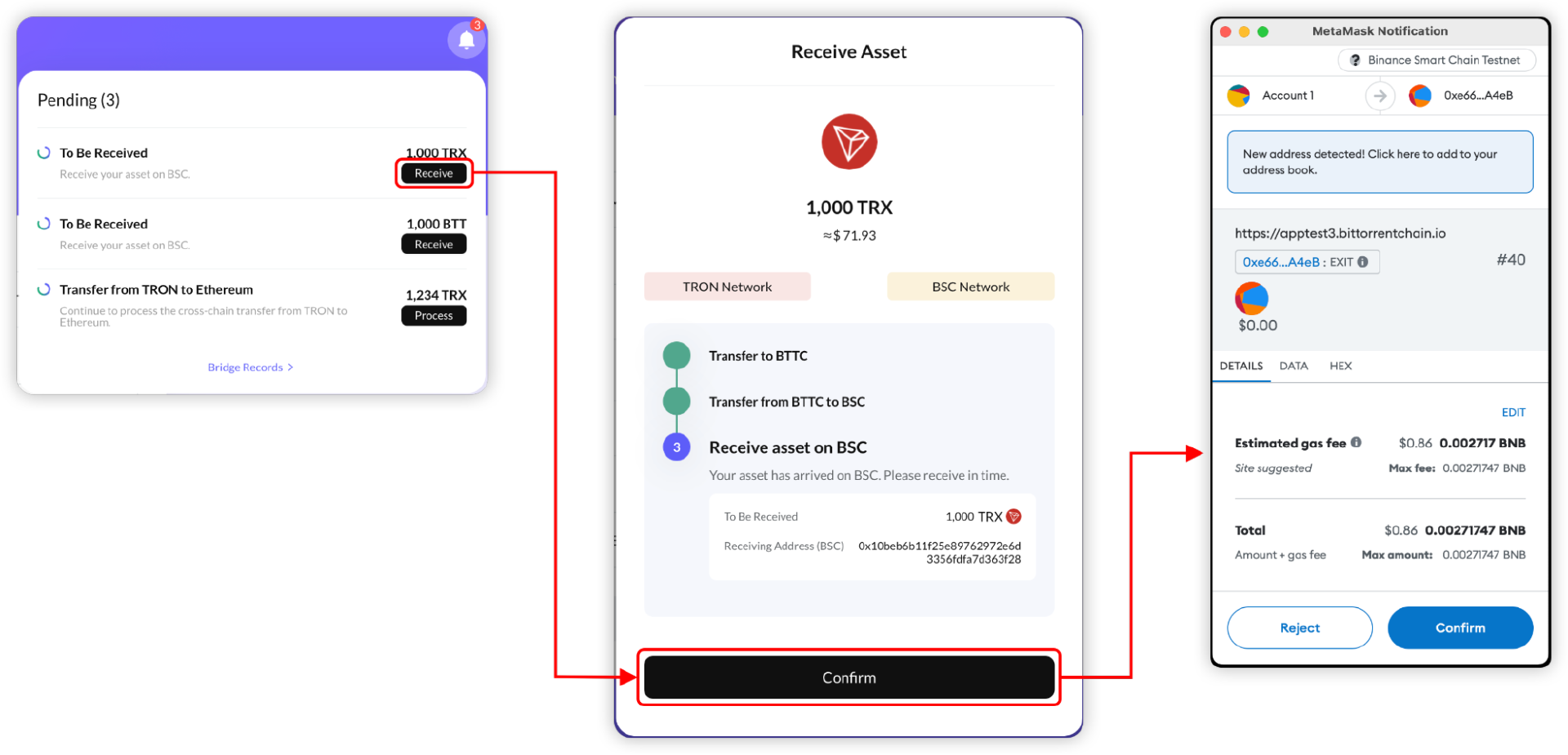
● Receive Assets
After the transaction completes, a prompt will appear in the "Notifications" area. Click the "Receive" button in the notification and confirm the signature in your wallet to finalize the asset receipt.
3. Auto Receive Mode
Auto Receive supports most tokens on BTTC. In this mode, users only need to complete the first two transactions (source → BTTC, BTTC → target). The Relayer automatically executes the third transaction (receipt on target chain).
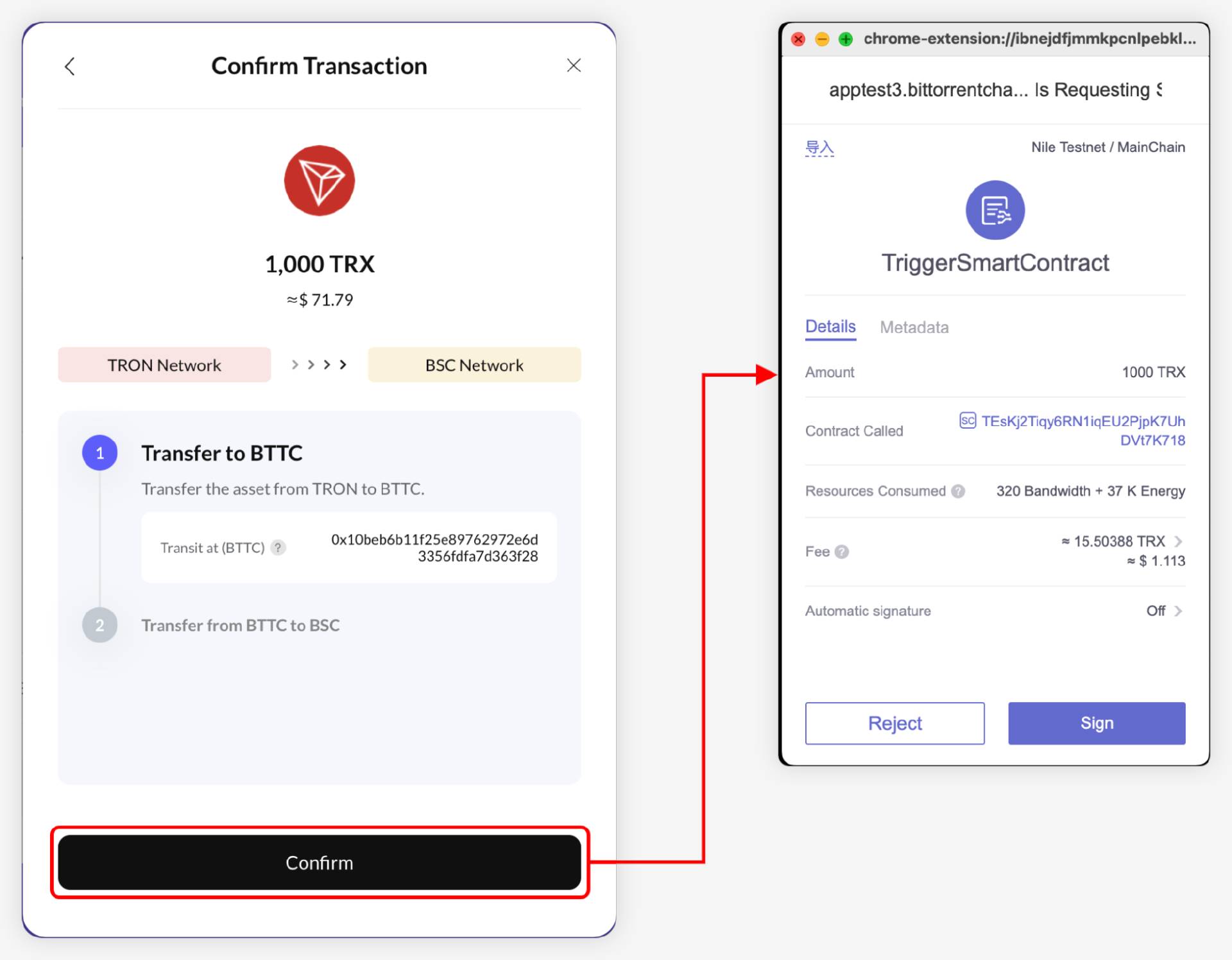
● Initiate Bridge (TRON → BTTC)
After entering basic details, switch to "Auto Receive" mode. The platform displays real-time service quotes from various Relayers. Check the estimated receipt time and Gas fee on the interaction page, then authorize the transaction.
● Asset Arrives at BTTC, Execute Cross-Chain (BTTC → BSC)
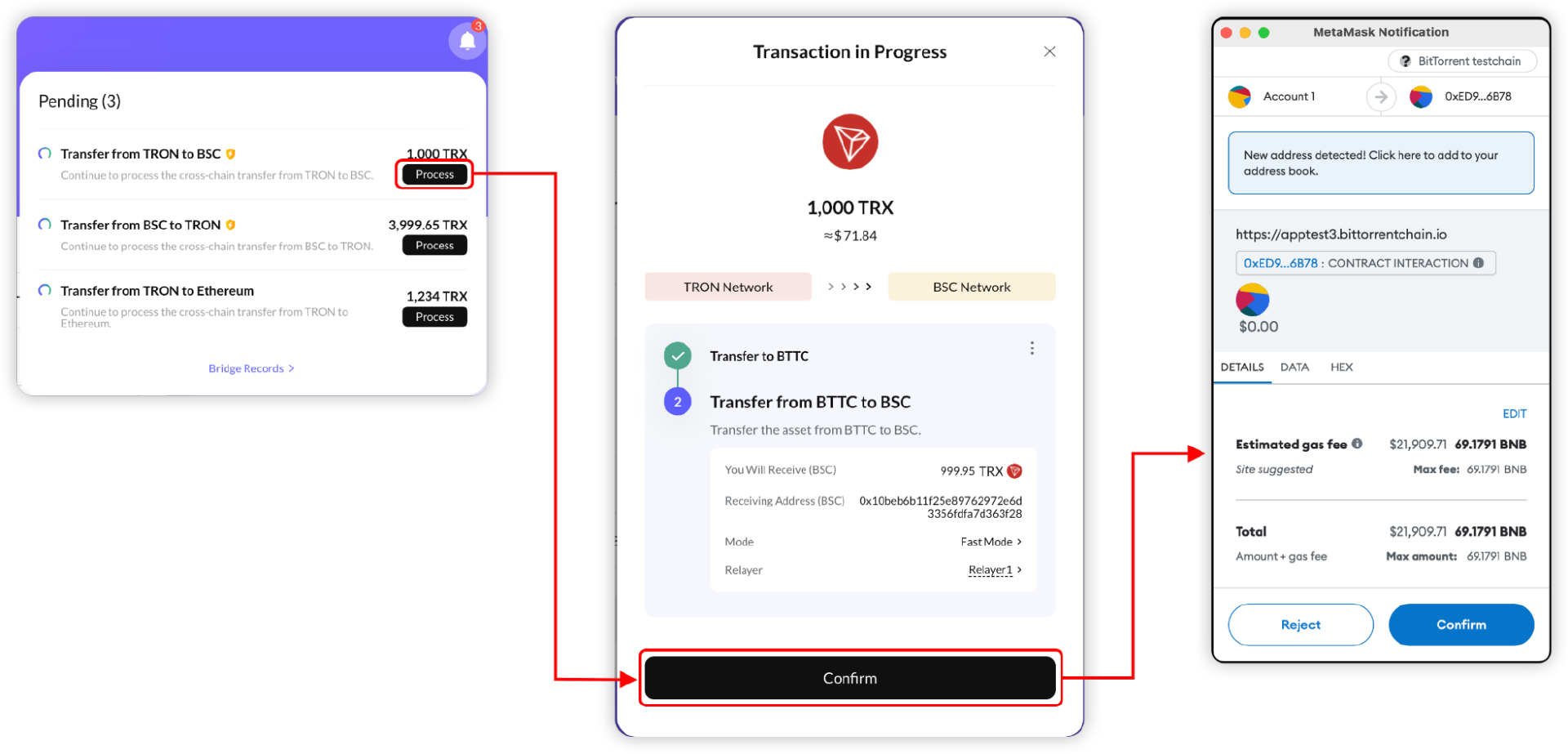
When the asset arrives at BTTC, go to the "Process" page to review transaction details. Confirm the information and authorize your wallet on the BTTC Network to begin the cross-chain transfer, which typically takes around 30 minutes (subject to network congestion).
● Asset Receipt
The Relayer will automatically complete the receipt on the target chain. No further action is required from the user—the assets, minus the service fee, will appear directly in the target chain address.
4. Auto Receive + Gas Top-Up
Similar to Auto Receive, users in this mode only need to complete the first two steps (source → BTTC, BTTC → target).
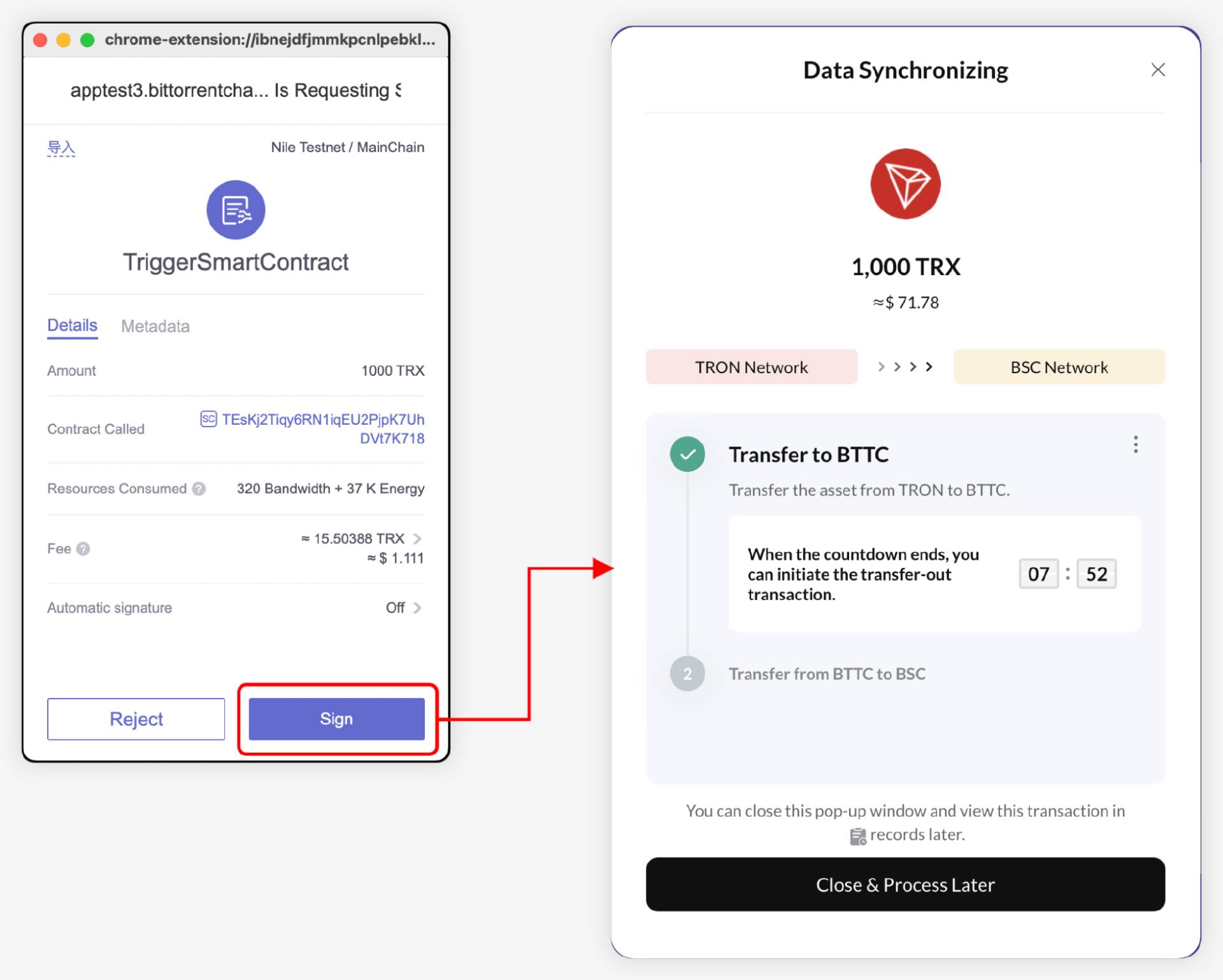
● Initiate Bridge (TRON → BTTC)
After filling in basic details, select "Auto Receive + Gas Top-Up" mode and choose a suitable Relayer. Review the estimated arrival time and Gas fee on the interaction page, then authorize the transaction.
● Asset Arrives at BTTC, Execute Cross-Chain (BTTC → BSC)
Once the asset arrives, check the details on the "Process" page. Confirm and authorize your wallet on the BTTC Network to transfer the asset from BTTC to BSC. This step usually takes about 30 minutes, depending on network conditions.
● Asset Receipt
The Relayer will automatically receive the assets on the target chain. The net amount (after service fee deduction) will appear in the target address, along with a small amount of native Gas token to facilitate immediate participation in the target chain’s ecosystem.
5. Transaction History Inquiry
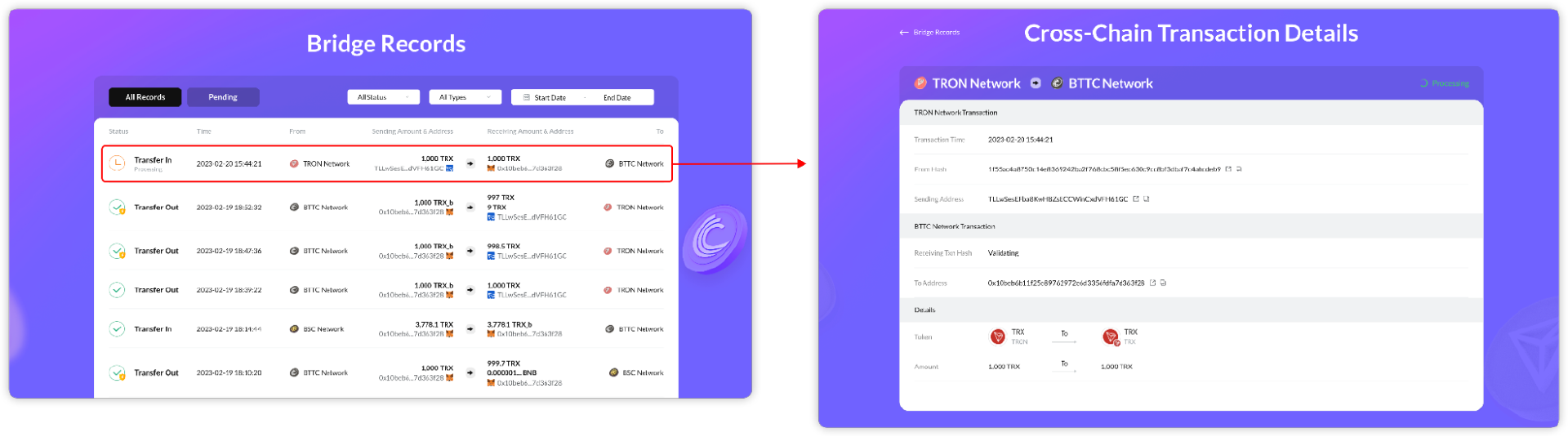
All cross-chain transaction records can be viewed transparently on the [Bridge Records] page.
Master the essential ability to freely transfer assets in the multi-chain era with BTTC—start now: visit the official website (https://app.bt.io/bridge) and begin your first cross-chain journey using tokens like BTT, TRX, or USDD, joining TRON’s trillion-dollar liquidity network that unlocks the full potential of the ecosystem.
Join TechFlow official community to stay tuned
Telegram:https://t.me/TechFlowDaily
X (Twitter):https://x.com/TechFlowPost
X (Twitter) EN:https://x.com/BlockFlow_News


